
1. Introduction
Thank you for purchasing the RCA SP550BT Portable Speaker. This manual provides important information regarding the setup, operation, and maintenance of your new speaker. Please read it thoroughly before use and keep it for future reference.
The RCA SP550BT is a versatile portable speaker featuring 50W output, Bluetooth connectivity, USB playback, FM radio, AUX input, True Wireless Stereo (TWS) function, LED lights, and a microphone input for an enhanced audio experience.
2. Package Contents
Please check the package for the following items:
- RCA SP550BT Portable Speaker
- Remote Control
- Power Cable
- User Manual (this document)
3. Product Overview
Familiarize yourself with the main components and features of your RCA SP550BT speaker.

Figure 3.1: Front view of the RCA SP550BT portable speaker. This image displays the speaker in an upright position, highlighting the top control panel and the three prominent speaker cones with red illumination.

Figure 3.2: Side view of the RCA SP550BT portable speaker. This perspective shows the depth of the speaker and the integrated handle for portability.

Figure 3.3: Horizontal view of the RCA SP550BT portable speaker. This image illustrates the speaker's design when placed on its side, emphasizing the speaker grille and LED lighting.
3.1 Remote Control
The included remote control allows for convenient operation of the speaker from a distance.
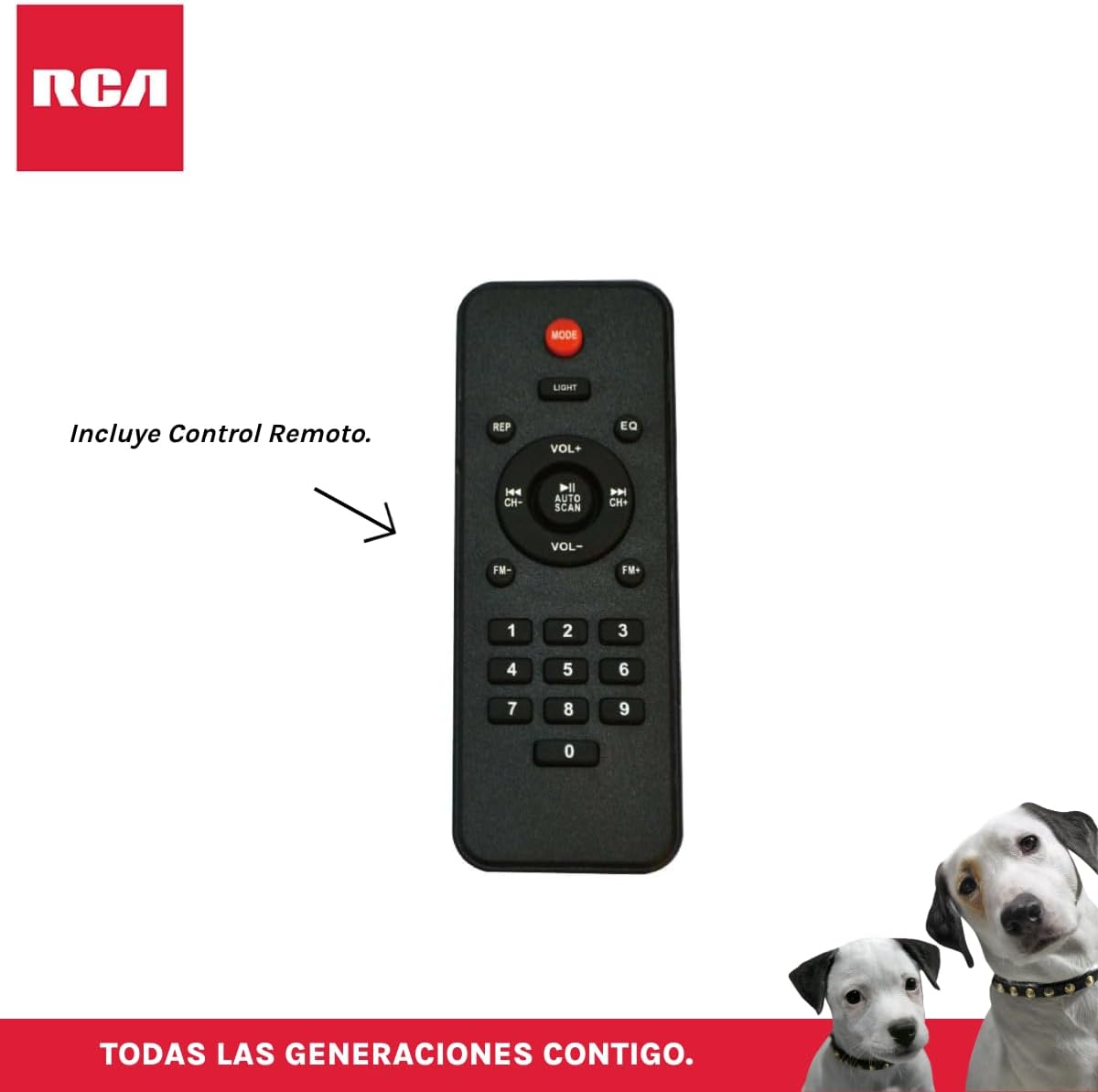
Figure 3.4: RCA SP550BT Remote Control. This image displays the full layout of the remote control, including buttons for power, mode selection, volume adjustment, track navigation, equalizer settings, and a numeric keypad.
4. Setup
4.1 Power Connection
- Ensure the speaker is placed on a stable, flat surface.
- Connect the power cable to the speaker's power input port.
- Plug the other end of the power cable into a standard electrical outlet (AC 100-240V, 50/60Hz).
- Press the power button on the speaker or remote control to turn it on.
5. Operating Instructions
5.1 Power On/Off
- To turn on the speaker, press the POWER button on the control panel or the remote control.
- To turn off the speaker, press the POWER button again.
5.2 Mode Selection
Press the MODE button on the control panel or remote control to switch between Bluetooth, USB, FM, and AUX input modes.
5.3 Bluetooth Pairing
- Turn on the speaker and select Bluetooth mode using the MODE button. The display will show "BLUE" and a pairing indicator will flash.
- Enable Bluetooth on your mobile device (smartphone, tablet, etc.).
- Search for "RCA SP550BT" in your device's Bluetooth list and select it to pair.
- Once paired, the speaker will emit a confirmation sound, and the Bluetooth indicator will stop flashing.
- You can now play audio from your device through the speaker.
5.4 USB Playback
- Insert a USB flash drive (FAT32 format, max 32GB) containing MP3 audio files into the USB port.
- The speaker will automatically switch to USB mode and begin playing the first track. If not, press the MODE button to select USB mode.
- Use the PLAY/PAUSE, PREVIOUS, and NEXT buttons on the control panel or remote to control playback.
5.5 FM Radio
- Turn on the speaker and select FM mode using the MODE button.
- Press and hold the PLAY/PAUSE button (or AUTO SCAN on remote) to automatically scan and save available FM stations.
- Use the PREVIOUS and NEXT buttons to navigate through the saved stations.
5.6 AUX Input
- Connect an external audio device (e.g., MP3 player, laptop) to the speaker's AUX input port using a 3.5mm audio cable (not included).
- Select AUX mode using the MODE button.
- Control playback and volume from your connected device.
5.7 TWS (True Wireless Stereo) Function
The TWS function allows you to connect two RCA SP550BT speakers wirelessly for a stereo sound experience.
- Ensure both SP550BT speakers are powered on and in Bluetooth mode, but not yet paired with any device.
- On one of the speakers, press and hold the TWS button (if available, or a dedicated TWS pairing button) until you hear a confirmation tone. The speakers will attempt to pair with each other.
- Once successfully paired, one speaker will act as the master (left channel) and the other as the slave (right channel).
- Now, pair your mobile device with the master speaker via Bluetooth as described in section 5.3.
5.8 LED Lights
Press the LIGHT button on the control panel or remote control to cycle through different LED light modes or to turn them off.
5.9 Microphone Usage
Connect a wired microphone (not included) to the microphone input port on the speaker. Adjust the microphone volume using the dedicated knob (if available) or the main volume control.
6. Maintenance
- Cleaning: Use a soft, dry cloth to clean the speaker's exterior. Do not use abrasive cleaners or solvents.
- Storage: When not in use for extended periods, store the speaker in a cool, dry place away from direct sunlight and extreme temperatures.
- Water Exposure: This speaker is not waterproof. Avoid exposing it to water or excessive moisture.
7. Troubleshooting
If you encounter issues with your speaker, refer to the following common problems and solutions:
| Problem | Possible Cause | Solution |
|---|---|---|
| No power | Power cable not connected; Power outlet not working; Speaker off. | Check power cable connection; Try a different outlet; Press the POWER button. |
| No sound | Volume too low; Incorrect mode selected; Device not connected properly. | Increase volume; Select correct input mode (Bluetooth, USB, AUX); Reconnect device. |
| Bluetooth pairing fails | Speaker not in pairing mode; Device Bluetooth off; Speaker already paired. | Ensure speaker is in Bluetooth pairing mode; Turn on device Bluetooth; Disconnect from other devices. |
| USB playback not working | USB drive format incompatible; Corrupt files; USB drive not inserted correctly. | Ensure USB is FAT32 format; Check file integrity; Reinsert USB drive. |
| FM radio poor reception | Weak signal; Interference. | Relocate speaker; Extend antenna (if applicable). |
8. Specifications
| Feature | Specification |
|---|---|
| Model | SP550BT |
| Brand | RCA |
| Speaker Output Power | 50 Watts (Maximum) |
| Connectivity Technology | Bluetooth, USB, AUX |
| Wireless Technology | Bluetooth |
| Audio Output Mode | Stereo |
| Speaker Type | Portable, Outdoor |
| Mounting Type | Tabletop Mount |
| Control Method | Remote Control |
| Speaker Size | 6.5 Inches |
| Woofer Diameter | 6.5 Inches |
| Battery Capacity | 4400 Milliamp Hours |
| Power Source | Electric Cable |
| Compatible Devices | Laptop, MP3 Player, Smartphone, Tablet |
| GTIN / UPC | 044476152061 |
9. Warranty and Support
This product comes with a limited warranty. Please refer to the warranty card included in your package for specific terms and conditions. For technical support or service inquiries, please contact RCA customer service through their official website or the contact information provided with your purchase.
Note: Warranty terms may vary by region. Keep your proof of purchase for warranty claims.

