
Introduction
Thank you for choosing the GOLDEN HOUR Waterproof Sport Women's Digital Chronograph Silicone Strap Watch. This manual provides detailed instructions to help you understand and utilize all the features of your new watch. Please read this manual carefully before use and keep it for future reference.

Front view of the GOLDEN HOUR digital watch, displaying the time, day, and date, with clearly labeled function buttons.
Key Features
- Shock-resistant and durable: Made of high-quality materials with a strong shock-resistant structure, suitable for various outdoor sports and daily wear.
- Multiple functions: Includes stopwatch, calendar, backlight, and alarm clock for enhanced daily convenience.
- Easy to read: Clear digital display with large, easy-to-read numbers, even in dark environments.
- Comfortable to wear: Features a soft and comfortable silicone strap that fits securely on your wrist.
- Water resistant: Water resistance up to 50 meters, suitable for swimming and snorkeling, but not for diving.
Setup
Setting Time and Date
Your GOLDEN HOUR watch features four primary buttons: 'LIGHT' (top left), 'MODE' (bottom left), 'ST/STP' (top right), and 'RESET' (bottom right).
- From the normal time display, press the 'MODE' button three times to enter the time setting mode. The seconds will begin to flash.
- Press the 'RESET' button to set the seconds to zero.
- Press the 'ST/STP' button to move to the hour setting. The hour digits will flash.
- Press the 'RESET' button to adjust the hour. Note that the watch supports 12-hour (with AM/PM indicator) and 24-hour formats.
- Press the 'ST/STP' button to move to the minute setting. The minute digits will flash.
- Press the 'RESET' button to adjust the minutes.
- Continue pressing 'ST/STP' to cycle through month, date, and day of the week settings, using 'RESET' to adjust each value.
- Once all settings are complete, press the 'MODE' button once to return to the normal time display.

A detailed view of the watch's digital display, highlighting the time, date, and the 'LIGHT', 'MODE', 'ST/STP', and 'RESET' button labels.
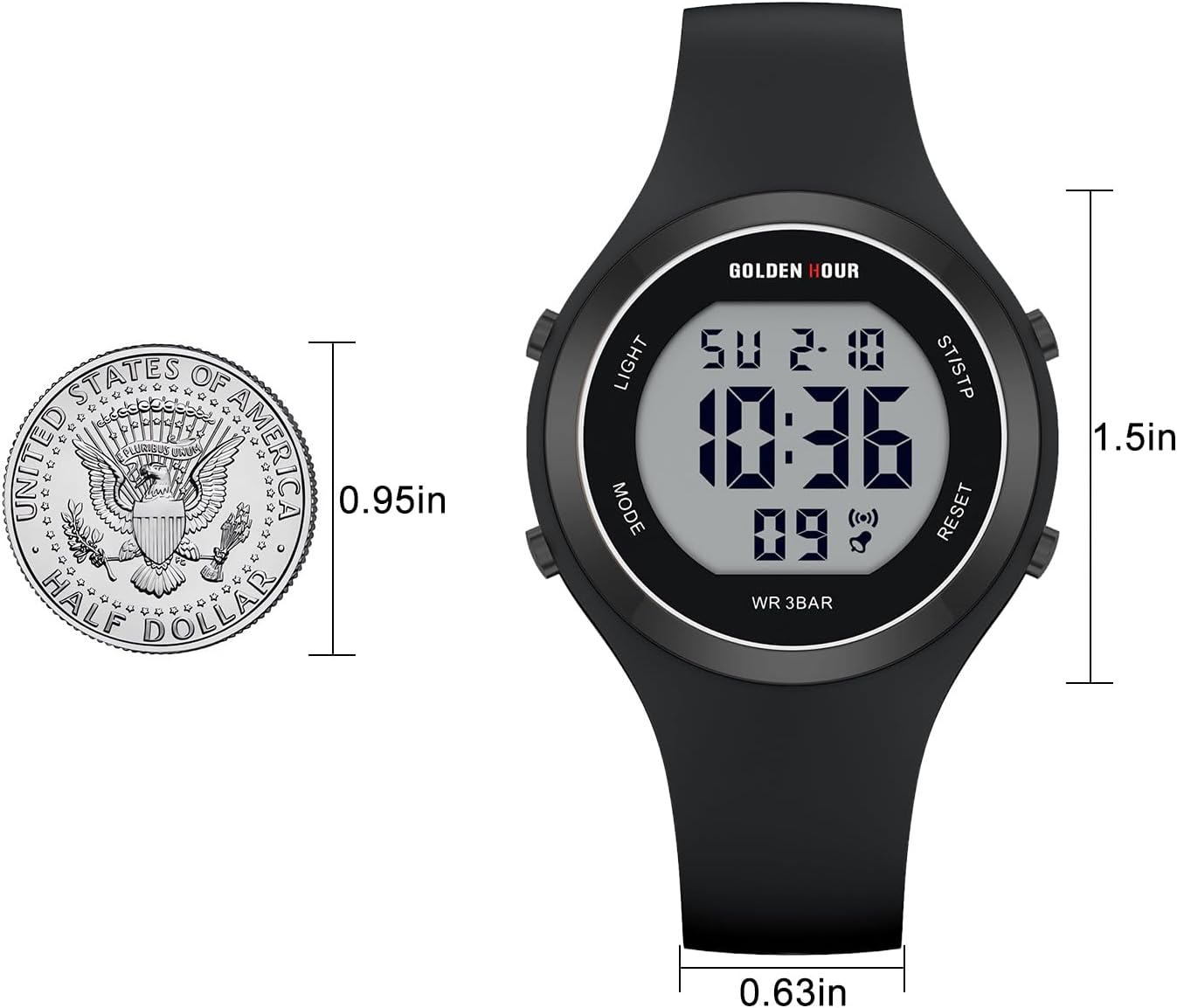
A visual comparison of the watch's size against a half-dollar coin, illustrating its compact dimensions for a comfortable fit.
Operating Instructions
Using the Stopwatch
- From the normal time display, press the 'MODE' button once to enter stopwatch mode. The display will show '00:00:00'.
- Press the 'RESET' button to start the stopwatch.
- Press the 'RESET' button again to pause the stopwatch.
- To resume, press 'RESET' again.
- To reset the stopwatch to zero, press the 'ST/STP' button while the stopwatch is paused.
- Press 'MODE' to return to the normal time display.
Setting and Using the Alarm
- From the normal time display, press the 'MODE' button twice to enter alarm setting mode. The hour digits will flash.
- Press the 'RESET' button to adjust the hour.
- Press the 'ST/STP' button to move to the minute setting. The minute digits will flash.
- Press the 'RESET' button to adjust the minutes.
- Press 'MODE' to confirm the alarm time and return to the normal time display.
- To activate/deactivate the alarm, press and hold the 'RESET' button, then press the 'ST/STP' button. An alarm icon will appear/disappear on the display.
Using the Backlight
Press the 'LIGHT' button (top left) to illuminate the display. The backlight will remain on for a few seconds, allowing you to read the time in low-light conditions.
Maintenance
Water Resistance
Your GOLDEN HOUR watch is water resistant up to 50 meters (5 ATM). This means it is suitable for everyday use, including splashes, rain, showering, and recreational swimming or snorkeling. It is NOT suitable for diving or high-pressure water activities. Do not press any buttons while the watch is submerged in water.
Cleaning
To clean your watch, wipe it with a soft, damp cloth. Avoid using harsh chemicals or abrasive materials, as these can damage the watch's finish or silicone strap.

The back of the watch features a stainless steel case, engraved with 'GOLDEN HOUR', 'GH1317', 'WATER RESISTANT 5ATM', and 'BATTERY CODE CR2025'.
Troubleshooting
- Display is blank or dim: The battery may be low or depleted. Contact a qualified watch technician for battery replacement.
- Buttons are unresponsive: Ensure the watch is not in a locked mode (if applicable, though this model does not feature one). Try pressing all buttons firmly. If the issue persists, a soft reset (removing and reinserting the battery, if accessible) or professional service may be required.
- Time is inaccurate: Re-set the time following the 'Setting Time and Date' instructions. If the watch continues to lose or gain time significantly, the internal mechanism may require inspection by a professional.
- Condensation under the crystal: This may indicate a breach in the water resistance. Avoid further water exposure and seek professional repair immediately to prevent internal damage.
Specifications
| Feature | Detail |
|---|---|
| Brand | GOLDEN HOUR |
| Model Number | GH-1317 |
| Clasp Type | Buckle |
| Water Resistance | 50 Meters (5 ATM) |
| Strap Material | Silicone |
| Display Type | Digital |
| Functions | Time, Date, Day, Stopwatch, Alarm, Backlight |
| Package Dimensions | 1.97 x 1.97 x 1.57 inches |
| Item Weight | 1.31 ounces |

This diagram shows the minimum and maximum wrist circumferences the silicone strap can accommodate, ensuring a comfortable fit for various users.
Warranty and Support
For warranty information or technical support, please refer to the product packaging or contact GOLDEN HOUR customer service directly. Contact details can typically be found on the manufacturer's official website or through your point of purchase.

The watch worn on a wrist during an active moment, emphasizing its suitability for sports and daily wear.

A close-up of the watch on a wrist, showing its sleek profile and how it complements everyday attire.
