
1. Important Safety Information
Please read all safety instructions carefully before using the device. Failure to follow these instructions may result in injury or damage to the product.
Caution:
- This product reaches high temperatures. To prevent burns or fire, do not use while sleeping or unattended.
- Not recommended for infants, young children, or individuals with reduced sensitivity to heat.
- Consult a doctor before use if pregnant or have medical conditions.
- Do not use on broken skin or open wounds.
Statements regarding dietary supplements have not been evaluated by the FDA and are not intended to diagnose, treat, cure, or prevent any disease or health condition.
2. Product Overview
The JOBYNA Cordless Ankle Massager with Heat is designed to provide targeted heat and vibration therapy to the ankle area, offering comfort and relief for various conditions.
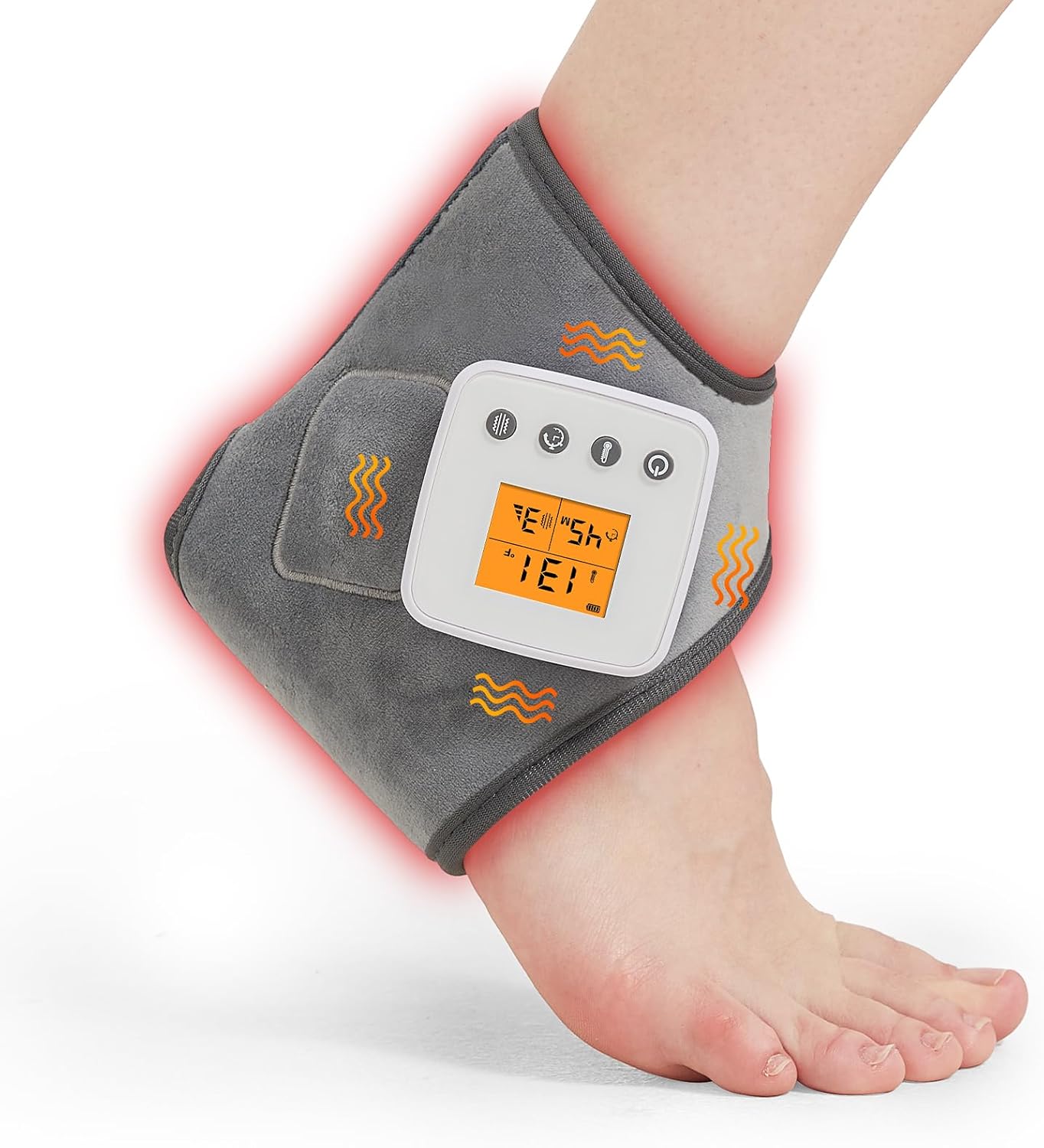
Image: The JOBYNA Cordless Ankle Massager with Heat, shown on an ankle with red glow indicating heat.
Key Features:
- Ankle Vibrating Massager: Features 2 motors for precise vibrations with 3 distinct vibration modes to soothe muscles.
- Cordless and Portable: Built-in rechargeable 3000mAh battery allows for up to 3 hours of use, providing freedom of movement.
- Heat Treatments: Offers 3 adjustable heat levels (113°F/131°F/149°F) for targeted warmth.
- Auto Shut Off: Includes 3 timing gears (30/45/60 minutes) for safe and controlled use.
- Adjustable Size: Unique contoured design with adjustable straps ensures a comfortable fit for most ankle shapes and sizes (6.7×5.5 inches).
- Soft Material: Made from super soft polyester fabric for comfort and even heat distribution.

Image: A person wearing the ankle massager, illustrating its dual heating and vibration functions.
Indications for Use:
This device is intended to help relieve muscle soreness and joint pain associated with overwork, strain, and sprain. It may also soothe symptoms related to:
- Achilles tendonitis
- Plantar fasciitis
- Arthritis
- Heel pain and heel spurs
- Muscle strains
- Chronic pain
- Torn tendons
- Foot stiffness
- Sore muscles and joints

Image: Visual representation of conditions the ankle massager can help with, such as Plantar Fasciitis, Achilles Tendonitis, and sprains.
3. Setup Instructions
3.1 Charging the Device
Before first use, fully charge the device. A full charge takes approximately 4-5 hours using a USB-C charging cable (not included) and a compatible adapter, power bank, or laptop.

Image: Diagram showing the USB-C charging port on the controller and various charging options like an adapter, power bank, or laptop.
3.2 Attaching the Controller
The LED controller is detachable. Ensure it is correctly inserted into the card slot on the ankle wrap.
- Locate the card slot on the ankle wrap.
- Align the controller with the slot, ensuring the buttons face outwards and the connection pins are correctly oriented.
- Gently slide the controller into the slot until it is securely in place.

Image: Illustration demonstrating the correct and incorrect orientation for inserting the controller into the ankle wrap's card slot.
3.3 Wearing the Ankle Massager
The ankle massager features adjustable straps for a custom and comfortable fit.
- Place your foot through the opening of the ankle wrap.
- Position the pad over your ankle area, ensuring the heating and vibration elements are correctly aligned.
- Secure the adjustable straps around your ankle to achieve a snug but comfortable fit. Avoid overtightening.

Image: A four-step visual guide demonstrating how to correctly wear and secure the ankle massager.
4. Operating Instructions
The device is operated via the integrated LED controller. Familiarize yourself with the buttons and display.

Image: Detailed view of the Cordless Smart LED Controller, highlighting buttons for power, heat settings, timer, and vibration modes.
4.1 Power On/Off
- Press and hold the Power Button (
 ) for a few seconds to turn the device on or off.
 - The LED display will illuminate when the device is powered on.
4.2 Adjusting Heat Levels
The device offers 3 heat levels:
- Level 1: 113°F (45°C)
- Level 2: 131°F (55°C)
- Level 3: 149°F (65°C)
- Press the Heat Button () to cycle through the heat levels.
- The current heat level will be displayed on the LED screen.

Image: Visual representation of the three adjustable heating levels and their corresponding temperatures.
4.3 Adjusting Vibration Modes
The device features 3 vibration modes:
- Mode 1: Low Intermittent Vibration
- Mode 2: Medium Intermittent Vibration
- Mode 3: High Intermittent Vibration
- Press the Massage Button () to cycle through the vibration modes.
- The selected vibration mode will be indicated on the LED screen.
- To turn off vibration, continue pressing the Massage Button until no vibration mode is selected.

Image: Illustration detailing the three levels of vibration intensity available on the device.
4.4 Setting the Timer (Auto Shut-Off)
The device includes an automatic shut-off feature with 3 timing options:
- 30 minutes
- 45 minutes
- 60 minutes
- Press the Time Button () to select your desired operating duration.
- The device will automatically power off once the selected time has elapsed.
5. Maintenance
5.1 Cleaning
- Ensure the device is powered off and unplugged before cleaning.
- Wipe the surface of the ankle wrap with a soft, damp cloth. Do not immerse the device in water.
- Do not use abrasive cleaners or harsh chemicals.
- Allow the device to air dry completely before storage or next use.
5.2 Storage
- Store the device in a cool, dry place, away from direct sunlight and extreme temperatures.
- Keep out of reach of children and pets.
6. Troubleshooting
If you encounter issues with your JOBYNA Cordless Ankle Massager, please refer to the following common problems and solutions:
| Problem | Possible Cause | Solution |
|---|---|---|
| Device does not power on. | Low battery; Controller not properly connected; Device malfunction. | Charge the device fully. Ensure the controller is securely inserted. If problem persists, contact customer support. |
| Vibration function not working. | Vibration mode not selected; Device malfunction. | Press the Massage Button to cycle through modes. If problem persists, contact customer support. |
| No heat or insufficient heat. | Heat level not selected; Device malfunction. | Press the Heat Button to select a heat level. Allow a few minutes for the device to reach temperature. If problem persists, contact customer support. |
| Screen flashing or unresponsive buttons. | Software glitch; Low battery; Device malfunction. | Recharge the device. Try turning the device off and on again. If problem persists, contact customer support. |
7. Specifications
| Feature | Detail |
|---|---|
| Model Name | ZF-FR-DC01 |
| Item Model Number | JB-FR-DC01-US |
| Brand | JOBYNA |
| Material | Polyester |
| Package Dimensions | 7.01 x 5.39 x 1.93 inches |
| Item Weight | 9.14 ounces |
| Heat Levels | 3 (113°F/131°F/149°F) |
| Vibration Modes | 3 |
| Timer Settings | 3 (30/45/60 minutes) |
| Battery Capacity | 3000mAh |
| Wattage | 8 watts |
| Bulb Voltage | 110 volts_of_alternating_current |
8. Warranty and Support
JOBYNA is committed to providing quality products and customer satisfaction.
Warranty Information:
- 365 Days Warranty: Your product is covered by a 365-day warranty from the date of purchase.
- 365 Days Free Replacement: In case of manufacturing defects, a free replacement will be provided within 365 days.
- 30 Days Free Return: You may return the product for a full refund within 30 days of purchase.
Image: Summary of JOBYNA's warranty and support policies.
Customer Support:
For any questions, concerns, or support needs, please contact JOBYNA customer service. Refer to your purchase documentation for specific contact details.
You can also refer to the official User Manual (PDF) for additional information: Download PDF Manual
