
Introduction
Thank you for choosing the ONEVAN Cordless Brushless Impact Wrench. This manual provides essential information for the safe and efficient operation, maintenance, and troubleshooting of your new tool. Please read it thoroughly before first use and keep it for future reference.
General Safety Instructions
WARNING: Read all safety warnings, instructions, illustrations, and specifications provided with this power tool. Failure to follow all instructions listed below may result in electric shock, fire, and/or serious injury.
Work Area Safety
- Keep work area clean and well lit. Cluttered or dark areas invite accidents.
- Do not operate power tools in explosive atmospheres, such as in the presence of flammable liquids, gases, or dust. Power tools create sparks which may ignite the dust or fumes.
- Keep children and bystanders away while operating a power tool. Distractions can cause you to lose control.
Electrical Safety
- Power tool plugs must match the outlet. Never modify the plug in any way.
- Avoid body contact with earthed or grounded surfaces, such as pipes, radiators, ranges, and refrigerators. There is an increased risk of electric shock if your body is earthed or grounded.
- Do not expose power tools to rain or wet conditions. Water entering a power tool will increase the risk of electric shock.
Personal Safety
- Always wear eye protection. Use appropriate safety equipment such as dust mask, non-skid safety shoes, hard hat, or hearing protection when necessary.
- Stay alert, watch what you are doing, and use common sense when operating a power tool.
- Prevent unintentional starting. Ensure the switch is in the off-position before connecting to battery pack, picking up or carrying the tool.
Package Contents
Upon unpacking, please verify that all items listed below are present and undamaged:
- 1x ONEVAN Cordless Brushless Impact Wrench
- 2x 3.0Ah Lithium-ion Batteries
- 1x Battery Charger
- 6x Sockets (14mm, 17mm, 18mm, 19mm, 21mm, 22mm)
- Additional accessories (e.g., drill chuck, screwdriver bit adapter, retaining ring, pin)

Image: ONEVAN Cordless Impact Wrench with included accessories, including two batteries, a charger, and a set of six sockets (14mm, 17mm, 18mm, 19mm, 21mm, 22mm), along with a drill chuck and screwdriver bit adapter.
Product Features
- High-Performance Brushless Motor: The ONEVAN impact wrench is equipped with an advanced brushless motor, offering higher efficiency (20-30% higher than traditional brush motors), reduced wear, longer lifespan, and stable power output without smoke or sparks. This design minimizes maintenance costs and enhances durability.
- Powerful Torque and Variable Speed: Delivers a maximum tightening torque of 280 N.m and a maximum loosening torque of 300 N.m. The tool features 2 adjustable speed levels for both forward and reverse rotation, allowing precise control by varying pressure on the trigger.
- Long-Lasting 3.0Ah Batteries: Comes with two high-capacity 3000 mAh Lithium-ion batteries, providing ample power for extended outdoor use. Integrated battery chip technology ensures reduced power loss and faster charging. A built-in battery indicator keeps you informed of the charge level.
- Forward/Reverse with Auto-Stop Function: Equipped with a locking system and distinct forward and reverse modes. In reverse mode, the auto-stop function activates once a nut or bolt is loosened, reducing speed and torque to prevent the fastener from falling off completely.
- Built-in LED Light: An integrated LED light illuminates the work area, improving visibility in dark or confined spaces.
- Multifunctional Use: Suitable for various applications including car tire removal, household appliance maintenance, heavy equipment assembly, and general fastening tasks. Can function as an impact wrench, impact drill (with appropriate adapter), or screwdriver.

Image: Internal diagram of the brushless motor, emphasizing its benefits such as high power, low energy loss, extended lifespan, and superior efficiency compared to brushed motors.

Image: Detailed view of the ONEVAN Li-ion battery, illustrating its internal structure and multiple protection mechanisms including overcurrent, voltage, short circuit, chip, charging, temperature regulation, and over-discharge protection, ensuring long-term work capability.
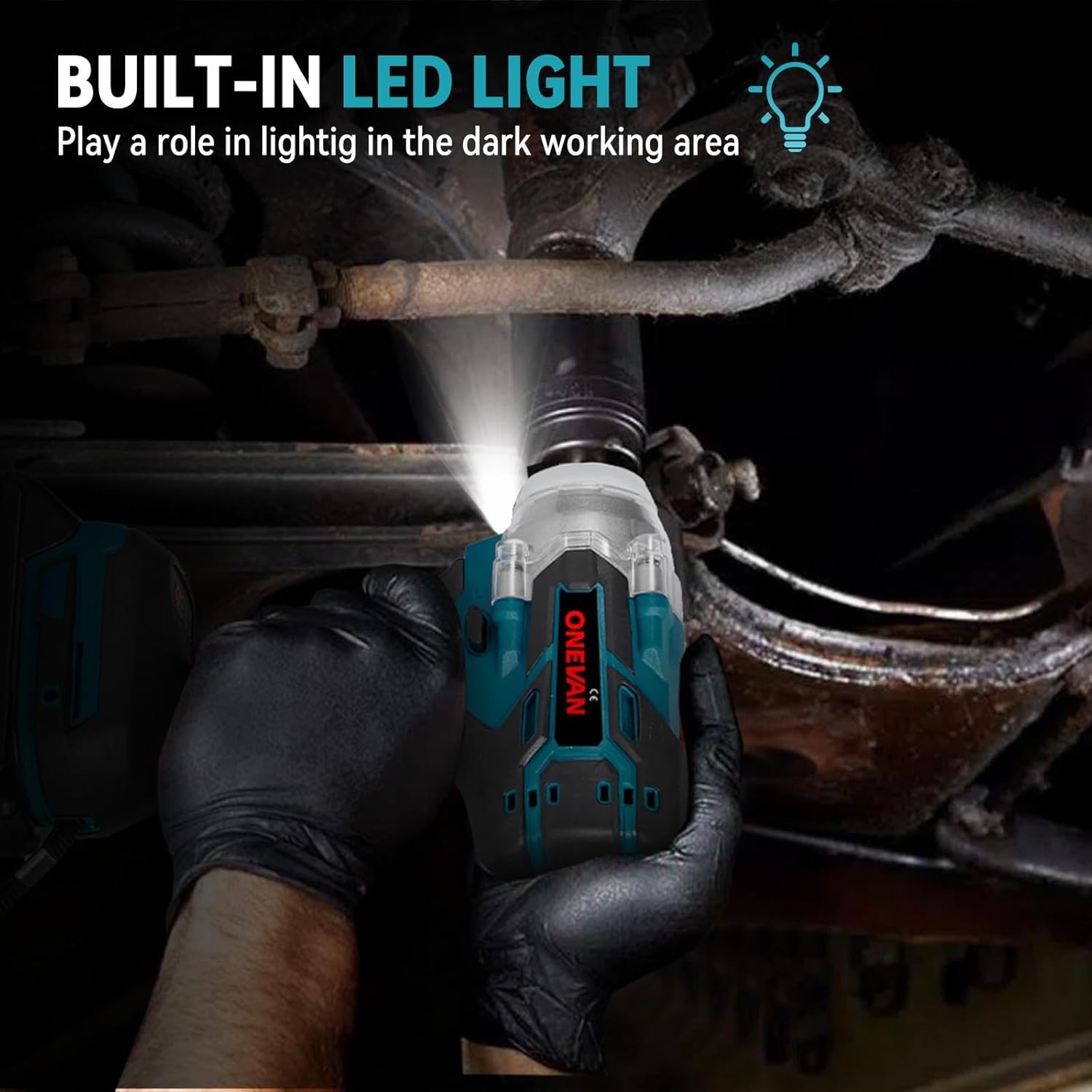
Image: Visual guide to the forward/reverse button positions and the automatic stop function in reverse, which prevents fasteners from completely detaching once loosened.
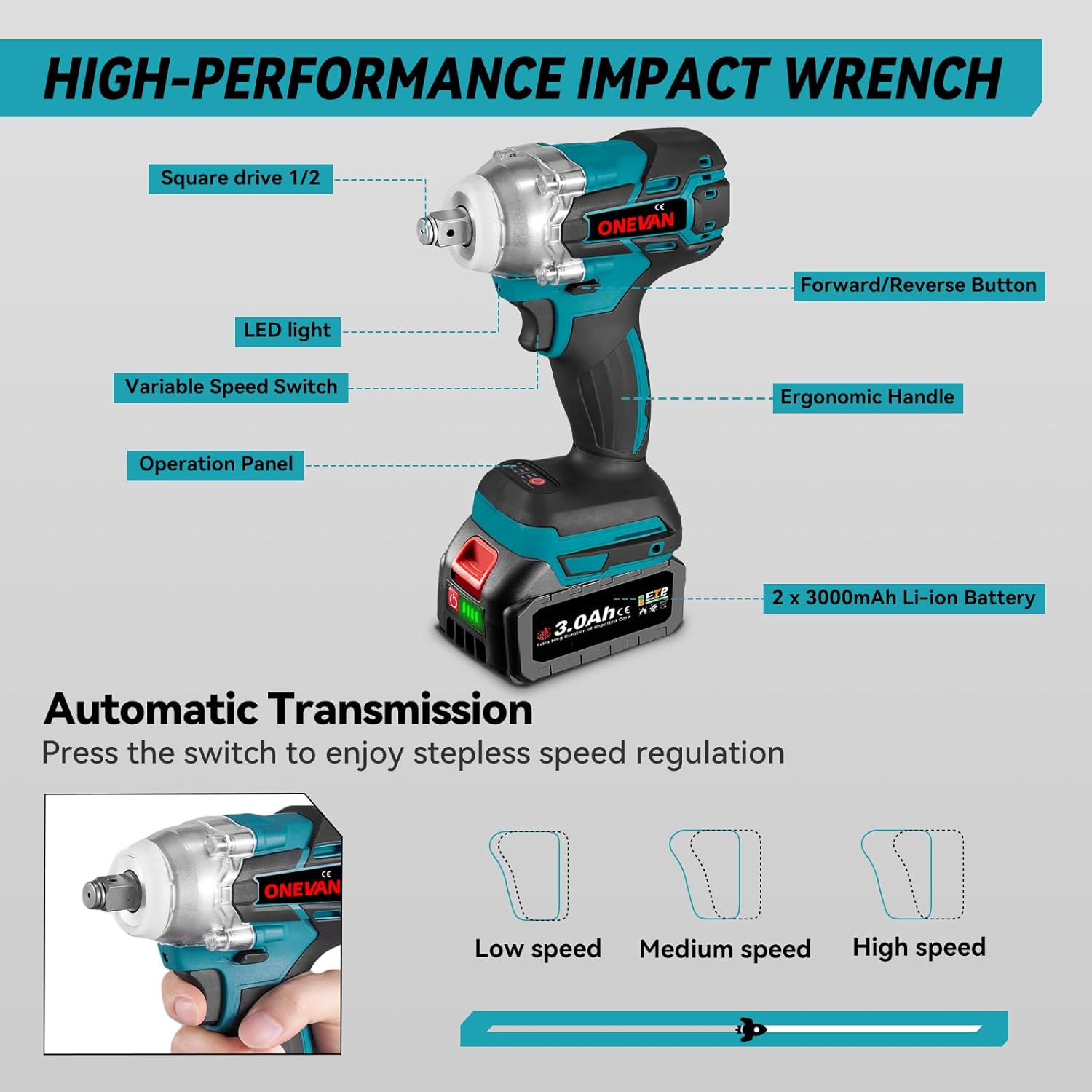
Image: The impact wrench operating in a dimly lit environment, demonstrating how the built-in LED light effectively illuminates the working area for enhanced visibility.

Image: An annotated diagram of the ONEVAN impact wrench, highlighting its key components such as the 1/2-inch square drive, LED light, variable speed switch, ergonomic handle, forward/reverse button, and the 3.0Ah Li-ion battery pack.
Setup
1. Charging the Battery
- Ensure the battery is fully charged before first use.
- Connect the charger to a standard power outlet.
- Slide the battery pack onto the charger until it clicks into place.
- The charger indicator light will show the charging status. Refer to the charger manual for specific light indications.
- Once fully charged, disconnect the battery from the charger and unplug the charger from the outlet.
2. Installing the Battery Pack
- Align the battery pack with the receptacle at the base of the impact wrench handle.
- Slide the battery pack into the handle until it locks securely into place. Ensure it is firmly seated to prevent accidental dislodgement during operation.
- To remove the battery, press the release button(s) on the sides of the battery pack and slide it out.
3. Attaching Sockets/Accessories
- Ensure the tool is off and the battery is removed before attaching or removing accessories.
- Align the square drive of the socket with the 1/2-inch square drive anvil on the impact wrench.
- Push the socket firmly onto the anvil until it clicks into place. Some sockets may require aligning with a detent pin or friction ring.
- To remove, pull the socket off the anvil. For stubborn sockets, a slight twisting motion may help.
Operating Instructions
1. Powering On/Off and Speed Control
- To turn on the tool, press the variable speed trigger switch. The tool speed increases with increased trigger pressure.
- To turn off the tool, release the trigger switch.
- The tool features 2 speed settings. Use the speed selector button (if present, typically near the trigger) to cycle between low and high speeds.
2. Forward/Reverse Rotation
- The forward/reverse button (typically a lever above the trigger) controls the direction of rotation.
- Push the button to the left for forward rotation (tightening).
- Push the button to the right for reverse rotation (loosening).
- When the button is in the center position, the trigger is locked, preventing accidental startup. Always engage the lock when not in use or when changing accessories.
3. Using the Auto-Stop Function (Reverse Mode)
- When loosening fasteners, select reverse rotation.
- As the fastener becomes loose, the tool's auto-stop function will reduce speed and torque. This helps prevent the nut or bolt from spinning off completely and falling.
- Monitor the fastener and manually stop the tool when the desired looseness is achieved.
4. LED Work Light
- The built-in LED light activates automatically when the trigger is pressed, illuminating the work area.
- It will turn off shortly after the trigger is released.
Maintenance
Regular maintenance ensures the longevity and optimal performance of your ONEVAN impact wrench.
Cleaning
- Always disconnect the battery pack before performing any cleaning or maintenance.
- Use a soft, damp cloth to clean the exterior of the tool. Do not use harsh chemicals or abrasive cleaners.
- Keep the ventilation openings clear of dust and debris to prevent overheating. Use compressed air if necessary.
Battery Care
- Store batteries in a cool, dry place away from direct sunlight and extreme temperatures.
- Do not store batteries in a discharged state for extended periods. Charge them periodically if not in use.
- Avoid dropping or subjecting batteries to impact.
General Inspection
- Periodically inspect the tool for any signs of damage, loose screws, or worn parts.
- Ensure the square drive anvil is free from excessive wear or damage.
- If any damage is found, do not operate the tool. Contact customer support for assistance.
Troubleshooting
| Problem | Possible Cause | Solution |
|---|---|---|
| Tool does not start | Battery not installed correctly or discharged. Forward/Reverse switch in center (locked) position. | Ensure battery is fully charged and properly seated. Move the Forward/Reverse switch to either forward or reverse position. |
| Insufficient power/torque | Battery charge is low. Incorrect speed setting. Fastener is excessively tight or seized. | Recharge the battery. Select a higher speed setting. For extremely tight fasteners, manual loosening may be required before using the impact wrench. |
| LED light not working | Faulty LED or wiring. | While the LED is a convenience feature, if it fails, it typically does not affect tool operation. If this is a concern, contact customer support. |
| Battery not charging | Charger not plugged in. Faulty battery or charger. | Ensure charger is securely plugged into a working outlet. Try another battery if available. If problem persists, contact customer support. |
Specifications
| Feature | Specification |
|---|---|
| Model Number | sku006213 |
| Brand | ONEVAN |
| Drive Square | 1/2 inch (12.7 mm) |
| Max. Tightening Torque | 280 N.m |
| Max. Loosening Torque | 300 N.m |
| No-Load Speed | 0-2000 RPM (2 speeds) |
| Impact Frequency | 0-2500 IPM |
| Battery Type | Lithium-ion |
| Battery Capacity | 3000 mAh (3.0 Ah) |
| Weight (Item) | 2.2 Kilograms |
| Material | Metal |
| Color | Blue |
| Standard Bolts Capacity | M10-M20 (3/8"-3/4") |
| High-Strength Bolts Capacity | M10-M16 (3/8"-5/8") |
Warranty and Support
Warranty Information
ONEVAN products are manufactured to high-quality standards. For specific warranty terms and conditions, please refer to the warranty card included with your product or visit the official ONEVAN website. Keep your purchase receipt as proof of purchase for warranty claims.
Customer Support
If you have any questions, require technical assistance, or need to report a problem with your ONEVAN Cordless Brushless Impact Wrench, please contact our customer support team. Contact details can typically be found on the product packaging, the official ONEVAN website, or through your retailer.
When contacting support, please have your model number (sku006213) and purchase date ready.


