
BLUETTI Elite 200 V2
BLUETTI Solar Generator Elite 200 V2 User Manual
Model: Elite 200 V2
1. Introduction
This manual provides essential information for the safe and efficient operation of your BLUETTI Solar Generator Elite 200 V2. Please read this manual thoroughly before using the product and retain it for future reference.
The BLUETTI Elite 200 V2 is a portable power station designed for various applications, including camping, road trips, home backup, and off-grid living. It features a 2073.6Wh LiFePO4 battery and a 2600W AC output.

Image: Front view of the BLUETTI Solar Generator Elite 200 V2, showcasing its display and various output ports.
2. Safety Instructions
Always adhere to the following safety guidelines to prevent injury or damage to the product:
- Do not disassemble, repair, or modify the unit.
- Do not place the unit near heat sources or in direct sunlight for prolonged periods.
- Keep the unit away from water and other liquids.
- Use only approved charging cables and accessories.
- Ensure proper ventilation during use and charging.
- Keep out of reach of children and pets.
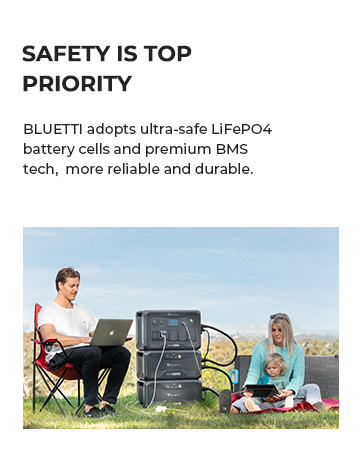
Image: Internal diagram illustrating the multi-layer protection systems, including BLUETOPUS AI-BMS, automotive-grade battery cells, wear-resistant ABS materials, and leakage protection grounding terminal.
3. Product Overview
3.1. Package Contents
- BLUETTI Elite 200 V2 Portable Power Station
- AC Charging Cable
- Solar Charging Cable
- Grounding Screw
- User Manual
3.2. Unit Features
- Capacity: 2073.6Wh LFP Battery
- AC Output: 2600W (3900W Power Lifting Mode)
- Lifespan: 6000+ cycles to 80% capacity (17-year lifespan)
- Charging: TurboBoost technology, dual AC and DC charging
- Ports: 4 AC Outlets, 2 USB-C (100W), 2 USB-A (15W), 1 Car Port (120W)
- Control: Upgraded app for intuitive control and real-time insights

Image: The BLUETTI Elite 200 V2 powering various devices, illustrating its capacity and output capabilities for different appliances.
4. Setup
4.1. Unpacking and Inspection
- Carefully remove all components from the packaging.
- Inspect the unit and accessories for any signs of damage. If any damage is found, contact customer support immediately.
- Verify that all items listed in the "Package Contents" section are present.
4.2. Initial Charging
Before first use, it is recommended to fully charge the BLUETTI Elite 200 V2.
- Connect the AC charging cable to the unit's AC input port and then to a wall outlet.
- The display will indicate charging status. The unit is fully charged when the battery indicator shows 100%.
- Initial charging may take approximately 1.4 hours using AC input.

Image: The BLUETTI Elite 200 V2 being charged via a wall outlet and simultaneously via solar panels, demonstrating its fast charging capabilities.
5. Operating Instructions
5.1. Turning On/Off
- To turn on the unit, press and hold the main power button for a few seconds until the display illuminates.
- To turn off the unit, press and hold the main power button until the display turns off.
5.2. Using AC Outputs
- Press the AC button to enable the AC outlets. The AC indicator on the display will light up.
- Plug your AC devices into the available AC outlets.
- Ensure the total power consumption of your devices does not exceed 2600W (or 3900W in Power Lifting Mode for resistive loads).
- Press the AC button again to disable the AC outlets when not in use.
5.3. Using DC Outputs (USB, Car Port)
- Press the DC button to enable the DC outputs (USB-A, USB-C, Car Port). The DC indicator on the display will light up.
- Connect your USB or 12V devices to the respective ports.
- Press the DC button again to disable the DC outputs when not in use.
5.4. Solar Charging
- Connect compatible solar panels (up to 1000W) to the unit's solar input port using the provided solar charging cable.
- Position solar panels in direct sunlight for optimal charging efficiency.
- The built-in MPPT controller will optimize solar input.

Image: A detailed view of the BLUETTI Elite 200 V2's control panel and output ports, including AC outlets, USB-C, USB-A, and car port.
5.5. App Control
Download the official BLUETTI app from your smartphone's app store to monitor and control your Elite 200 V2 remotely via Bluetooth or Wi-Fi. The app provides real-time power insights, energy usage patterns, and allows for setting adjustments.

Image: A screenshot illustrating the user interface of the BLUETTI mobile application, showing real-time status and control options.
6. Maintenance
- Cleaning: Use a dry, soft cloth to wipe the unit. Do not use abrasive cleaners or solvents.
- Storage: If storing for an extended period, charge the unit to 50-80% every 3-6 months to preserve battery health. Store in a cool, dry place away from direct sunlight and extreme temperatures.
- Battery Health: The LiFePO4 battery is designed for 6000+ cycles. Avoid fully discharging the battery frequently to maximize its lifespan.

Image: An X-ray view of the BLUETTI Elite 200 V2, highlighting its automotive-grade LiFePO4 battery cells and internal structure, emphasizing durability and longevity.
7. Troubleshooting
| Problem | Possible Cause | Solution |
|---|---|---|
| Unit does not turn on | Battery is fully discharged. | Charge the unit using the AC charging cable. |
| AC output not working | AC output not enabled; Overload protection activated. | Press the AC button to enable. Reduce connected load. |
| Slow solar charging | Insufficient sunlight; Panels not optimally angled; Dirty panels. | Adjust panel angle, clean panels, ensure direct sunlight. |
| App connectivity issues | Bluetooth/Wi-Fi off; App outdated. | Ensure Bluetooth/Wi-Fi is on. Update app to latest version. |
For issues not listed here, please refer to the official BLUETTI support resources or contact customer service.
8. Specifications
| Feature | Detail |
|---|---|
| Model | Elite 200 V2 |
| Battery Type | LiFePO4 (Lithium Iron Phosphate) |
| Capacity | 2073.6Wh |
| AC Output Power | 2600W (Pure Sine Wave), 3900W (Power Lifting Mode) |
| AC Output Ports | 4 x 120V/20A |
| USB-C Output | 2 x 100W Max |
| USB-A Output | 2 x 15W Max |
| Car Port Output | 1 x 12V/10A |
| AC Input Power | 1800W Max |
| Solar Input Power | 1000W Max (12-60V DC) |
| Dimensions (L x W x H) | 13.78"L x 9.84"W x 12.74"H |
| Weight | 53.4 lbs |
9. Warranty and Support
BLUETTI provides a 5-year coverage for the Elite 200 V2. For detailed warranty information, please refer to the official BLUETTI website or the warranty card included with your product.
For technical support, troubleshooting assistance, or general inquiries, please contact BLUETTI customer service through their official channels. You can also visit the BLUETTI Store on Amazon for more information.

Image: A BLUETTI customer service representative, symbolizing available support for product inquiries.
Related documentsElite 200 V2


Ask a question about this manual
Ask about setup, troubleshooting, compatibility, parts, safety, or missing instructions. Manuals+ will review the question and use this page’s manual context to help answer it.