
Introduction
Thank you for choosing the NOPAARD 52-Inch Smart Ceiling Fan with Light. This fan combines modern design with advanced smart features, including remote, app, and voice control. It features a quiet, reversible DC motor, dimmable LED light with adjustable color temperature, and multiple speed settings to enhance comfort in your home. Please read this manual thoroughly before installation and operation to ensure safe and efficient use.

Image: NOPAARD 52-Inch Smart Ceiling Fan with Light in a modern room setting.
Safety Information
Always follow basic safety precautions when installing and operating electrical appliances to reduce the risk of fire, electric shock, and personal injury.
- Ensure the power is turned off at the circuit breaker before installation or maintenance.
- All wiring must be in accordance with national and local electrical codes. Consult a qualified electrician if you are unsure.
- The mounting bracket must be securely fastened to a structural ceiling joist or outlet box capable of supporting the fan's weight (minimum 35 lbs).
- Do not bend the blade holders during installation or cleaning.
- Keep hands, tools, and other objects clear of the fan blades when the fan is operating.
- This fan is damp-rated for covered outdoor locations but should not be exposed to direct water.
Package Contents
Verify that all components are present before beginning installation:
- Ceiling Fan Motor Assembly
- Fan Blades (3)
- LED Light Kit
- Remote Control with Wall Mount
- Downrods (6-inch and 10-inch)
- Mounting Bracket
- Hardware Pack (screws, wire nuts, etc.)
- User Manual
Installation Guide
Professional installation is recommended. Ensure power is disconnected before starting.
Mounting Options
The fan supports various ceiling types:
- Downrod Mount: Use either the 6-inch or 10-inch downrod for standard or higher ceilings.
- Flush Mount: For lower ceilings, the fan can be installed without a downrod.
- Sloped Ceiling Mount: Suitable for ceilings with a slope of up to 15 degrees.
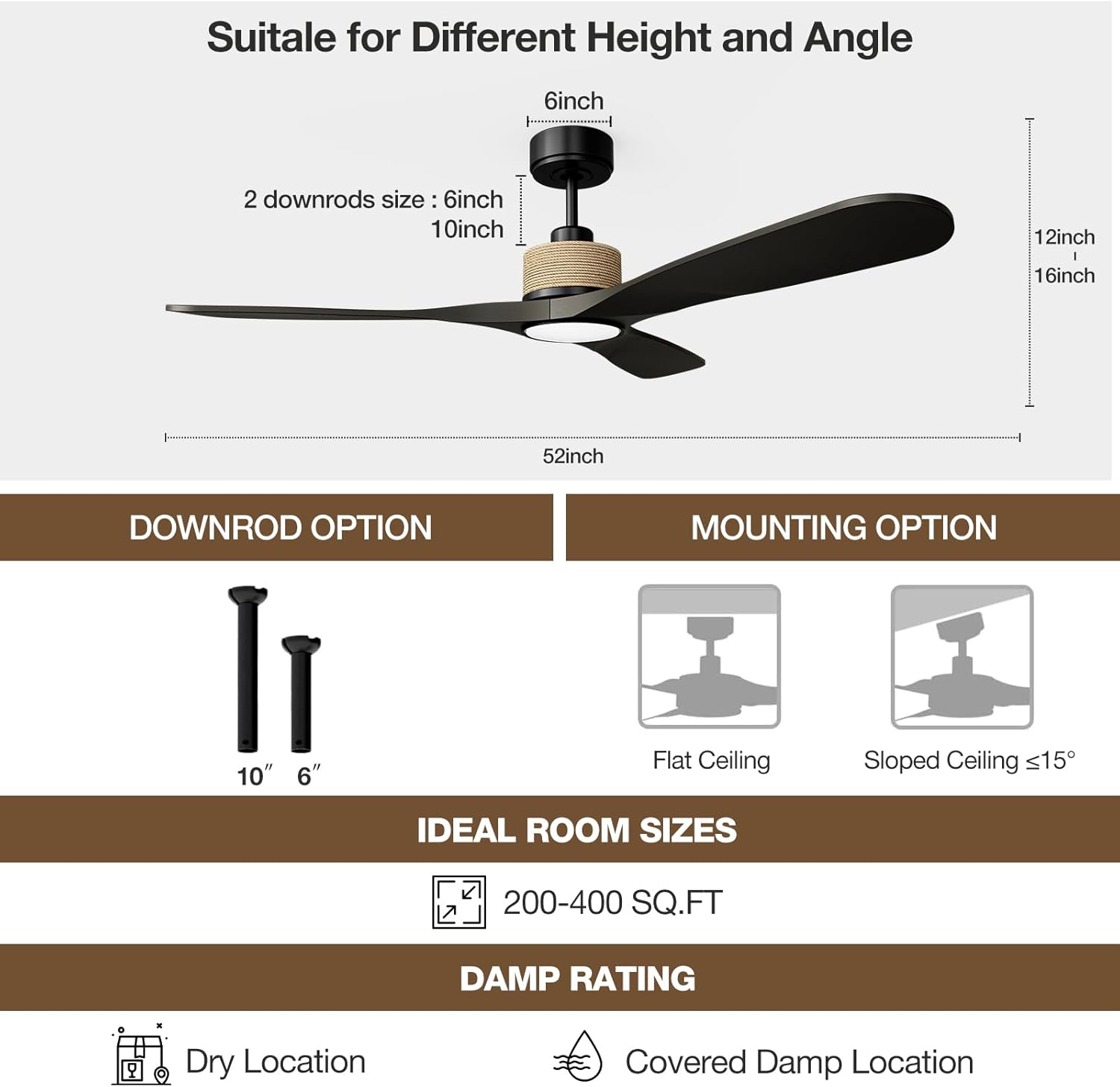
Image: Downrod sizes and compatible ceiling mounting options.
General Installation Steps (Summary)
- Secure the mounting bracket to the ceiling outlet box.
- Assemble the downrod (if used) to the motor assembly.
- Hang the fan assembly onto the mounting bracket.
- Connect the electrical wiring according to the provided wiring diagram.
- Attach the fan blades to the motor housing.
- Install the LED light kit and light cover.
- Restore power and test the fan.
Operating Instructions
The NOPAARD smart ceiling fan offers multiple control methods for convenience.

Image: Overview of control methods for the NOPAARD ceiling fan.
Remote Control
The included remote control provides full functionality:
- Power On/Off: Turns the fan and light on or off.
- Fan Speed: Adjusts between 6 fan speeds.
- Light On/Off: Controls the light independently.
- Light Color Temperature (CCT): Cycles through 3000K (warm yellow), 4000K (bright daylight), and 6000K (cool white).
- Light Dimming: Adjusts light brightness from 0% to 100%.
- Timer: Sets the fan to turn off after 1, 2, 4, or 8 hours.
- Reverse Function: Changes the direction of blade rotation for seasonal use.
Fan Speed Settings
Choose from 6 variable speeds to suit your comfort needs:
- Levels 1-2: Low speed for comfortable, gentle air circulation.
- Levels 3-4: Medium speed for natural wind sensation.
- Levels 5-6: High speed for powerful cooling airflow.

Image: Visual representation of 6 adjustable fan speeds.
Light Control
The integrated LED light offers versatile illumination:
- 3 CCT Options: Switch between 3000K (warm), 4000K (neutral), and 6000K (cool) light.
- Dimmable: Adjust brightness from 0% to 100% to create the desired ambiance. The light provides up to 2000 lumens.

Image: Dimmable light feature with adjustable color temperatures.
Reversible Airflow
The fan features a reversible DC motor for year-round comfort:
- Summer Mode: Downward airflow creates a cooling effect.
- Winter Mode: Upward airflow circulates warm air trapped near the ceiling, reducing heat loss.

Image: Reversible fan blades for seasonal comfort.
Quiet Operation
The fan's DC motor operates quietly, with noise levels below 35dB at lower speeds, ensuring minimal disturbance.
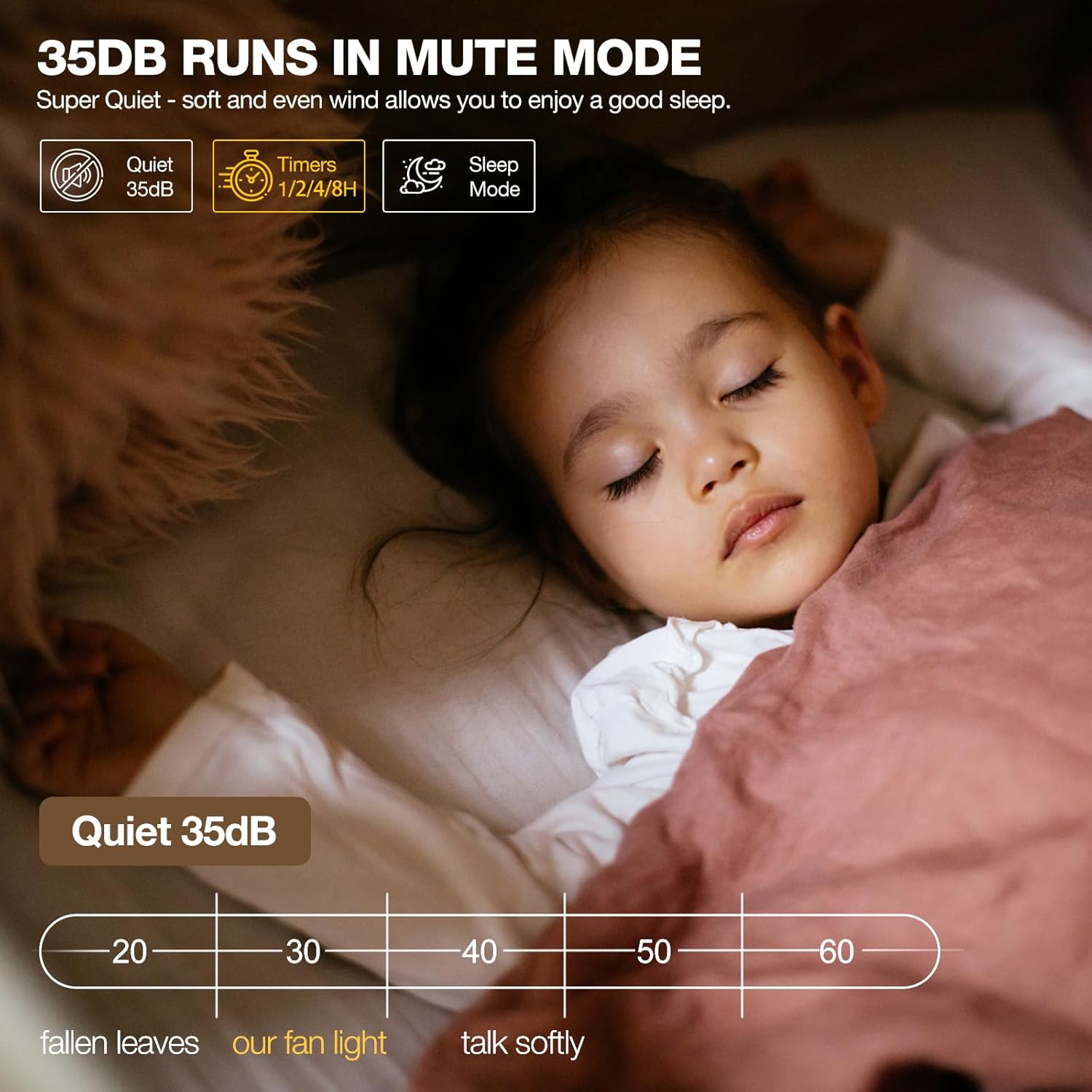
Image: Fan noise level comparison, highlighting quiet operation.
Smart Control Features
Enhance your experience with smart home integration.
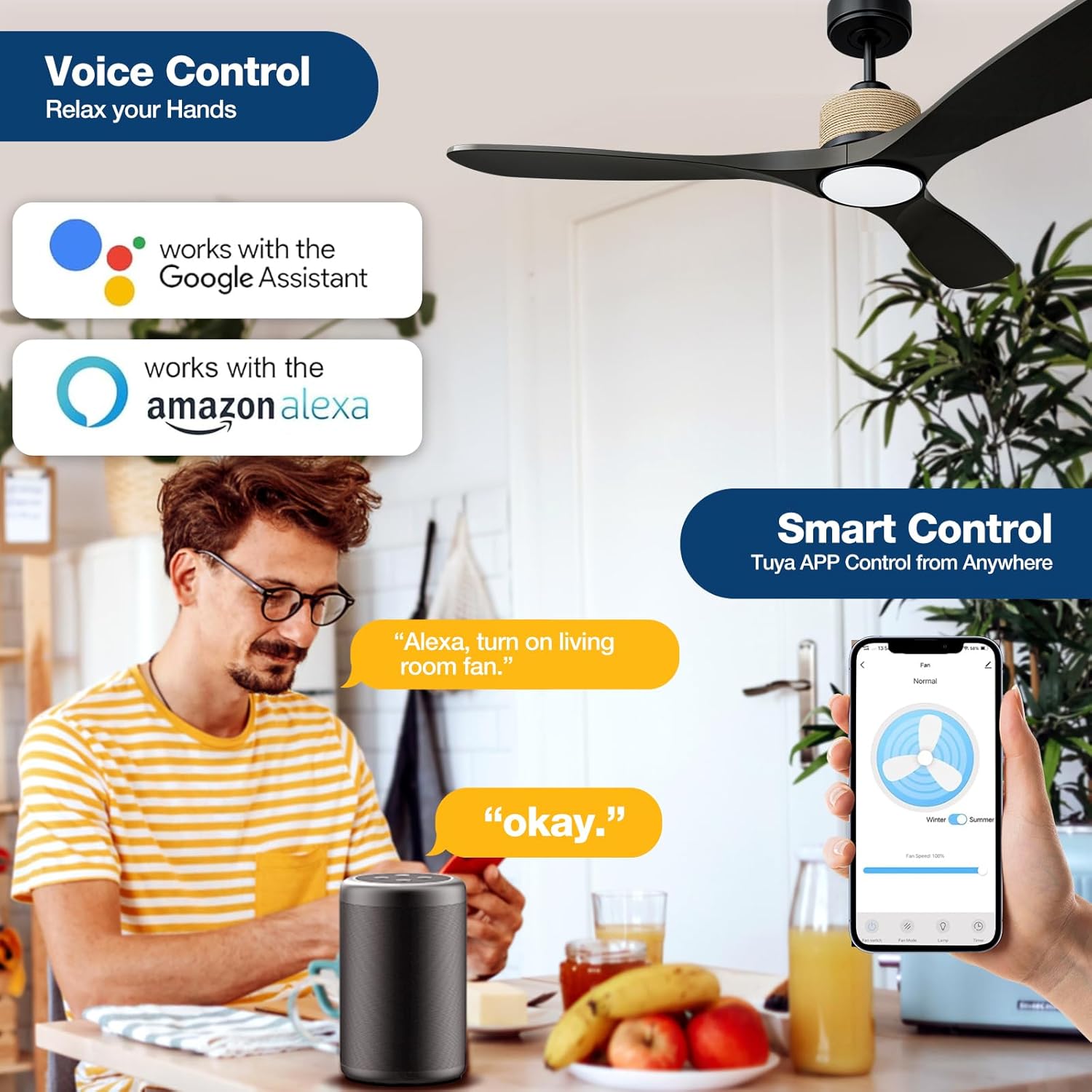
Image: Voice and App control features.
Tuya App Control
Download the Tuya Smart app to control your fan from anywhere:
- Power on/off the fan and light.
- Adjust fan speed.
- Change light color temperature and brightness.
- Set timers and schedules.
- Access reversible airflow function.
Voice Control (Alexa & Google Assistant)
Integrate with Amazon Alexa or Google Assistant devices for hands-free control:
- Link your Tuya Smart account to your Alexa or Google Home app.
- Use simple voice commands such as: "Alexa, turn on the fan in the bedroom" or "Hey Google, set the fan speed to 3."
Note: When using wall control, the fan and lights can only be turned on/off together. Separate operation or adjustment is not possible via wall control.
Maintenance
Regular maintenance ensures optimal performance and longevity of your ceiling fan.
- Cleaning: Use a soft, damp cloth to clean the fan blades and motor housing. Do not use abrasive cleaners or solvents.
- Dusting: Regularly dust the fan to prevent accumulation, which can affect performance and balance.
- Tightening: Periodically check and tighten all screws on the fan blades and mounting hardware.
- Light Kit: The LED light source is designed for long life and is generally not user-serviceable.
Troubleshooting
Refer to the table below for common issues and their solutions.
| Problem | Possible Cause | Solution |
|---|---|---|
| Fan does not start | No power; Loose wire connections; Remote battery low; Incorrect pairing. | Check circuit breaker; Verify all wire connections; Replace remote battery; Re-pair remote with fan. |
| Fan wobbles | Loose blade screws; Unbalanced blades; Loose mounting bracket. | Tighten all blade screws; Use balancing kit (not included) if needed; Ensure mounting bracket is secure. |
| Light does not work | Loose wire connection; LED driver issue; Remote battery low. | Check light kit wiring; Contact customer support if LED driver is suspected; Replace remote battery. |
| Remote not working | Battery low/dead; Obstruction; Not paired. | Replace battery; Ensure clear line of sight; Re-pair remote with fan. |
| Cannot connect to Wi-Fi/App | Incorrect Wi-Fi password; Router too far; 5GHz Wi-Fi network. | Ensure correct 2.4GHz Wi-Fi network and password; Move router closer or use a Wi-Fi extender. |
Specifications
Detailed technical specifications for the NOPAARD 52-Inch Smart Ceiling Fan.
| Feature | Detail |
|---|---|
| Model Name | 52-YJ818 |
| Brand | NOPAARD |
| Product Dimensions | 52"D x 52"W x 12"H |
| Blade Length | 52 Inches |
| Number of Blades | 3 |
| Motor Type | Brushless DC Motor |
| Power Source | DC |
| Voltage | 110 Volts |
| Wattage | 57 watts |
| Air Flow Capacity | 7451 Cubic Feet Per Minute (CFM) |
| Noise Level | 35 Decibels (at low speed) |
| Light Type | 3CCT Dimmable LED Light (3000K, 4000K, 6000K) |
| Control Method | App, Remote, Voice (Alexa, Google Assistant) |
| Indoor/Outdoor Usage | Indoor, Covered Outdoor (Damp-rated) |
| Certification | ETL Listed |

Image: DC Motor efficiency comparison.
Warranty and Support
NOPAARD stands behind the quality of its products.
- Product Warranty: This ceiling fan comes with a 2-year manufacturer's warranty covering defects in materials and workmanship.
- DC Motor Warranty: The DC motor is covered by a 10-year warranty.
- Extended Protection Plans: Additional protection plans (e.g., 3-year or 4-year) may be available for purchase from authorized retailers.
- Customer Support: For installation assistance, troubleshooting, or warranty claims, please contact NOPAARD customer service. Refer to the product packaging or retailer's website for contact details.