
Introduction
This manual provides essential information for the proper setup, operation, and maintenance of your CUNPU 32-inch QHD 165Hz Gaming Monitor. Please read these instructions carefully before using the product to ensure optimal performance and longevity. Keep this manual for future reference.
What's in the Box
Upon unpacking, please verify that all the following items are included:
- 1x 32 inch Monitor & Stand
- 1x 1.5m DisplayPort (DP) Cable
- 1x User Manual
- 1x Power Adaptor

Figure 1: CUNPU 32-inch QHD 165Hz Gaming Monitor with its included stand.
Setup
1. Stand Assembly
The monitor stand is designed for quick and easy assembly. Follow these steps:
- Attach the stand base to the stand pillar. Secure it using the provided screws.
- Align the assembled stand with the mounting slot on the back of the monitor.
- Gently push the monitor onto the stand until it clicks securely into place.
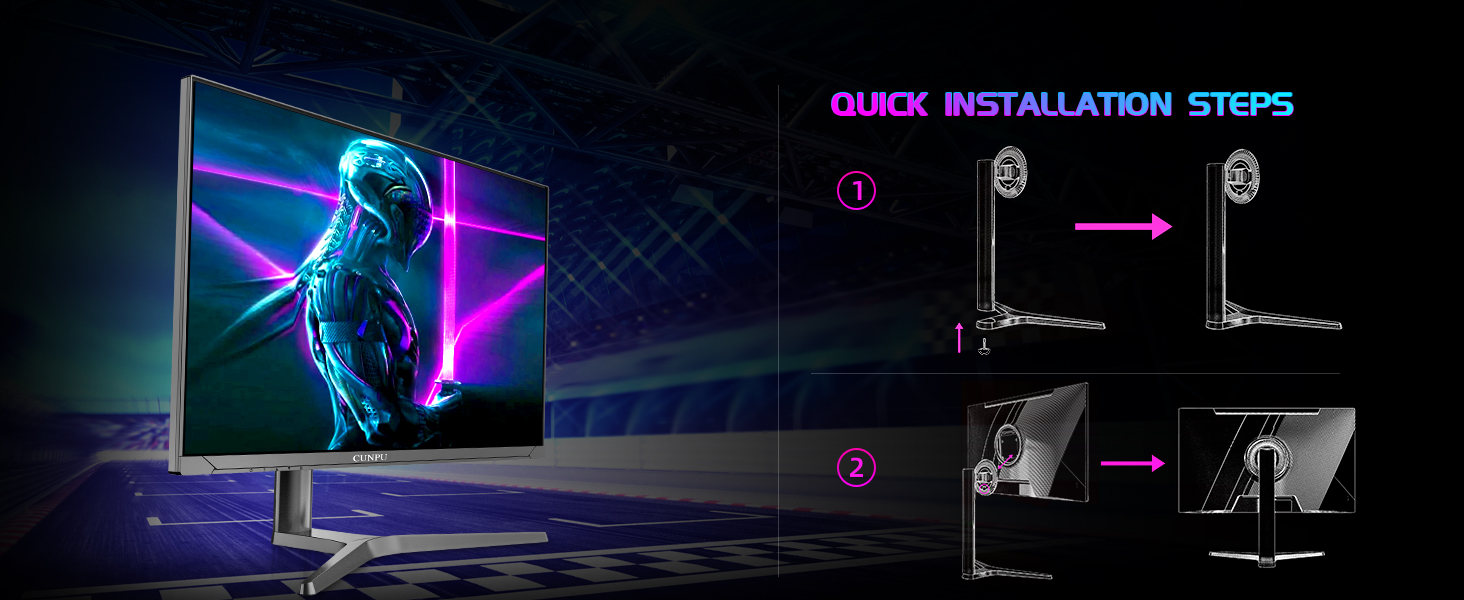
Figure 2: Quick installation steps for attaching the monitor stand.
2. VESA Mounting
The monitor supports VESA mounting (100 x 100 mm) for alternative mounting solutions such as wall mounts, desk mounts, or articulating arms. Ensure the VESA mount is compatible and capable of supporting the monitor's weight (21.4 pounds).
3. Connecting the Monitor
Connect your devices using the available ports:
- DisplayPort (DP 1.4): For optimal performance, including 165Hz refresh rate and QHD resolution.
- HDMI (HDMI 2.0): Connect to gaming consoles (Xbox, PS5) or other devices. Supports QHD 2560x1440P resolution at a maximum of 165Hz (compatible with most standard graphics cards).
- Power: Connect the provided power adaptor to the DC port and then to a power outlet.
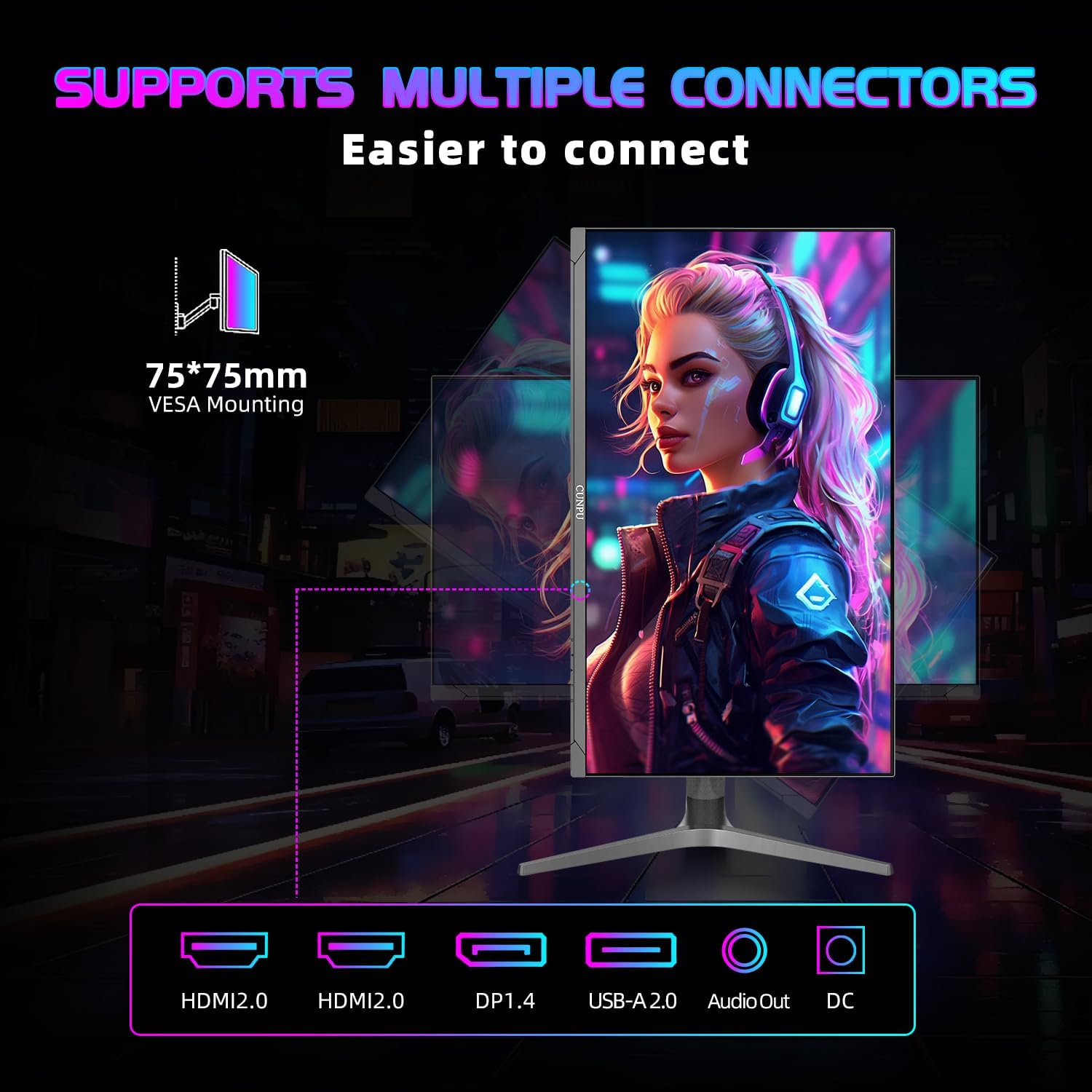
Figure 3: Rear view of the monitor displaying various connectivity ports.
Operating the Monitor
1. Power On/Off
Press the power button, typically located on the back or bottom edge of the monitor, to turn it on or off. The power indicator light will illuminate when the monitor is active.
2. On-Screen Display (OSD) Menu
The OSD menu allows you to adjust various monitor settings. Access it using the control buttons or joystick on the monitor. Common settings include:
- Picture Settings: Brightness, Contrast, Color Temperature, HDR.
- Display Settings: Resolution, Refresh Rate.
- Audio Settings: Volume (if built-in speakers are used).
- Input Source: Select between HDMI and DisplayPort inputs.
3. Picture Settings
Your CUNPU monitor features a Fast IPS panel with HDR10 support, 1.07 billion colors, 100% sRGB color gamut, 300 nits brightness, and a 1200:1 static contrast ratio. These features combine to produce crisp, sharp images with accurate color reproduction (ΔE < 2).

Figure 4: Monitor showcasing detailed visuals and color performance.
4. Gaming Features
- 165Hz Refresh Rate: Provides ultra-smooth action and eliminates lag for an exhilarating gaming experience.
- 1ms GTG Response Time: Minimizes motion blur, offering clear, fast-paced visuals.
- Adaptive Sync (FreeSync & G-SYNC Compatible): Ensures tear-free visuals and reduced input delay for high-resolution, fast-paced gaming.
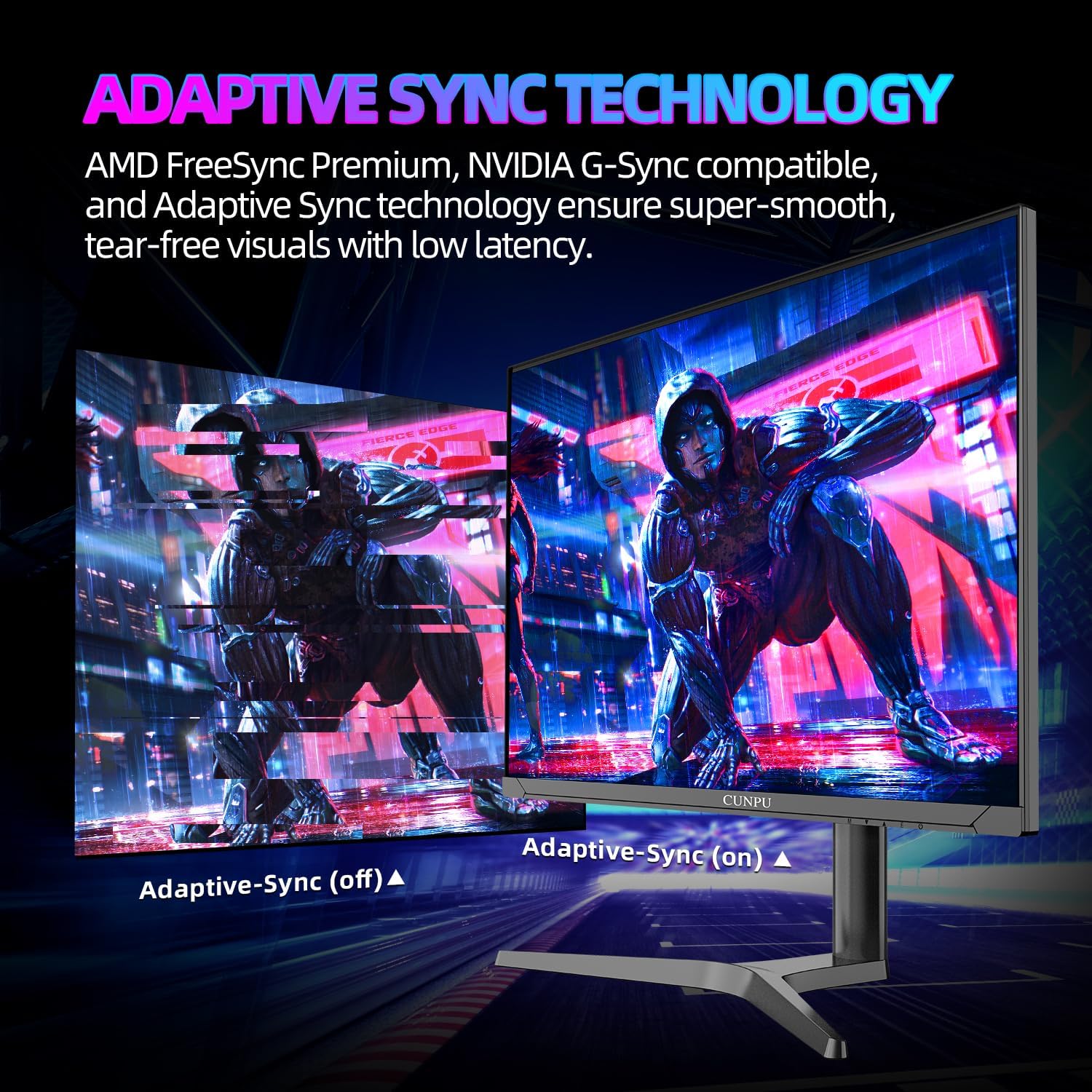
Figure 5: Visual comparison of Adaptive Sync technology in action.
5. RGB Lighting
The monitor features a customizable RGB light effect on its rear panel. This can be adjusted through the OSD menu to match your gaming setup or personal preference.

Figure 6: Rear panel with customizable RGB lighting.
6. Ergonomic Adjustments
The monitor stand offers extensive ergonomic adjustments for comfortable viewing:
- Tilt: -5° to 15°
- Swivel: -15° to 15°
- Pivot: -90° to 90° (for landscape or portrait orientation)
- Height Adjustment: Up to 3.93 inches (100mm)

Figure 7: Ergonomic adjustments for optimal viewing comfort.
7. Product Video
Video 1: An official product video showcasing the CUNPU 32-inch 2K gaming monitor's features and design.
Maintenance
To ensure the longevity and optimal performance of your monitor, follow these maintenance guidelines:
- Cleaning the Screen: Use a soft, lint-free cloth lightly dampened with water or a specialized screen cleaner. Avoid harsh chemicals or abrasive materials.
- Cleaning the Casing: Wipe the monitor casing with a soft, dry cloth.
- Ventilation: Ensure proper airflow around the monitor by keeping vents clear of obstructions.
- Power Off: Always turn off the monitor and unplug it from the power outlet before cleaning or if it will be unused for an extended period.
Troubleshooting
If you encounter issues with your monitor, refer to the following common solutions:
- No Power: Ensure the power cable is securely connected to both the monitor and the power outlet. Verify the power outlet is functional.
- No Signal: Check that the video cable (DP or HDMI) is correctly connected to both the monitor and your computer/device. Ensure the correct input source is selected in the OSD menu.
- Flickering/Distorted Image: Verify the video cable is not damaged. Try a different cable or port. Ensure your graphics card drivers are up to date.
- Incorrect Resolution/Refresh Rate: Adjust the display settings in your operating system or through the monitor's OSD menu.
- Color Issues: Reset picture settings to factory defaults via the OSD menu. Adjust color temperature and other picture settings as needed.
For persistent issues, please contact customer support.
Specifications
| Feature | Detail |
|---|---|
| Product Dimensions | 9.2 x 28.16 x 23.84 inches |
| Item Weight | 21.4 pounds |
| Manufacturer | CUNPU |
| Model Number | S027/32/34ES |
| Screen Size | 32 Inches |
| Aspect Ratio | 16:9 |
| Resolution | QHD (2560 x 1440 Pixels) |
| Panel Type | IPS |
| Refresh Rate | 165Hz |
| Response Time | 1ms GTG |
| Color Gamut | 100% sRGB |
| Brightness | 300 candela |
| Contrast Ratio | 1200:1 (Static) |
| HDR Support | HDR10 |
| Adaptive Sync | FreeSync, G-SYNC Compatible |
| Connectivity | HDMI, DisplayPort, 1x Total USB Ports |
| VESA Mountable | 100 x 100 mm |
| Ergonomic Stand | Height, Tilt, Swivel, Pivot Adjustment |
Warranty and Support
For warranty information or technical assistance, please contact CUNPU customer support. You can typically find contact details on the product packaging or through the seller's official channels.
Email: ZZA-Service@outlook.com
Customer service is committed to assisting you with any inquiries or issues.