
1. Safety Information
Please read and understand all instructions before beginning installation. Failure to follow these instructions may result in electric shock, fire, or personal injury.
- Ensure power is disconnected at the circuit breaker before installation or servicing.
- All electrical connections must be in accordance with local codes, ordinances, or national electrical codes. If you are unfamiliar with electrical wiring, consult a qualified electrician.
- The mounting bracket must be securely fastened to a building structure capable of supporting the fan's weight.
- Do not operate the fan with damaged blades or housing.
- Keep hands, clothing, and other objects clear of the fan blades when the fan is in operation.
- This fan is suitable for indoor and covered outdoor damp locations. Do not expose to direct water.
2. Package Contents
Verify all components are present before beginning installation:
- Motor Unit (with hemp rope design)
- 3 Solid Wood Fan Blades
- LED Light Board
- Light Cover
- Remote Control
- Remote Receiver
- Down-rods (6-inch and 10-inch options)
- Mounting Bracket
- Hardware Pack (screws, wire nuts, washers)
- Instruction Manual

Image: All components of the NOPAARD 52-inch smart ceiling fan laid out, including the motor unit, wooden blades, LED light, remote, and hardware.
3. Setup & Installation
Follow these steps for proper installation. It is recommended to have assistance during installation.
- Prepare for Installation: Ensure the power supply to the installation area is turned OFF at the circuit breaker.
- Attach Fan Blades: Securely attach the three solid wood fan blades to the motor unit using the provided screws. Each blade typically requires two screws.
- Install LED Light Board: Connect the motor line to the LED panel line. Align the LED board and install the three screws to secure it to the motor unit.
- Prepare Mounting Bracket: Disassemble the mounting bracket from the fan's canopy if it's pre-attached.
- Mounting Bracket Installation: Install the mounting bracket onto the ceiling junction box. Use the four provided screws to securely fasten it. Ensure the junction box can support the fan's weight.
- Electrical Connections: Separately connect the live wires, neutral wires, and ground wires from the ceiling to the fan's wiring. Use wire nuts to secure connections.
- Hang the Fan: Carefully lift the fan assembly and hang it onto the hook provided in the mounting bracket. This allows hands-free wiring.
- Connect Receiver: Tuck the remote receiver into the top of the motor housing, ensuring all wires are neatly organized. Connect the receiver to the motor power cord.
- Secure Fan to Bracket: Adjust the fan into place on the mounting bracket and tighten the four screws to secure it.
- Attach Light Cover: Place the light cover onto the LED light board and turn it clockwise to tighten and secure it.
Video: Step-by-step guide on how to install the NOPAARD ceiling fan, demonstrating assembly of blades, wiring, and mounting to the ceiling.
Video: Detailed installation process for a 52-inch boho ceiling fan, covering component assembly and ceiling mounting.
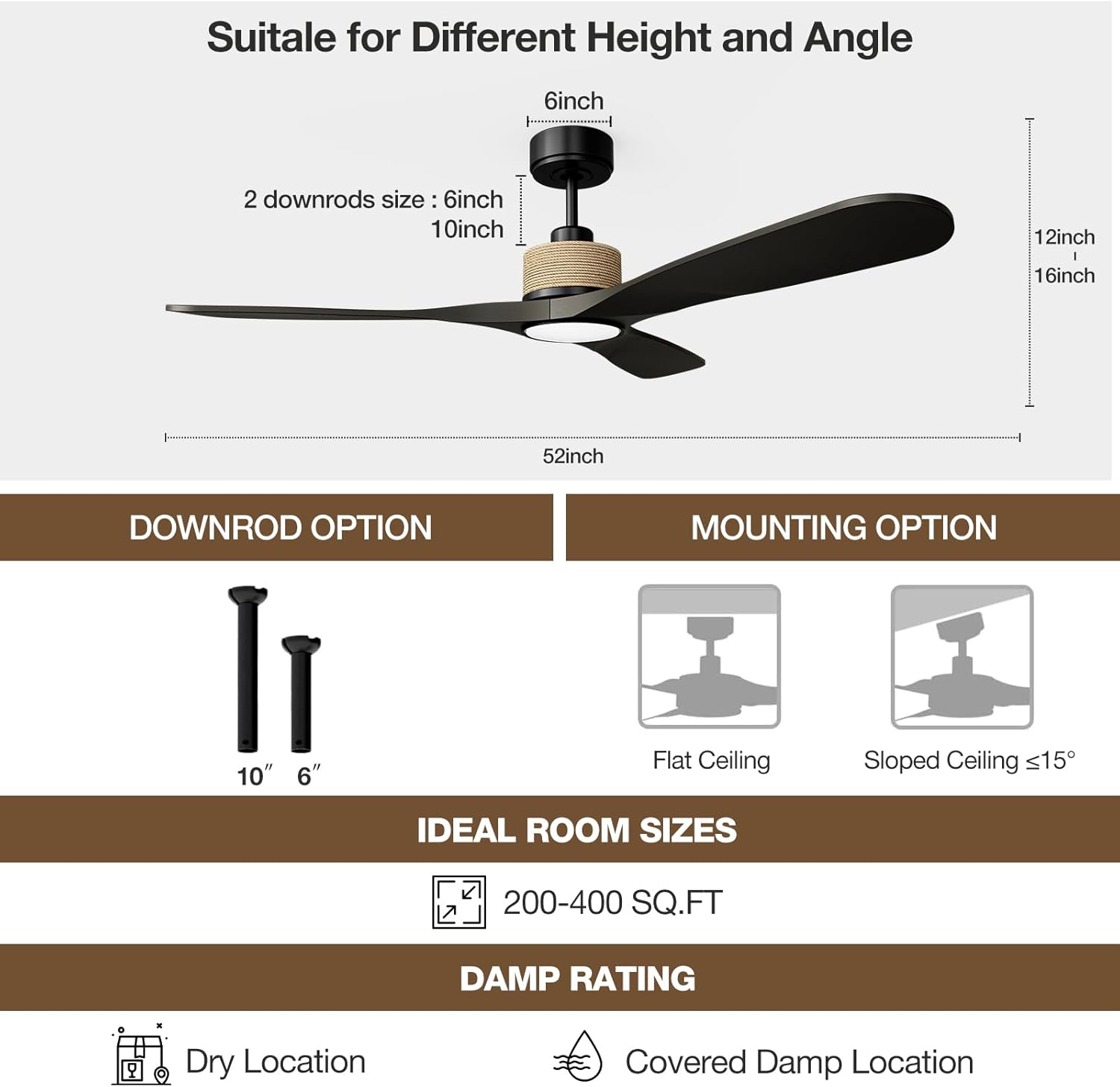
Image: Diagram showing the fan's dimensions (52-inch diameter, 12-16 inch height) and available down-rod options (6-inch and 10-inch) for flush or sloped ceiling mounting (up to 15°).
4. Operating Instructions
The NOPAARD smart ceiling fan offers multiple control methods for convenience.
4.1 Remote Control
Use the included remote control to manage fan and light functions:
- Fan ON/OFF: Press the fan power button to turn the fan on or off.
- Fan Speed: Select from 6 variable speeds (1-6) to adjust airflow.
- Light ON/OFF: Press the light power button to turn the light on or off.
- Light Color Temperature (CCT): Cycle through 3000K (warm yellow), 4000K (bright daylight), and 6000K (cool white) settings.
- Light Dimming: Adjust brightness from 0% to 100%.
- Timer Function: Set the fan to turn off automatically after 1, 2, 4, or 8 hours.
- Reversible Function: Change the direction of the fan blades for summer or winter mode.
- Natural Wind Mode: Activates a fluctuating fan speed to simulate natural breezes.
- Mute Mode: Reduces fan noise for quiet operation, ideal for sleeping.

Image: Overview of the four control methods for the NOPAARD smart ceiling fan: remote control, Tuya APP, voice control (Alexa/Google Assistant), and wall control. Note: Wall control may only turn on/off fan and lights together, not separately or adjustable.
4.2 Smart Control (App & Voice)
Integrate your fan with smart home systems for enhanced control:
- Tuya APP Control: Download the Tuya Smart app to control the fan from anywhere. This allows for advanced scheduling and customization.
- Voice Control: Compatible with Alexa and Google Assistant devices. Use simple voice commands like "Alexa, turn on the fan in the bedroom" for hands-free operation.
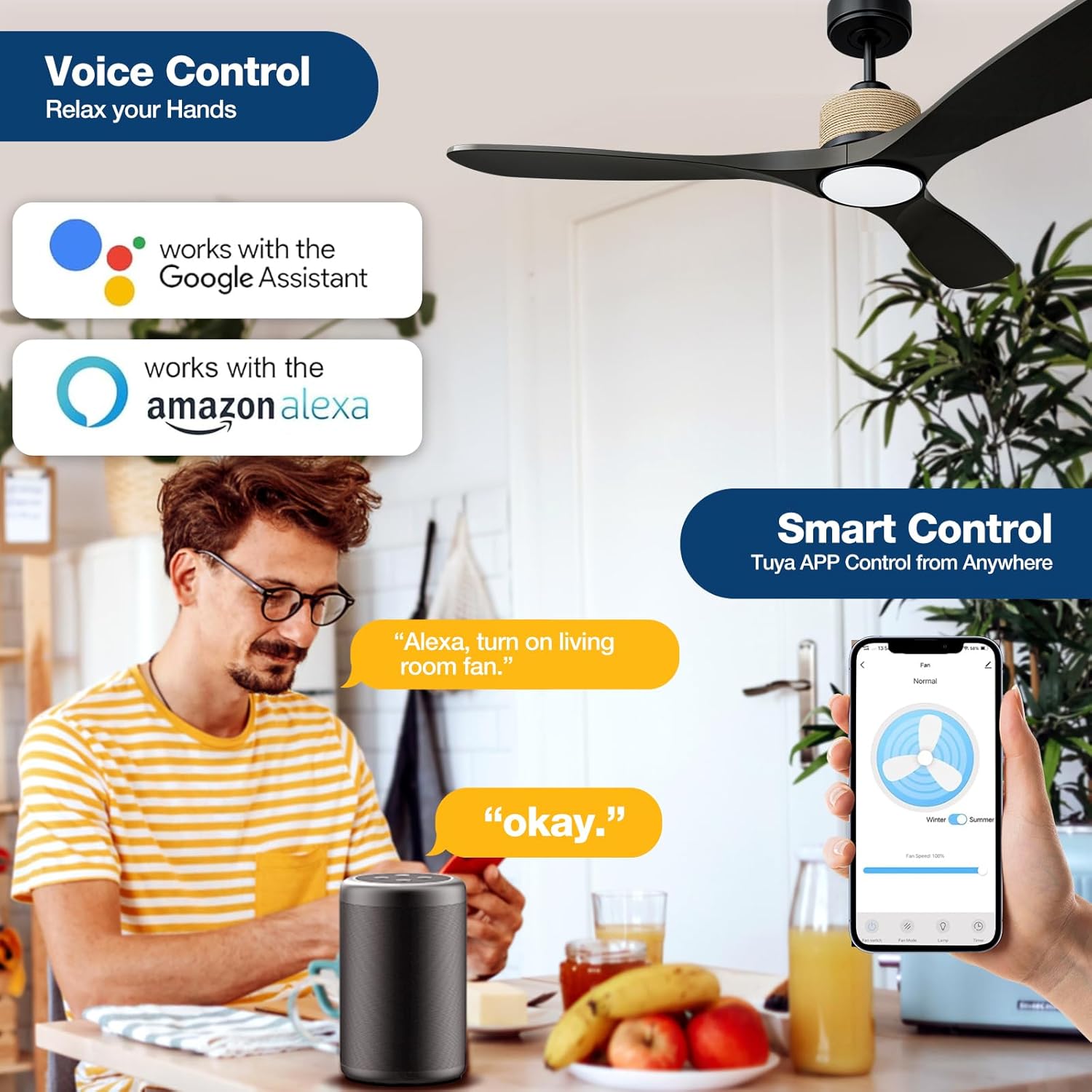
Image: Demonstrates voice control functionality with Amazon Alexa and Google Assistant, and smart control via the Tuya App, allowing remote operation.
4.3 Fan Speed Adjustment
The fan features 6 adjustable speeds to meet various comfort needs:
- Levels 1-2 (Low): Provides a comfortable, gentle breeze.
- Levels 3-4 (Medium): Offers a natural wind sensation.
- Levels 5-6 (High): Delivers powerful cooling wind.

Image: Illustrates the 6 adjustable fan speeds, categorized into low (levels 1-2), medium (levels 3-4), and high (levels 5-6) for various comfort levels.
4.4 Quiet Operation
Equipped with a quiet DC motor, the fan operates at less than 35dB at lower speeds, ensuring minimal disturbance for work or sleep.
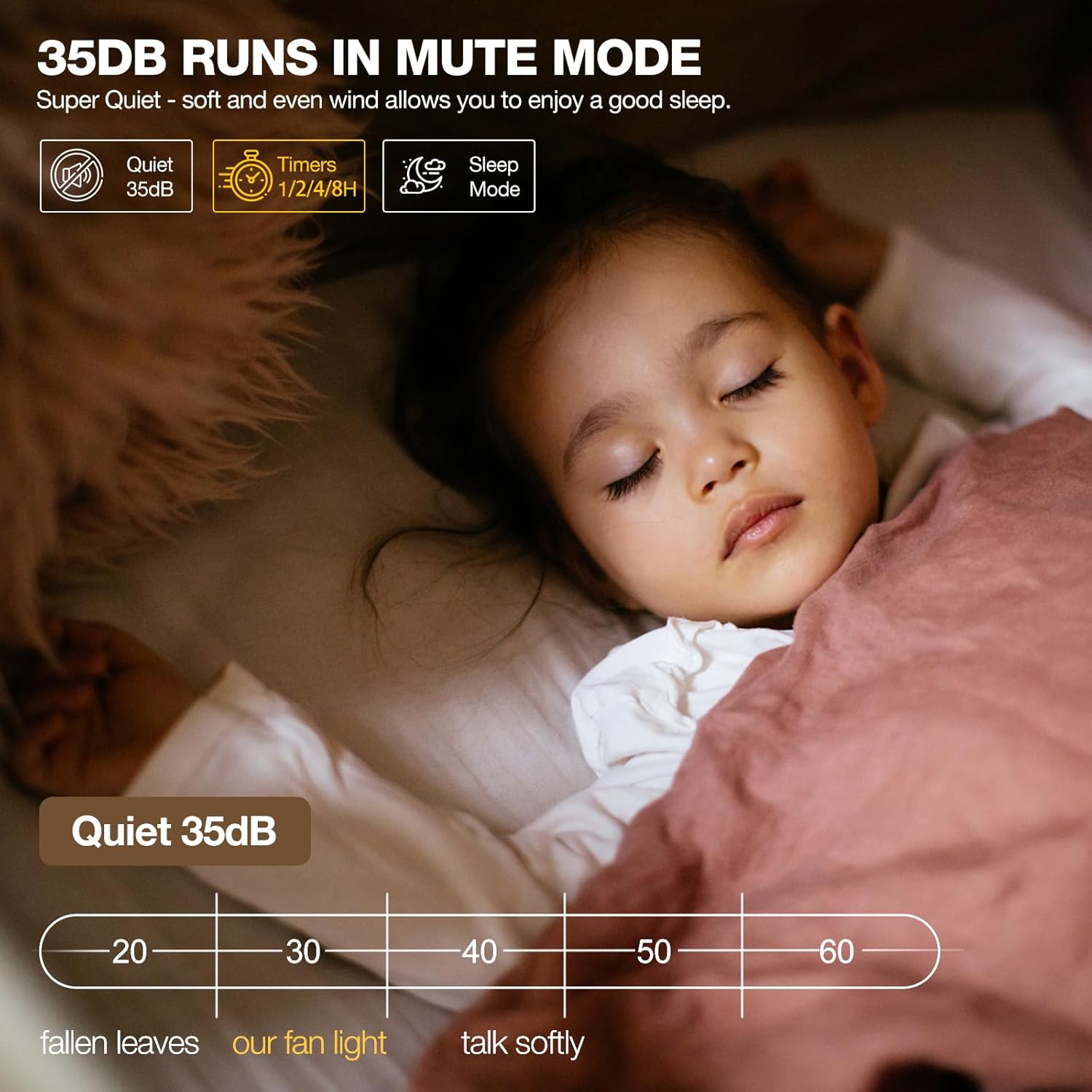
Image: Highlights the fan's quiet operation at 35dB in mute mode, making it suitable for bedrooms and undisturbed sleep.
4.5 Dimmable LED Light
The integrated LED light offers customizable illumination:
- 3 Color Temperatures (CCT): Choose between 3000K (warm yellow), 4000K (bright daylight), and 6000K (cool white) to match your ambiance.
- Dimmable: Adjust the light brightness from 0% to 100% (up to 2000 lumens).

Image: Illustrates the dimmable LED light feature, showcasing three color temperatures (3000K warm yellow, 4000K bright daylight, 5000K cool white) and brightness adjustment from 0-2000 lumens.
4.6 Reversible Fan Blades
Optimize air circulation for different seasons:
- Summer Mode: Blades rotate counter-clockwise to create a downward airflow, enhancing cooling.
- Winter Mode: Blades rotate clockwise to create an upward airflow, circulating warm air and reducing heat loss.

Image: Depicts the 3 reversible fan blades, explaining their function to reduce heat loss and circulate warm air in winter, and keep cool and enhance cold air flow in summer.
5. Maintenance
Regular maintenance ensures optimal performance and longevity of your ceiling fan.
- Cleaning: Use a soft, damp cloth to clean the fan blades and motor housing. Avoid abrasive cleaners that may damage the finish.
- Blade Inspection: Periodically check the fan blades for any signs of damage or warping. Ensure all blade screws are tight.
- Electrical Connections: Annually inspect all electrical connections for tightness and wear. Ensure power is OFF before inspection.
- Dust Accumulation: Dust the fan regularly to prevent buildup, which can affect performance and balance.
6. Troubleshooting
Refer to this section for common issues and their solutions.
| Problem | Possible Cause | Solution |
|---|---|---|
| Fan does not start | No power to the fan; loose wire connections; remote control battery low. | Check circuit breaker and wall switch. Ensure all wire connections are secure. Replace remote control batteries. |
| Fan wobbles | Loose blade screws; unbalanced blades; loose mounting bracket. | Tighten all blade screws. Ensure blades are balanced (use balancing kit if necessary). Securely fasten the mounting bracket to the ceiling. |
| Light does not work | Loose wire connection to LED board; LED board failure; remote control battery low. | Check wire connections to the LED board. If LED board is faulty, contact support. Replace remote control batteries. |
| Remote control not working | Low battery; receiver not paired; interference. | Replace remote batteries. Refer to pairing instructions in the full manual. Ensure no strong interference sources are nearby. |
| Wi-Fi/App connectivity issues | Incorrect Wi-Fi password; router too far; app not updated. | Verify Wi-Fi password. Ensure fan is within Wi-Fi range. Update Tuya app to the latest version. Follow app pairing instructions carefully. |
7. Specifications
| Brand | NOPAARD |
| Model Name | 52-YJ818 |
| Size | 52 inches |
| Number of Blades | 3 |
| Motor Type | Brushless DC Motor (Reversible) |
| Noise Level | 35 Decibels (at low speed) |
| Light Feature | 3CCT Dimmable LED (3000K, 4000K, 6000K), 0-2000 Lumens |
| Control Method | Remote, App (Tuya), Voice (Alexa, Google Assistant) |
| Number of Power Levels | 6 Speeds |
| Air Flow Capacity | Up to 7451 Cubic Feet Per Minute (CFM) |
| Voltage | 110 Volts |
| Wattage | 57 watts |
| Indoor/Outdoor Usage | Indoor, Covered Outdoor (Damp-rated) |
| Installation Type | Flush Mount, Down-rod (6 & 10 inch) |
| Special Features | Timer & Memory Function |
| Certification | ETL Listed |
8. Warranty & Support
NOPAARD offers comprehensive support for your ceiling fan:
- Quality Assurance: 24 months quality assurance.
- DC Motor Warranty: 10-year warranty for the DC motor.
- Customer Service: For any product installation or quality problems, please contact our professional support team.


