
1. Introduction
This manual provides essential instructions for the proper use and care of FORA G20/D30/V20 Blood Glucose Test Strips. These test strips are designed for self-testing of blood glucose levels with compatible FORA blood glucose meters. Please read this manual thoroughly before using the test strips to ensure accurate results and safe operation.
Important: These test strips are for in vitro diagnostic use only. Do not use for diagnosis of diabetes or for screening of newborns. Consult your healthcare professional for interpretation of results.
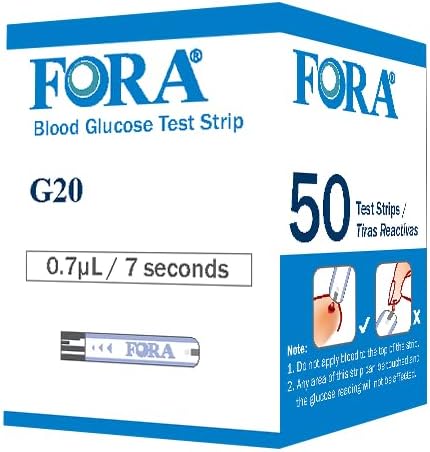
Figure 1: A box of FORA G20/D30/V20 Blood Glucose Test Strips, containing 50 strips.
2. Compatibility
FORA G20/D30/V20 Blood Glucose Test Strips are specifically designed for use with the following FORA blood glucose meters:
- FORA G20 Blood Glucose Meter
- FORA D30 Blood Glucose Meter
- FORA V20 Blood Glucose Meter
Using these test strips with any other blood glucose meter may lead to inaccurate results.
3. Setup
3.1 Unpacking and Inspection
- Carefully open the test strip box.
- Verify that the test strip vial is sealed and undamaged. Do not use strips from a damaged or previously opened vial.
- Check the expiration date printed on the test strip vial and the outer box. Do not use expired test strips.
3.2 Preparing the Meter
Ensure your FORA blood glucose meter is clean and has sufficient battery power. Refer to your meter's user manual for specific instructions on meter preparation.
4. Operating Instructions
4.1 Before Testing
- Wash your hands thoroughly with warm, soapy water and dry them completely. This helps prevent contamination and improves blood flow.
- Prepare your lancing device according to its instructions.
- Remove one test strip from the vial. Immediately close the vial cap tightly to protect the remaining strips from moisture.
4.2 Performing a Blood Glucose Test
- Insert the test strip into the test strip port of your FORA blood glucose meter. The meter will typically turn on automatically and display a symbol indicating it is ready for blood application.
- Prick the side of your fingertip with the lancing device to obtain a blood sample. Gently squeeze your finger to form a round drop of blood.
- Touch the tip of the test strip to the blood drop. The strip will draw the blood into the reaction area. Do not apply blood to the top of the strip.
- Wait for the meter to display the result. This usually takes a few seconds.
- Record your result if necessary.
4.3 Disposing of Used Test Strips and Lancets
Dispose of used test strips and lancets in a puncture-resistant sharps container immediately after use. Follow local regulations for proper disposal of medical waste.
5. Maintenance and Storage
5.1 Test Strip Storage
- Store test strips in their original vial with the cap tightly closed.
- Keep the vial in a cool, dry place, away from direct sunlight and heat.
- Do not store test strips in a refrigerator or freezer.
- Do not transfer test strips to a new vial or any other container.
- Use test strips within the expiration date printed on the vial.
- Once the vial is opened, use the test strips within the period specified in the meter's manual (typically 3-6 months). Write the discard date on the vial label.
5.2 Meter Care
Regularly clean your blood glucose meter according to its user manual. Keep the meter free from dust, dirt, and moisture.
6. Troubleshooting
If you encounter issues during testing, refer to the following common problems and solutions. For detailed troubleshooting, consult your FORA blood glucose meter's user manual.
| Problem | Possible Cause | Solution |
|---|---|---|
| Meter does not turn on after inserting strip. | Strip inserted incorrectly; meter battery low; strip damaged. | Reinsert strip correctly. Check/replace meter batteries. Use a new strip. |
| "Error" message or unusual reading. | Insufficient blood sample; expired or damaged strip; extreme temperature; meter malfunction. | Apply sufficient blood. Use a new, unexpired strip. Test in recommended temperature range. Refer to meter manual or contact support. |
| Blood does not draw into the strip. | Insufficient blood drop; strip tip not touching blood correctly; strip damaged. | Ensure a large enough blood drop. Touch the tip of the strip to the blood drop. Use a new strip. |
7. Specifications
- Product Name: FORA G20/D30/V20 Blood Glucose Test Strips
- Model Number (Strips): FBA-810-4251100-003
- Quantity: 50 test strips per box
- Sample Type: Capillary whole blood
- Test Time: Typically 5 seconds (refer to meter manual for exact time)
- Storage Conditions: 39.2°F - 86°F (4°C - 30°C), below 85% relative humidity. Do not freeze.
- Compatibility: FORA G20, D30, V20 Blood Glucose Meters
- UPC: 816042013911
- Manufacturer: Taidoc Technology Corporation
Note: These specifications are subject to change without prior notice. Always refer to the product packaging and your meter's manual for the most current information.
8. Warranty & Support
8.1 Warranty Information
FORA Blood Glucose Test Strips are manufactured under strict quality control standards. For specific warranty details regarding manufacturing defects or product performance, please refer to the information provided with your purchase or contact FORA customer support directly. The warranty typically covers manufacturing defects and ensures the strips meet performance standards until their expiration date, provided they are stored and used correctly.
8.2 Customer Support
If you have any questions, concerns, or require assistance with your FORA G20/D30/V20 Blood Glucose Test Strips, please contact FORA customer support:
- Manufacturer: Taidoc Technology Corporation
- Brand: FORA
- Website: www.foracare.com
- Contact Information: Please refer to the contact details provided on the product packaging or the official FORA website for the most up-to-date support channels (phone, email, etc.).
When contacting support, please have your product model number (FBA-810-4251100-003) and lot number (found on the test strip vial) ready.


