
1. Introduction
Thank you for choosing the KINGON F0C Rechargeable Luggage Scale. This digital portable scale is designed to accurately measure the weight of your luggage, helping you avoid overweight baggage fees. It features a rechargeable battery, a clear LCD display, and a robust design for reliable use. Please read this manual thoroughly before using the device to ensure proper operation and to maximize its lifespan.
2. Safety Information
- Do not overload the scale beyond its maximum capacity of 110lb (50kg).
- Keep the device away from water and extreme temperatures.
- Avoid dropping or subjecting the scale to strong impacts.
- Do not attempt to disassemble or repair the scale yourself. Contact customer support if issues arise.
- Use only the provided charging cable or a compatible Type-C cable for charging.
3. Package Contents
- KINGON F0C Rechargeable Luggage Scale
- USB Type-C Charging Cable
- Removable Nylon Woven Strap
- User Manual
4. Product Overview
The KINGON F0C luggage scale is designed for ease of use and portability. Key features include:
- Rechargeable Battery: Equipped with a Type-C charging port, eliminating the need for disposable batteries. An indication light shows charging status, and the device features auto-shutdown when fully charged.
- High Accuracy Sensor: Utilizes a thick, high-precision aluminum sensor for consistent and reliable measurements.
- Quick Lock Function: Locks the weight reading after approximately 5 seconds of stable measurement, accompanied by an audible beep.
- Versatile Hook and Strap: Features a large, concealable hook and includes a removable nylon woven strap for use with various luggage handle types.
- User-Friendly Design: Includes a comfortable 3.3-inch wide plastic-coated steel handle, a large backlit LCD display for clear reading in any light, low battery indication, and an optional hold function.

Image: Front view of the KINGON F0C Luggage Scale, highlighting the power, unit, and tare buttons, along with the large LCD display.

Image: Detailed view of the scale's large LCD screen, showing weight measurements in different units (lb, kg, lb-oz) and indicating the data lock feature with a beep.
5. Setup
5.1 Charging the Scale
- Locate the Type-C charging port on the side of the scale.
- Connect the provided USB Type-C cable to the scale and a suitable USB power source (e.g., wall adapter, computer USB port).
- The indication light will illuminate during charging. It will turn off automatically when the battery is fully charged, which typically takes about 3 hours. A full charge provides approximately 6-8 months of use.

Image: The KINGON luggage scale being charged via its Type-C port, showing the red indication light and highlighting the auto-shutdown feature.
5.2 Initial Power On
Press the power button (O) to turn on the scale. The display will show '8888' and then '0.00' or '0.0' with the last used unit.
6. Operating Instructions
6.1 Power On/Off
- Press the power button (O) to turn the scale on.
- Press and hold the power button (O) for 3 seconds to turn the scale off. The scale will also automatically turn off after 60 seconds of inactivity to conserve battery.
6.2 Changing Weight Units
With the scale powered on and displaying '0.00', press the UNIT button to cycle through the available weight units: pounds (lb), kilograms (kg), and pounds-ounces (lb-oz). The scale will retain the last chosen unit for future use.
6.3 Tare/Zero Function
The Tare function allows you to weigh items in a container without including the container's weight.
- Turn on the scale.
- Hang the empty container (e.g., a basket) onto the hook.
- Wait for the reading to stabilize, then press the Z/T button. The display will reset to '0.00'.
- Place the items you wish to weigh into the container. The display will show only the net weight of the items.

Image: Demonstrates the Tare function (Z/T button) by first weighing an empty basket and then adding items, showing only the weight of the items.
6.4 Weighing Luggage
- Ensure the scale is powered on and displaying '0.00'.
- Using the Hook: Attach the scale's hook directly to the handle of your luggage.
- Using the Nylon Strap (for thicker handles):
- Press the root of the hook to release it from its slot.
- Pass the removable nylon strap through your luggage handle.
- Hang the metal sheet of the strap onto the triangular ring of the scale's hook.
- Lift the luggage using the scale's handle.
- Lift the luggage gently and steadily off the ground using the scale's handle. Keep the luggage still for approximately 5 seconds.
- The scale will beep, and the weight reading will lock on the display (indicated by an 'H' symbol). You can then lower the luggage and read the stable weight.

Image: A person holding the KINGON luggage scale to weigh a blue suitcase, demonstrating the proper lifting technique.

Image: A four-step visual guide illustrating how to attach and use the woven strap for weighing luggage with thicker handles.
6.5 Hold Function
The Quick Lock function automatically holds the reading after stabilization. If you prefer to disable this, consult the troubleshooting section or product support for advanced settings, though typically this is a default feature for convenience.
7. Maintenance
7.1 Cleaning
Wipe the scale with a soft, damp cloth. Do not use abrasive cleaners or immerse the device in water.
7.2 Storage
Store the scale in a cool, dry place. The compact design allows the hook to be concealed, making it easy to store in luggage or a drawer.

Image: The KINGON luggage scale neatly stored in a pocket of a travel bag, demonstrating its compact and portable design.
7.3 Battery Care
To prolong battery life, charge the scale regularly, especially if it has not been used for an extended period. Avoid completely draining the battery frequently.
8. Troubleshooting
- Inaccurate Readings: Ensure the scale is held steadily and the luggage is not touching the ground or any other surface during weighing. Recalibrate by turning the scale off and on again.
- Display Shows 'Lo': The battery is low. Recharge the scale using the provided Type-C cable.
- Scale Does Not Turn On: The battery may be completely depleted. Connect the scale to a charger and allow it to charge for at least 15-30 minutes before attempting to turn it on again.
- Display Shows 'O-Ld': The scale is overloaded. Remove the item immediately to prevent damage. The maximum capacity is 110lb (50kg).
9. Specifications
| Feature | Specification |
|---|---|
| Brand | KINGON |
| Model Number | F0C |
| Color | Black |
| Weight Limit | 110 Pounds / 50 Kilograms |
| Graduation | 0.05lb / 20g |
| Display Type | LCD (Backlit) |
| Special Features | Auto Shut Off, Backlit Display, Large Display, Portable, Tare Function |
| Power Source | Rechargeable Lithium Polymer Battery (included) |
| Charging Port | USB Type-C |
| Material | Plastic with Steel Reinforcement |
| Item Weight | 6.9 Ounces |
| Product Dimensions | 5.3 x 3.5 x 0.9 inches |
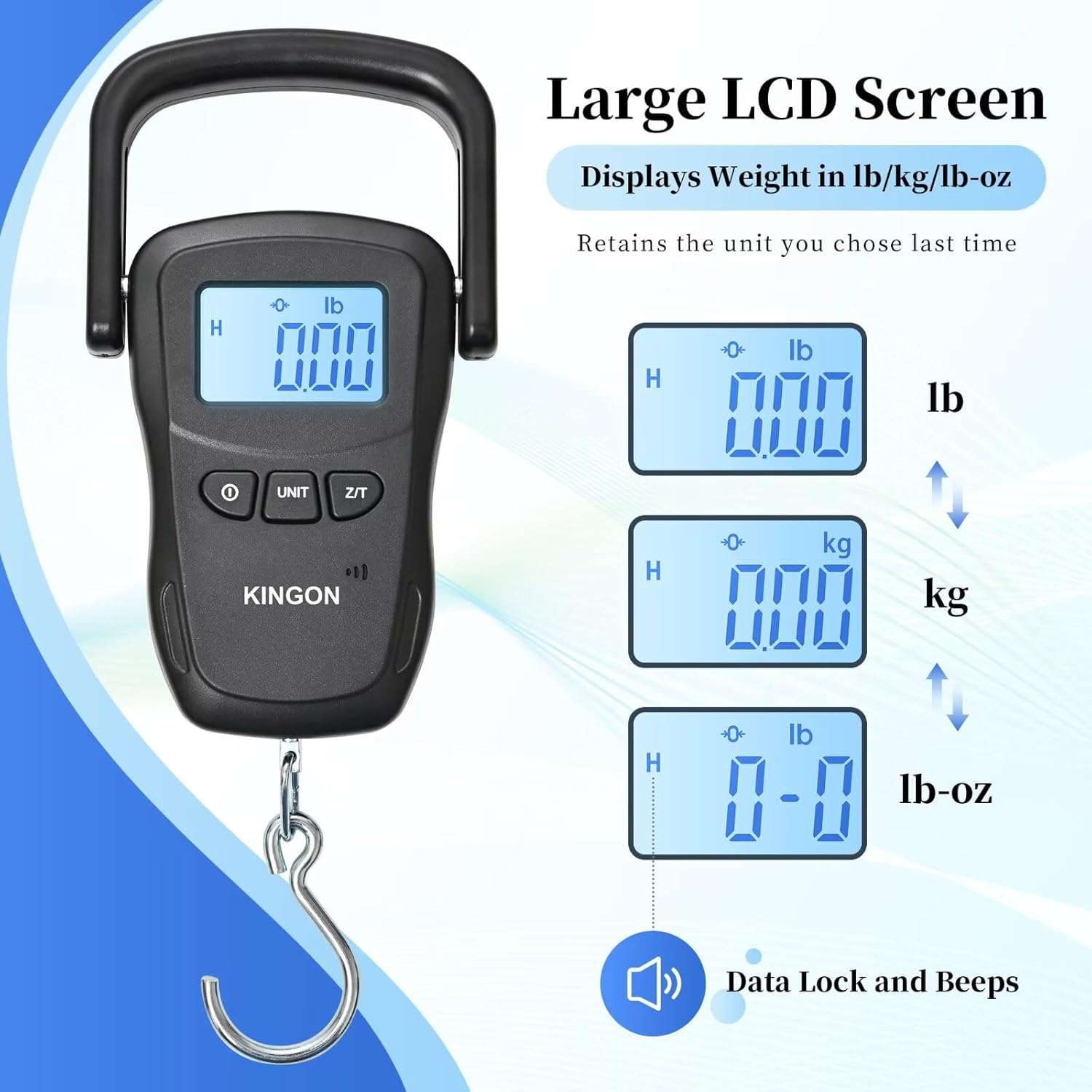
Image: A visual representation of the KINGON F0C luggage scale with its dimensions (5.3 x 3.5 x 0.9 inches) and weight (6.9 oz) indicated, along with a flexible ruler.
10. Warranty and Support
For warranty information or technical support, please refer to the product packaging or contact KINGON customer service directly through the retailer's platform or the official brand website. Please have your model number (F0C) and purchase date available when contacting support.