
DAYI DF-45
DAYI Biometric Fingerprint Safe Box DF-45 Plus User Manual
Model: DF-45 Plus | Brand: DAYI
1. Introduction
This manual provides detailed instructions for the setup, operation, and maintenance of your DAYI DF-45 Plus Biometric Fingerprint Safe Box. Please read this manual thoroughly before using the safe to ensure proper function and security.
2. Safety Information
- Keep emergency keys in a secure location away from the safe. Do not store them inside the safe.
- Ensure the safe is installed on a stable surface or securely mounted to a wall/floor to prevent unauthorized removal.
- Do not expose the safe to extreme temperatures or humidity.
- This safe is not fireproof or waterproof. The included fireproof bag offers basic protection against fire and water for documents, but the safe itself does not.
- Replace batteries promptly when the low battery indicator appears to avoid being locked out.
3. Package Contents
Verify that all components are present:
- 1 x DAYI Biometric Safe Box (DF-45 Plus)
- 2 x Emergency Keys
- 1 x Fireproof Bag
- 1 x Emergency Battery Box
- 4 x Foot Pads
- 1 x Installation Hardware Set (2 x Mounting Bolts)
- 1 x User Manual (This document)
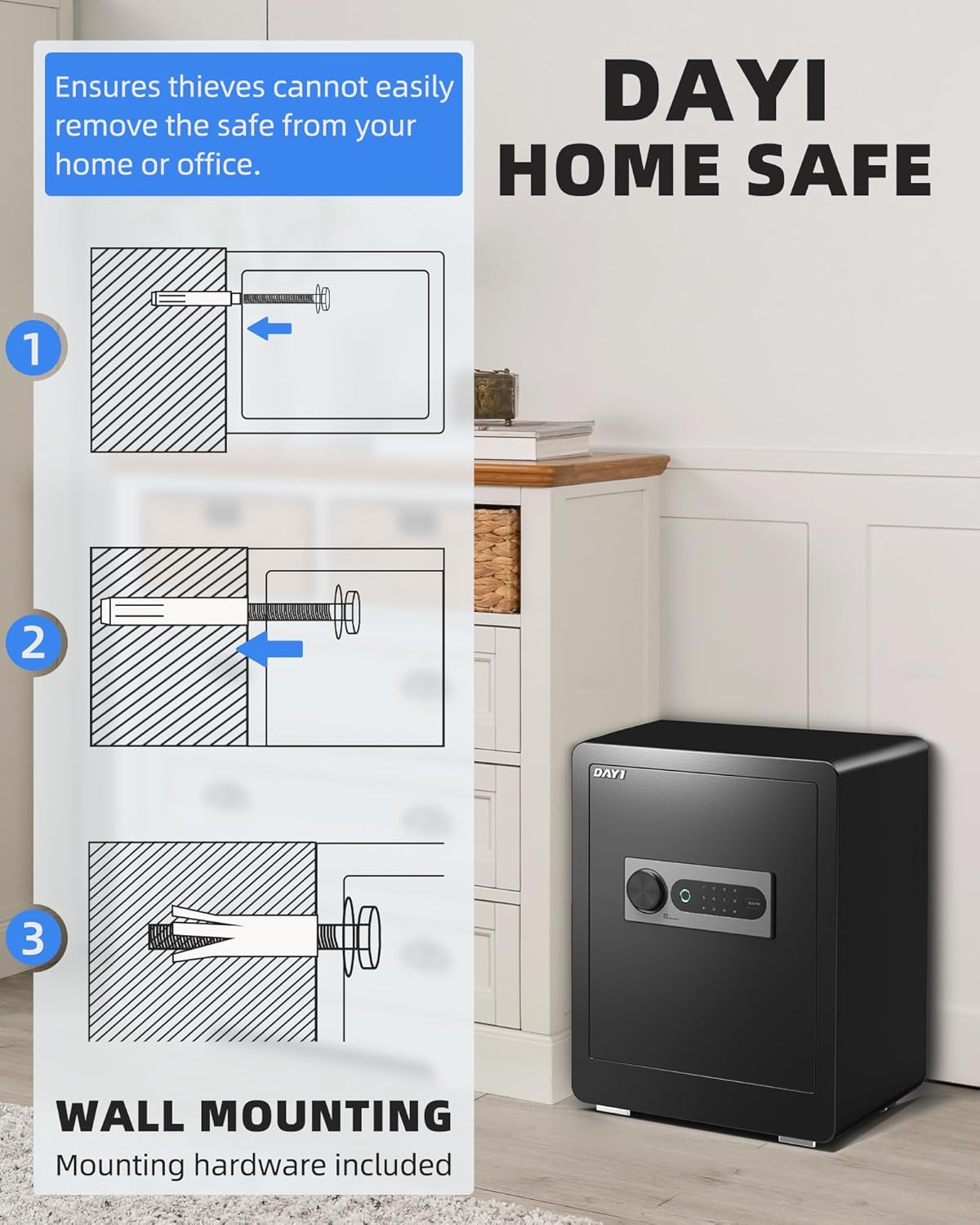
Figure 3.1: Included Components of the DAYI DF-45 Plus Safe.
4. Product Overview
The DAYI DF-45 Plus safe box features advanced security mechanisms and convenient access options.
4.1. Exterior Features
- Solid Steel Construction: Crafted with one-piece bending and precision laser-cutting technology for enhanced durability.
- Pry-Resistant Door: Designed to resist forced entry.
- Live-Locking Bolts: Four 1.2-inch diameter bolts provide secure locking.
- Digital Touchscreen Keypad: For passcode entry.
- Biometric Fingerprint Sensor: For quick and secure access.
- Emergency Keyhole: For manual override.

Figure 4.1: DAYI DF-45 Plus Safe Exterior and Control Panel.
4.2. Interior Features
- Removable Shelves: Two adjustable shelves for versatile organization.
- Built-in Key Rack: For organizing keys.
- Interior Sensor Lighting: Illuminates the interior when the door is opened.
- Soft Carpet Lining: Protects valuables from scratches.

Figure 4.2: DAYI DF-45 Plus Safe Interior Organization.
5. Setup
5.1. Battery Installation
- Locate the battery compartment on the inside of the safe door.
- Open the battery compartment cover.
- Insert four (4) AA batteries (not included) according to the polarity markings (+/-).
- Close the battery compartment cover.
Note: Ensure batteries are inserted correctly. Low battery power may prevent the safe from opening or trigger the alarm.
5.2. Initial Opening (First Use)
For the first opening, use the emergency key:
- Locate the emergency keyhole, usually concealed behind the control panel or a removable cover.
- Insert one of the emergency keys into the keyhole and turn it clockwise.
- While holding the key turned, rotate the handle to open the safe door.

Figure 5.1: Using the Emergency Key.
5.3. Setting a Passcode
The default passcode is "123456". It is highly recommended to change this immediately.
- With the safe door open, press the internal reset button (often located on the inside of the door near the hinge or battery compartment).
- The keypad will illuminate, and you will hear a beep.
- Enter your new 3-8 digit passcode on the touchscreen keypad.
- Press the "#" or "SAFE" button to confirm. The safe will beep to confirm the new passcode.
- Test the new passcode with the door open before closing it.

Figure 5.2: Setting a New Passcode.
5.4. Registering Fingerprints
The safe can store up to 25 unique fingerprints.
- With the safe door open, press the internal reset button.
- Place your finger on the fingerprint sensor. The sensor will light up.
- Lift and place your finger repeatedly (typically 4-5 times) until the safe confirms successful registration with a beep.
- Repeat for additional fingerprints or users.
- Test registered fingerprints with the door open before closing it.

Figure 5.3: Registering a Fingerprint.
5.5. Wall Mounting
To enhance security and prevent unauthorized removal, the safe can be mounted to a wall or floor.
- Choose a suitable location, ensuring there are no electrical wires or pipes behind the drilling area.
- Mark the drilling points through the pre-drilled holes at the back or bottom of the safe.
- Drill pilot holes into the wall or floor using an appropriate drill bit.
- Align the safe with the drilled holes and insert the provided mounting bolts.
- Tighten the bolts securely.

Figure 5.4: Wall Mounting Instructions.
6. Operating the Safe
6.1. Unlocking with Fingerprint
- Place a registered finger firmly on the biometric sensor.
- The safe will beep, and the indicator light will turn green if the fingerprint is recognized.
- Rotate the handle within 5 seconds to open the door.
6.2. Unlocking with Passcode
- Wake up the keypad by touching it.
- Enter your 3-8 digit passcode.
- Press the "#" or "SAFE" button to confirm. The safe will beep, and the indicator light will turn green if the passcode is correct.
- Rotate the handle within 5 seconds to open the door.
6.3. Unlocking with Emergency Key
This method bypasses the electronic lock and is used for initial opening, forgotten passcodes, or dead batteries.
- Locate and access the emergency keyhole.
- Insert the emergency key and turn it clockwise.
- While holding the key turned, rotate the handle to open the safe door.
6.4. Emergency Power Supply
If the batteries are completely drained and the safe cannot be opened electronically, use the emergency battery box:
- Insert 4 AA batteries into the emergency battery box.
- Connect the emergency battery box to the USB-C port on the safe's control panel.
- You can now use your fingerprint or passcode to open the safe.
- Replace the internal batteries immediately after opening.
Figure 6.1: Emergency Power Supply Connection.
6.5. Dual Alarm System
The safe is equipped with a dual alarm system that triggers a loud 70-decibel alarm under the following conditions:
- Unauthorized Access: Multiple incorrect passcode or fingerprint attempts.
- Forceful Breach: If the safe detects physical tampering or strong vibrations.
The alarm will sound for a set period and can be deactivated by entering a correct passcode or fingerprint.

Figure 6.2: Dual Alert System Activation.
7. Maintenance
- Battery Replacement: Replace all four AA batteries when the low battery indicator appears or if the keypad becomes unresponsive. Always use new, high-quality batteries.
- Cleaning: Wipe the exterior and interior of the safe with a soft, damp cloth. Avoid abrasive cleaners or solvents that could damage the finish or electronic components.
- Key Care: Keep emergency keys clean and dry. Do not force keys into the lock.
- Fingerprint Sensor: Keep the fingerprint sensor clean and free of dirt or moisture for optimal performance.
8. Troubleshooting
| Problem | Possible Cause | Solution |
|---|---|---|
| Safe does not open with fingerprint. | Finger not properly placed; unregistered finger; dirty sensor; low batteries. | Ensure finger covers the sensor completely; register the finger; clean the sensor; replace batteries. |
| Safe does not open with passcode. | Incorrect passcode entered; low batteries. | Verify passcode and re-enter; replace batteries; use emergency key if locked out. |
| Keypad is unresponsive. | Dead batteries. | Use emergency battery box or emergency key to open, then replace internal batteries. |
| Alarm sounds unexpectedly. | Multiple incorrect entries; physical impact. | Enter correct passcode/fingerprint to deactivate. Avoid bumping the safe. |
| Door does not close or lock properly. | Obstruction; locking bolts misaligned. | Check for obstructions; ensure safe is on a level surface. |
9. Specifications
| Feature | Detail |
|---|---|
| Brand | DAYI |
| Model Number | DF-45 |
| Product Dimensions (Exterior) | 11.9"D x 15"W x 17.8"H |
| Capacity | 2.0 Cubic Feet |
| Lock Type | Biometric, Electronic Combination Lock, Key |
| Color | Black |
| Material | Alloy Steel |
| Item Weight | 33.1 Pounds |
| Power Source | 4 x AA Batteries (not included) |
| Alarm System | Audible (70-decibel) |
| Water Resistance Level | Not Water Resistant |
| Special Features | Alarm System, Biometric Fingerprint, Combination Lock, Removable Shelf, Sensor Light |

Figure 9.1: Product Dimensions and Key Features.
10. Warranty and Support
For warranty information and technical support, please refer to the warranty card included with your product or contact DAYI customer service through the retailer where the product was purchased. Please have your model number (DF-45 Plus) and purchase date available when contacting support.
You can also visit the official DAYI store for more information: DAYI Store on Amazon.
Related documentsDF-45


Ask a question about this manual
Ask about setup, troubleshooting, compatibility, parts, safety, or missing instructions. Manuals+ will review the question and use this page’s manual context to help answer it.