
1. Introduction
Thank you for choosing the ICECO VL35 ProS 12V Portable Refrigerator and Freezer. This manual provides essential information for the safe and efficient operation, maintenance, and troubleshooting of your appliance. Please read it thoroughly before use and retain it for future reference.
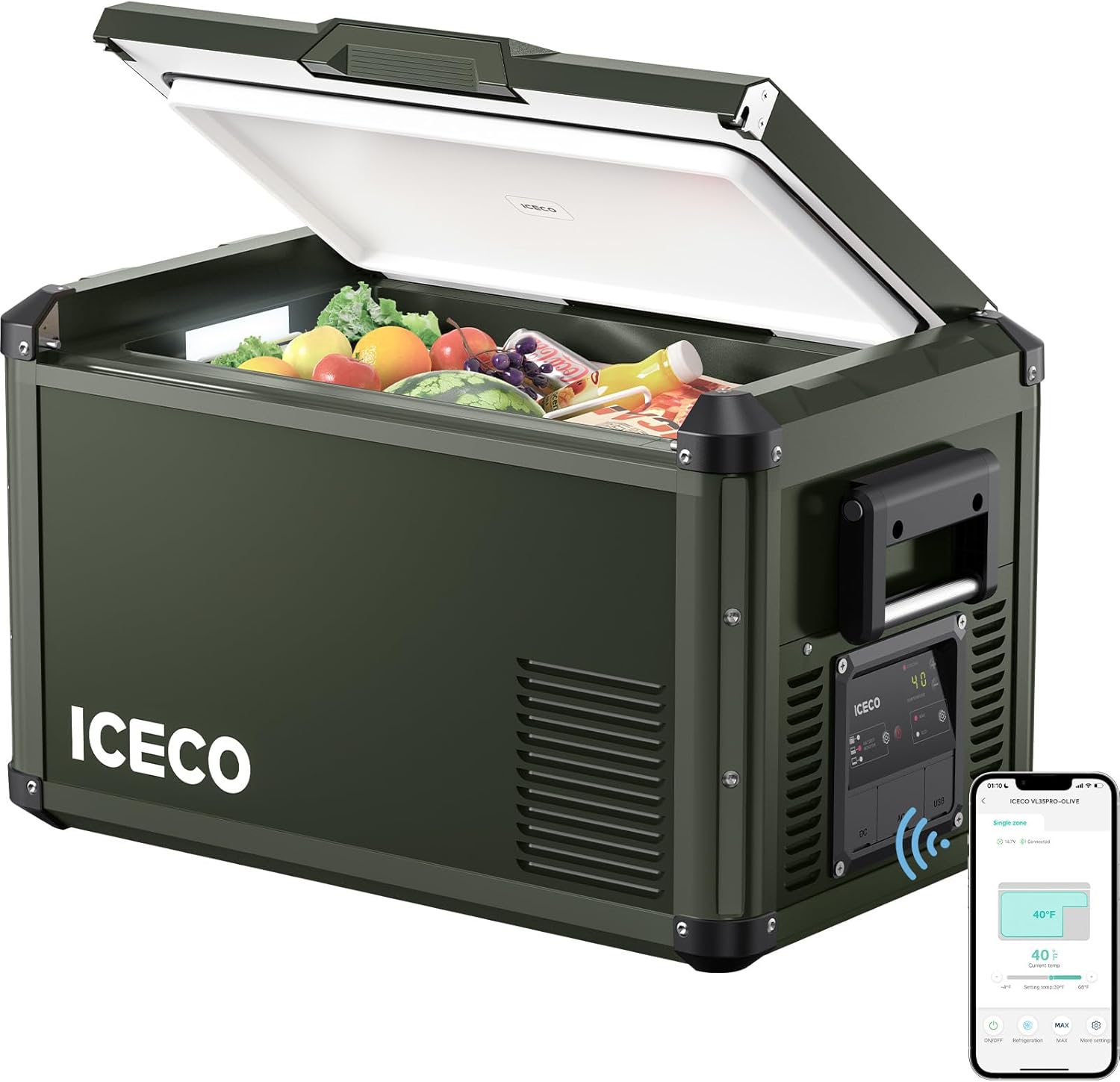
Image: The ICECO VL35 ProS portable refrigerator and freezer in olive green.
2. Safety Instructions
To ensure safe operation, always adhere to the following guidelines:
- Read all instructions before operating the appliance.
- Do not operate the appliance if the power cord is damaged. Contact customer support for assistance.
- Ensure proper ventilation around the unit. Do not block air vents.
- Avoid placing the appliance in direct sunlight or near heat sources.
- Do not immerse the appliance in water or expose it to heavy rain.
- Keep children away from the appliance, especially during operation.
- Disconnect power before cleaning or performing any maintenance.
3. Setup
3.1 Unboxing and Initial Placement
Carefully remove the refrigerator from its packaging. Place the unit on a stable, level surface, ensuring adequate space for ventilation around all sides. Allow the unit to stand upright for at least 6 hours before connecting to power, especially if it was transported horizontally.
3.2 Power Connection
The VL35 ProS supports both AC and DC power inputs. The unit includes an AC power cord and a DC power cord.
- AC Power (110-240V): Connect the AC power cord to the designated AC port on the refrigerator and then to a standard wall outlet. This is ideal for pre-cooling the unit at home.
- DC Power (12/24V): Connect the DC power cord to one of the two DC ports on the refrigerator and then to your vehicle's 12V or 24V power outlet.

Image: Rear view of the ICECO VL35 ProS showing the AC and DC power input ports and USB charging ports.
3.3 Pre-cooling
For optimal performance, it is recommended to pre-cool the refrigerator using AC power at home before transferring it to a vehicle or outdoor setting. This reduces the initial power draw from your vehicle's battery or portable power source.
3.4 Lid Orientation
The lid of the VL35 ProS is designed for multi-directional opening. You can easily change the opening direction of the lid without requiring tools or reassembly. This feature allows for convenient access in various tight spaces, such as inside a vehicle.

Image: Illustration of the multi-opening lid design, showing left, right, and top opening options.
4. Operating Instructions
4.1 Control Panel Overview
The control panel features a display for temperature, buttons for temperature adjustment, and mode selection.

Image: Close-up of the ICECO VL35 ProS control panel with temperature display and mode buttons.
4.2 Temperature Control
Use the '+' and '-' buttons on the control panel to set your desired temperature. The cooling range is from 0°F to 50°F (-18°C to 10°C).
4.3 MAX and ECO Modes
The VL35 ProS offers two operating modes:
- MAX Mode: Provides rapid cooling to reach the set temperature quickly.
- ECO Mode: Optimizes energy consumption for extended operation, ideal when power efficiency is critical.
4.4 Battery Protection
The unit features a 3-level battery protection system to prevent excessive discharge of your vehicle's battery. You can select the desired protection level via the control panel settings.
4.5 USB Charging
Two USB outlets are integrated for charging mobile devices. These outlets are active only when the refrigerator is powered by DC (12/24V).
4.6 App Control
The VL35 ProS can be controlled remotely via a dedicated mobile application. This allows for temperature adjustments and performance monitoring from your smartphone.

Image: Screenshot of the mobile application interface for controlling the ICECO portable refrigerator.
5. Maintenance
5.1 Cleaning
Regular cleaning helps maintain hygiene and efficiency. Disconnect the power before cleaning.
- Clean the interior with a damp cloth and mild detergent. Avoid abrasive cleaners.
- Wipe the exterior with a soft, dry cloth.
- Ensure vents are clear of dust and debris for proper airflow.
5.2 Defrosting
The VL35 ProS features a manual defrost system. When ice buildup occurs, disconnect the unit from power, remove contents, and allow the ice to melt naturally. Use the convenient drain plug to remove melted water.

Image: Close-up of the convenient drain plug for easy water removal during defrosting or cleaning.
6. Troubleshooting
If you encounter issues with your ICECO VL35 ProS, refer to the table below for common problems and solutions. If the problem persists, contact customer support.
| Problem | Possible Cause | Solution |
|---|---|---|
| Unit does not power on | No power supply; damaged power cord; faulty power outlet. | Check power connections; try a different outlet; inspect power cord for damage. |
| Insufficient cooling | Blocked vents; high ambient temperature; door not sealed properly; incorrect temperature setting. | Ensure vents are clear; move unit to a cooler area; check door seal; adjust temperature setting. |
| Unusual noise | Unit not level; fan obstruction; normal compressor operation. | Ensure unit is on a level surface; check for obstructions around the fan. |
| Display error codes | Internal fault. | Refer to the full user manual for specific error code meanings or contact customer support. |
7. Specifications
| Feature | Detail |
|---|---|
| Model Name | VL35 ProS Olive |
| Capacity | 35 Liters (37 Quarts) |
| Cooling Range | 0°F to 50°F (-18°C to 10°C) |
| Compressor | SECOP Compressor |
| Power Source | 12/24V DC, 110-240V AC |
| Product Dimensions (D x W x H) | 28.1" x 15.9" x 15.7" |
| Item Weight | 48.7 pounds |
| Defrost System | Manual |
| Included Components | AC Power Cord, Basket, Corner Guards, DC Power Cord, Drain Plug |

Image: Diagram showing the external dimensions, internal dimensions, weight, and capacity in cans and bottles for the VL35 ProS.
8. Warranty and Support
8.1 Warranty Information
ICECO provides a 5-year warranty on the SECOP compressor and a 1-year warranty on all other parts and accessories for the VL35 ProS. Please retain your proof of purchase for warranty claims.

Image: Close-up view of the SECOP compressor inside the ICECO VL35 ProS, highlighting the 5-year compressor guarantee.
8.2 Technical Support
For technical assistance, warranty claims, or any questions regarding your ICECO VL35 ProS, please contact ICECO customer support. Contact information can typically be found on the official ICECO website or your purchase documentation.
9. Product Videos
ICECO VL35ProS Olive Green Portable Freezer Overview
Video: An official overview of the ICECO VL35ProS Olive Green Portable Freezer, showcasing its features and design.
ICECO VL35Pro Single Zone Portable Refrigerator
Video: A detailed look at the ICECO VL35Pro Single Zone Portable Refrigerator, highlighting its functionality.
ICECO VL35 ProS 12V Freezer & PB1000 Power Station Review
Video: A review demonstrating the ICECO VL35 ProS 12V Freezer in conjunction with the PB1000 Power Station.
ICECO VL45ProS: No Ice. No Water. No Mess. Just Cold.
Video: A general brand video from ICECO highlighting the benefits of their portable fridge freezers, including the VL series.


