
Edillas 8206B
Edillas Kids Digital Watch User Manual
Model: 8206B
Introduction
Thank you for choosing the Edillas Kids Digital Watch. This watch is designed for children aged 4-12, offering a range of useful functions including time display, alarm, stopwatch, calendar, and colorful LED backlighting. Its durable and waterproof design makes it suitable for daily wear and outdoor activities. Please read this manual carefully to understand how to operate and maintain your watch.
Safety Information
- This watch is designed for children aged 4 and older.
- Do not attempt to open the watch case or replace the battery yourself, as this may damage the watch and void the warranty.
- Avoid exposing the watch to extreme temperatures (hot or cold) for prolonged periods.
- Keep the watch away from strong magnetic fields.
- While the watch is water-resistant, avoid pressing any buttons underwater to prevent water ingress.
Product Overview
Familiarize yourself with the buttons and display of your Edillas Kids Digital Watch:

Figure 1: Watch Buttons and Functions
- LIGHT Button (Top Left): Activates the backlight and changes light colors.
- MODE Button (Bottom Left): Cycles through different modes (Time, Alarm, Stopwatch).
- START Button (Top Right): Starts/stops stopwatch, adjusts settings in setting mode.
- RESET Button (Bottom Right): Resets stopwatch, adjusts settings in setting mode.
Setup and Operation
1. Setting Time and Date
- From the Time Display Mode, press the MODE button three times until the seconds start flashing.
- Press the RESET button to cycle through the setting options: Seconds → Hours → Minutes → Month → Date → Day of Week.
- Use the START button to adjust the flashing value.
- Once all settings are correct, press the MODE button to return to Time Display Mode.
2. Setting the Alarm
- From the Time Display Mode, press the MODE button twice to enter Alarm Mode. The hour digits will flash.
- Press the START button to adjust the alarm hour.
- Press the RESET button to switch to minute setting.
- Press the START button to adjust the alarm minute.
- Press the MODE button to return to Time Display Mode.
To activate/deactivate the alarm: In Time Display Mode, press and hold the RESET button, then press the START button. The alarm icon will appear/disappear on the display.
3. Using the Stopwatch
- From the Time Display Mode, press the MODE button once to enter Stopwatch Mode.
- Press the START button to begin timing.
- Press the START button again to pause timing.
- Press the RESET button to reset the stopwatch to zero.
- Press the MODE button to return to Time Display Mode.
4. Changing Backlight Colors
The watch features 7 different backlight colors. Press the LIGHT button to activate the backlight. Each subsequent press of the LIGHT button will cycle through the available colors (blue, green, red, light blue, yellow, purple, white) and a colorful flashing mode.

Figure 2: Luminous Display with Multiple Color Options
5. Switching 12H/24H Format
In Time Display Mode, press the RESET button to toggle between 12-hour (with AM/PM indicator) and 24-hour formats.
6. Turning Off Hourly Chime
To turn off the hourly chime: From Time Display Mode, press the RESET button and the MODE button simultaneously. Repeat this action to turn the hourly chime back on.
Maintenance
Cleaning
Wipe the watch with a soft, damp cloth. Avoid using harsh chemicals or abrasive materials that could damage the watch's finish or display.
Water Resistance
The Edillas Kids Digital Watch is 30M (3 ATM) water resistant, suitable for daily activities such as hand washing, rain, splashes, and brief immersion in cold water. It is not recommended for showering with hot water, diving, or prolonged underwater activities.
Important: Do not press any buttons while the watch is submerged in water, as this can compromise the water resistance seal.
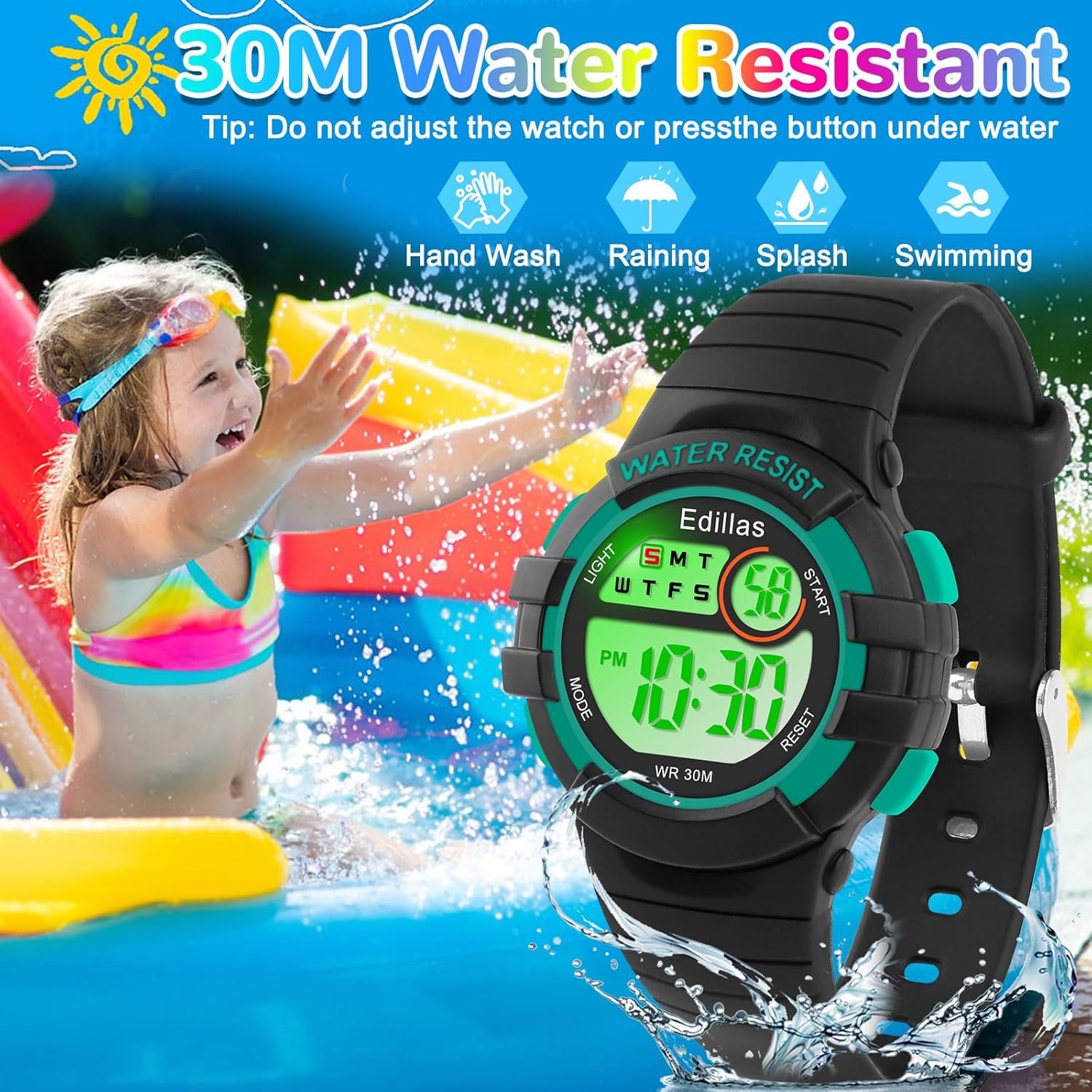
Figure 3: Water Resistance Guidelines
Battery Replacement
The watch uses Japan imported batteries designed for long life. If you experience issues with the battery or movement, please contact customer support for assistance. Do not attempt to replace the battery yourself.
Troubleshooting
| Problem | Possible Cause / Solution |
|---|---|
| Display is blank or dim. | Battery may be low. Contact customer support for assistance. |
| Time is inaccurate. | Ensure time and date are set correctly. Refer to "Setting Time and Date" section. If problem persists, contact customer support. |
| Hourly chime sounds unexpectedly. | The hourly chime function may be active. Refer to "Turning Off Hourly Chime" section to deactivate it. |
| Water appears inside the watch. | Water resistance may have been compromised, possibly by pressing buttons underwater. Stop using the watch and contact customer support immediately. |
Specifications
| Feature | Detail |
|---|---|
| Model Number | 8206B |
| Product Dimensions | 8.27 x 0.55 x 0.39 inches (21 x 1.4 x 1 cm) |
| Item Weight | 1.41 ounces (40 grams) |
| Water Resistance | 30M / 3 ATM |
| Display Type | Digital |
| Backlight Colors | 7 Colors (Blue, Green, Red, Light Blue, Yellow, Purple, White) + Flashing Mode |
| Functions | Time, Date, Day of Week, Alarm, Stopwatch, Colorful LED Light, 12H/24H Format |
| Strap Material | Soft TPU |
| Case Material | Fine Metal Steel Case with 304 Stainless Steel Case Back |
| Watch Glass Material | High-Transparency Resin |
| Battery Type | C battery (included) |
| Applicable Age | Ages 4-12 |

Figure 4: Watch Dimensions
Warranty and Support
Edillas is committed to providing reliable quality and satisfactory service. If you encounter any problems with your watch, particularly concerning the battery or movement, please do not hesitate to contact our customer support team. We are ready to assist you with replacements or solutions as needed.
For support, please visit the Edillas store on Amazon or contact us through the platform where you purchased the product.
Online User Manual (PDF): Download PDF
Related documents8206B


Ask a question about this manual
Ask about setup, troubleshooting, compatibility, parts, safety, or missing instructions. Manuals+ will review the question and use this page’s manual context to help answer it.