
Introduction
This manual provides detailed instructions for the assembly, operation, and maintenance of your ALLSTAND 70-inch Fireplace TV Stand. Please read all instructions carefully before assembly and use to ensure safe and proper functioning of the product.
The ALLSTAND 70-inch Fireplace TV Stand combines a television stand with an integrated 30-inch electric fireplace. It is designed to accommodate TVs up to 80 inches and features ample storage with drawers and cabinets.
Important Safety Information
⚠ WARNING: To reduce the risk of fire, electric shock, or injury, read all instructions before using this appliance.
- Ensure all parts are present and undamaged before assembly. If any parts are missing or damaged, do not proceed with assembly. Contact customer support immediately.
- Always follow assembly instructions carefully. Improper assembly can lead to instability and potential injury.
- Do not overload the TV stand. The tabletop can support up to 300 lbs.
- The electric fireplace unit has overheating protection. Do not block air vents.
- Keep flammable materials at least 3 feet (0.9 meters) away from the front of the fireplace heater.
- This product is equipped with an anti-tip device. Install it according to instructions to prevent tipping.
- The electric fireplace is CSA & ETL certified for safety.
Package Contents
Your ALLSTAND Fireplace TV Stand will arrive in two separate packages. These packages may not arrive simultaneously. Please verify all components are present before beginning assembly.
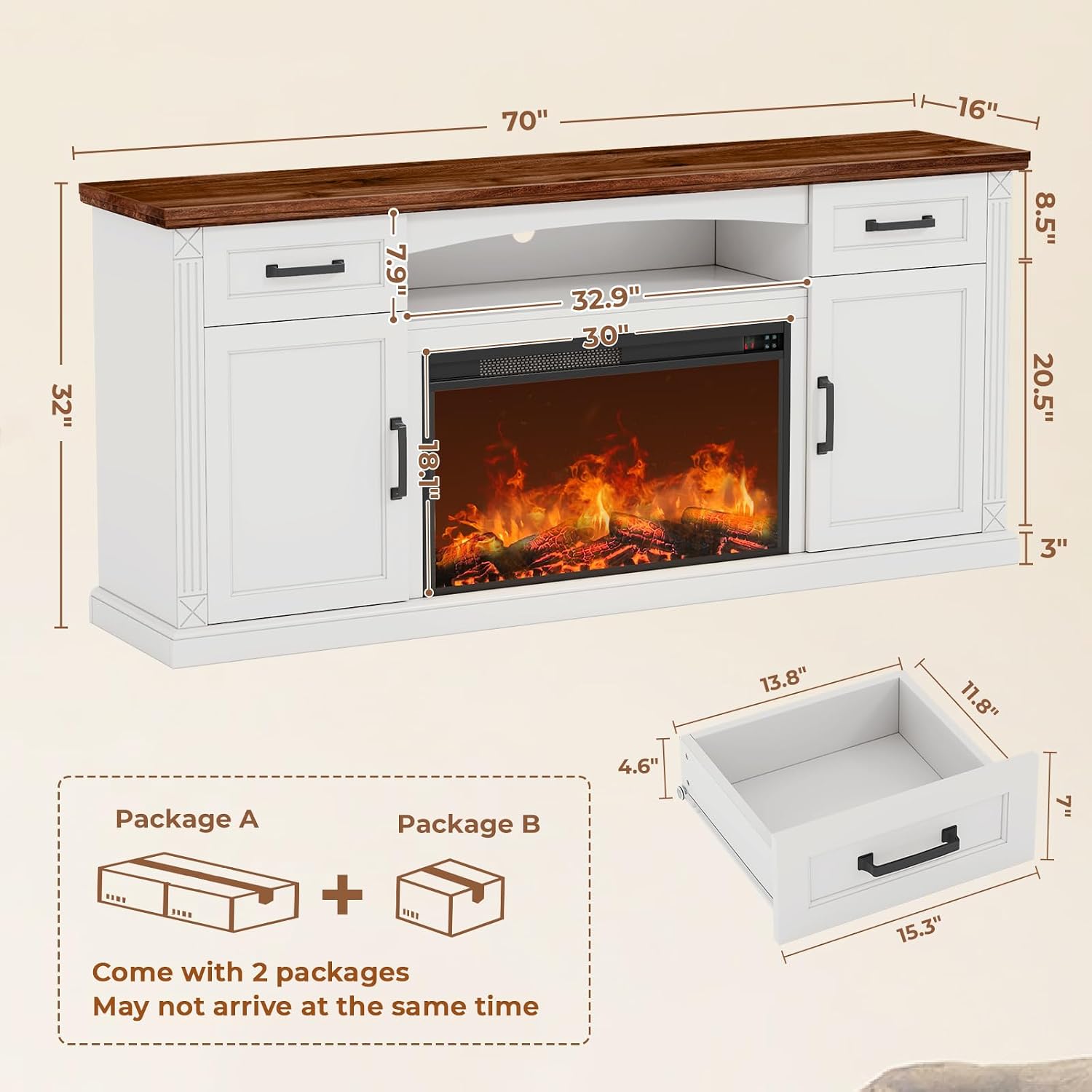
Image: Illustration showing two packages, labeled 'Package A' and 'Package B', with a note that they may arrive at different times. This indicates the product is shipped in multiple boxes.
Refer to the included parts list in your physical manual for a complete inventory of hardware and furniture components.
Setup and Assembly
Assembly of the ALLSTAND 70-inch Fireplace TV Stand requires careful attention to detail. All parts and accessories are labeled for easy identification. It is recommended to have two people for assembly.
Tools Required (Not Included):
- Phillips Head Screwdriver
- Hammer (optional, for dowels)
Assembly Steps:
- Unpack and Identify Parts: Carefully unpack all components from both packages. Lay them out on a clean, soft surface to prevent scratches. Identify each part using the provided labels and the parts list in your manual.
- Assemble the Base Structure: Follow the step-by-step diagrams in your physical instruction manual to connect the base panels and side supports.
- Install Shelves and Dividers: Insert the adjustable shelves into the cabinet sections. The shelves can be adjusted up or down by 1.37 inches or removed entirely to accommodate various items.
- Assemble Drawers: Construct the two drawers according to the diagrams. Ensure smooth guide rails are properly installed.
- Install Doors: Attach the cabinet doors using the soft-close hinges. Adjust as necessary for proper alignment.
- Integrate the Electric Fireplace: Carefully slide the 30-inch electric fireplace unit into its designated central compartment. Ensure it is securely seated.
- Attach Back Panels and Cable Management: Secure the back panels. Utilize the pre-drilled cable holes to organize and hide wires from your electronic devices.
- Secure Anti-Tipping Device: Attach the anti-tipping device to the wall and the TV stand as instructed to enhance stability and safety.

Image: Detail showing the adjustable cabinet shelves with three possible height settings, indicated by numbered holes.

Image: A single drawer with its dimensions (13.8" W x 11.8" D x 4.6" H) and a metal handle, illustrating its construction.
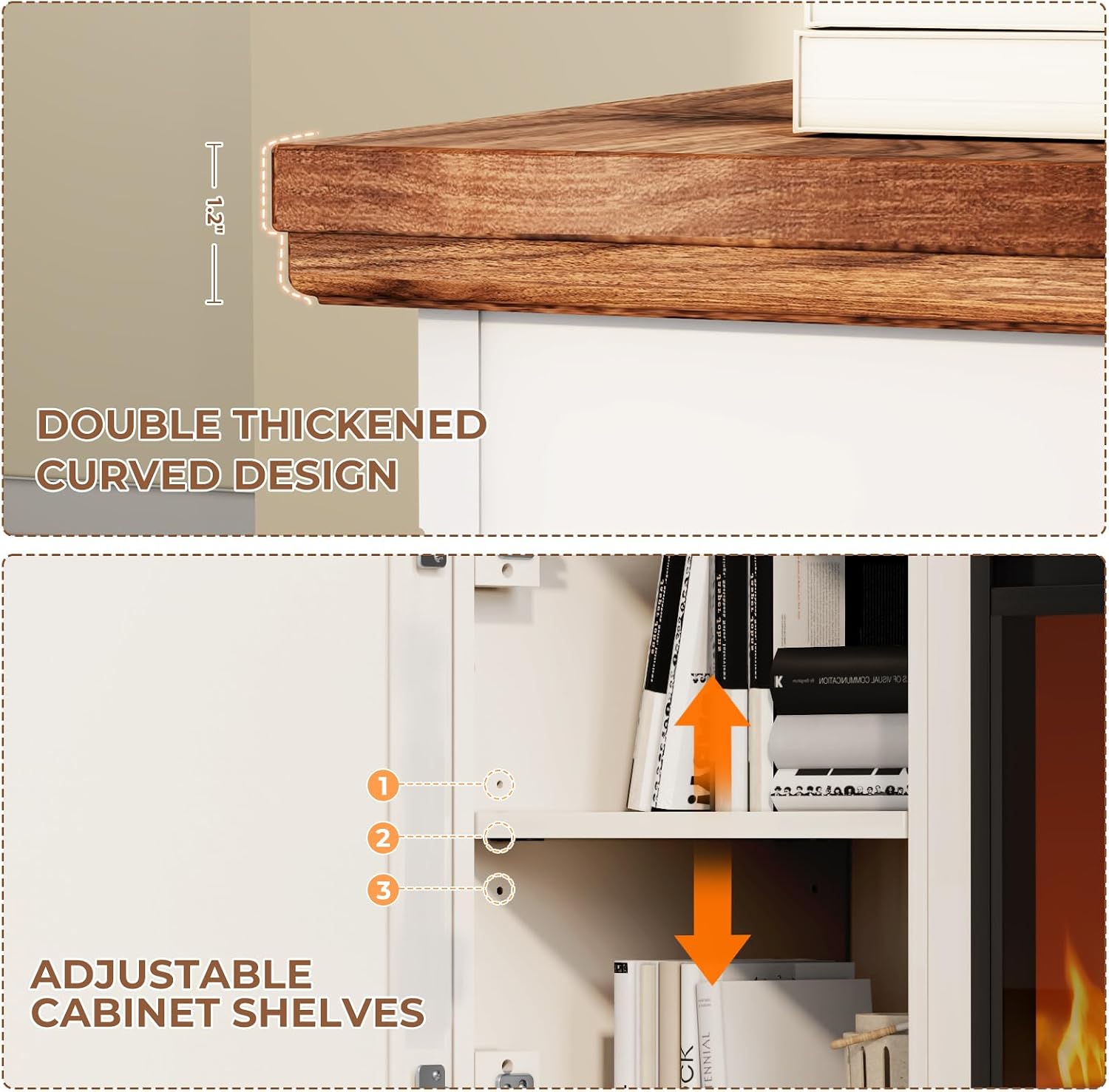
Image: The TV stand showcasing its storage compartments, including an open shelf for media devices and a circular cable management hole at the rear.
For visual guidance, refer to the assembly video available via the QR code in your physical manual or on the product's support page.
Operating the Electric Fireplace
The integrated 30-inch electric fireplace provides both heat and a realistic flame effect. It can be operated using the control panel on the unit or the included remote control.

Image: A remote control being used to operate the fireplace, with icons for power, flame, heat, timer, and temperature adjustment. An inset shows the fireplace's digital display.
Fireplace Features:
- Power On/Off: Press the power button to turn the unit on or off.
- Flame Brightness: Select from 4 flame brightness settings (L1, L2, L3, L4) to adjust the visual effect. The flame effect can be operated independently of the heat.
- Heat Function: Activate the heater to warm spaces up to 400 sq. ft. The temperature can be maintained between 64°F to 82°F. The heat function operates quietly, with sound levels less than 38 dB.
- Timer: Set the automatic shut-off timer for 1 to 8 hours.
- Energy Efficiency: LED flame technology is designed for energy efficiency.
- Safety: Equipped with overheating protection.
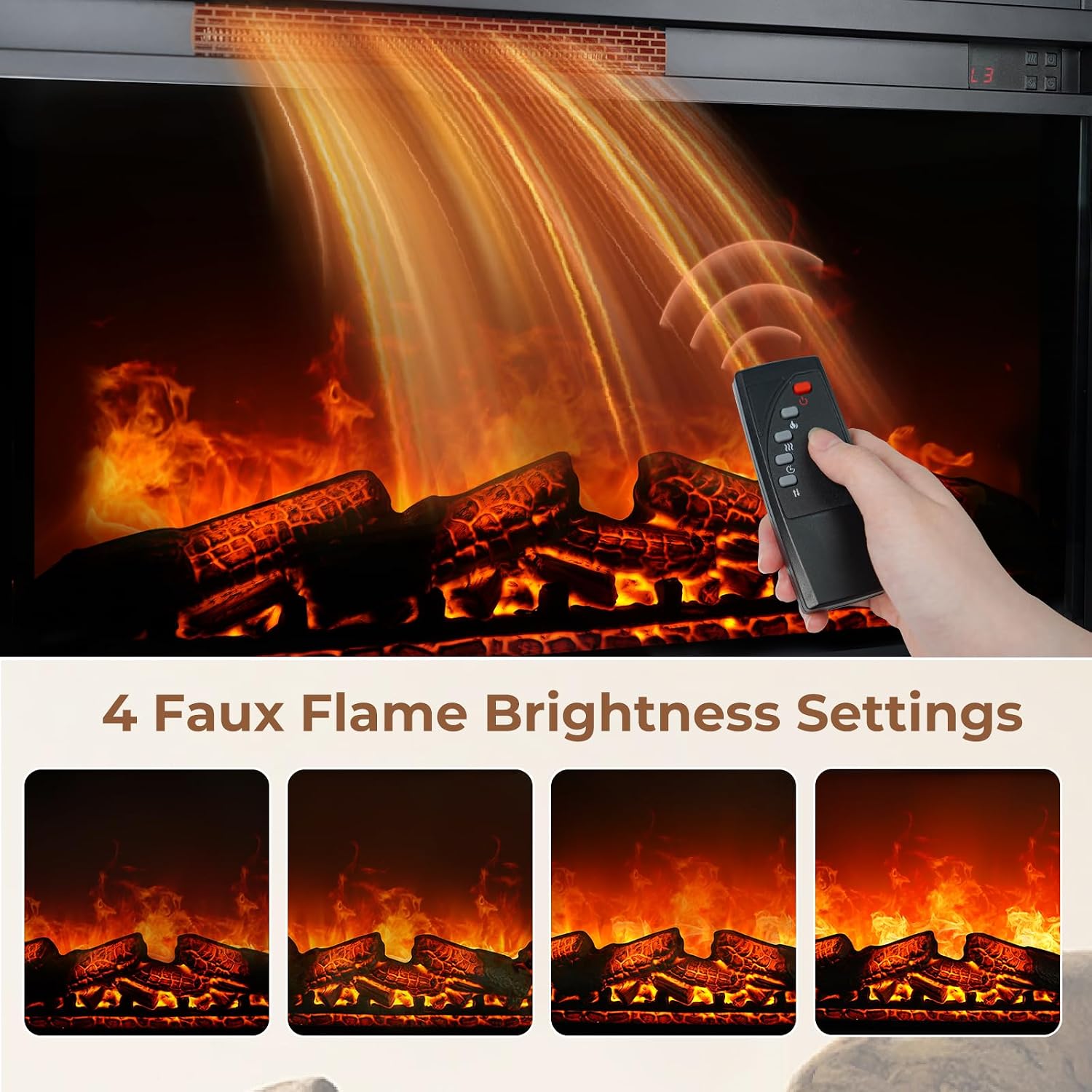
Image: A visual comparison of the four faux flame brightness settings (L1, L2, L3, L4) available on the electric fireplace.
Using the Remote Control:
The remote control allows convenient adjustment of all fireplace functions from a distance. Point the remote directly at the fireplace unit for optimal response.
- Power Button: Turns the fireplace on or off.
- Flame Button: Cycles through flame brightness settings.
- Heat Button: Activates or deactivates the heating element.
- Timer Button: Sets the automatic shut-off timer.
- Temperature Up/Down: Adjusts the desired room temperature.
Maintenance
Regular maintenance ensures the longevity and optimal performance of your ALLSTAND Fireplace TV Stand.
- Cleaning the Stand: Wipe the wooden surfaces with a damp or dry cloth. Avoid abrasive cleaners that may damage the finish.
- Cleaning the Fireplace: Ensure the fireplace is turned off and unplugged before cleaning. Gently wipe the exterior surfaces with a soft, damp cloth. Do not spray water directly onto the unit.
- Dusting: Regularly dust the unit, especially around the air intake and exhaust vents of the fireplace, to ensure proper airflow.
- Inspecting Connections: Periodically check all screws and connections to ensure they remain tight. Retighten if necessary.
Troubleshooting
If you encounter issues with your ALLSTAND Fireplace TV Stand, refer to the following common solutions:
| Problem | Possible Cause | Solution |
|---|---|---|
| Fireplace does not turn on. | Not plugged in; power outlet issue; unit switch off; remote battery dead. | Ensure power cord is securely plugged into a working outlet. Check the main power switch on the unit. Replace remote batteries. |
| No heat output. | Heat function not activated; thermostat setting too low; air vents blocked; overheating protection activated. | Activate heat function via control panel or remote. Increase thermostat setting. Clear any obstructions from air vents. Unplug unit for 5-10 minutes to reset overheating protection. |
| Flame effect not visible or dim. | Flame brightness set to lowest setting; LED light issue. | Increase flame brightness setting. If issue persists, contact customer support. |
| Stand feels unstable after assembly. | Loose connections; anti-tip device not installed. | Recheck all screws and connections, tightening as needed. Ensure the anti-tipping device is properly installed and secured to the wall. |
| Drawers or doors do not align properly. | Improper hinge/rail installation; loose screws. | Adjust hinges on doors. Ensure drawer rails are correctly installed and screws are tight. |
If these solutions do not resolve the issue, please contact ALLSTAND customer support for further assistance.
Specifications

Image: The assembled ALLSTAND 70-inch Fireplace TV Stand, featuring a white base with a brown wooden top, two drawers, two cabinets, and a central electric fireplace, with a large television above it.

Image: Dimensional diagram of the TV stand, indicating overall measurements of 70 inches in width, 16 inches in depth, and 32 inches in height. It also shows the 30-inch fireplace opening.
| Feature | Detail |
|---|---|
| Brand | ALLSTAND |
| Model Number | TV stand-fireplace |
| Product Dimensions (L x W x H) | 70 x 16 x 32 inches |
| Item Weight | 135 pounds |
| Material | Wood (P2 MDF) |
| Color | White (with Wooden Door variant) |
| TV Size Compatibility | Up to 80 inches |
| Fireplace Size | 30 inches |
| Heat Output | Heats up to 400 sq. ft. |
| Temperature Range | 64°F to 82°F |
| Flame Brightness Settings | 4 levels |
| Timer | 1-8 hours |
| Number of Drawers | 2 |
| Number of Shelves | 3 (1 open, 2 adjustable in cabinets) |
| Special Features | 30 Inch Fireplace, Adjustable Shelf, Anti-Tipping Device, Cable Management Holes |
| Certifications | CSA & ETL |
| Product Care Instructions | Wipe with Damp or Dry Cloth |
Warranty and Customer Support
ALLSTAND is committed to providing quality products and customer satisfaction.
Warranty Information:
Specific warranty details are typically provided with your purchase documentation. Please refer to the warranty card or contact ALLSTAND customer support for information regarding coverage and duration.
Customer Support:
If you have any questions, require assistance with assembly, or encounter any issues not covered in the troubleshooting section, please do not hesitate to contact ALLSTAND customer support.
Contact information can typically be found on the product packaging, your purchase receipt, or the ALLSTAND official website.
Note: In case of missing or broken parts upon delivery, please contact customer support immediately. We conduct thorough inspections before delivery, but unforeseen transit issues can occur.