1. Important Safety Instructions
Please read all instructions carefully before using the device. Keep this manual for future reference.
- Installation: Ensure proper wiring and secure mounting to prevent damage or injury. Consult a professional if unsure.
- Power Supply: Connect the unit only to a 12V DC car battery with negative ground.
- Volume Control: Avoid excessively high volume levels that could impair your ability to hear traffic sounds or emergency vehicles.
- Cleaning: Use a soft, dry cloth for cleaning. Do not use abrasive cleaners or solvents.
- Water Exposure: Do not expose the unit to water or excessive moisture.
- Temperature: Operate the unit within recommended temperature ranges.
2. Product Overview
The Caliber Autoradio RMD057-FBA is a versatile 1DIN car stereo system designed to enhance your in-car audio experience with modern connectivity options.

Figure 2.1: Front panel of the Caliber Autoradio RMD057-FBA, showing the central rotary knob, various control buttons, USB port, Micro SD slot, and AUX input.
Key Features:
- FM Tuner with RDS-EON: For clear and stable radio reception.
- Bluetooth Hands-free: Integrated Bluetooth for safe and convenient phone calls with an external microphone.
- Multiple Audio Inputs: Play music from USB drives, Micro SD cards, or external devices via Aux-in.
- USB Charging Function: 2.1A USB port for charging mobile devices.
- RCA Output: For connecting external amplifiers.
- Adjustable Lighting: Customizable display illumination to match your vehicle's interior.
- Remote Control: For convenient operation.

Figure 2.2: Visual representation of the main features and connectivity options of the Caliber Autoradio.
3. Installation Guide
This section provides general guidelines for installing your Caliber Autoradio. Professional installation is recommended for optimal performance and safety.
3.1. Before Installation:
- Disconnect the negative terminal of your vehicle's battery to prevent short circuits.
- Ensure you have the necessary tools and wiring harness adapters for your vehicle model.
- Familiarize yourself with your vehicle's wiring diagram.
3.2. Wiring Connections:
Connect the supplied wiring harness to the corresponding wires in your vehicle. Common connections include:
- Yellow (Constant 12V): Connect to a constant 12V power source.
- Red (Accessory 12V): Connect to a switched 12V power source (ignition).
- Black (Ground): Connect to a good chassis ground point.
- Blue (Antenna/Remote): Connect to power antenna or amplifier remote turn-on lead.
- Speaker Wires: Connect to your vehicle's speakers (e.g., White/White-Black for Front Left, Gray/Gray-Black for Front Right, Green/Green-Black for Rear Left, Purple/Purple-Black for Rear Right).
- External Microphone: Plug the external microphone into the designated jack on the rear of the unit.
- RCA Outputs: Connect to external amplifiers if desired.

Figure 3.1: Rear panel connections, including the main power/speaker harness, RCA outputs, and external microphone input.
3.3. Mounting the Unit:
Slide the metal mounting sleeve into the dashboard opening. Bend the tabs outward to secure it. Insert the radio into the sleeve until it locks into place.

Figure 3.2: The compact 1DIN design of the Caliber Autoradio, suitable for standard car stereo slots.
4. Operating Instructions
4.1. Basic Operation:
- Power ON/OFF: Press the POW button to turn the unit on or off.
- Volume Control: Rotate the central knob to adjust the volume.
- Mode Selection: Press the MOD button to cycle through available modes (FM, Bluetooth, USB, SD, AUX).
- Mute: Press the MUTE button (often integrated with MOD or CLK) to mute/unmute audio.
- Display Dimmer: Use the built-in light dimmer function to adjust display brightness for night driving.
4.2. FM Radio Operation:
- Band Selection: Press the BAND button to switch between FM1, FM2, FM3 bands.
- Automatic Search: Press and hold APS (Auto Preset Store) to automatically scan and store strong stations.
- Manual Tuning: Use the CH+/CH- buttons for manual frequency adjustment.
- Preset Stations: Use the numeric buttons (1-6) to select stored preset stations.
- RDS-EON: The unit supports RDS-EON for displaying station information and traffic announcements.
4.3. Bluetooth Operation:
Pair your mobile device with the Autoradio for hands-free calling and audio streaming.
- Ensure Bluetooth is enabled on your mobile device.
- Select "BT" mode on the Autoradio using the MOD button.
- Search for "Caliber RMD057-FBA" (or similar name) on your device's Bluetooth settings.
- Select the unit to pair. A confirmation tone will sound upon successful pairing.
Hands-free Calling:
- Answer/End Call: Press the MIC button (or similar) to answer an incoming call or end an ongoing call.
- Dialing: Use your phone to dial numbers. Audio will automatically transfer to the car speakers.
- External Microphone: The external microphone ensures clear voice transmission during calls.

Figure 4.1: Enjoy safe hands-free communication while driving with the integrated Bluetooth functionality.
4.4. USB/Micro SD Playback:
- Insert a USB drive into the USB port or a Micro SD card into the TF (Micro SD) slot.
- The unit will automatically switch to USB/SD mode and begin playback.
- Use the Previous/Next Track buttons to navigate songs.
- The unit supports MP3, WMA, APE, and FLAC audio formats.
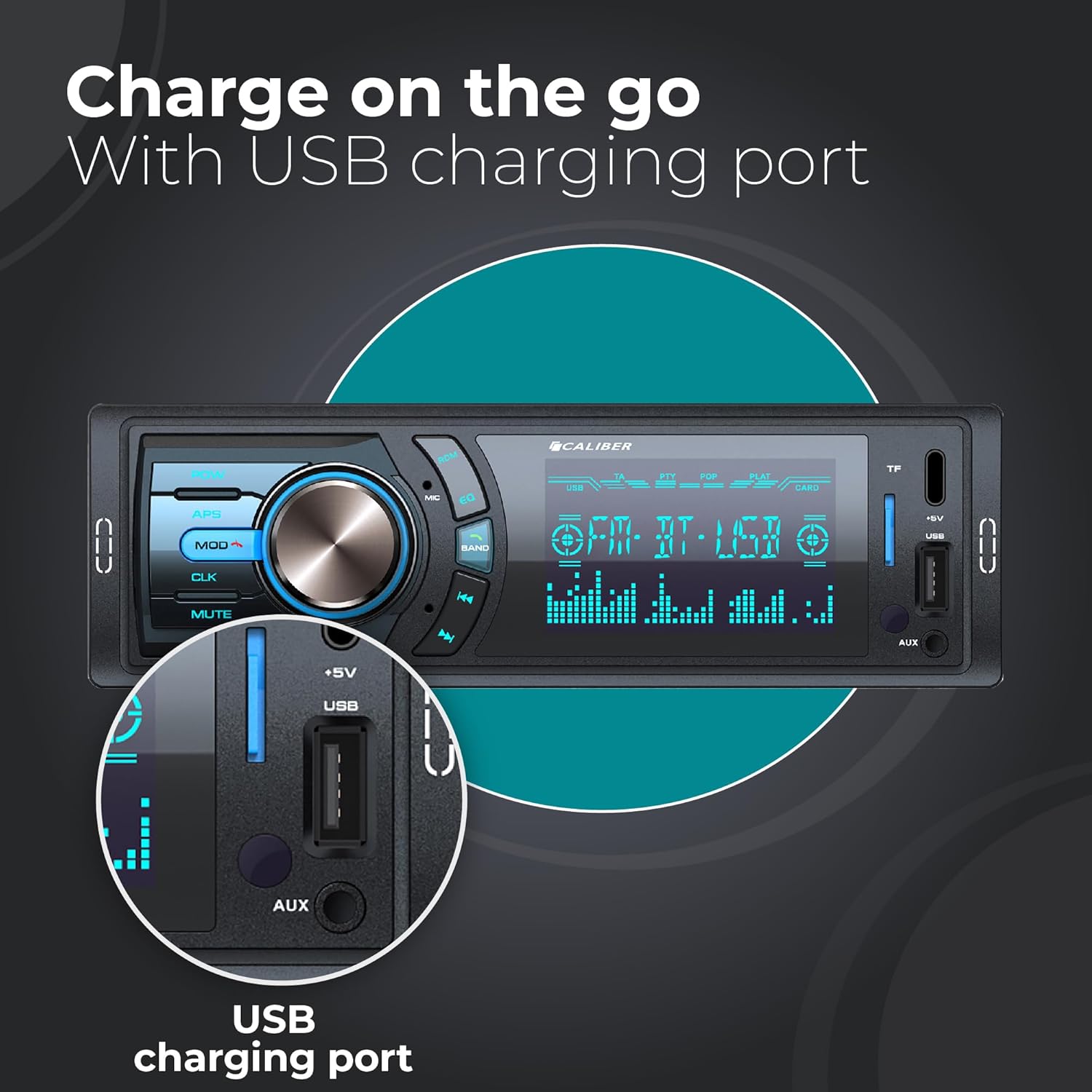
Figure 4.2: The convenient USB charging port and AUX input located on the front panel.
4.5. AUX-in Operation:
- Connect an external audio device (e.g., smartphone, MP3 player) to the AUX-in jack using a 3.5mm audio cable.
- Select "AUX" mode using the MOD button.
- Control playback from your connected device.
4.6. Audio Settings:
Press the central knob briefly to access audio settings such as Bass, Treble, Balance, Fader, and Equalizer presets (e.g., Pop, Rock, Classic, Flat).
5. Maintenance
- Cleaning the Unit: Use a soft, dry cloth to wipe the front panel. For stubborn stains, dampen the cloth lightly with water. Do not use harsh chemicals or abrasive materials.
- USB/SD Card Slot: Keep the USB and Micro SD card slots free from dust and debris.
- Fuse Replacement: If the unit does not power on, check the fuse located on the rear of the unit. Replace it with a fuse of the same rating (e.g., 10A).
6. Troubleshooting
If you encounter issues with your Caliber Autoradio, refer to the following table for common problems and solutions.
| Problem | Possible Cause | Solution |
|---|---|---|
| No power | Blown fuse; Incorrect wiring; Loose connection. | Check and replace fuse; Verify power and ground connections; Ensure all wires are securely connected. |
| No sound | Volume too low; Mute activated; Incorrect speaker wiring; Amplifier not powered (if connected). | Increase volume; Deactivate mute; Check speaker connections; Verify amplifier power. |
| Poor radio reception | Antenna not connected; Weak signal area; Damaged antenna. | Ensure antenna is properly connected; Try tuning to a stronger station; Inspect antenna for damage. |
| Bluetooth not connecting | Bluetooth not enabled on device; Unit not in pairing mode; Device too far. | Enable Bluetooth on your phone; Ensure unit is in BT mode; Move device closer to the unit. |
| USB/SD not playing | Unsupported file format; Corrupted files; USB/SD card not inserted correctly. | Ensure files are in supported formats (MP3/WMA/APE/FLAC); Reinsert USB/SD card; Try a different USB/SD card. |
7. Specifications
| Feature | Specification |
|---|---|
| Model Number | RMD057-FBA |
| Product Dimensions | 17.8 x 8.5 x 5 cm (W x D x H) |
| Weight | 447 Grams |
| Power Output | 4 x 75W (Peak) |
| Connectivity | Bluetooth, Auxiliary, USB |
| Special Features | SD Card Input, RCA Output, FM Tuner, Built-in Bluetooth, Hands-free Calling, Light Dimmer |
| Compatible Devices | Smartphone, Tablet, Personal Computer, Game Console, Television, Amplifier, Speakers |
| Audio Output Mode | Stereo |
| Color | Black |
| Country of Origin | China |
8. Warranty and Support
Caliber products are designed and manufactured to the highest quality standards. For warranty information and technical support, please refer to the warranty card included with your product or visit the official Caliber website.
For further assistance, you may contact Caliber customer service through their official channels.


