
1. Important Safety Information
Please read this manual carefully before assembly and use. Keep this manual for future reference. Incorrect assembly or use may cause damage or injury.
- Weight Capacity: Do not exceed the maximum weight capacity of 40 kg (88 lbs) for the TV and 5 kg (11 lbs) for the shelf. Overloading can result in serious injury or property damage.
- TV Size: This stand is designed for TVs between 32 and 70 inches. Ensure your TV falls within this range.
- VESA Compatibility: Verify your TV's VESA mounting pattern is between 100x100mm and 400x400mm.
- Anti-Tip Safety: Always install the included anti-tip wire to secure the TV stand to the wall, preventing accidental tipping, especially in households with children or pets.
- Stable Placement: Place the TV stand on a flat, stable, and level surface. Avoid placing it on uneven ground or near edges where it could be easily knocked over.
- Assembly: Assemble the product according to the instructions provided. Do not modify the structure or use parts not supplied by the manufacturer.
- Cable Management: Use the integrated cable management features to prevent tripping hazards and keep cables organized.
2. Package Contents
Before starting assembly, ensure all parts and hardware are present and undamaged. Refer to the parts list and diagrams in the included assembly guide.
- TV Stand Components (Base, Vertical Support, TV Bracket, Shelf)
- Assembly Hardware (Screws, washers, nuts, Allen wrench)
- Anti-Tip Safety Wire and Wall Anchors
- Cable Management Clips
- Instruction Manual (English and Japanese)

Image: Overview of TV stand compatibility and load capacities.
3. Setup and Assembly
Follow these steps for proper assembly. It is recommended to have two people for certain steps, especially when mounting the TV.
- Unpack and Identify Parts: Carefully unpack all components and lay them out. Compare them with the parts list in the separate assembly guide to ensure everything is present.
- Assemble the Base: Attach the vertical support column to the wooden base using the provided screws and tools. Ensure all connections are secure.
- Install the Shelf: The shelf can be adjusted to 5 different height levels. Choose your desired height and secure the shelf to the vertical support.
- Attach TV Brackets to TV: Secure the TV mounting brackets to the back of your television. Ensure the correct screws and spacers are used for your TV's VESA pattern.
- Mount TV to Stand: With assistance, carefully lift the TV and hook the brackets onto the vertical support's mounting plate. Secure the TV using the safety locks. The TV bracket offers 3 height levels, and the metal pole offers 4 height levels, providing a total of 12 height adjustment options for the TV.
- Install Anti-Tip Wire: Attach one end of the anti-tip wire to the TV stand and the other end to a wall stud or appropriate wall anchor. This is a crucial safety step.
- Cable Management: Route all TV and device cables through the integrated cable management clips on the back of the stand for a tidy and safe setup.

Image: Detailed dimensions and height adjustment options for the TV stand.

Image: Illustration of the anti-tip safety wire installation.
4. Operating Instructions
The Rfiver TV Stand offers flexible viewing options:
- Height Adjustment: The TV can be adjusted to 12 different height levels, ranging from 113.2 cm to 128.2 cm (from floor to top of TV). To adjust, loosen the securing screws on the vertical support, slide the TV to the desired height, and re-tighten the screws firmly.
- Swivel Function: The TV mount allows for a 25-degree swivel to the left or right. Gently push the TV to achieve your preferred viewing angle. This feature provides a comfortable viewing experience from various positions in the room.
- Shelf Adjustment: The accessory shelf can be adjusted to 5 different height positions to accommodate various media devices, soundbars, or decorative items. Loosen the shelf screws, move to the desired slot, and re-tighten.

Image: TV height adjustment feature.
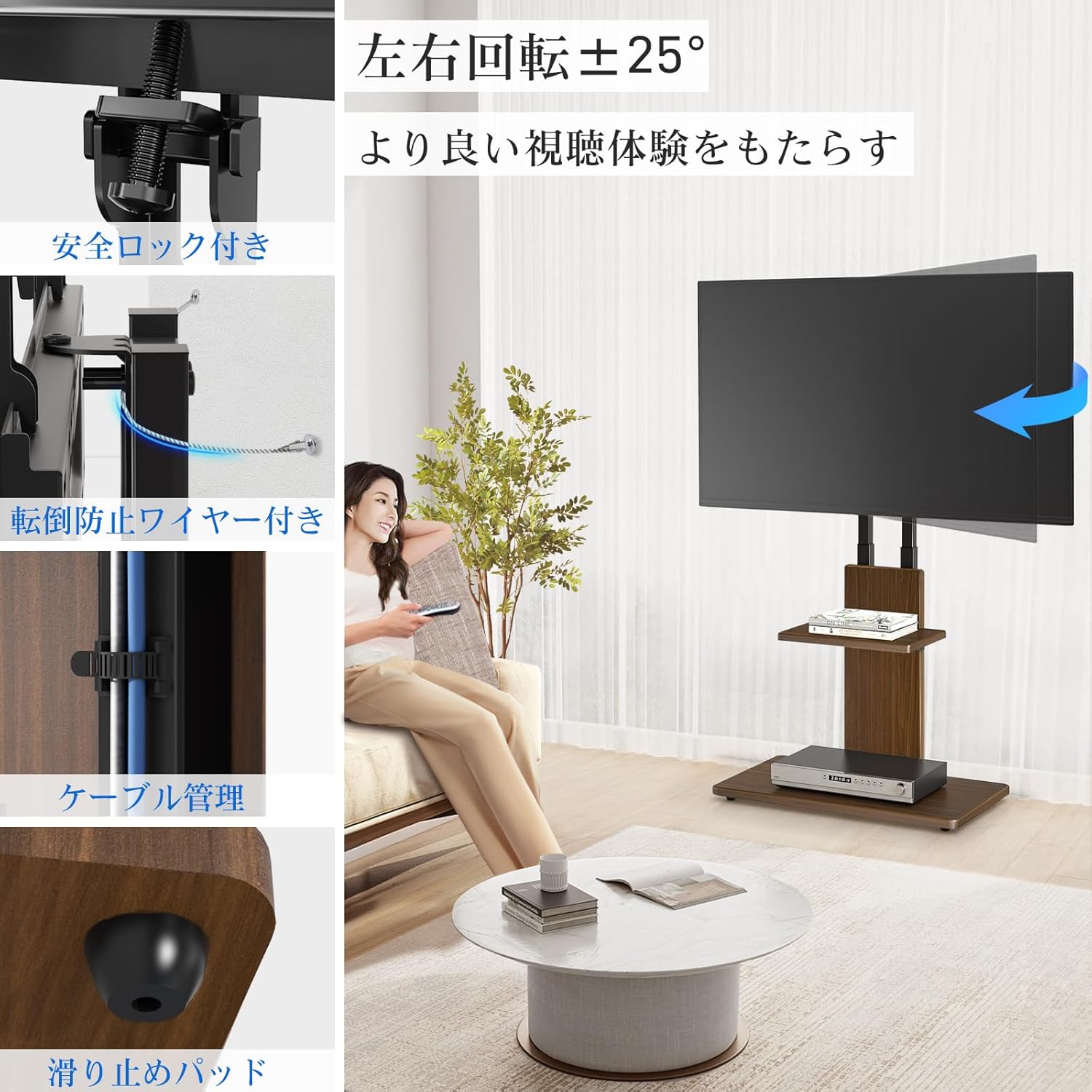
Image: Swivel function and other features.
5. Maintenance
To ensure the longevity and appearance of your Rfiver TV Stand:
- Cleaning: Wipe surfaces with a soft, dry cloth. For stubborn marks, a slightly damp cloth can be used, followed by immediate drying. Avoid harsh chemicals or abrasive cleaners.
- Hardware Check: Periodically check all screws and connections to ensure they remain tight. Re-tighten if necessary.
- Anti-Tip Wire: Regularly inspect the anti-tip wire and its wall attachment for any signs of wear or loosening.
- Avoid Overloading: Do not place items heavier than the specified weight limits on the TV or shelf.
6. Troubleshooting
If you encounter any issues with your TV stand, refer to the following common solutions:
- Stand is Wobbly:
- Ensure all assembly screws are fully tightened.
- Verify the stand is on a flat and level surface.
- Check if the anti-tip wire is properly installed and taut.
- TV Not Level:
- Re-check the TV mounting brackets on the back of the TV to ensure they are evenly aligned.
- Adjust the height of the TV on the stand, ensuring both sides are at the same level before tightening.
- Missing Parts:
- Carefully re-check all packaging materials. If parts are still missing, contact Rfiver customer support.
- Difficulty Adjusting Height/Swivel:
- Ensure all locking mechanisms or screws related to the adjustment are loosened before attempting to move the TV or shelf. Re-tighten after adjustment.
7. Specifications
| Brand | Rfiver |
| Model Name | Wall-Leaning TV Stand |
| Compatible Devices | Television, Monitor |
| Compatible TV Size | 32 to 70 inches |
| Maximum TV Load Capacity | 40 kg (88 lbs) |
| Maximum Shelf Load Capacity | 5 kg (11 lbs) |
| VESA Compatibility | 100x100mm to 400x400mm (Horizontal x Vertical) |
| Height Adjustment (TV) | 12 levels, 113.2 cm to 128.2 cm (floor to top of TV) |
| Height Adjustment (Shelf) | 5 levels |
| Swivel Angle | ±25 degrees (Left/Right) |
| Material | Alloy Steel, MDF Wood |
| Color | Brown |
| Mounting Type | Floor Mount (Wall-leaning) |
| Product Dimensions (L x W x H) | 60 x 40 x 113-128.2 cm |
| Item Weight | 12.6 kg |

Image: Rfiver TV Stand in a living room setting.
8. Warranty and Support
Rfiver is committed to providing high-quality products and customer satisfaction. For any questions, concerns, or warranty claims, please contact our customer support team.
- Warranty Information: Specific warranty details may vary. Please refer to the warranty card included with your product or visit the official Rfiver website for the most up-to-date information.
- Customer Support: If you require assistance with assembly, troubleshooting, or have any product-related inquiries, please reach out to our dedicated support team. Contact information can typically be found on our website or on the product packaging.


