
1. Introduction
Thank you for choosing the Edillas Kids Digital Watch. This watch is designed for children aged 4-12, offering a blend of durability, functionality, and fun. It features a clear digital display, multiple light colors, and essential functions like an alarm and stopwatch, all within a waterproof design suitable for daily activities.
Please read this manual carefully to understand how to operate and maintain your watch for optimal performance and longevity.
2. Package Contents
- 1 x Edillas Kids Digital Watch
- 1 x Present Box
3. Product Overview and Components
Familiarize yourself with the watch's buttons and display features.

Figure 3.1: Watch Button Layout. This image illustrates the location of the four main buttons on the watch: LIGHT, MODE, START, and RESET, along with their primary functions.
- LIGHT Button: Activates the backlight and changes backlight colors.
- MODE Button: Cycles through different modes (Time, Alarm, Stopwatch).
- START Button: Used to start/stop stopwatch, adjust settings in setting mode.
- RESET Button: Used to reset stopwatch, adjust settings in setting mode.
- Display: Shows time, date, day of the week, and active functions (e.g., alarm on).

Figure 3.2: Front view of the Edillas Kids Digital Watch. This image shows the watch's digital display, indicating time, day of the week, and PM indicator, surrounded by a light green casing and strap, with water splashes around it to highlight its water resistance.
4. Setup and Initial Configuration
4.1 Setting Time and Date
- From the normal time display, press the MODE button three times to enter time setting mode. The seconds will start flashing.
- Press the RESET button to set the seconds to zero.
- Press the START button to move to the next setting (hours).
- Press the RESET button to adjust the hours. Pay attention to the AM/PM indicator for 12-hour format.
- Continue pressing START to cycle through minutes, month, date, and day of the week.
- Use the RESET button to adjust each value.
- Once all settings are adjusted, press the MODE button to exit setting mode and return to the normal time display.
4.2 12/24 Hour Format Selection
In the normal time display, press the RESET button once. This will toggle between 12-hour (with AM/PM indicator) and 24-hour formats.
5. Operating Instructions
5.1 Using the Backlight and Color Options

Figure 5.1: Luminous Display with Color Options. This image shows the watch's display in both normal and illuminated modes, demonstrating the seven available backlight colors: blue, green, red, light blue, yellow, purple, and white.
Press the LIGHT button to activate the backlight. Each press will cycle through the 7 available colors (blue, green, red, light blue, yellow, purple, white) and a colorful flashing mode. The backlight will remain on for a few seconds.
5.2 Setting and Using the Alarm
- From the normal time display, press the MODE button once to enter Alarm mode. The alarm time will be displayed.
- Press the START button to toggle the alarm ON/OFF. An alarm icon will appear on the display when the alarm is active.
- To set the alarm time, press the RESET button. The hours will flash.
- Use the START button to adjust the hours.
- Press the RESET button again to move to minutes.
- Use the START button to adjust the minutes.
- Press the MODE button to exit Alarm setting mode.
- When the alarm sounds, press any button to stop it.
5.3 Using the Stopwatch
- From the normal time display, press the MODE button twice to enter Stopwatch mode. The display will show "00:00:00".
- Press the START button to begin timing.
- Press the START button again to pause the stopwatch.
- Press the RESET button to reset the stopwatch to "00:00:00".
- Press the MODE button to exit Stopwatch mode.
5.4 Waterproof Functionality

Figure 5.2: Watch in a water environment. This image shows a child happily playing in a pool, with the Edillas Kids Digital Watch prominently displayed on their wrist, emphasizing its 30M water resistance suitable for hand washing, rain, splashes, and swimming.
The Edillas Kids Digital Watch is 30M (3 ATM) waterproof. This means it is suitable for daily use and can withstand splashes, rain, hand washing, and brief immersion in cold water. It is suitable for swimming.
Important: Do NOT press any buttons while the watch is submerged in water, as this can compromise the waterproof seal.
6. Maintenance
6.1 Cleaning
To clean the watch, wipe it gently with a soft, damp cloth. For stubborn dirt, a mild soap solution can be used, followed by wiping with a clean, damp cloth. Ensure the watch is dry before storage.
6.2 Battery Replacement
The watch uses a nonstandard battery (included). Battery life is designed to be long-lasting. If the display becomes dim or functions are erratic, the battery may need replacement. It is recommended to have the battery replaced by a qualified watch technician to ensure the waterproof seal is maintained.
7. Troubleshooting
| Problem | Possible Cause | Solution |
|---|---|---|
| Watch display is blank or dim. | Low battery. | Replace the battery. |
| Time is incorrect. | Time not set correctly or accidental button press. | Refer to Section 4.1 "Setting Time and Date" to reset the time. |
| Buttons are unresponsive. | Watch may be in a specific mode or battery is low. | Try pressing the MODE button multiple times to cycle through modes. If still unresponsive, consider battery replacement. |
| Water inside the watch. | Buttons pressed underwater or watch exposed to hot water/steam. | Immediately stop using the watch. Seek professional repair to prevent further damage. Avoid hot water/steam. |
8. Specifications
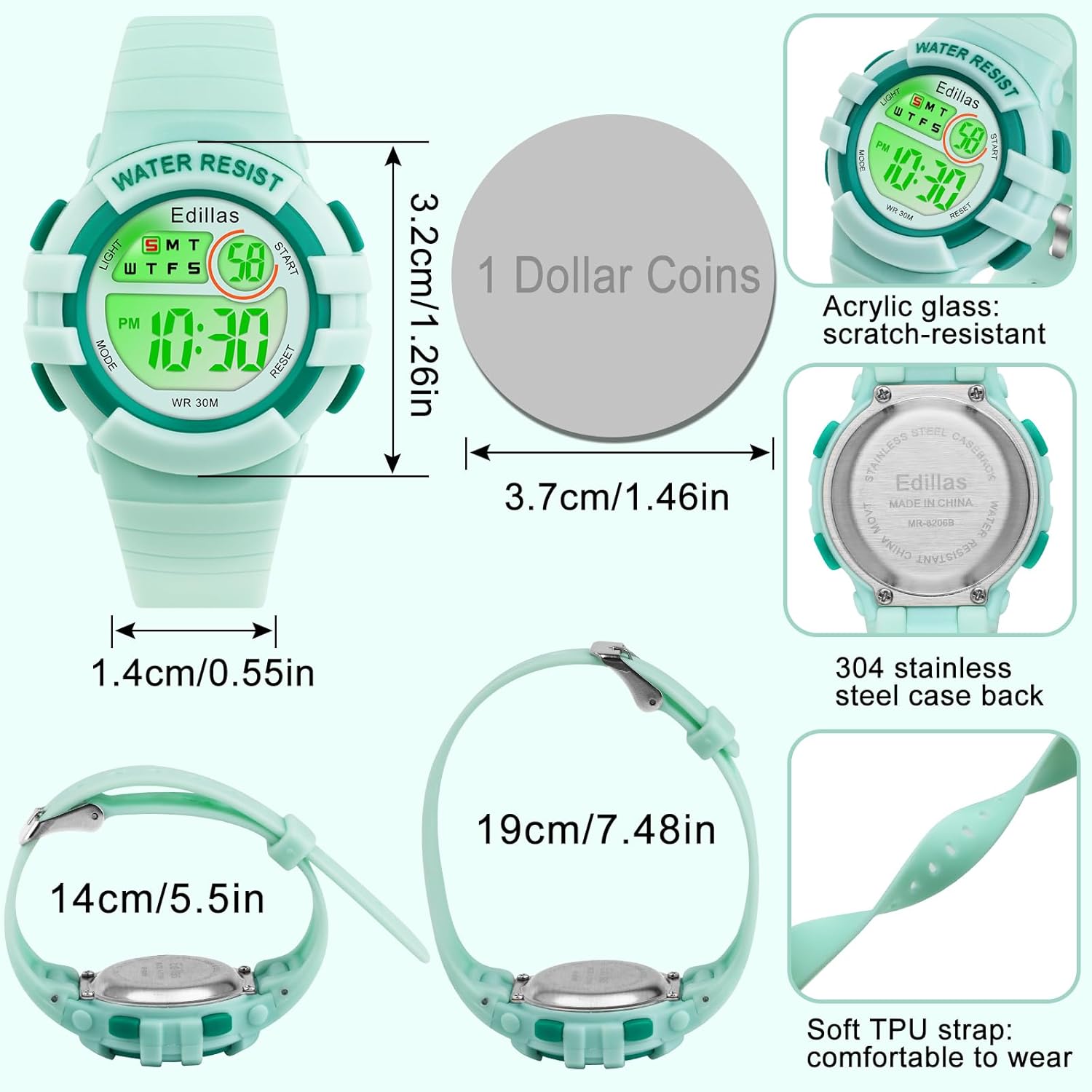
Figure 8.1: Watch Dimensions and Material Breakdown. This image provides detailed measurements of the watch's dial diameter (3.2cm/1.26in), case thickness (1.35cm/0.53in), band width (1.4cm/0.55in), and strap length (19cm/7.48in), along with descriptions of its acrylic glass, 304 stainless steel case back, and soft TPU strap.
- Model: 8206B green
- Dial Diameter: 34mm (1.36 inches)
- Case Thickness: 13.5mm (0.53 inches)
- Band Length: 22cm (8.66 inches)
- Band Width: 15mm (0.59 inches)
- Max Fit Wrist: 20cm (7.87 inches)
- Min Fit Wrist: 14cm (5.5 inches)
- Watch Weight: 22.5g (0.79 oz)
- Water Resistance: 30M (3 ATM)
- Display: Digital LED with 7 color backlight options
- Functions: Time, Date, Day of Week, Alarm, Stopwatch, 12/24H format
- Battery: 1 Nonstandard Battery (included)
- Case Material: Fine metal steel
- Case Back Material: Stainless Steel
- Strap Material: Soft TPU
- Glass Material: High-transparency resin
- Suitable Age: 4-13 years
9. Warranty and Support
Edillas is committed to providing quality products. This watch comes with a standard manufacturer's warranty covering defects in materials and workmanship. For specific warranty details or support inquiries, please refer to the warranty card included with your purchase or contact Edillas customer service through the retailer where the product was purchased.
If you experience any issues with the battery or movement, Edillas can assist with replacement under warranty.


