
Cillso H97
Cillso H97 Wireless Earbuds
User Instruction Manual
Important Safety Information
Please read all safety instructions carefully before using this product. Failure to follow these instructions may result in injury or damage.
- Do not expose the earbuds or charging case to extreme temperatures, direct sunlight, or fire.
- Avoid using the product in environments with high humidity or water, beyond its IP7 waterproof rating.
- Do not disassemble, repair, or modify the product. This will void the warranty.
- Keep the product out of reach of children and pets.
- Use only the provided charging cable or a certified standard charger (5V/1A; 5V/2A) to charge the case.
- Avoid listening at high volume levels for extended periods to prevent hearing damage.
Package Contents
Verify that all items are present in your package:
- 2x Bluetooth Earbuds (Left and Right)
- 1x Portable Charging Case
- 1x Type-C Charging Cable
- 1x User Manual
Product Overview
Familiarize yourself with the components of your Cillso H97 Wireless Earbuds.
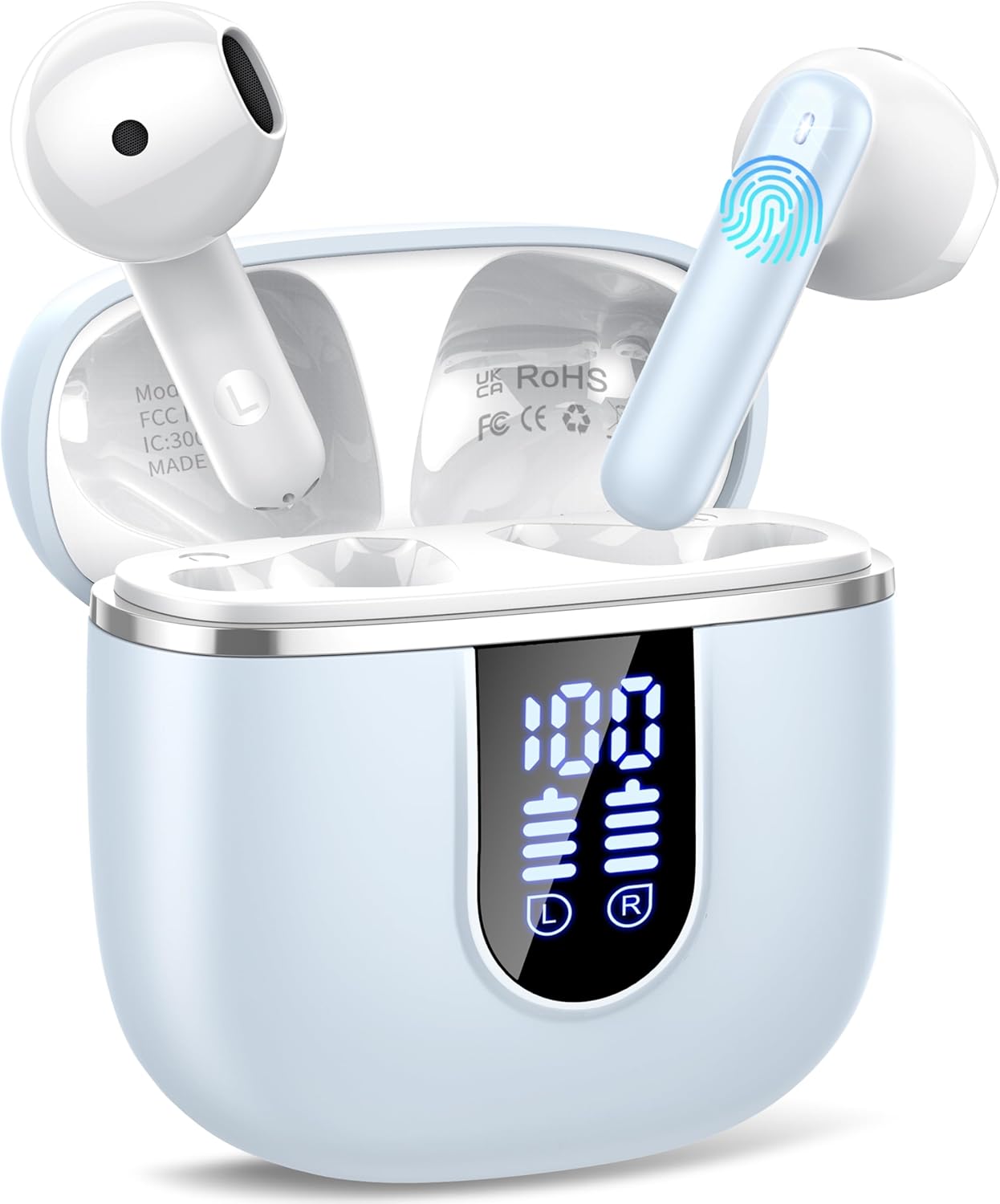
Image: The Cillso H97 Wireless Earbuds are shown inside their open charging case. The case features a dual LED display indicating battery percentages for the case and individual earbuds. The earbuds are white with a sleek design, and the charging case is a light azure color.
The image above displays the earbuds within their charging case. Key features include the dual LED display on the charging case, which shows the battery status for both the case and each earbud. The earbuds themselves are designed for in-ear comfort and feature touch control areas.
Setup
1. Charging the Earbuds and Case
Before first use, fully charge the earbuds and charging case.
- Connect the provided Type-C charging cable to the charging port on the case and to a standard USB power adapter (5V/1A or 5V/2A).
- The dual LED display on the charging case will show the charging progress. A full charge for the case takes approximately 1.5 hours.
- Place the earbuds into the charging case. They will automatically begin charging. The LED display will indicate their charging status.
- The earbuds provide up to 8 hours of playback on a single charge, and the charging case provides an additional 32 hours of playtime.
2. Pairing with Your Device
The H97 earbuds utilize Bluetooth 5.4 for a stable and efficient connection.
- Initial Pairing:
- Ensure your device's Bluetooth is turned on.
- Open the lid of the charging case. The earbuds will automatically power on and enter pairing mode.
- On your device, search for Bluetooth devices and select "H97" from the list.
- Once connected, you will hear a confirmation prompt, and the earbuds will be ready for use.
- Automatic Reconnection: After the initial pairing, the earbuds will automatically connect to the last paired device when the charging case lid is opened.
- Single Earbud Mode: Either earbud can be used independently. Simply take one out of the case, and it will connect.
Operating Instructions
1. Wearing the Earbuds
The H97 earbuds are designed for an ergonomic and secure fit.

Image: A diagram illustrating the correct angle and position for wearing the earbud in the ear canal for optimal comfort and sound.
- Gently insert each earbud into your ear canal.
- Adjust the earbud until it feels snug and comfortable. A proper fit ensures optimal sound quality and noise isolation.
- Each earbud weighs only 3.5 grams, providing lightweight comfort for extended wear.
2. Touch Controls
The earbuds feature sensitive touch sensors for easy control of various functions:
| Action | Function |
|---|---|
| Single Tap (Left/Right) | Play/Pause music, Answer/End call |
| Double Tap (Left) | Previous Song |
| Double Tap (Right) | Next Song |
| Triple Tap (Left) | Volume Down |
| Triple Tap (Right) | Volume Up |
| Long Press (2 seconds) | Reject Call, Activate Voice Assistant |
3. Power On/Off
- Power On: Open the charging case lid, or long-press the touch area on both earbuds for 3 seconds if they are outside the case and off.
- Power Off: Place the earbuds back into the charging case and close the lid. Alternatively, long-press the touch area on both earbuds for 5 seconds.
4. Making and Receiving Calls
The H97 earbuds are equipped with 4 ENC (Environmental Noise Cancelling) microphones to ensure clear call quality.
- Answer Call: Single tap either earbud.
- End Call: Single tap either earbud during a call.
- Reject Call: Long press either earbud for 2 seconds.
5. Audio Playback
Experience immersive HiFi stereo sound with deep bass, delivered by 14.2mm diaphragm drivers and AAC/SBC audio encoding.
- Play/Pause: Single tap either earbud.
- Next Song: Double tap the right earbud.
- Previous Song: Double tap the left earbud.
Maintenance
Proper care will extend the lifespan of your earbuds.
- Cleaning: Use a soft, dry, lint-free cloth to clean the earbuds and charging case. Do not use harsh chemicals or abrasive materials.
- Storage: When not in use, store the earbuds in their charging case to protect them and keep them charged. Store in a cool, dry place.
- Water Resistance: The earbuds feature IP7 nano-coating technology, protecting them from daily splashes, sweat, and rain. Do not submerge them in water or expose them to strong jets of water. Ensure they are dry before placing them back in the charging case.
Troubleshooting
If you encounter any issues, refer to the following common problems and solutions:
| Problem | Possible Solution |
|---|---|
| Earbuds not pairing with device |
|
| Only one earbud working |
|
| Charging case not charging |
|
| Poor sound quality or intermittent connection |
|
Specifications
Key technical details of the Cillso H97 Wireless Earbuds:
- Model: H97
- Bluetooth Version: 5.4
- Audio Encoding: AAC/SBC
- Driver Size: 14.2mm Diaphragm Driver
- Earbud Playtime: Up to 8 hours (single charge)
- Total Playtime (with charging case): Up to 40 hours
- Charging Time (Case): Approximately 1.5 hours (Type-C)
- Waterproof Rating: IP7
- Earbud Weight: 3.5 grams (each)
- Charging Case Weight: 32 grams
- Product Dimensions: 0.79 x 0.79 x 0.79 inches (earbuds, approximate)
- Item Weight: 3.2 ounces (total package weight)
- Batteries: 2 A batteries required (included)
- Compatibility: Most Bluetooth devices (Android 4.4+, iOS 8.0+, Bluetooth 4.0+)
Warranty and Support
Cillso products are designed for reliability and performance. This product comes with a standard manufacturer's warranty against defects in materials and workmanship.
- For warranty claims or technical support, please refer to the contact information provided with your purchase or visit the official Cillso website.
- Please retain your proof of purchase for warranty service.
Ask a question about this manual
Ask about setup, troubleshooting, compatibility, parts, safety, or missing instructions. Manuals+ will review the question and use this page’s manual context to help answer it.