
1. Important Safety Instructions
Please read all instructions carefully before assembling and using your Dolonm Power Lift Recliner Chair. Retain this manual for future reference.
- Ensure all connections are secure before plugging the chair into a power outlet.
- Use only the provided power adapter.
- Keep children and pets away from the chair's moving parts.
- Do not allow liquids to spill on the chair or its electrical components.
- The maximum weight capacity for this chair is 350 lbs (158 kg). Do not exceed this limit.
- If you have any health concerns, consult your doctor before using the massage or heat functions.
- Avoid placing hands or feet near the chair's mechanism during operation.
2. Package Contents
Your Dolonm Power Lift Recliner Chair is shipped in two separate boxes. Please ensure all components are present before beginning assembly.
- Backrest Section
- Seat Base Section (with armrests and footrest)
- Power Adapter
- Wired Remote Control for Lift/Recline
- Wired Remote Control for Massage/Heat

Figure 2.1: Packaging and Weight Capacity. The chair arrives in two boxes (Box A and Box B) and supports a maximum weight of 350 lbs.
3. Setup and Assembly
Assembly of your recliner chair is designed to be straightforward and requires no additional tools.
- Carefully unpack all components from both boxes.
- Place the seat base section in your desired location.
- Align the backrest section with the metal slots on the seat base. Slide the backrest down firmly until it locks into place. You should hear a click.
- Connect the power adapter to the chair's power input, typically located at the rear or side of the base.
- Plug the power adapter into a grounded electrical outlet.
- Connect the remote controls to their respective ports on the chair.

Figure 3.1: Assembly Overview. This diagram illustrates the primary sections of the chair and their connection points for assembly.
4. Operating Instructions
4.1 Power Lift and Recline Function
The chair features a dual motor mechanism for smooth and independent control of the backrest and footrest. Use the dedicated remote control for these functions.
- To Recline: Press and hold the 'Recline' button on the remote. The backrest will lean back, and the footrest will extend. Release the button when you reach your desired position.
- To Lift/Stand Assist: Press and hold the 'Lift' button on the remote. The chair will gently tilt forward and lift, assisting you in standing up. Release the button when you reach your desired height.
- To Return to Upright Position: Press and hold the 'Upright' button (or the opposite of recline) until the chair returns to its standard seated position.
4.2 Massage and Heat Functions
The chair is equipped with 8 vibrating massage nodes and a lumbar heating function, controlled by a separate remote.
- Massage Nodes: The 8 vibrating nodes are located in the back, lumbar, thighs, and legs. Each point can be activated individually or in combination.
- Massage Modes: Select from 3 different massage modes to customize your experience.
- Lumbar Heat: Activate the lumbar heat function for soothing warmth in the lower back area.
- Timer Function: Set the massage duration for 15, 30, or 60 minutes using the timer button on the remote.
4.3 USB Charging Ports
Two USB charging ports are integrated into the chair, typically on the side armrest, allowing you to charge low-power devices such as smartphones or tablets. Note: These ports are not designed for high-power devices like laptops.
4.4 Side Pockets
Convenient side pockets are provided for storing remote controls, magazines, or other small items.

Figure 4.1: Chair Features and Controls. This image highlights the massage and heat zones on the chair and displays the two remote controls for operation.
5. Product Features Overview
The Dolonm Power Lift Recliner Chair Model 7878 offers a range of features designed for comfort and convenience:
- Dual Motor System: Provides independent control for lift, recline, and footrest positions.
- 8-Point Vibration Massage: Targets back, lumbar, thighs, and legs with multiple modes.
- Lumbar Heating: Offers soothing warmth to the lower back.
- USB Charging Ports: Conveniently charge low-power electronic devices.
- Side Storage Pockets: For easy access to remotes and personal items.
- Genuine Leather Upholstery: Durable and comfortable seating surface.
- Heavy-Duty Motion Mechanism: Ensures smooth and reliable operation.
- High Weight Capacity: Supports users up to 350 lbs.
6. Maintenance and Care
Proper care will extend the life and appearance of your recliner chair.
- Cleaning Leather Upholstery: Wipe with a soft, damp cloth. For tougher stains, use a mild leather cleaner according to its instructions. Avoid harsh chemicals or abrasive cleaners.
- Power Cord: Regularly inspect the power cord for any damage. Do not use the chair if the cord is frayed or damaged.
- General Inspection: Periodically check all connections and moving parts to ensure they are secure and functioning correctly.
- Avoid Direct Sunlight: Prolonged exposure to direct sunlight can cause leather to fade or crack.
7. Troubleshooting
If you encounter issues with your recliner, refer to the following common problems and solutions:
| Problem | Possible Cause | Solution |
|---|---|---|
| Chair does not move/operate. | No power, loose connection, remote issue. | Ensure power cord is securely plugged into the wall outlet and the chair. Check all cable connections. Verify remote control is connected. |
| Massage/Heat function not working. | Remote not connected, power issue. | Ensure the massage/heat remote is properly connected. Check main power supply. |
| USB ports not charging devices. | Device incompatible, power issue. | Confirm the device is low-power (e.g., smartphone, not laptop). Check main power supply to the chair. |
| Unusual noise during operation. | Loose components, obstruction. | Inspect for any loose screws or obstructions around the mechanism. If noise persists, contact customer support. |
If the problem persists after attempting these solutions, please contact Dolonm customer support for assistance.
8. Specifications
Detailed specifications for the Dolonm Power Lift Recliner Chair Model 7878:
- Brand: Dolonm
- Model: 7878
- Color: Black
- Material: Genuine Leather
- Product Dimensions (Upright): 38.18" W x 40.15" D x 41.33" H
- Product Dimensions (Fully Reclined): Approximately 38.18" W x 69.68" D x 25.19" H
- Lift Height (Max): Approximately 57.08"
- Seat Dimensions: 22.83" W x 22.04" D x 18.5" H (from floor)
- Weight Capacity: 350 lbs (158 kg)
- Special Features: Power Lift, Recline, 8-Point Vibration Massage, Lumbar Heat, USB Charging Ports, Side Pockets
- Motor Type: Dual Motor
Figure 8.1: Overall Product Dimensions. This image provides a comprehensive view of the chair's dimensions in various positions.

Figure 8.2: Lifted Position Dimensions. Detailed measurements for the chair when fully lifted.
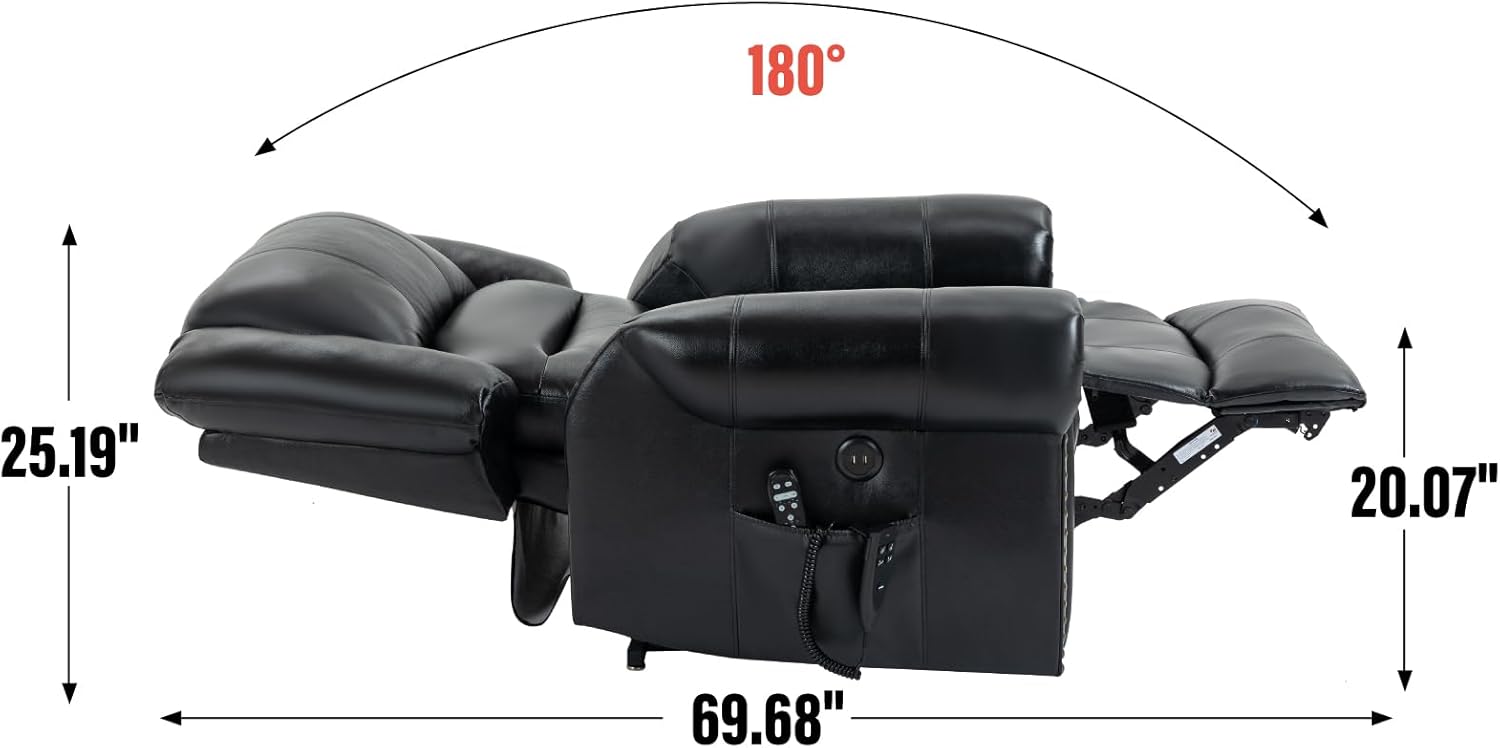
Figure 8.3: Reclined Position Dimensions. Detailed measurements for the chair when fully reclined.

Figure 8.4: Upright Position Dimensions. Detailed measurements for the chair in its standard upright position.
9. Warranty and Support
For warranty information, product support, or to report any issues not covered in this manual, please contact Dolonm customer service. Refer to your purchase documentation for specific warranty terms and contact details.
You can typically find support contact information on the Dolonm brand website or through your original retailer.