
1. Introduction
Thank you for purchasing the BoostArea Dimmable Floor Lamp. This LED torchiere standing lamp features stepless dimming, adjustable color temperature (2700K-6500K), and dual control methods via touch and remote. Designed for various indoor environments, this manual provides essential information for safe operation, assembly, and maintenance.

Image 1.1: The BoostArea Dimmable Floor Lamp in gold, showcasing its sleek design and included remote control.
2. Safety Information
- Ensure the lamp is placed on a stable, level surface to prevent tipping. The lamp has passed UL 8° Stability testing.
- Do not expose the lamp to water or moisture. This product is for indoor use only.
- Do not attempt to disassemble or modify the lamp. There are no user-serviceable parts inside.
- Keep the lamp away from heat sources and direct sunlight.
- Unplug the lamp from the power outlet before cleaning or performing any maintenance.
- The LED light source is non-replaceable. Do not attempt to replace the LED beads.

Image 2.1: A close-up view of the lamp's sturdy base, designed for enhanced stability.
3. Package Contents
Please check the package for the following items:
- Lamp Head (with integrated LED)
- Lamp Pole Sections (multiple sections)
- Lamp Base
- Power Adapter
- Remote Control (batteries included)
- User Manual (this document)
4. Product Overview
The BoostArea Dimmable Floor Lamp consists of a sturdy metal construction, an integrated LED light source, and intuitive control options.
Key Components:
- Lamp Head: Houses the 30W 3000LM LED light source.
- Lamp Pole: Connects the head to the base, includes the touch control panel.
- Touch Control Panel: Located on the lamp pole for direct operation.
- Lamp Base: Provides stability for the entire unit.
- Remote Control: Offers comprehensive control from a distance.
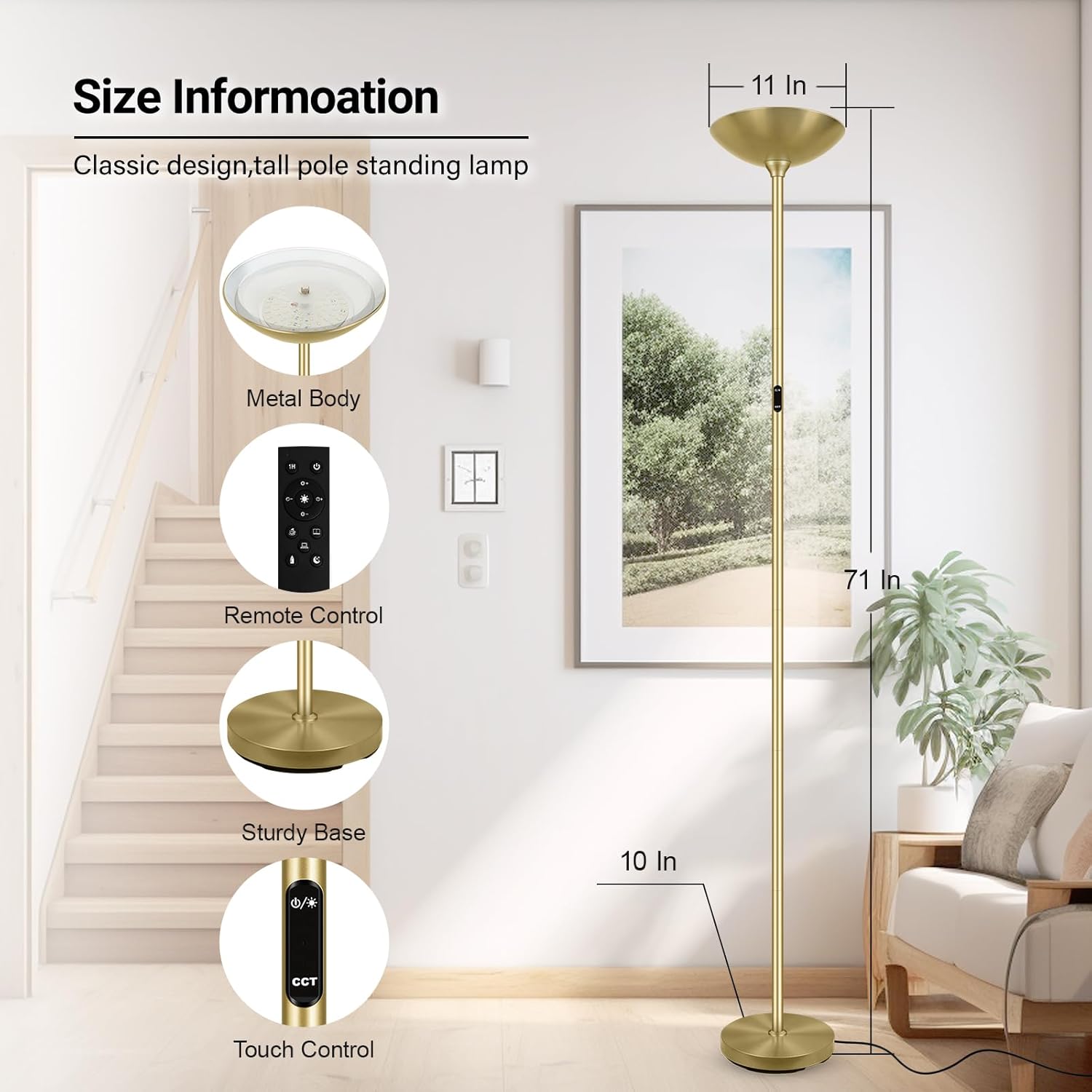
Image 4.1: An illustration detailing the lamp's dimensions (71 inches tall, 10-11 inches head/base diameter) and highlighting its metal body, remote control, sturdy base, and touch control features.

Image 4.2: A close-up view of the integrated bright LED panel within the lamp head.
5. Setup and Assembly
Assembly of the BoostArea Floor Lamp is designed to be quick and straightforward, typically taking less than 10 minutes without the need for additional tools.
Assembly Steps:
- Carefully unpack all components from the packaging.
- Begin by screwing the first pole section into the lamp base, ensuring the power cord passes through the center.
- Continue screwing the remaining pole sections together in sequence, gently pulling any excess cord through the base as you go. Ensure each section is securely tightened.
- Attach the lamp head to the top pole section, twisting until firm.
- Plug the power adapter into a standard wall outlet.
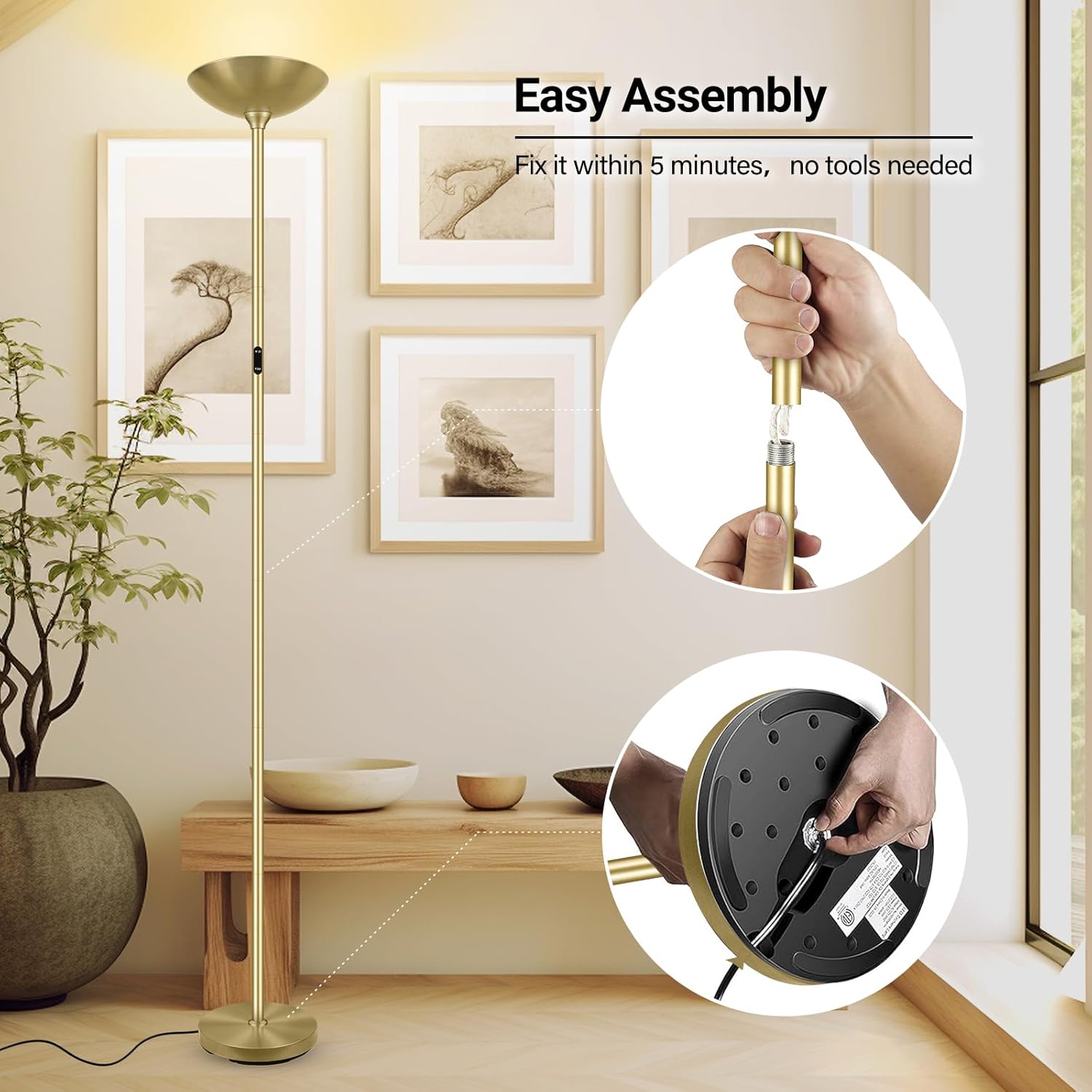
Image 5.1: Visual guide demonstrating the simple assembly process, including connecting pole sections and securing the base.

Image 5.2: A detailed view of how the lamp pole sections connect by screwing together.
6. Operating Instructions
The BoostArea Dimmable Floor Lamp offers versatile control options for brightness and color temperature.
6.1 Touch Control
- Power On/Off: Lightly touch the power symbol on the touch control panel to turn the lamp on or off.
- Brightness Adjustment: Press and hold the power symbol to cycle through brightness levels (5% to 100%). Release at your desired brightness.
- Color Temperature Adjustment: Touch the 'CCT' symbol to cycle through different color temperatures (2700K Warm White, 4000K Neutral Light, 5000K Daylight, 6500K Cool White).
- Memory Function: The lamp will remember the last brightness setting when turned off and on again.

Image 6.1: A user interacting with the touch control panel on the lamp pole.

Image 6.2: A user demonstrating the use of both the remote control and the touch control panel on the lamp.
6.2 Remote Control
The included remote control allows for convenient operation from up to 16.5 feet away. The remote can be magnetically attached to the lamp pole for storage.
- ON/OFF/Matching: Press the power button to turn the lamp on or off. To pair the remote, ensure the lamp is off, then press and hold the power button on the remote until the lamp flashes.
- Brightness Adjustment: Use the '+' and '-' buttons to increase or decrease brightness (5% to 100%).
- Color Temperature Presets: Buttons for 2700K (Warm White), 4000K (Neutral Light), 5000K (Daylight), and 6500K (Cool White) allow quick selection of color temperatures.
- 1-Hour Timer: Press the '1H' button to set the lamp to automatically turn off after one hour.
- Lighting Modes: Dedicated buttons for various scenarios:
- Sleeping Mode (Moon symbol)
- Nursery Mode (Baby bottle symbol)
- Reading Mode (Open book symbol)
- Working Mode (Laptop symbol)
- Leisure Mode (Coffee cup symbol)

Image 6.3: An illustration of the five distinct lighting modes available, each represented by a unique symbol on the remote control.

Image 6.4: A comprehensive diagram labeling each button on the remote control and its corresponding function, including 1-hour timing, ON/OFF/Matching, brightness adjustment, color temperature presets, and various lighting modes.

Image 6.5: The lamp shown with an overlay indicating the activation of the 1-hour timer function.

Image 6.6: The remote control shown magnetically adhering to the lamp pole for convenient storage.
6.3 Stepless Dimming and Color Temperature
The lamp offers continuous adjustment for both brightness and color temperature, allowing for precise customization of your lighting environment.

Image 6.7: A graphic illustrating the range of stepless color temperature adjustments from 2700K (Warm White) to 6500K (Cool White), and stepless brightness dimming from 5% to 100%.

Image 6.8: The lamp demonstrating the stepless color temperature feature, transitioning from 2700K Warm White to 6500K Cool White.

Image 6.9: The lamp illustrating the stepless dimmable brightness feature, ranging from 5% to 100% illumination.
7. Maintenance
Proper care will ensure the longevity and optimal performance of your floor lamp.
- Cleaning: Disconnect the power before cleaning. Use a soft, dry cloth to wipe the lamp. Do not use abrasive cleaners, solvents, or polishes as they may damage the finish.
- Storage: If storing the lamp for an extended period, disassemble it and store it in its original packaging in a dry, cool place.
- LED Care: The integrated LED light source is designed for long-term use and does not require replacement. Avoid touching the LED panel directly.
8. Troubleshooting
If you encounter any issues with your BoostArea Dimmable Floor Lamp, please refer to the following common problems and solutions:
| Problem | Possible Cause | Solution |
|---|---|---|
| Lamp does not turn on. | No power supply. Lamp not properly assembled. | Ensure the power adapter is securely plugged into a working outlet. Check all pole connections to ensure they are tightened. |
| Remote control is not working. | Remote batteries are low or dead. Remote is not paired with the lamp. Obstruction between remote and lamp. | Replace the batteries in the remote control. Re-pair the remote: Turn off the lamp, then press and hold the power button on the remote until the lamp flashes. Ensure a clear line of sight between the remote and the lamp. |
| Brightness or color temperature cannot be adjusted. | Incorrect button usage. Remote control issue. | Refer to the 'Operating Instructions' section for correct button functions. Try using the touch control panel on the lamp. If it works, troubleshoot the remote control. |
| Lamp flickers or dims unexpectedly. | Unstable power supply. Loose connection. | Try plugging the lamp into a different outlet. Check all pole connections and ensure they are secure. |
If the problem persists after trying these solutions, please contact BoostArea customer support.
9. Specifications
| Feature | Detail |
|---|---|
| Model Name | 30W Dimmable Floor Lamp |
| Item Model Number | B0514 |
| Product Dimensions | 10"D x 10"W x 71"H |
| Item Weight | 8.25 pounds |
| Light Source Type | LED |
| Wattage | 30 watts |
| Luminous Flux | 3000 Lumens |
| Color Temperature | 2700K-6500K (Adjustable) |
| Control Method | Remote Control, Touch Control |
| Material | Metal |
| Finish Type | Matte |
| Power Source | Corded Electric |
| Voltage | 120 Volts (AC) |
| Indoor/Outdoor Usage | Indoor |
| Special Features | Adjustable Color Temperature, Dimmable, Remote Control, Timer |
| Batteries Included | Yes (for remote control) |
10. Warranty Information
BoostArea products are manufactured to high-quality standards. For specific warranty details, including coverage period and terms, please refer to the warranty card included with your purchase or visit the official BoostArea website. Please retain your proof of purchase for any warranty claims.
11. Customer Support
If you have any questions, require assistance, or need to report a problem with your BoostArea Dimmable Floor Lamp, please contact BoostArea customer service through the retailer where you purchased the product or visit the official BoostArea website for support contact information.
For more information, you may visit the BoostArea Store on Amazon.


