
Introduction
This manual provides comprehensive instructions for the MASTERFUN Automatic Solar-Powered Chicken Coop Door, Model JSM13BN. This device is designed to automate the opening and closing of your chicken coop door, enhancing the safety and convenience for your poultry. It features solar charging, an LCD display for easy programming, a light sensor, timer functions, and an anti-pinch safety mechanism. Please read this manual thoroughly before installation and operation to ensure proper use and longevity of the product.
Package Contents
Upon unpacking, please verify that all components are present and undamaged. The package should include:
- Automatic Chicken Coop Door Unit
- 7W Solar Panel (with 2.8m cable)
- Remote Control
- Type-C Charging Cable (1.0m)
- Universal Wheel
- User Manual
- Screw Set for installation

Figure 1: Package Contents. This image illustrates all items included in the product package, ensuring you have everything needed for setup.
Safety Information
- Ensure the installation area is clear of obstructions.
- Keep children and pets away from the door during operation.
- Do not attempt to force the door open or closed manually while it is operating automatically.
- Regularly inspect the door and solar panel for any damage.
- The anti-pinch function is designed to prevent injury, but caution should always be exercised.
Setup and Installation
The MASTERFUN Automatic Chicken Coop Door is designed for easy installation. Follow these steps for optimal performance.
1. Choose an Installation Location
Select a flat, vertical surface on your chicken coop where the door can be mounted securely. Ensure there is sufficient space for the door to open and close without obstruction. The door opening measures 29 x 22.5 cm, which is larger than many standard doors, accommodating various chicken sizes.

Figure 2: Installed Door Unit. This image demonstrates the door unit mounted on a chicken coop, highlighting its compact design and the large opening for chickens.
2. Mount the Door Unit
- Position the door unit against the coop wall, ensuring it is level.
- Mark the screw holes using the door unit as a template.
- Drill pilot holes if necessary.
- Secure the door unit to the coop using the provided screw set.
3. Install the Solar Panel
The 7W solar panel provides continuous charging for the internal battery. Mount the solar panel in a location that receives maximum direct sunlight throughout the day. Connect the solar panel cable to the designated port on the main door unit.

Figure 3: Charging Options. This image details how to connect the solar panel for charging and also shows the alternative USB-C charging method.
4. Initial Battery Charge
Although solar-powered, it is recommended to fully charge the internal 3000mA lithium battery using the provided Type-C charging cable before first use. A full charge can last up to 50 days.
Operating Instructions
The MASTERFUN chicken coop door offers multiple operating modes for flexibility and convenience.
LCD Display and Controls
The integrated LCD display allows for easy programming and monitoring of the door's status. Use the buttons adjacent to the display to navigate menus and set parameters.

Figure 4: Control Panel and LCD Display. This image highlights the user interface for programming and operating the door.
Operating Modes
The door supports four primary operating modes, which can also be combined:
- Timer Mode: Set specific times for the door to open and close.
- Light-Sensitive Mode: The door opens at dawn and closes at dusk, based on ambient light levels.
- Remote Control Mode: Use the provided remote control to manually open or close the door from up to 15 meters away.
- Manual Mode: Directly operate the door using the buttons on the control panel.
Mixed Mode: For advanced control, you can combine modes. For example, set the door to open by timer in the morning and close using the light sensor in the evening.

Figure 5: Multiple Operating Modes. This graphic explains the different ways to control the chicken coop door, including automatic and manual options.

Figure 6: Intelligent Light and Timer Mode. This image further clarifies the combined functionality of the light sensor and timer for opening and closing the door.
Anti-Pinch Function
The door is equipped with intelligent obstacle sensors. If an obstruction (e.g., a chicken) is detected during closing, the door will stop its descent, reopen for 10 seconds, and then attempt to close again. If the door detects an obstruction three times, a red light will blink, and an alarm will sound until the door is properly closed.

Figure 7: Anti-Pinch Protection. This graphic demonstrates how the door's safety mechanism prevents injury to your poultry.
Maintenance
Proper maintenance ensures the longevity and reliable operation of your MASTERFUN Automatic Chicken Coop Door.
- Cleaning: Periodically clean the door tracks and the main unit to prevent dirt and debris from interfering with operation. Use a soft, damp cloth.
- Solar Panel: Keep the solar panel clean and free of dust, leaves, or snow to ensure efficient charging.
- Battery: The internal lithium battery is designed for long life. If the solar panel cannot provide sufficient charge (e.g., during prolonged cloudy weather), use the Type-C charging cable to recharge the unit.
- Weather Resistance: The door is designed to withstand extreme weather conditions, operating in temperatures from -15°C to 60°C (5°F to 140°F).
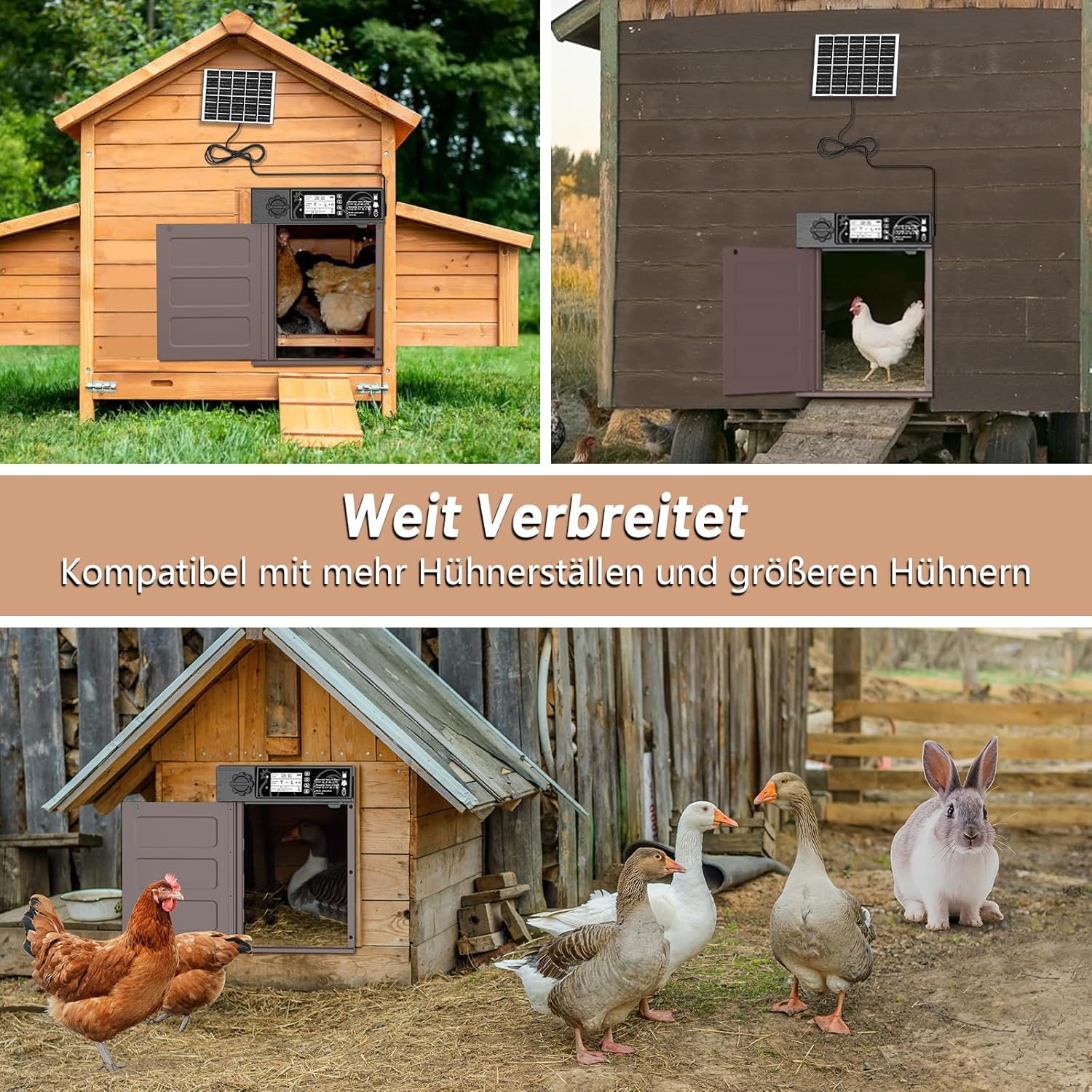
Figure 8: All-Weather Durability. This image illustrates the door's resilience against rain, heat, and snow, ensuring reliable operation in various climates.
Troubleshooting
If you encounter issues with your MASTERFUN Automatic Chicken Coop Door, refer to the following common problems and solutions:
| Problem | Possible Cause | Solution |
|---|---|---|
| Door not opening/closing | Low battery, obstruction, incorrect mode settings, sensor malfunction. |
|
| Door closes prematurely (Light Sensor Mode) | Insufficient ambient light, sensor sensitivity. |
|
| Solar panel not charging | Panel obstructed, dirty, or disconnected. |
|
| Remote control not working | Remote battery dead, out of range, interference. |
|
Specifications
| Feature | Detail |
|---|---|
| Brand | MASTERFUN |
| Model Number | JSM13BN |
| Material | Aluminum, AES |
| Product Dimensions (Unit) | 28 cm (W) x 37.5 cm (H) |
| Door Opening Dimensions | 29 cm (H) x 22.5 cm (W) |
| Weight | 1.78 kg |
| Power Source | 7W Solar Panel, 3000mA Lithium Battery, Type-C USB Charging |
| Battery Life (fully charged) | Up to 50 days |
| Operating Temperature | -15°C to 60°C (5°F to 140°F) |
| Special Features | Rotating door, Light detection, Programmable LCD screen, Timing function, Anti-pinch safety, Remote control (15m range) |
| Recommended for | Chickens (up to 6kg) |
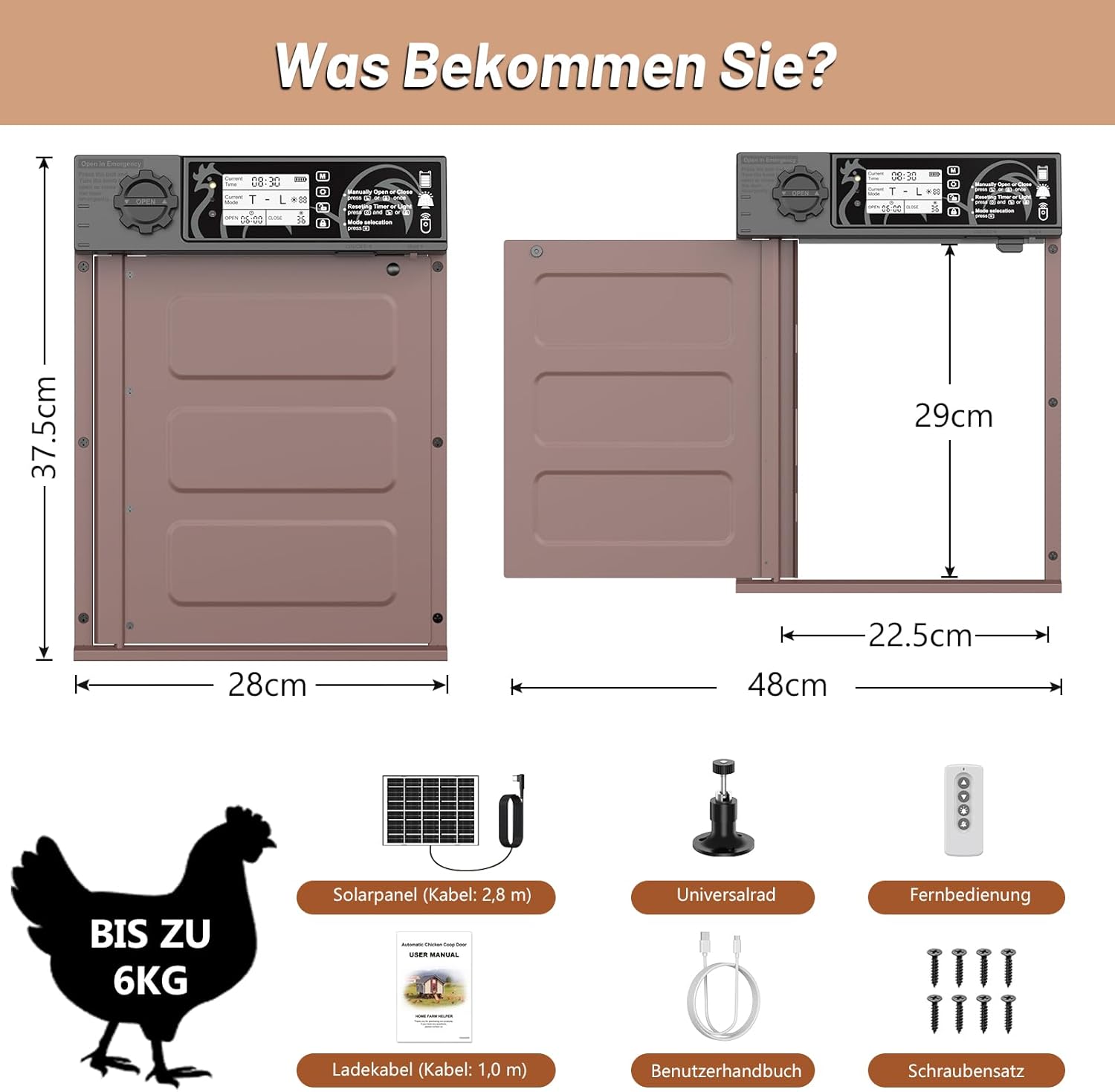
Figure 9: Product Dimensions. This image provides a visual representation of the door unit's and opening's measurements, along with the recommended chicken weight capacity.
Warranty Information
Specific warranty details for the MASTERFUN Automatic Solar-Powered Chicken Coop Door are not provided in the product information. Please refer to the retailer's or manufacturer's official website for the most current warranty policy.
Customer Support
For further assistance, technical support, or inquiries regarding your MASTERFUN Automatic Solar-Powered Chicken Coop Door, please contact the retailer or visit the official MASTERFUN website. Contact information may be available on the product packaging or purchase receipt.