
1. Introduction
Thank you for choosing the Furmax Vanity Desk with Mirror and Power Outlet. This manual provides essential information for the safe assembly, proper operation, and effective maintenance of your new vanity desk. Please read these instructions thoroughly before beginning assembly or use, and retain them for future reference.

Image 1.1: The Furmax Vanity Desk, featuring a large mirror with integrated lighting, two drawers, and multiple storage shelves.
2. Safety Information
Please observe the following safety precautions to prevent injury or damage to the product:
- Assembly required. Follow all assembly instructions carefully.
- Keep electrical components and lighting away from water to prevent electric shock.
- Do not overload the integrated power outlets. Ensure total wattage of connected devices does not exceed the specified limit.
- Always unplug the vanity desk from the power source when not in use or before cleaning.
- Be cautious of sharp edges and pinch points during assembly and use.
- Place the vanity desk on a stable, level surface to prevent tipping.
3. Package Contents
Verify that all components are present before beginning assembly. Refer to the separate assembly manual included in the packaging for a detailed list of parts and hardware.
Typical contents include:
- Vanity Desk Panels (Tabletop, Side Panels, Drawer Components, Shelves)
- Mirror with Integrated Lights
- Power Outlet Unit with USB Ports
- Hardware Pack (Screws, Dowels, Brackets, etc.)
- Power Cord
- Extra Light Bulbs (Quantity may vary)
- Assembly Instructions Manual
4. Setup and Assembly
Assembly of the Furmax Vanity Desk requires careful attention to detail. Please follow the step-by-step instructions provided in the dedicated assembly manual included with your product. Ensure you have adequate space and the necessary tools (typically a Phillips head screwdriver) before starting.
4.1. General Assembly Tips
- Unpack all components and lay them out on a clean, soft surface to prevent scratches.
- Identify all parts and hardware using the provided diagrams in the assembly manual.
- Do not overtighten screws during initial assembly; tighten fully once the structure is stable.
- Seek assistance for lifting heavy components, especially the mirror section.
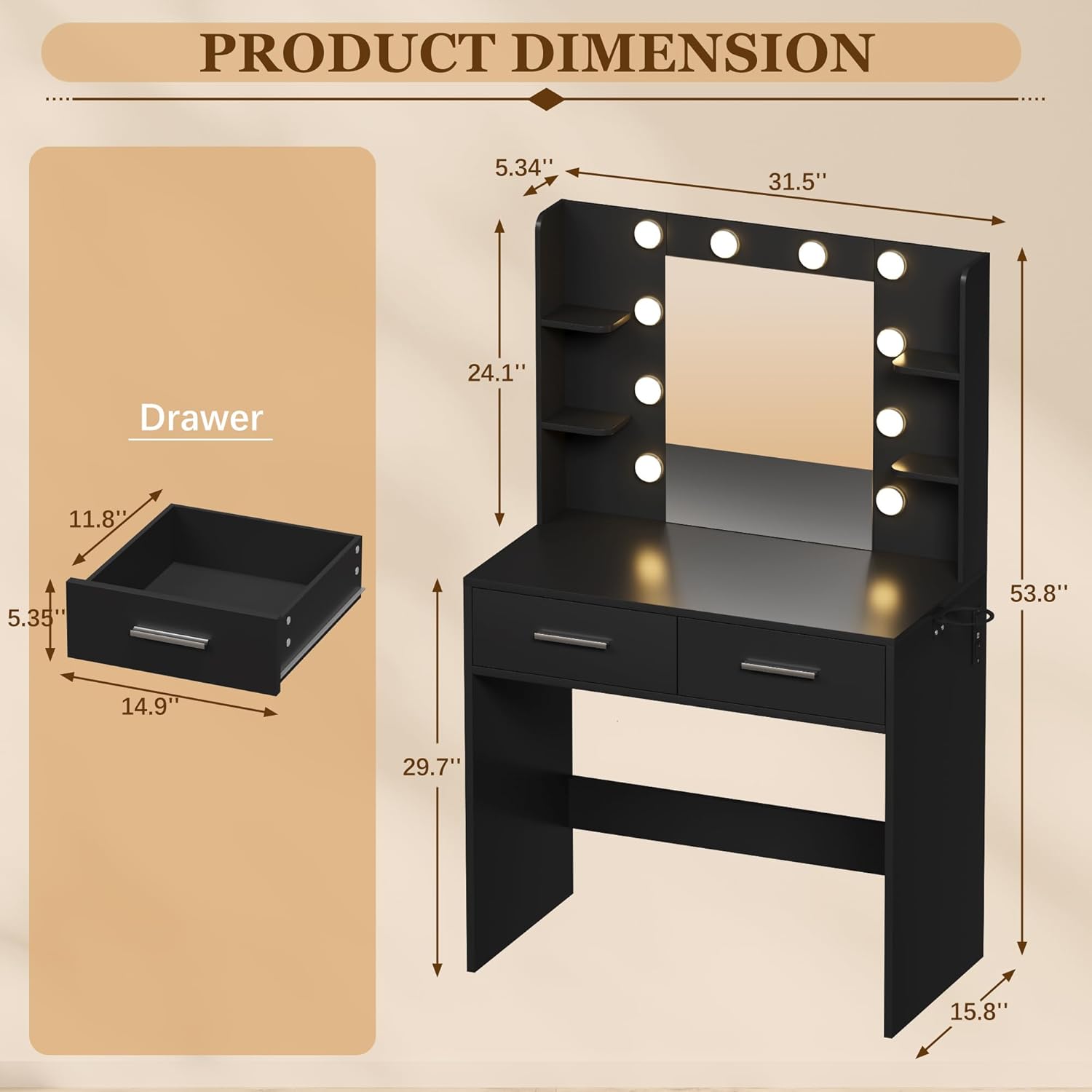
Image 4.1: Detailed product dimensions for the Furmax Vanity Desk, including measurements for the overall unit and individual drawers.
5. Operating Instructions
5.1. Lighting System
The integrated mirror lights feature a touch-sensitive switch for control. To operate:
- Ensure the vanity desk is properly connected to a power source.
- Power On/Off: Lightly touch the designated sensor on the mirror to turn the lights on or off.
- Change Color Temperature: With the lights on, short press the sensor to cycle through three color temperature options: Cold Light, Natural Light, and Warm Light.
- Adjust Brightness: With the lights on, long press the sensor to continuously adjust the brightness level. Release when the desired brightness is achieved.

Image 5.1: Illustration of the three adjustable light color options (Cold, Natural, Warm) available on the vanity mirror.
5.2. Integrated Power Outlet and USB Ports
The vanity desk is equipped with a convenient power hub for your electronic devices.
- It includes two (2) standard 125V/12A AC outlets for hair styling tools, lamps, or other small appliances.
- It also features two (2) 5V/2A USB ports for charging smartphones, tablets, and other USB-powered devices.
- The power cord is approximately 4.6 feet long.
Caution: Do not exceed the maximum electrical load for the outlets. Unplug devices when not in use.

Image 5.2: The integrated power hub with AC outlets and USB ports, designed for convenient charging and power access.
5.3. Storage Features
The vanity desk offers ample storage to keep your items organized:
- Two (2) Spacious Drawers: Utilize these for cosmetics, jewelry, or personal items.
- Six (6) Storage Shelves: Located around the mirror, these shelves are ideal for displaying frequently used items or decorative pieces.
- Hair Dryer Stand: A dedicated holder is provided for convenient storage of your hair dryer.

Image 5.3: Overview of the vanity desk's storage capabilities, including drawers, shelves, and a spacious desktop.
6. Maintenance
Regular cleaning and care will help maintain the appearance and functionality of your vanity desk.
- Cleaning Surfaces: Wipe all surfaces with a soft, damp cloth. Avoid abrasive cleaners or harsh chemicals that may damage the finish.
- Mirror Cleaning: Use a standard glass cleaner and a lint-free cloth for the mirror. Do not spray cleaner directly onto the mirror, especially near electrical components.
- Dusting: Regularly dust the shelves and desktop to prevent buildup.
- Electrical Components: Ensure all electrical connections are secure. If a light bulb needs replacement, ensure the unit is unplugged and use bulbs of the same type and wattage.
7. Troubleshooting
If you encounter issues with your Furmax Vanity Desk, refer to the following common problems and solutions:
| Problem | Possible Cause | Solution |
|---|---|---|
| Lights do not turn on. | Not plugged in; power outage; faulty bulb; touch sensor issue. | Check power connection; verify power supply; replace faulty bulb; ensure clean, dry touch sensor. |
| Power outlets/USB ports not working. | Not plugged in; circuit breaker tripped; device not compatible. | Check power connection; reset household circuit breaker; test with another device. |
| Desk feels wobbly. | Loose screws; uneven floor. | Tighten all assembly screws; use furniture levelers if necessary. |
If the problem persists after attempting these solutions, please contact Furmax customer support.
8. Specifications
| Feature | Detail |
|---|---|
| Model Number | VN0497 |
| Product Dimensions (Overall) | 15.8"D x 31.5"W x 53.8"H |
| Item Weight | 67 pounds |
| Frame Material | Wood |
| Color | Black |
| Furniture Finish | Polish |
| Power Outlets | 2 x 125V/12A AC outlets |
| USB Ports | 2 x 5V/2A USB ports |
| Lighting Options | 3 Color Temperatures (Cold, Natural, Warm), Adjustable Brightness |
| Assembly Required | Yes |
9. Warranty Information
Furmax products are manufactured to high-quality standards. For specific warranty terms and conditions, please refer to the warranty card included with your product or visit the official Furmax website. The warranty typically covers manufacturing defects under normal use.
10. Customer Support
If you have any questions, require assistance with assembly, or need to report a missing/damaged part, please contact Furmax customer service. Have your model number (VN0497) and purchase information ready when contacting support.
For the most up-to-date contact information, please visit the Furmax official website or refer to your purchase documentation.
