
1. Introduction
Thank you for choosing the Ddidbi Smartwatch P114. This device is designed to enhance your daily life by providing convenient access to calls, notifications, and health monitoring features directly from your wrist. This manual will guide you through the setup, operation, and maintenance of your smartwatch to ensure optimal performance and user experience.
2. Safety Information
- Do not attempt to disassemble, repair, or modify the device. This may void the warranty and cause damage.
- Keep the device away from extreme temperatures, direct sunlight, and open flames.
- Avoid exposing the device to strong impacts or vibrations.
- Use only the provided charging cable and a certified power adapter.
- Consult a medical professional before starting any new exercise regimen or if you have pre-existing health conditions that may be affected by heart rate monitoring.
3. Package Contents
Please verify that all items are present in your package:
- Ddidbi Smartwatch P114
- USB Charging Cable
- User Manual (this document)
4. Product Overview
Familiarize yourself with the components of your Ddidbi Smartwatch P114.
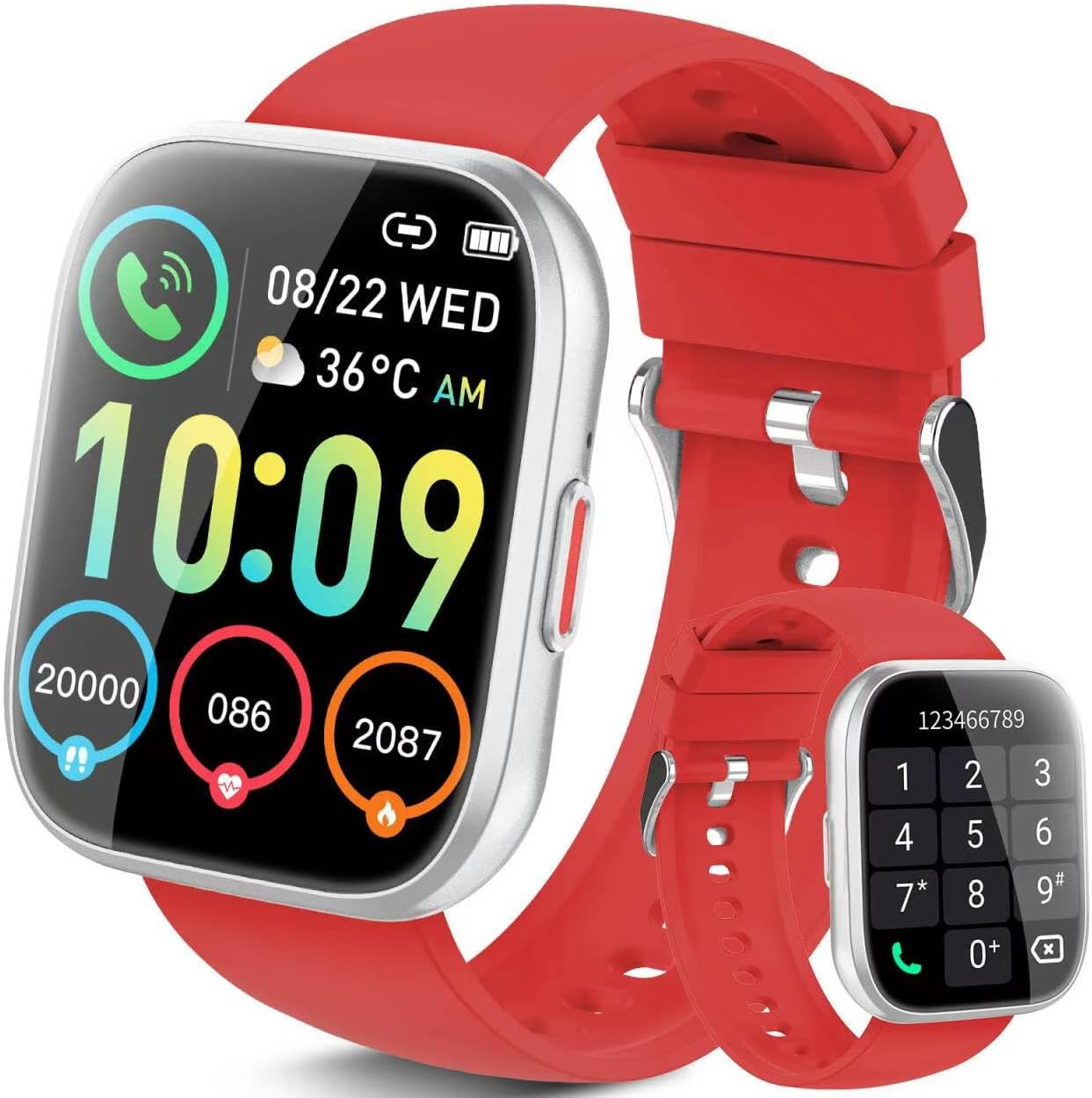
The image displays the Ddidbi Smartwatch P114 with a red silicone strap. The main screen shows the time '10:09', date '08/22 WED', temperature '36°C AM', and icons for calls, battery status, steps (20000), heart rate (086), and calorie burn (2087). An inset image shows the watch displaying a dial pad for making calls.
- Touchscreen Display: 1.85-inch HD screen for interactive control.
- Side Button: Typically used for power on/off, screen wake/sleep, and returning to the home screen.
- Sensors: Located on the back for heart rate monitoring and other health tracking functions.
- Charging Contacts: Magnetic contacts on the back for connecting the charging cable.
5. Setup
5.1. Charging the Smartwatch
Before first use, fully charge your smartwatch. Connect the magnetic charging cable to the charging contacts on the back of the watch and plug the USB end into a power adapter (not included) or a computer's USB port. The watch display will indicate charging status.
5.2. App Installation and Pairing
- Scan the QR code in the manual (if provided) or search for the companion app (e.g., 'Ddidbi Fit' or similar) in your smartphone's app store (Google Play Store for Android, Apple App Store for iOS).
- Download and install the app.
- Ensure Bluetooth is enabled on your smartphone.
- Open the app, create an account if prompted, and follow the on-screen instructions to add your device. Select 'P114' from the list of available devices.
- Confirm the pairing request on both your phone and the smartwatch.
5.3. Initial Configuration
After successful pairing, use the companion app to set your personal information (age, height, weight), preferred units, and other settings. This data helps improve the accuracy of health tracking features.
6. Operating Instructions
6.1. Basic Navigation
- Swipe Up/Down: Scroll through menus or view notifications.
- Swipe Left/Right: Access quick functions or different widgets (e.g., heart rate, weather).
- Tap: Select an item or open an application.
- Side Button Press: Return to the previous screen or home screen. Long press for power options.
6.2. Call Function
The Ddidbi Smartwatch P114 supports Bluetooth calling. Ensure your watch is connected to your phone via Bluetooth.
- Making Calls: Access the dial pad or contact list on your watch to initiate a call. The call audio will be routed through the watch's speaker and microphone.
- Receiving Calls: When a call comes in, the watch will display the caller ID. Tap the green icon to answer or the red icon to reject.
6.3. Notifications
Enable notification permissions for the companion app on your smartphone. You will receive alerts for incoming calls, messages, and social media apps (e.g., Facebook, WhatsApp, Instagram, Twitter) directly on your watch. Notifications are typically accompanied by a vibration.
6.4. Health Monitoring
The smartwatch continuously monitors various health metrics:
- Heart Rate: View your current heart rate and historical data in the app.
- Calorie Tracking: Estimates calories burned based on activity and personal data.
- Activity Tracking: Records steps taken and distance covered.
6.5. Sport Modes
Select from various sport modes (e.g., walking, running, cycling) to track specific workout data. The watch will record duration, calories burned, and heart rate during your activity.
6.6. Customization
Change your watch face through the companion app to personalize your device's appearance.
7. Maintenance
7.1. Cleaning
Wipe the watch screen and strap regularly with a soft, dry, lint-free cloth. Avoid using harsh chemicals or abrasive materials.
7.2. Water Resistance
The Ddidbi Smartwatch P114 is designed to be waterproof. However, it is not suitable for hot water, saunas, or deep diving. Avoid prolonged exposure to water and dry the watch thoroughly after contact with water.
7.3. Battery Care
To prolong battery life, avoid fully discharging the battery frequently. Charge the device regularly and avoid leaving it in extreme temperatures.
8. Troubleshooting
- Watch not turning on: Ensure the watch is fully charged. Connect it to the charger for at least 30 minutes.
- Cannot pair with phone:
- Ensure Bluetooth is enabled on your phone.
- Make sure the watch is within Bluetooth range of your phone.
- Restart both your phone and the smartwatch.
- Clear the app's cache or reinstall the app.
- No notifications received:
- Check if notification permissions are granted to the companion app in your phone's settings.
- Ensure the watch is connected via Bluetooth.
- Verify that 'Do Not Disturb' mode is not active on either the watch or phone.
- Inaccurate health data: Ensure the watch is worn snugly on your wrist, not too tight or too loose. Keep the sensors clean and free from debris.
9. Specifications
| Brand | Ddidbi |
| Model Number | P114 |
| Screen Size | 1.85 Inches |
| Operating System | Android (Compatible with Android and iOS) |
| Connectivity Technology | Bluetooth |
| Special Features | Heart Rate Monitoring, Notification, Calorie Tracking, Bluetooth Calling |
| Battery Composition | Lithium-polymer |
| Water Resistance | Yes (Waterproof) |
10. Warranty and Support
For warranty information or technical support, please refer to the documentation provided with your purchase or contact the seller/manufacturer directly. Keep your proof of purchase for warranty claims.
11. Compliance Information
This device complies with relevant regulatory standards for electronic devices. For detailed compliance information, please refer to the product packaging or contact customer support.
