
Introduction
Thank you for choosing the Furmax Vanity Desk. This manual provides essential information for the safe assembly, operation, and maintenance of your new vanity desk. Please read these instructions thoroughly before beginning assembly and retain them for future reference.
Safety Information
- Assembly: Ensure all parts are present and undamaged before assembly. Do not use power tools for assembly unless specifically instructed, as this may damage the product.
- Stability: Place the vanity desk on a flat, stable surface. Avoid placing heavy objects on the shelves or tabletop that exceed the desk's weight capacity.
- Electrical Safety: The integrated power outlet and USB ports are designed for standard household use. Do not overload the outlets. Ensure the power cord is not pinched or damaged. Unplug the unit from the wall outlet before cleaning or if any electrical issues arise.
- Mirror Care: Handle the mirror with care to prevent breakage. Clean with a soft, damp cloth and a mild glass cleaner.
- Children and Pets: Keep small parts and packaging materials away from children and pets during assembly. Do not allow children to climb on or play with the vanity desk.
Package Contents
Please verify that all components listed below are present in your package. If any parts are missing or damaged, contact Furmax customer support.
- Vanity Desk Panels (Tabletop, Side Panels, Back Panel, Drawer Components, Shelf Panels)
- Mirror with Integrated Lighting
- Power Outlet and USB Hub Assembly with Power Cord
- Hair Dryer Holder
- Bench Components (if included in your model)
- Hardware Pack (Screws, Dowels, Cam Locks, Drawer Slides, etc.)
- Light Bulbs (including spares)
- Assembly Instructions Manual
Setup and Assembly
Assembly of the Furmax Vanity Desk requires careful attention to detail. It is recommended to have two people for certain steps. Please refer to the separate, detailed assembly guide included in your package for step-by-step instructions and diagrams. The following provides a general overview:
- Unpack and Identify: Carefully unpack all components and lay them out on a clean, soft surface to prevent scratches. Identify each part using the provided labels and the assembly guide.
- Assemble Base Structure: Begin by assembling the main desk frame, attaching the side panels to the tabletop and back panel using the specified hardware.
- Install Drawers: Assemble the two drawers according to the instructions, then install the drawer slides onto both the drawers and the desk frame. Insert the assembled drawers into their respective compartments.
- Attach Mirror and Shelves: Securely attach the mirror unit to the main desk structure. Install the six storage shelves into their designated slots around the mirror.
- Install Electrical Components: Mount the power outlet and USB hub assembly. Carefully route and secure the power cord. Screw in the light bulbs into the mirror frame.
- Attach Hair Dryer Holder: Secure the hair dryer holder to the side of the desk as indicated in the assembly guide.
- Assemble Bench (if applicable): If your model includes a bench, assemble it following its specific instructions.
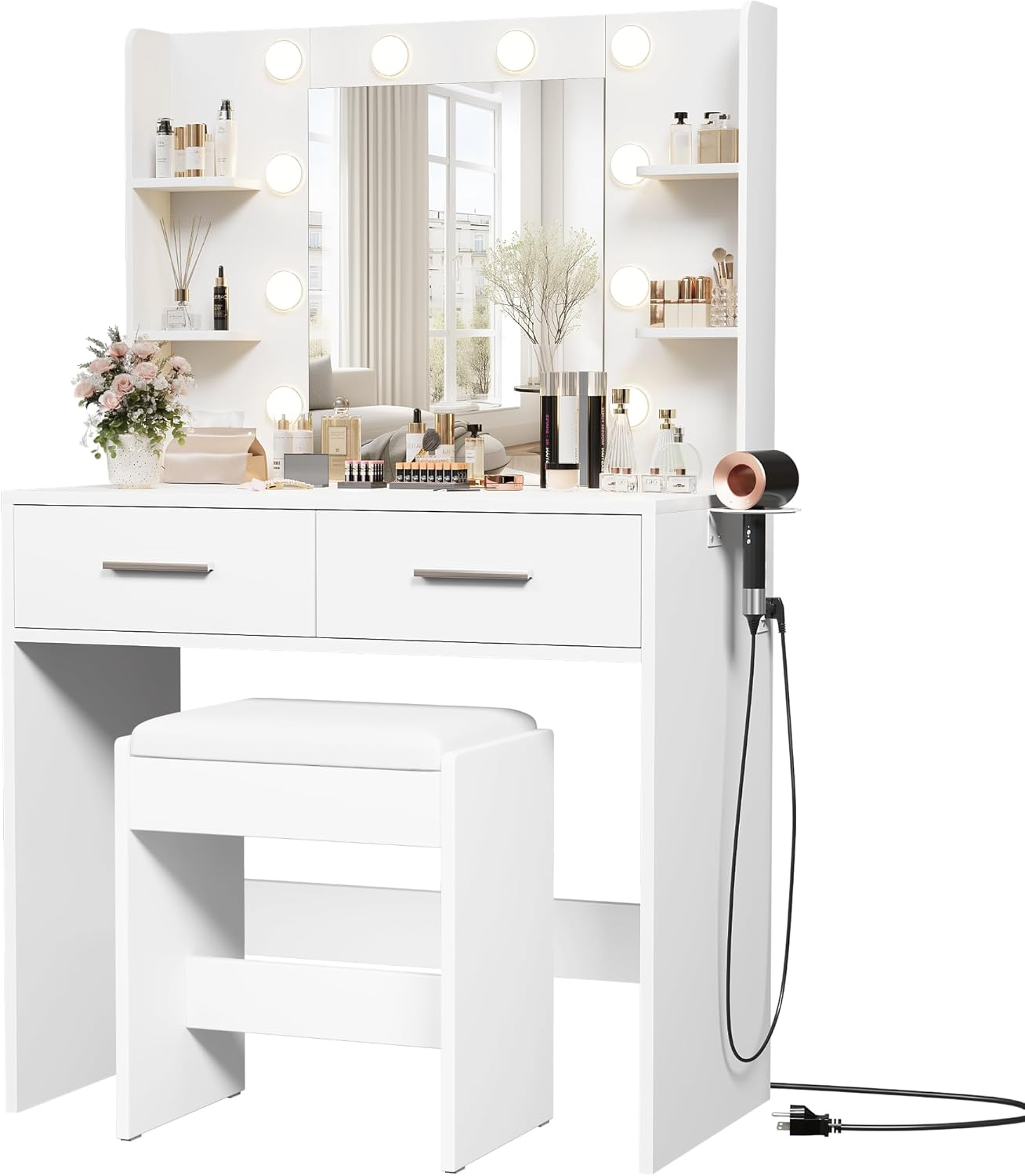
Image 1: Fully assembled Furmax Vanity Desk with mirror, lights, and accompanying bench.

Image 2: The Furmax Vanity Desk integrated into a bedroom environment, showcasing its functional design.
Operating Instructions
A. Mirror Lighting System
The vanity mirror features an integrated lighting system with adjustable color temperatures and brightness levels.
- Power On/Off: Locate the touch-sensitive switch on the mirror surface. Tap once to turn the lights on or off.
- Change Color Temperature: With the lights on, tap the touch switch repeatedly to cycle through the three available light colors: Cold Light, Natural Light, and Warm Light.
- Adjust Brightness: To adjust brightness, press and hold the touch switch. The brightness will gradually increase or decrease. Release the switch when the desired brightness is achieved.

Image 3: Illustration of the three intelligent brightness settings: Cold Light, Natural Light, and Warm Light, suitable for various makeup applications.
B. Power Outlet and USB Charging Hub
The vanity desk includes a convenient power strip with two standard AC outlets and two USB charging ports.
- AC Outlets: Plug in hair styling tools, small appliances, or other electronic devices into the 125V/12A AC outlets.
- USB Ports: Use the 5V/2A USB ports to charge smartphones, tablets, or other USB-powered devices.
- Usage: Ensure the vanity desk's main power cord is plugged into a wall outlet for the charging hub to function.
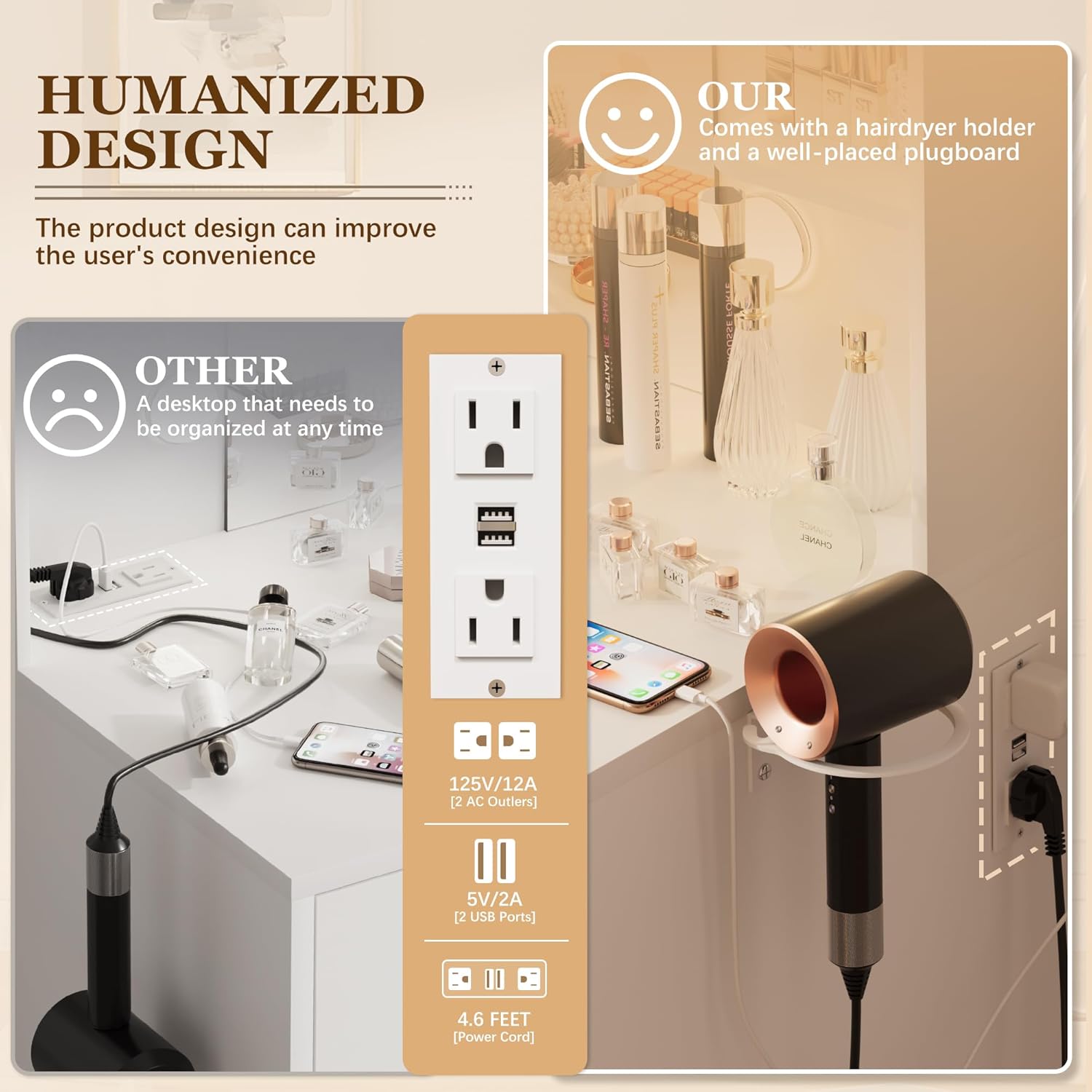
Image 4: Close-up view of the integrated power strip with two AC outlets and two USB ports, alongside the dedicated hairdryer holder.
C. Storage and Hair Dryer Stand
Utilize the various storage options and the dedicated hair dryer stand for organization.
- Drawers: The two spacious drawers provide concealed storage for cosmetics, accessories, and personal items.
- Shelves: The six open shelves around the mirror are ideal for displaying frequently used items, decorative pieces, or smaller beauty products.
- Hair Dryer Stand: Place your hair dryer in the designated holder on the side of the desk for easy access and organized storage.

Image 5: Overview of the vanity desk's storage capabilities, including open shelves, a large desktop, and multiple drawers for efficient organization.
Maintenance
- Cleaning: Wipe the desk surfaces with a soft, damp cloth. Avoid harsh chemicals or abrasive cleaners that could damage the finish. For the mirror, use a glass cleaner and a lint-free cloth.
- Dusting: Regularly dust all surfaces to prevent buildup.
- Spills: Clean up spills immediately to prevent staining or damage to the wood finish.
- Light Bulbs: If a light bulb burns out, replace it with a compatible bulb. Your package includes spare bulbs. Ensure the unit is unplugged before replacing bulbs.
Troubleshooting
| Problem | Possible Cause | Solution |
|---|---|---|
| Lights not turning on. | Power cord unplugged; faulty bulb; touch switch malfunction. | Ensure power cord is securely plugged in. Check if bulbs are screwed in tightly or need replacement. Contact support if touch switch is unresponsive. |
| Power outlets/USB ports not working. | Vanity desk not plugged in; circuit overload. | Verify the vanity desk's main power cord is plugged into a functional wall outlet. Unplug some devices to check for overload. |
| Drawers are stiff or not closing smoothly. | Improper assembly of drawer slides; obstruction. | Review assembly instructions for drawer slide installation. Check for any objects obstructing the drawer path. |
Specifications
- Model: VN0497
- Brand: Furmax
- Material: Wood
- Product Dimensions: 31.5" (W) x 15.8" (D) x 53.8" (H)
- Item Weight: Approximately 67 pounds
- Power Outlet: 2 x 125V/12A AC Outlets
- USB Ports: 2 x 5V/2A USB Ports
- Lighting: 3 Color Options (Cold, Natural, Warm), Adjustable Brightness
- Storage: 2 Drawers, 6 Shelves
- Assembly Required: Yes
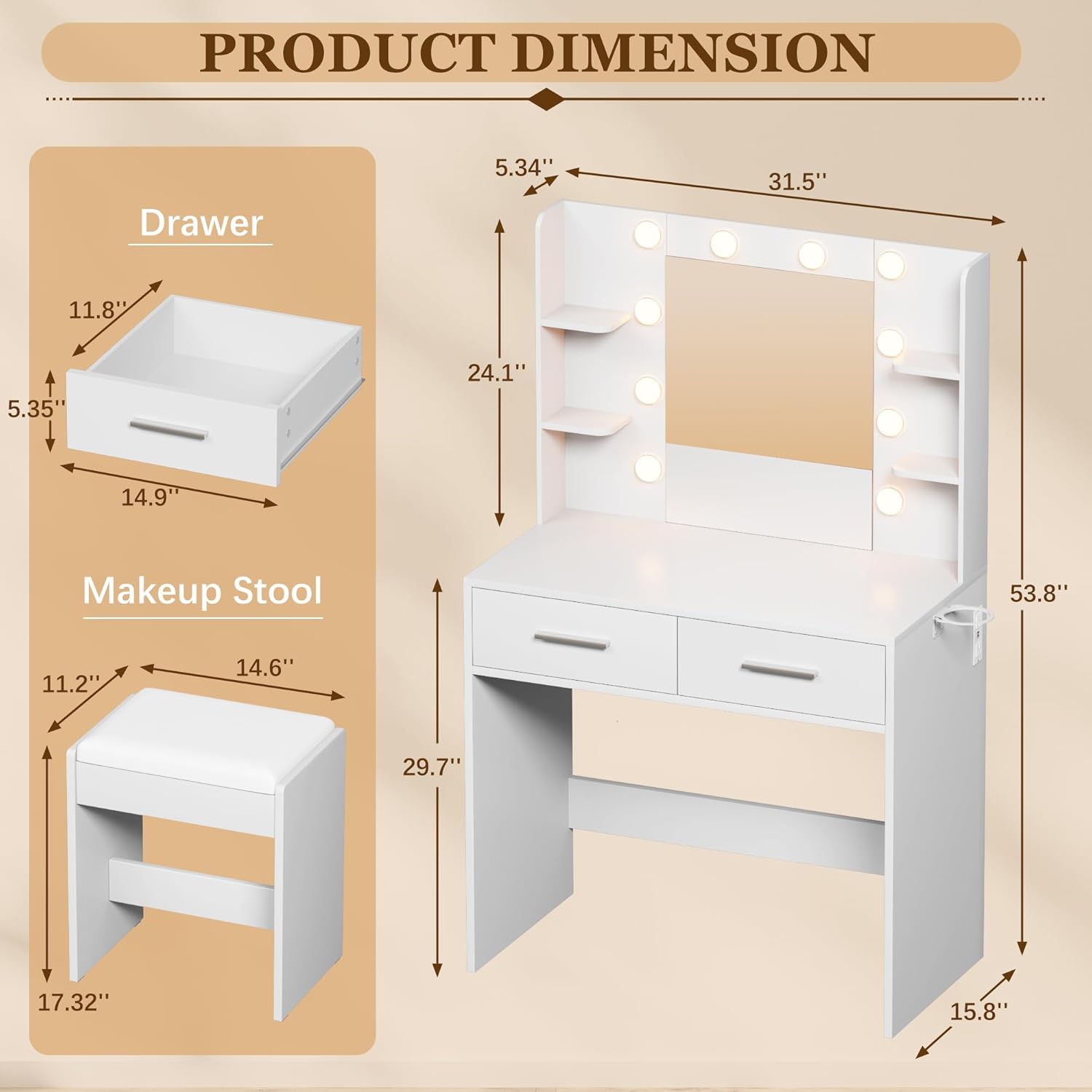
Image 6: Detailed diagram showing the dimensions of the Furmax Vanity Desk and its components, including drawer and stool measurements.
Warranty and Support
For warranty information, product support, or to report missing/damaged parts, please contact Furmax customer service directly. Refer to the contact information provided in your product packaging or visit the official Furmax website. Amazon's return policy typically allows for returns within 30 days of purchase.
Online Support: For additional resources and FAQs, please visit the Furmax Store on Amazon.
