
1. Product Overview
The Wulcea Graphene Heated Jacket is designed to provide superior warmth and comfort in cold environments. Featuring advanced graphene heating technology and a high-capacity battery pack, this jacket offers customizable warmth for extended periods. Its durable, windproof, and waterproof design ensures protection against various weather conditions.

Image 1.1: Front view of the Wulcea Graphene Heated Jacket.
Key Features:
- Graphene Heating Technology: Provides rapid, consistent, and evenly distributed heat.
- High-Capacity Battery: Includes a 12V 18,400mAh fast-charging power bank for extended heating duration.
- Multiple Heat Zones: Strategically placed heating elements for targeted warmth.
- Durable Construction: Windproof and waterproof exterior with a comfortable fleece lining.
- Stylish Design: Combines functionality with a modern aesthetic.
2. Safety Information
Your safety is paramount. The Wulcea Graphene Heated Jacket utilizes advanced graphene heating elements designed for even heat distribution and reduced risk of hot spots, unlike traditional linear heating wires. Always follow these guidelines:
- Do not use the jacket if the heating elements or wiring appear damaged.
- Avoid folding the jacket tightly when the heating function is active to prevent damage to the elements.
- Keep the battery pack dry and away from extreme temperatures.
- Disconnect the battery pack before washing the jacket.
- If you experience discomfort or excessive heat, immediately turn off the jacket and disconnect the battery.
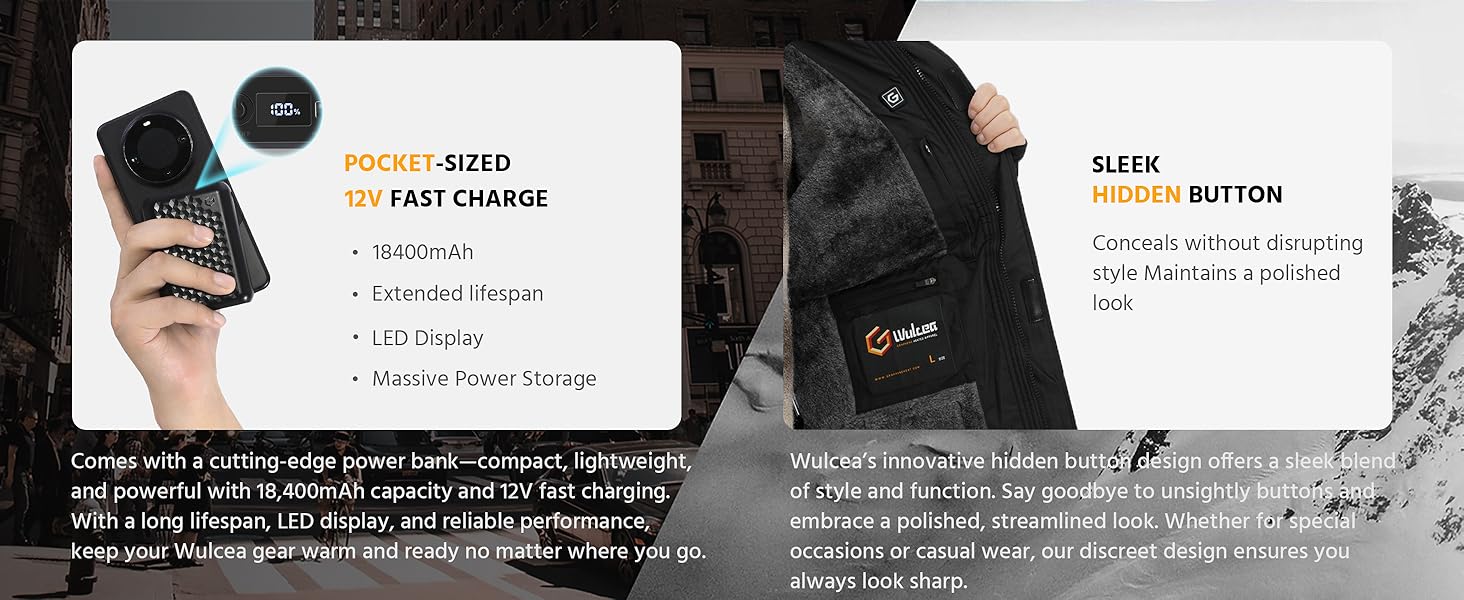
Image 2.1: Graphene heating provides even warmth, reducing the risk of localized hot spots associated with traditional linear heating.
Video 2.1: This video illustrates the difference between graphene infrared heating and traditional copper wire heating, highlighting the even heat distribution of graphene technology.
3. Package Contents
Upon opening your Wulcea Graphene Heated Jacket package, please ensure all the following items are present:
- 1 x Wulcea Graphene Heated Jacket
- 1 x 12V 18,400mAh Power Bank
- 1 x Charging Cable for Power Bank
- 1 x User Manual (this document)
4. Setup and Charging
4.1 Charging the Power Bank
Before first use, fully charge the included 12V 18,400mAh power bank. Connect the charging cable to the power bank and plug it into a suitable power source. The LED display on the power bank will indicate the charging status and battery level. A full charge typically takes approximately 4.5 hours from a depleted state.

Image 4.1: The included 12V 18,400mAh power bank.
4.2 Connecting the Power Bank to the Jacket
- Locate the battery pocket inside the jacket, typically on the left side.
- Inside the pocket, you will find a connecting cable.
- Connect the cable from the jacket to the designated port on the fully charged power bank.
- Place the power bank securely into the pocket and zip it closed.

Image 4.2: Power bank connected inside the jacket pocket.
Video 4.1: This video demonstrates the features of the jacket, including how to connect the power bank.
5. Operating Instructions
5.1 Powering On/Off and Adjusting Heat Settings
Once the power bank is connected, locate the power button on the inside lapel of the jacket. This button controls the heating function and allows you to cycle through heat settings.
- To Power On: Press and hold the power button for approximately 3 seconds until it illuminates. The jacket will typically start on the High heat setting (Red light).
- To Adjust Heat: Briefly press the power button to cycle through the heat settings:
- High Heat (Red Light): Approximately 131°F (55°C), lasting 3-4 hours.
- Medium Heat (Blue Light): Approximately 113°F (45°C), lasting 5-6 hours.
- Gentle Heat (Green Light): Approximately 95°F (35°C), lasting 8-10 hours.
- To Power Off: Press and hold the power button for approximately 3 seconds until the light turns off. Alternatively, you can disconnect the power bank.

Image 5.1: Heat settings and estimated battery life.

Image 5.2: The discreetly placed power button.
5.2 Heat Zones
The jacket features multiple graphene heating zones strategically placed to provide warmth to key areas of your body, including the back, chest, and neck. This design ensures comprehensive and comfortable heating.

Image 5.3: Illustration of the 6 smart heat zones.
Video 5.1: This video provides a brief overview of the Wulcea Graphene Heated Jacket's heating capabilities and operation.
6. Care and Maintenance
Proper care will extend the life and performance of your heated jacket.
6.1 Washing Instructions
- Disconnect Power: Always ensure the power bank is disconnected and removed from the jacket before washing.
- Hand Wash: Hand washing is recommended for best results. Use cold water and a mild detergent.
- Machine Wash: If machine washing, use a gentle cycle with cold water. Place the jacket in a laundry bag to protect the heating elements.
- Do Not Bleach: Avoid using bleach or harsh chemicals.
- Do Not Wring: Gently squeeze out excess water.
- Air Dry: Hang the jacket to air dry completely before reconnecting the power bank or wearing. Do not tumble dry or iron.
6.2 Storage
Store the jacket in a cool, dry place when not in use. Ensure the power bank is fully charged before long-term storage to maintain battery health.

Image 6.1: Key features like the detachable hood, waterproof fabric, and fleece lining contribute to the jacket's durability and ease of care.
7. Troubleshooting
If you encounter issues with your Wulcea Graphene Heated Jacket, please refer to the common problems and solutions below. For further assistance, contact customer support.
| Problem | Possible Cause | Solution |
|---|---|---|
| Jacket not heating | Power bank not connected or discharged; power button not activated. | Ensure power bank is fully charged and securely connected. Press and hold the power button for 3 seconds to activate. |
| Uneven or localized heating | Damage to heating elements; improper fit of jacket. | Ensure the jacket fits snugly to allow heating elements to make proper contact. If issue persists, contact support. |
| Power bank not charging | Faulty charging cable or adapter; power bank issue. | Try a different charging cable and adapter. Ensure connections are secure. If still not charging, contact support. |
| Jacket turns off unexpectedly | Low battery on power bank; safety shutdown. | Recharge the power bank. If the jacket repeatedly shuts off with a charged battery, contact support. |
Video 7.1: This video provides a detailed troubleshooting guide and instructions for common issues.
8. Product Specifications
| Feature | Detail |
|---|---|
| Model Number | RTAX-018A |
| Brand | Wulcea |
| Material | 100% Polyester (Outer Fabric), Polyester Fleece (Lining) |
| Battery Type | 12V 18,400mAh Lithium-ion (included) |
| Heat Settings | High (131°F/55°C), Medium (113°F/45°C), Low (95°F/35°C) |
| Estimated Battery Life | 3-4 hours (High), 5-6 hours (Medium), 8-10 hours (Low) |
| Care Instructions | Machine Wash, Hand Wash (remove battery) |
| Climate Suitability | Cold Weather |
| Features | Graphene heating, Fur Lined, Detachable Hood, Windproof, Waterproof |
8.1 Garment Measurements
Please refer to the sizing chart below to ensure the correct fit. Measurements are approximate and may vary slightly.

Image 8.1: Detailed garment measurements by size.
9. Warranty and Support
Wulcea products are manufactured with quality and customer satisfaction in mind. While specific warranty details are not provided in this manual, please retain your proof of purchase for any warranty claims. For product support, technical assistance, or warranty inquiries, please contact the seller or refer to the contact information provided with your purchase.
