
1. Introduction
This manual provides essential information for the safe and efficient operation of your boogostore Portable Charger, Model PS-160. This device is a high-capacity power bank designed for charging various electronic devices on the go. It features multiple charging options, including built-in cables, a wall plug, and solar charging capabilities, along with additional functionalities like dual LED flashlights and a phone holder.
2. Product Overview
The boogostore PS-160 Portable Charger is equipped with a 50000mAh battery, offering substantial power for multiple charges of your devices. Its compact design integrates various charging interfaces and utility features.
Key Components:
- Built-in Cables: Micro USB, Type-C, and Lightning output cables for direct device connection.
- AC Wall Plug: Retractable plug for direct wall charging of the power bank.
- Solar Panel: Integrated panel for auxiliary solar charging.
- USB Output Port: Standard USB-A port for additional device charging.
- Type-C Input/Output Port: Versatile port for both charging the power bank and charging devices.
- Dual LED Flashlights: For illumination in low-light conditions.
- Phone Holder: A pull-out bracket to support your mobile phone.
- Battery Indicator: LED lights to show remaining power.
- Power Button: Controls power and flashlight functions.

Figure 1: Overview of the boogostore PS-160 Portable Charger's features, including built-in cables, ports, solar panel, and wall plug.
Video 1: An unboxing and demonstration of the boogostore PS-160 Portable Charger, showcasing its features and how to use them.
3. Setup
Before initial use, it is recommended to fully charge the power bank using a wall adapter and cable for optimal performance. This ensures the internal battery is calibrated and ready for use.
Charging the Power Bank:
Your power bank can be charged using three methods:
- AC Wall Plug: Extend the built-in AC plug and insert it directly into a wall outlet.
- USB Cable Charging: Connect a USB cable to the power bank's Type-C input port and a USB power adapter.
- Solar Charging: Place the power bank in direct sunlight. The solar panel acts as an auxiliary emergency charging method. The battery indicator will flash when solar charging is active.

Figure 2: Illustration of the three charging methods for the power bank: via USB cable, direct wall plug, and solar energy.
4. Operating Instructions
Charging Mobile Devices:
The power bank offers multiple output options to charge your devices:
- Built-in Cables: Select the appropriate built-in cable (Micro USB, Type-C, or Lightning) and connect it directly to your device.
- USB Output Port: Use your device's own USB charging cable and plug it into the USB-A output port on the power bank.
- Type-C Output Port: Use a Type-C to Type-C cable (not included) to connect your device to the power bank's Type-C port.
The power bank supports fast charging with up to 22.5W output, allowing quick recharges for compatible devices.
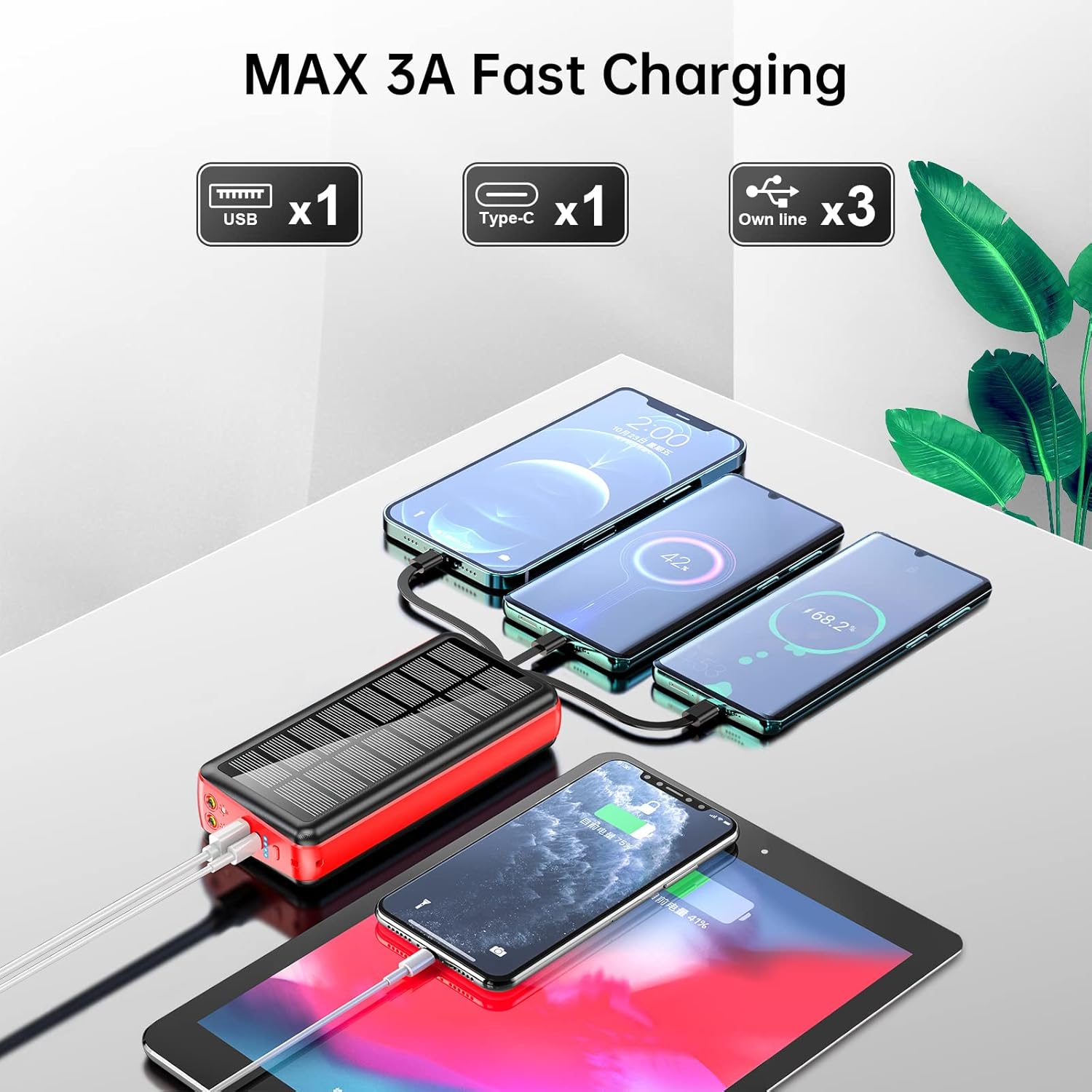
Figure 3: The power bank charging multiple devices simultaneously, demonstrating its versatile output capabilities.
Using the LED Flashlights:
To activate the dual LED flashlights, long press the power button for 3 seconds. To turn them off, long press the power button again for 3 seconds.

Figure 4: The power bank's dual LED flashlights providing illumination, useful for outdoor activities.
Using the Phone Holder:
The power bank includes a pull-out bracket that functions as a phone holder. Simply extend the bracket to prop up your smartphone, allowing for hands-free viewing while charging.

Figure 5: A smartphone utilizing the integrated pull-out phone holder on the power bank for convenient viewing.
5. Safety Information
To ensure safe operation and prolong the life of your power bank, please observe the following:
- Do not place the product in fire; there is a risk of explosion.
- Do not drop the charger, knock it hard, disassemble it, or attempt to repair it.
- Avoid charging or using the device in a completely enclosed car or in direct sunlight for extended periods to prevent overheating.
- Do not expose to corrosive and inflammable liquids.
- Optimal use temperature is 15-25°C. Avoid extreme high or low temperatures.
- Dispose of waste electronic products in accordance with local regulations.
- The power bank provides short circuit protection, over current protection, over voltage, and over heat protection to ensure safe charging.

Figure 6: Safety features of the power bank, including protection against overcurrent, short-circuit, over-discharge, and extreme temperatures.
6. Specifications
| Feature | Specification |
|---|---|
| Model | PS-160 |
| Battery Capacity | 50000mAh (185Wh) |
| Product Dimensions | 6.42 x 2.91 x 1.18 inches |
| Item Weight | 1.17 pounds |
| Built-in Line Output | 5V/2A |
| USB Output | 4.5V/5A, 5V/4.5A, 9V/2A, 12V/1.5A (Max 22.5W) |
| Type-C Output | 5V/3A, 9V/2.22A, 12V/1.67A (PD 20W) |
| Type-C Input | 5V/3A, 9V/2A, 12V/1.5A (PD 18W) |
| AC Plug Input | 5V/2A |
| Special Features | Built-in Cable, Built-in Wall Plug, Fast Charging, Flashlight, Phone Holder, Solar Charging |
| Manufacturer | Shenzhen Ente Intelligent Co., Ltd. |
7. Troubleshooting
- Device not charging: Ensure the power bank is sufficiently charged. Check that cables are securely connected to both the power bank and your device. Press the power button to activate output if necessary.
- Slow charging: Verify that your device supports fast charging and that the correct port/cable is being used. Ensure the power bank itself is fully charged.
- Flashlight not turning on/off: Ensure you are long-pressing the power button for 3 seconds, not just a short press.
- Solar charging indicator not flashing: Ensure the solar panel is exposed to direct sunlight. Note that solar charging is an auxiliary feature and may be slower than other methods.
8. Warranty and Support
The boogostore Portable Charger comes with a commitment to quality and customer satisfaction. If you encounter any issues or have questions regarding your product, please contact customer support. The manufacturer provides power short circuit protection, over current protection, over voltage, and over heat protection to ensure safe charging.
For any problems, please contact us, and we will endeavor to resolve it within 12 hours.