
Product Overview
The Miracase Magnetic Full-Body Case for iPhone 16 Pro provides comprehensive protection for your device. It features a built-in glass screen protector, military-grade drop protection, and seamless compatibility with MagSafe accessories. This manual provides instructions for installation, usage, maintenance, and troubleshooting.
Package Contents
- 16 Pro Case (Front and Back Sections)
- Camera Protector
- Built-in Screen Protector (integrated into the front section)
Installation Guide
Step 1: Prepare Your Device
Ensure your iPhone 16 Pro is clean and free of any dust, fingerprints, or debris. A clean surface is crucial for optimal screen protector adhesion and clarity.
Step 2: Install the Front Cover
Carefully place the front cover onto your iPhone, aligning it precisely with the screen. The built-in screen protector should lay flat without bubbles. Gently press around the edges to secure it.

Image: A visual representation of the front cover being placed onto the iPhone 16 Pro, highlighting the built-in screen protector.
Step 3: Install the Back Cover
Once the front cover is securely in place, align the back cover with the front cover. Starting from the bottom, press firmly around the edges until both sections snap together completely, enclosing your device.
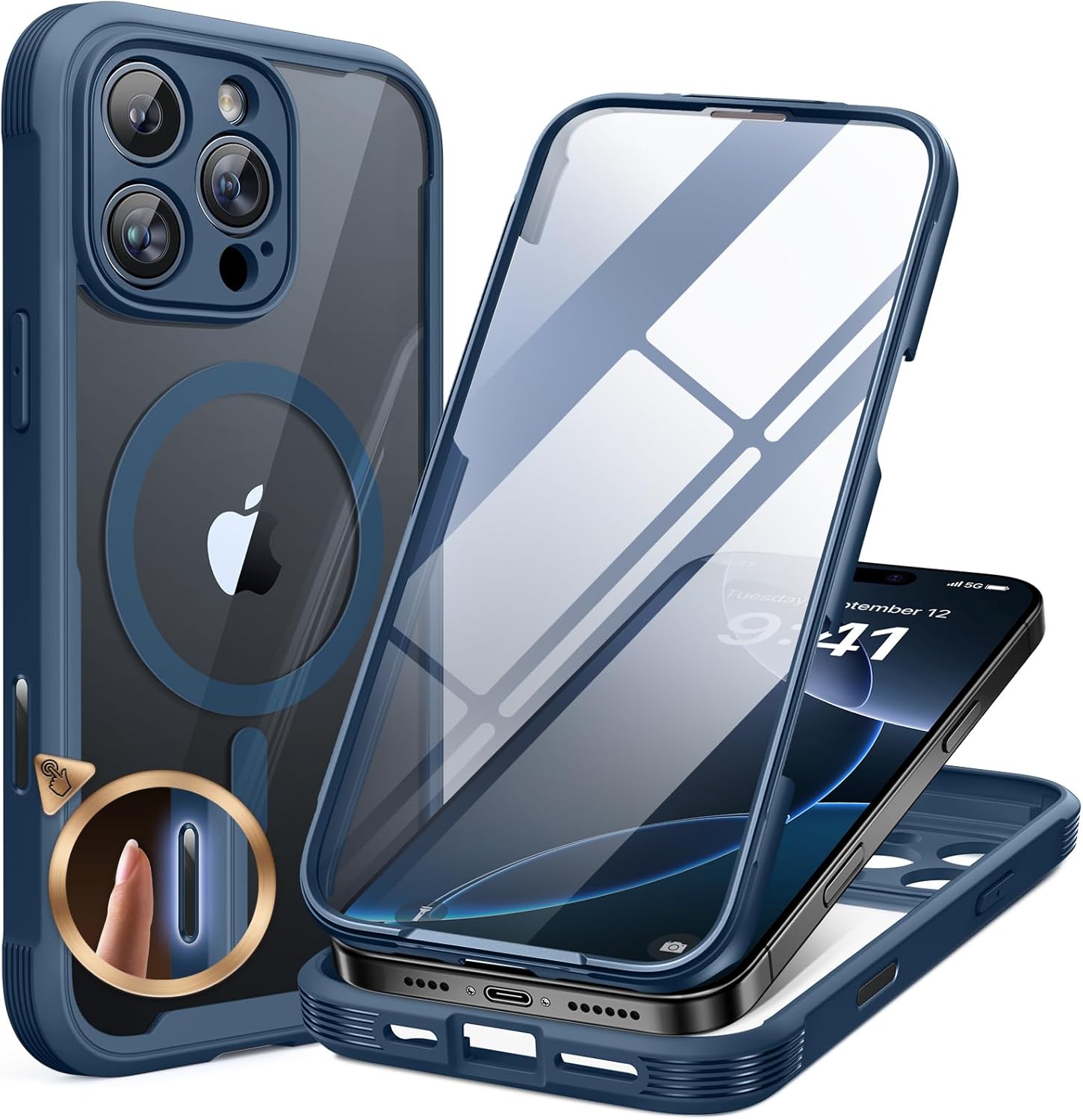
Image: A visual representation of the back cover being attached to the iPhone 16 Pro, securing the device within the case.
Key Features
Built-in 9H Glass Screen Protector
The case includes an integrated 9H tempered glass screen protector, designed to prevent scratches and cracks without affecting touch sensitivity. This eliminates the need for a separate screen protector and ensures a bubble-free application.

Image: An illustration demonstrating the integrated 9H tempered glass screen protector safeguarding the iPhone screen from impacts.
Full-Body Protection & Unique Camera Control
Engineered for military-grade drop protection, this dual-layer case offers 360-degree coverage. It features a unique camera control design that protects the camera module while maintaining original touch functionality.

Image: A depiction of the case's robust construction, highlighting its full-body coverage and the specialized camera protection.
MagSafe Compatibility
An upgraded third-generation magnetic ring is built into the case, ensuring strong compatibility with all MagSafe accessories. This allows for faster, easier, and more secure wireless charging and accessory attachment.

Image: The case showcasing its integrated magnetic ring, demonstrating compatibility with various MagSafe accessories like chargers and wallets.
Crystal Clear Design
The diamond-hard clear back panel allows the original color and design of your iPhone 16 Pro to be visible, maintaining its aesthetic appeal without yellowing over time.

Image: The clear back of the case, allowing the iPhone's original color to shine through, emphasizing its non-yellowing properties.
Usage and Operation
General Use
The case is designed for daily use, providing protection against drops, scratches, and impacts. All ports, buttons, and speakers remain accessible and functional with the case installed.
MagSafe Accessories
To use MagSafe accessories, simply align your MagSafe charger, wallet, or other compatible accessories to the back of the case. The strong magnetic connection will hold them securely in place.
Camera Control
The unique camera control design allows for normal operation of your iPhone's camera functions while providing enhanced protection for the lenses.
Maintenance
To clean your Miracase case, gently wipe it with a soft, damp cloth. Avoid using harsh chemicals, abrasive cleaners, or alcohol-based solutions, as these may damage the case material or its clear finish. Regular cleaning will help maintain its appearance and clarity.
Troubleshooting
Screen Protector Bubbles
The built-in screen protector is designed for a bubble-free fit. If bubbles appear during installation, carefully remove the front cover, clean the screen again, and re-align the front cover for a smoother application.
Product Issues
For any product issues or concerns not covered in this manual, please contact Miracase customer support for assistance or a replacement. Refer to the contact information provided with your purchase.
Specifications
- Product Dimensions: 6.3 x 3.94 x 0.63 inches
- Item Weight: 3.84 ounces
- Material: Tempered Glass
- Compatible Phone Models: iPhone 16 Pro
- Special Features: Built-in Screen Protector, Camera Protector, MagSafe Compatible
Warranty and Support
Miracase provides product support for any manufacturing defects or issues encountered with your case. For warranty claims or technical assistance, please contact Miracase directly through their official website or the retailer where the product was purchased. Keep your proof of purchase for warranty validation.