
Introduction
The VASTEND Magnetic Solar Wireless Backup Camera System is designed to provide a clear and reliable rear view for various vehicles, enhancing safety and convenience during reversing and driving. Its innovative magnetic and solar-powered design ensures easy installation and long-lasting performance without complex wiring.
Setup
Package Contents
Before beginning installation, please ensure all components are present:
- 1* 7.0 Inch Monitor
- 1* Magnetic Solar Camera
- 1* Sunshade for Monitor
- 1* U-bracket for Monitor
- 1* Power Cable for Monitor
- 1* USB to Type-C Cable for Camera
- 3* Antennas
- 1* Cigarette Lighter Adapter
- 1* Mounting Screw Set
- 1* Product Instruction
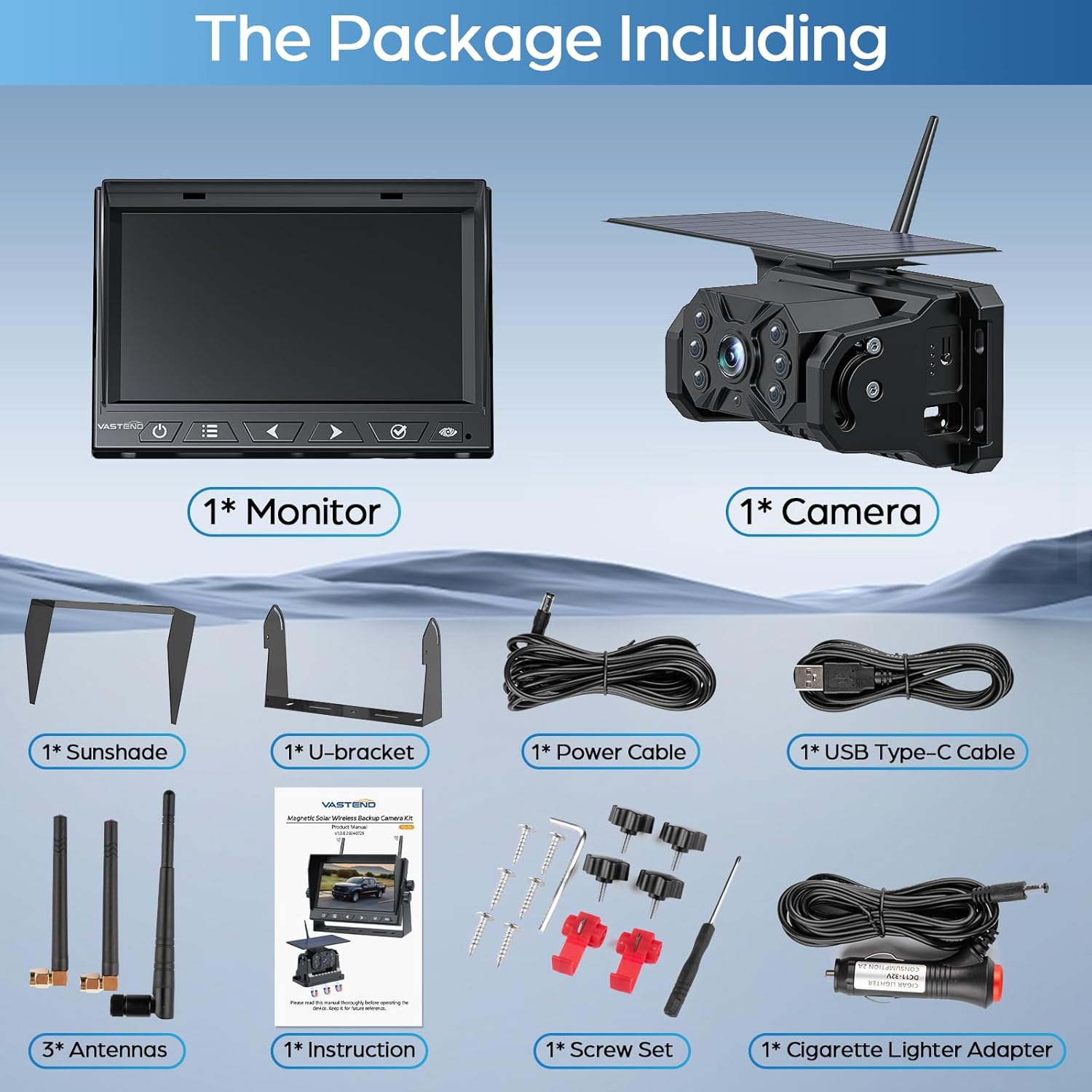
Image: All components included in the VASTEND Magnetic Solar Wireless Backup Camera system package.
Monitor Setup
Attach the U-shaped bracket to the monitor using the provided screws. The monitor can be mounted on your dashboard using the bracket. Connect the monitor to the cigarette lighter adapter for power. The monitor features touch keys for easy navigation.

Image: The VASTEND 7-inch monitor and magnetic solar camera components.

Image: Visual guide for quick installation of the camera and monitor.
Camera Setup
The magnetic solar camera can be firmly absorbed onto any metal surface of your vehicle. Ensure the surface is clean and free of debris for optimal magnetic adhesion. The base is wrapped with soft rubber to prevent scratches. Install the camera antenna by threading it through the designated port.
Video: Instructions on how to install the U-shaped bracket and sunshade for the monitor.
Powering On and Pairing
After connecting the monitor, briefly press the power button on the camera to turn it on. The monitor should automatically display the camera feed. If not, you may need to pair the devices. To pair, access the monitor's menu and select the 'Pairing' option. Follow the on-screen prompts.
Video: Demonstrates how to pair a second backup camera to the monitor.
Video: Guide on how to test the system before installation.
SD Card Installation
The monitor supports DVR loop recording. To use this feature, insert an SD card (up to 512GB, not included) into the designated slot on the back of the monitor. You may need to loosen a small screw to access the slot. Format the SD card through the monitor's system settings before first use.
Operating
Monitor Functions and Settings
The 7-inch monitor provides a clear 1080P HD image. You can adjust various settings through the menu:
- Image Settings: Adjust brightness, contrast, and color saturation.
- Mirror-Flip: Flip the image horizontally or vertically to suit your viewing preference.
- System Settings: Configure language, time, and auto-sleep functions.
- Recording: Enable or disable loop recording.
- Playback: View recorded footage from the SD card.

Image: The 7-inch monitor supports full screen and split screen modes for up to two cameras.
Video: Introduction to the 6 main functions of the Magnetic Wireless Backup Camera.
Backup Guidelines
The monitor displays adjustable backup guidelines (P-Lines) to assist with precise maneuvering. These lines can be turned on or off via the system settings menu.
Energy Saving System
When the monitor is turned off, the camera will automatically enter an energy-saving sleep mode to conserve battery life. This prolongs the battery's operational time and reduces the need for manual power management.
Video: Demonstrates the automatic sleep mode feature of the VASTEND VS-7A Magnetic Backup Camera.
Night Vision
The camera is equipped with infrared sensors for clear night vision, providing sharp black and white images in low-light conditions, enhancing safety during nighttime operations.
Maintenance
Battery Charging
The camera features a built-in 10000mAh rechargeable lithium-ion battery. It can be charged via the 5V-2A USB Type-C charging cable. A full charge takes approximately 5 hours and provides up to 30 hours of use. The solar panel also continuously charges the battery when exposed to sunlight.

Image: The 10000mAh large capacity battery with multiple power supply options.
Waterproof and Durability
The camera is designed with IP69 waterproof performance, ensuring it functions reliably in various weather conditions, including rain, wind, and dust. It is built to withstand extreme temperatures ranging from -10℃ to 65℃.

Image: The camera's IP69 waterproof and infrared night vision capabilities.
Troubleshooting
If you encounter any issues with your VASTEND backup camera system, please refer to the following common troubleshooting steps:
- No Signal: Ensure both the camera and monitor are powered on and fully charged. Check that the antennas are securely attached. Try re-pairing the camera and monitor through the monitor's settings.
- Poor Image Quality: Verify the camera lens is clean and free from obstructions. Adjust brightness, contrast, and saturation settings on the monitor. Ensure the camera is within the recommended 60ft range for optimal signal.
- Recording Issues: Confirm an SD card is inserted and properly formatted. Check if the SD card has sufficient free space. Ensure loop recording is enabled in the settings.
- Battery Draining Quickly: Verify the solar panel is clean and receiving adequate sunlight. Ensure the energy-saving sleep mode is functioning correctly.
For further assistance, please contact VASTEND customer support.
Specifications
| Feature | Specification |
|---|---|
| Product Dimensions | 10.4 x 7.5 x 3.3 inches |
| Item Weight | 3.94 pounds |
| Model Number | VS-7A |
| Display Technology | LCD |
| Screen Size | 7 Inches |
| Video Capture Resolution | 1080p |
| Voltage | 12 Volts (DC) |
| Lens Type | Wide Angle |
| Real Angle of View | 170 Degrees |
| Waterproof Rating | IP69 |
| Operating Temperature | -10℃ to 65℃ |
| Battery Capacity | 10000mAh |
Warranty and Support
The VASTEND Magnetic Solar Wireless Backup Camera System comes with a 30-day money-back guarantee and a 2-year warranty. During this period, you will receive technical support and replacement services for any manufacturing defects or issues. For any inquiries or support, please refer to the contact information provided in your product packaging or visit the official VASTEND website.