
AOHI AOC-P011
AOHI 240W Laptop Power Bank (Model AOC-P011) User Manual
Model: AOC-P011
1. Introduction
This manual provides detailed instructions for the safe and efficient use of your AOHI 240W Laptop Power Bank, Model AOC-P011. This portable fast charger features a 27,600mAh capacity, 240W total output with PD 3.1 technology, and is designed for charging a wide range of devices including laptops, tablets, and smartphones. Please read this manual thoroughly before operation and retain it for future reference.

Image 1: AOHI 240W Laptop Power Bank (Model AOC-P011) with its included USB-C to USB-C cable.
2. What's in the Box
Verify that all items are present upon unboxing:
- AOHI The Future Starship 240W PD3.1 Power Bank
- 140W USB-C to USB-C Cable (3 ft / 1m)
- Quick Start Guide

Image 2: Packaging contents of the AOHI 240W Laptop Power Bank.
3. Key Features
- Ultra-High Capacity: 27,600mAh (99.36Wh) battery, compliant with TSA regulations for carry-on luggage.
- High Power Output: Up to 240W total output, with dual USB-C ports delivering up to 140W each and one USB-A port delivering up to 22.5W.
- Fast Recharge: Supports 140W input via either USB-C port, allowing a 50% recharge in approximately 30 minutes.
- Smart Digital Display: Real-time display of remaining battery capacity and input/output power.
- 3-Stage Smart Charging: LED indicator for Fast Charging (Amber breathing), Standard Charging (Blue solid), and Trickle Charging (Green solid).
- Advanced Safety: Utilizes automotive-grade battery cells and features 15 layers of built-in safety protection, including temperature control and over-charge protection.
- Broad Compatibility: Compatible with over 1000 devices, including MacBook, iPad, iPhone, Galaxy, Steam Deck, and more.
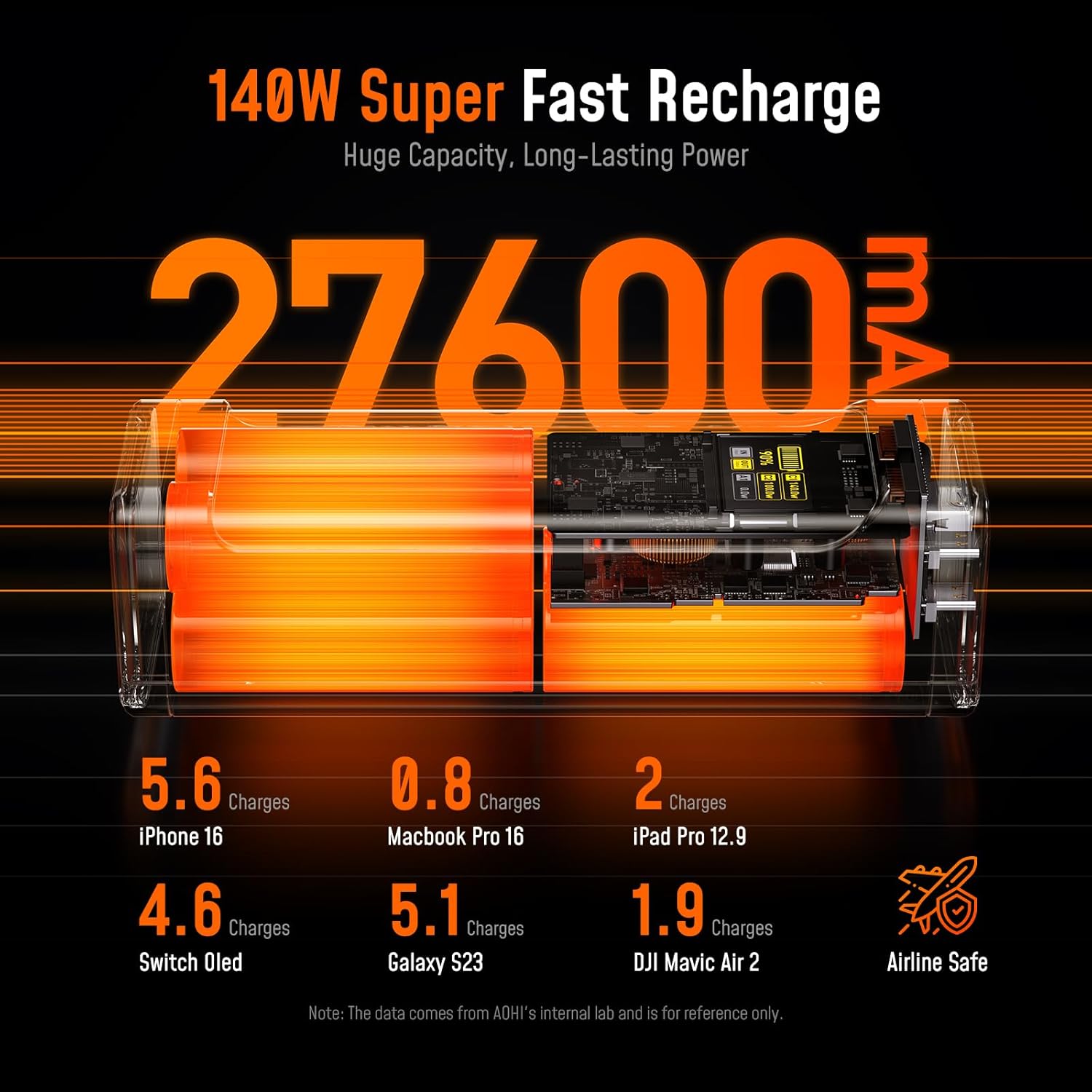
Image 3: High capacity and airline compliance of the power bank.

Image 4: Portability and versatile use cases of the AOHI power bank.
4. Setup and Initial Charging
4.1 Initial Charge
Before first use, fully charge your AOHI Power Bank. Use the included 140W USB-C to USB-C cable and a compatible power adapter (not included) to connect either USB-C port on the power bank to a power source. The digital display will show the charging status.
- A 140W power adapter is recommended for the fastest recharge time (approximately 30 minutes to 50%).
- The digital display indicates the battery percentage and input wattage.

Image 5: Real-time Smart Digital Display showing charging status.
5. Operating Instructions
5.1 Charging Devices
Connect your device to the AOHI Power Bank using an appropriate USB cable. The power bank will automatically detect the device and begin charging. The digital display will show the output wattage for each connected port.
- USB-C Ports (C1 & C2): Both USB-C ports support up to 140W Power Delivery 3.1 output. Use these for fast charging laptops, tablets, and compatible smartphones.
- USB-A Port: The USB-A port provides up to 22.5W output, suitable for smartphones and other smaller devices.
- Simultaneous Charging: The power bank can charge multiple devices simultaneously. Power distribution will adjust based on the connected devices. For example, when C1 delivers 140W, C2 can provide up to 100W.

Image 6: Charging a laptop using a dual 140W USB-C port.

Image 7: Simultaneous fast charging of two laptops.

Image 8: PPS fast charging and broad device compatibility.
6. Safety Guidelines
To ensure safe operation and prolong the lifespan of your power bank, please adhere to the following guidelines:
- Do not expose the power bank to extreme temperatures (hot or cold), direct sunlight, or high humidity.
- Avoid dropping, puncturing, or disassembling the device.
- Keep away from water and flammable materials.
- Use only certified charging cables and adapters.
- The power bank is equipped with 15 layers of safety protection, including over-charge, over-discharge, over-current, short-circuit, and temperature protection.
- The 99.36Wh capacity complies with TSA regulations for carry-on luggage on airplanes. Always confirm with your airline before travel.
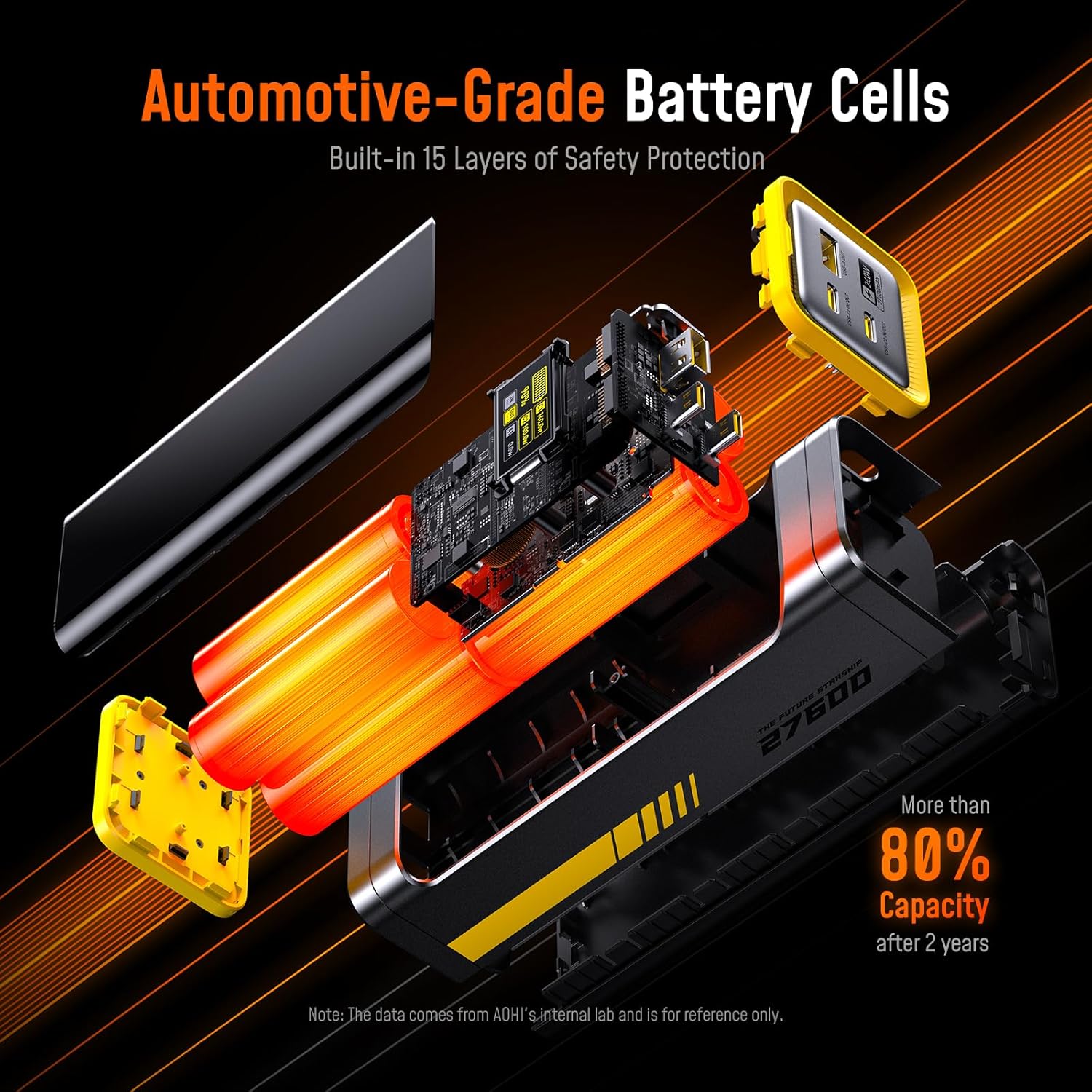
Image 9: Internal structure showing automotive-grade battery cells and safety features.
7. Care and Maintenance
- Clean the power bank with a dry, soft cloth. Do not use liquid cleaners.
- Store the power bank in a cool, dry place when not in use.
- For optimal battery health, fully charge and discharge the power bank at least once every three months if stored for extended periods.
- The power bank is designed for over 1000 charge cycles, maintaining over 80% capacity after 2 years under normal use.
8. Troubleshooting
| Problem | Possible Cause | Solution |
|---|---|---|
| Power bank not charging | Charging cable or adapter is faulty; power bank is fully charged; connection issue. | Check cable and adapter. Ensure secure connection. If fully charged, no action is needed. |
| Device not charging from power bank | Power bank battery is low; cable is faulty; device is incompatible; power bank is in trickle charge mode. | Recharge power bank. Try a different cable. Ensure device compatibility. Check LED indicator for charging mode. |
| Digital display is off or unresponsive | Power bank is off; internal malfunction. | Press the power button to activate the display. If issue persists, contact customer support. |
| Slow charging | Cable or device limits charging speed; multiple devices connected; power bank temperature. | Use a high-wattage cable. Disconnect other devices. Ensure power bank is in a well-ventilated area. |
9. Technical Specifications
| Model | AOC-P011 |
| Battery Capacity | 27,600mAh (99.36Wh) |
| Number of Ports | 2 x USB-C, 1 x USB-A |
| Maximum Output Power | 240W Max |
| USB-C1 Input/Output | 5V-3A, 9V-3A, 12V-3A, 15V-3A, 20V-5A, 28V-5A (140W Max) |
| USB-C2 Input/Output | 5V-3A, 9V-3A, 12V-3A, 15V-3A, 20V-5A, 28V-5A (140W Max) |
| USB-A Output | 5V-3A, 9V-2A, 12V-1.5A, 10V-2.25A (22.5W Max) |
| Product Dimensions | 8.9 x 3.1 x 3.9 inches (108.5 x 53.5 x 50.5 mm) |
| Item Weight | 2.12 pounds (650g) |
| Color | Grey |
| Display Screen | 1.88" (Diagonal) TFT |
| Material | PC+ABS |
| Manufacturer | Shenzhen AODA Power Technology Co., Ltd |
10. Warranty and Support
AOHI provides the following support for your product:
- Warranty: 18-month replacement warranty.
- Returns: 30-day refund policy.
- Customer Support: 24/7 professional online support is available for any inquiries or assistance.
- For further assistance, please visit the official AOHI website or contact their customer service directly.
Related documentsAOC-P011

Ask a question about this manual
Ask about setup, troubleshooting, compatibility, parts, safety, or missing instructions. Manuals+ will review the question and use this page’s manual context to help answer it.