
Yaheetech YA-00139894
Yaheetech YA-00139894 Ergonomic Faux Leather Swivel Office Chair User Manual
Model: YA-00139894
1. Safety Information
Please read all instructions carefully before assembly and use. Keep this manual for future reference.
- Caution: Please adhere to the maximum load capacity of 136 kg (299.8 lbs). Exceeding this limit may cause damage to the chair or personal injury.
- Verify the chair's stability before each use. Ensure all screws and connections are tight.
- Do not stand on the chair.
- Keep children away from moving parts during assembly and adjustment.
- Avoid exposing the chair to direct sunlight or extreme temperatures to prevent material degradation.
2. Product Overview
The Yaheetech YA-00139894 office chair is designed for comfort and functionality in various settings, including home offices, bedrooms, and reception areas. It features a modern aesthetic with practical adjustments.
Key Features:
- Selected Materials: Constructed with high-density foam, electroplated metal, FSC certified laminated seat wood, and soft faux leather for durability and comfort.
- Safety Assured: SGS certified gas lift, tested for 100,000 impact cycles and 120,000 rotation cycles, ensuring superior strength and stability.
- Modern Design: Finely textured polyurethane faux leather upholstery and refined tufting enhance any decor.
- Space-Saving: Compact design suitable for limited spaces, serving as a desk chair or accent chair.
- Adjustable Functions: Features 360° swivel, adjustable height, and a reclining backrest for personalized comfort.

This image displays the overall design of the Yaheetech YA-00139894 office chair, highlighting its pink faux leather upholstery, tufted backrest, and chrome-plated star base with casters.
3. Setup and Assembly
Simple assembly is required. An accessory kit with necessary tools and illustrated instructions is provided to facilitate the process.
Assembly Steps:
- Unpack Components: Carefully remove all parts from the packaging and lay them out on a clean, soft surface to prevent scratches. Verify all components are present against the parts list in the included manual.
- Prepare Gas Lift: Important: Before installing the gas lift, please remove the black plastic protective cap from the top of the gas cylinder.
- Attach Casters to Base: Insert the five casters into the holes at the ends of the star base until they click securely into place.
- Insert Gas Lift into Base: Place the gas lift cylinder into the central hole of the star base.
- Attach Seat Plate: Secure the seat plate mechanism to the underside of the seat cushion using the provided screws. Ensure the front of the seat plate faces the front of the seat.
- Connect Seat to Gas Lift: Carefully place the assembled seat onto the gas lift cylinder, ensuring it is centered and stable.
- Final Check: Once assembled, sit on the chair to engage the gas lift and ensure all connections are secure.

This image clearly shows the step of removing the black plastic cap from the gas lift cylinder, which is crucial for proper chair function.
4. Operating Instructions
Your Yaheetech office chair offers several adjustable features for optimal comfort.
4.1. Height Adjustment
To adjust the seat height, locate the lever under the right side of the seat. While seated, pull the lever up to lower the seat. To raise the seat, stand up slightly and pull the lever up. Release the lever at the desired height.
4.2. 360° Swivel Function
The chair seat is designed to swivel 360 degrees, allowing for easy movement and access to different areas of your workspace without needing to reposition the entire chair.
4.3. Tilt/Recline Function
To recline the backrest, pull out the lever located under the seat. Lean back to your desired angle. To lock the tilt, push the lever back in. To adjust the tension of the tilt, rotate the round knob located under the front of the seat.

This image illustrates the reclining function of the chair's backrest, showing the tilt angle, the tilt lock lever, and the adjustable knob for tension control.
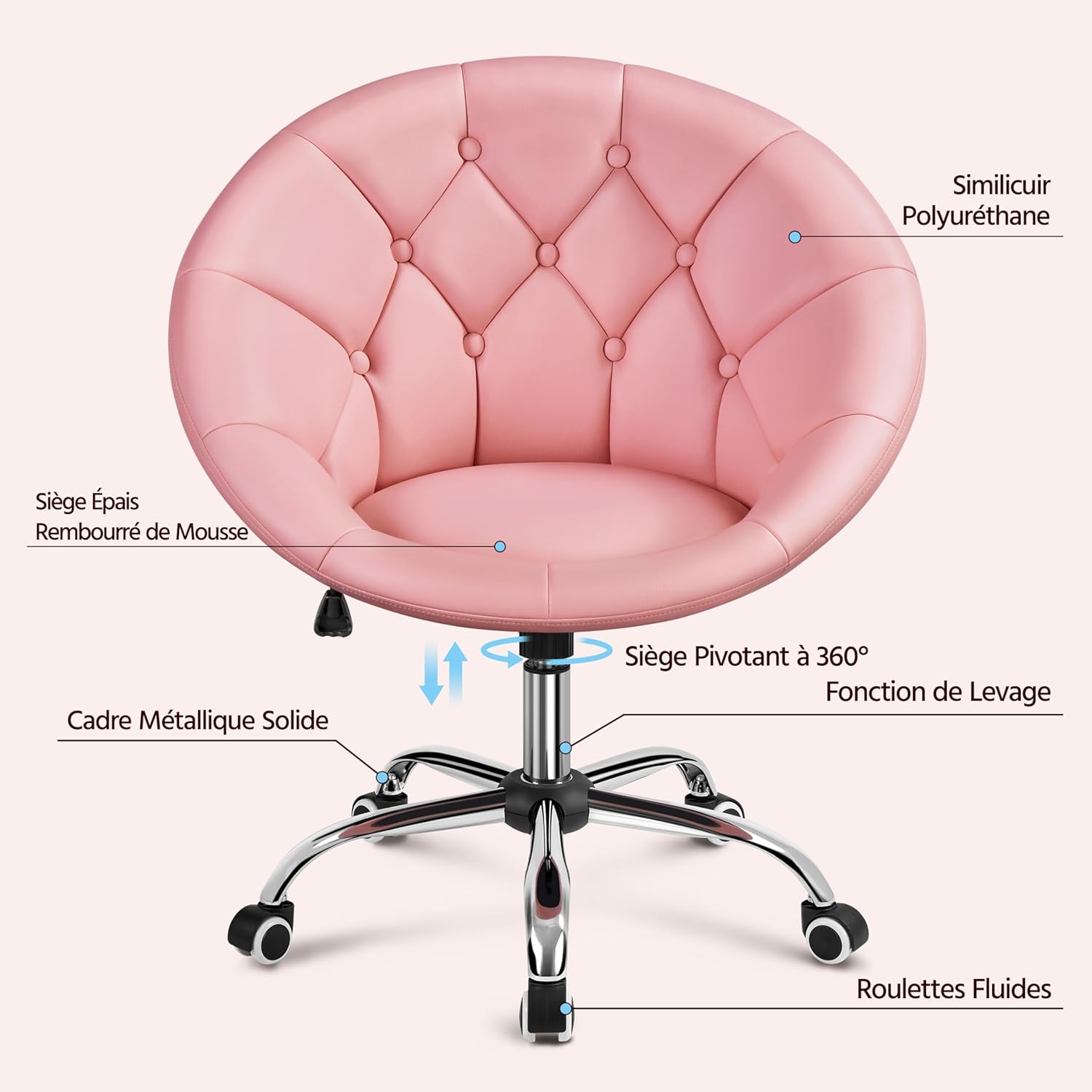
This image highlights the chair's polyurethane faux leather, thick foam padding, 360° swivel seat, lift function, solid metal frame, and smooth casters.
5. Maintenance
Regular maintenance will extend the life and appearance of your chair.
- Cleaning: For the faux leather upholstery, wipe with a soft, damp cloth. For stubborn stains, use a mild soap solution and wipe dry immediately. Avoid harsh chemicals or abrasive cleaners.
- Hardware Check: Periodically check all screws and bolts to ensure they are tight. Re-tighten if necessary to maintain stability and safety.
- Caster Care: Keep casters clean from hair and debris to ensure smooth rolling.
- Avoid Overloading: Do not exceed the maximum weight capacity of 136 kg.
6. Troubleshooting
If you encounter any issues with your chair, refer to the following common problems and solutions:
- Chair does not adjust height:
Possible Cause: The black plastic cap on the gas lift was not removed during assembly.
Solution: Disassemble the chair, remove the seat from the gas lift, and ensure the black plastic cap is removed from the top of the gas cylinder. Reassemble the chair. - Chair feels unstable or wobbly:
Possible Cause: Screws or bolts are loose.
Solution: Check and tighten all assembly screws and bolts. Ensure casters are fully inserted into the base. - Casters are not rolling smoothly:
Possible Cause: Debris (hair, dust) caught in casters.
Solution: Turn the chair over and carefully remove any debris from the caster wheels. - Chair makes squeaking noises:
Possible Cause: Loose connections or friction between parts.
Solution: Tighten all screws. A small amount of silicone lubricant can be applied to moving parts if the noise persists, avoiding contact with upholstery.
7. Specifications
Detailed specifications for the Yaheetech YA-00139894 office chair:

This image provides a visual representation of the chair's dimensions and a summary of its key specifications.
| Feature | Detail |
|---|---|
| Brand | Yaheetech |
| Model Number | YA-00139894 |
| Color | Rose |
| Materials | Faux Leather, Metal, Wood |
| Assembled Dimensions (L x W x H) | 71.5 cm x 59 cm x 78-88 cm (28.1" x 23.2" x 30.7"-34.6") |
| Seat Dimensions (W x D) | 40 cm x 45 cm (15.7" x 17.7") |
| Seat Height | 37-47 cm (14.6"-18.5") |
| Item Weight | 8.1 kg (17.9 lbs) |
| Maximum Load Capacity | 136 kg (299.8 lbs) |
8. Warranty and Support
For warranty information or technical support, please refer to the documentation included with your purchase or contact Yaheetech customer service directly. Contact details can typically be found on the Yaheetech official website or through your retailer.
Related documentsYA-00139894


Ask a question about this manual
Ask about setup, troubleshooting, compatibility, parts, safety, or missing instructions. Manuals+ will review the question and use this page’s manual context to help answer it.