
1. Introduction
This manual provides essential information for the setup, operation, maintenance, and troubleshooting of your Maxtang MTN-8845HS Barebone Mini PC. Please read this manual thoroughly before using the device to ensure proper function and longevity.
2. Product Overview
2.1 Key Features
- Equipped with high-performance AMD Ryzen 8845HS processor (8 cores/16 threads, maximum frequency 5.1GHz, 16MB L3 cache). Compact size of 127 mm x 135 mm x 55 mm.
- Supports up to 96GB dual channel SO-DIMM DDR5 5600MHz memory.
- Integrated AMD Radeon 780M graphics (12 graphics cores, 2700MHz frequency) with multiple display outputs (HDMI, DP, USB4) supporting 4K image output and multi-monitor environments.
- Rich Connectivity: 2x 2.5GbE LAN ports, 2x M.2 NVMe PCIe 4.0 slots, additional M.2 slot for Wi-Fi and Bluetooth, 2x USB 3.2 Type-A, 1x USB 2.0 Type-A, 1x USB-C (USB 3.2 10Gbps), 1x USB-C (USB 4.0, 40Gbps, DisplayPort 1.4, Power Delivery), and a 2-in-1 CTIA audio jack.
2.2 Front and Rear Panel Layout
The Maxtang MTN-8845HS Mini PC features a comprehensive array of ports for versatile connectivity.

Image Description: A view of the Maxtang MTN-8845HS Mini PC showing its front and rear ports. The front panel includes a power button, audio jack, two USB-A ports, and two USB-C ports (one OCuLink, one USB4). The rear panel features two HDMI ports, two 2.5GbE LAN ports, two USB-A ports, and the DC power input.
Front Ports:
- 1x Power Button
- 1x 2-in-1 CTIA Audio Jack
- 2x USB 3.2 Type-A (10Gbps)
- 1x USB-C (USB 3.2 10Gbps)
- 1x USB-C (USB 4.0, 40Gbps, DisplayPort 1.4, Power Delivery)
- 1x OCuLink Port (PCIe 4.0 x4)
Rear Ports:
- 2x HDMI 2.0 (4K@60Hz)
- 1x DisplayPort (8K@60Hz)
- 2x 2.5GbE LAN (RJ45)
- 2x USB 2.0 Type-A
- 1x DC Power Input
- 1x Security Lock Slot
2.3 Internal Components
The device allows for easy access to internal components for upgrades.
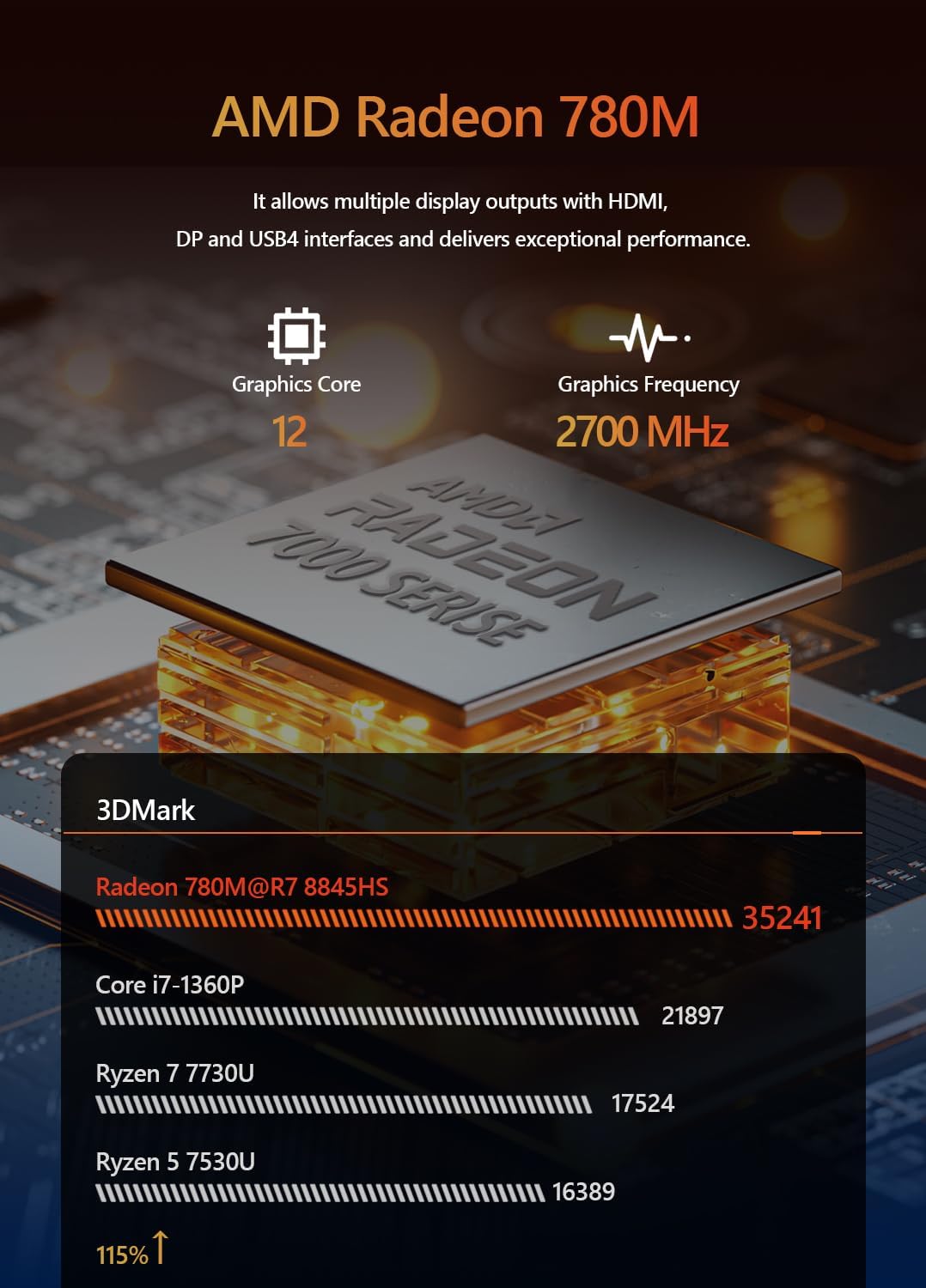
Image Description: An internal view of the Maxtang MTN-8845HS Mini PC with the bottom cover and fan removed, revealing the motherboard. Two DDR5 SO-DIMM slots are visible, along with two M.2 NVMe slots (one populated with an SSD, one open) and an additional M.2 slot for Wi-Fi/Bluetooth.
- 2x DDR5 SO-DIMM slots (expandable up to 96GB)
- 2x M.2 2280 NVMe PCIe 4.0 slots (one pre-installed with 1TB SSD in some configurations, one open for expansion up to 8TB)
- 1x M.2 slot for Wi-Fi and Bluetooth module.
3. Setup Guide
3.1 Hardware Installation (Barebone Model)
For barebone models (no RAM, no SSD, no OS), follow these steps to install essential hardware.
- Open the Chassis: Carefully unscrew the bottom panel of the Mini PC.
- Install RAM: Locate the DDR5 SO-DIMM slots. Insert the RAM modules firmly until they click into place.
- Install M.2 NVMe SSD: Locate the M.2 2280 NVMe slots. Insert the SSD into an available slot and secure it with the provided screw.
- Close the Chassis: Reattach the bottom panel and secure it with screws.
3.2 Initial Power On
- Connect Display: Connect your monitor(s) to the HDMI, DisplayPort, or USB4 ports using appropriate cables.
- Connect Peripherals: Plug in your keyboard and mouse to the available USB-A ports.
- Connect Power: Connect the power adapter to the DC input port on the rear of the Mini PC, then plug the power cord into an electrical outlet.
- Power On: Press the power button on the front panel.
3.3 Operating System Installation
As this is a barebone unit, an operating system (e.g., Windows 11 Pro, Linux) must be installed.
- Prepare Installation Media: Create a bootable USB drive with your preferred operating system.
- Boot from USB: Power on the Mini PC and repeatedly press the designated key (e.g., DEL or F7) to enter the BIOS/Boot Options menu. Select your USB drive as the boot device.
- Follow On-Screen Instructions: Proceed with the operating system installation as prompted.
4. Operating Instructions
4.1 Basic Usage
Once the operating system is installed, the Mini PC functions like a standard desktop computer.
- Web Browsing: The powerful processor ensures smooth and fast web browsing.
- Productivity: Handle multiple tasks simultaneously with high-capacity DDR5 RAM.
- Video Playback: Supports 4K@60Hz video playback from streaming services.
4.2 Display Configuration
The Mini PC supports up to three independent displays.
- Connect displays to the HDMI, DisplayPort, and USB4 ports.
- Configure display settings within your operating system.
5. Connectivity
5.1 Network Connectivity
- Wired Ethernet: Utilize the two 2.5GbE LAN ports for high-speed wired network connections.
- Wireless (Wi-Fi/Bluetooth): Install a compatible M.2 Wi-Fi/Bluetooth module (if not pre-installed) for wireless connectivity.
5.2 USB and OCuLink Ports
- USB 4.0: The USB 4.0 port supports 40Gbps data transfer, DisplayPort 1.4 video output, and power delivery. It is compatible with Thunderbolt devices, including external GPUs.
- OCuLink: The OCuLink port provides a direct PCIe 4.0 x4 bus connection, allowing for high-performance external graphics cards (eGPUs) with minimal overhead.
Video Description: An official product video showcasing the Maxtang Mini PC's features, including its OCuLink port for external graphics cards and multiple display outputs.
6. Performance Information
6.1 Processor and Graphics
The AMD Ryzen 8845HS processor with integrated Radeon 780M graphics delivers strong performance for various tasks.

Image Description: A graphic detailing the AMD Ryzen 7 8845HS processor, highlighting its 8 cores/16 threads, up to 5.1GHz boost clock, and 16MB L3 cache.

Image Description: A graphic illustrating the AMD Radeon 780M graphics, noting its 12 graphics cores and 2700MHz graphics frequency, capable of multiple display outputs.
6.2 Memory and Storage
Dual-channel DDR5 memory and PCIe 4.0 NVMe SSDs ensure fast and efficient data handling.

Image Description: A graphic showing DDR5 RAM modules and an M.2 PCIe Gen4x4 SSD, indicating support for up to 96GB DDR5 and up to 2TB SSD storage.
6.3 Network Performance
The 2.5GbE LAN ports provide excellent wired network speeds. Wi-Fi performance is generally good, though actual speeds may vary based on environment.

Image Description: A visual representation of the Mini PC connected to multiple monitors and network cables, emphasizing its LAN (2.5GbE), Wi-Fi 6, and Bluetooth 5.2 capabilities for stable and fast network performance.
6.4 Power Consumption and Noise
- Idle Power Consumption: Approximately 13.5 watts.
- Full Load Power Consumption: Approximately 96 watts.
- Fan Noise: The fan is generally quiet, even under load, and is not considered obtrusive.
7. Maintenance
7.1 Cleaning
- Regularly clean the exterior of the Mini PC with a soft, dry cloth.
- Ensure ventilation grilles are free from dust and obstructions to maintain optimal airflow.
7.2 Upgrades
- RAM: Upgrade DDR5 SO-DIMM modules up to 96GB.
- Storage: Add or replace M.2 2280 NVMe SSDs up to 8TB.
- Wireless Module: Replace or install a compatible M.2 Wi-Fi/Bluetooth module.
8. Troubleshooting
- No Display: Check all display cable connections. Ensure the monitor is powered on and set to the correct input.
- Power Issues: Verify the power adapter is securely connected to both the Mini PC and the power outlet.
- Performance Lag: Ensure sufficient RAM and SSD space. Close unnecessary applications. Check for overheating (though the system is designed for efficient cooling).
- Network Connectivity Problems: For wired connections, check Ethernet cables and router status. For wireless, ensure the Wi-Fi module is correctly installed and drivers are up to date.
- BIOS Access: To enter BIOS setup, press the DEL key during startup. For boot options, press F7.
9. Specifications
| Component | Detail |
|---|---|
| Processor | AMD Ryzen 7 8845HS (8C/16T, up to 5.1GHz, 16MB Cache) |
| Graphics | AMD Radeon 780M (Integrated) |
| RAM | Supports up to 96GB DDR5 5600MHz SO-DIMM (Dual Channel) |
| Storage | 2x M.2 2280 NVMe PCIe 4.0 slots (up to 8TB total) |
| Network | 2x 2.5GbE LAN, Wi-Fi 6, Bluetooth 5.2 |
| Video Output | 2x HDMI 2.0 (4K@60Hz), 1x DisplayPort (8K@60Hz), 1x USB4 (4K@60Hz) |
| USB Ports | 2x USB 3.2, 1x USB 2.0, 1x USB4, 1x OCuLink |
| Audio | 1x 2-in-1 CTIA Audio Jack |
| Dimensions | 127 mm x 135 mm x 55 mm |
| Power Supply | 120W Power Adapter |
10. What's in the Box
- 1x Maxtang Mini PC
- 1x HDMI cable
- 1x Power adapter
- 1x Power cord
- 1x VESA mount
- 4x Mounting screws
- 1x Product manual

Image Description: A photo showing all items included in the Maxtang MTN-8845HS Mini PC package: the Mini PC unit, HDMI cable, power adapter, power cord, VESA mount, mounting screws, and product manual.
11. Warranty and Support
This product comes with a 12-month product warranty from the date of order. For customer service and technical support, please refer to the contact information provided in the product manual or visit the official Maxtang website.


