
BLACK+DECKER BUC2120MS
BLACK+DECKER 21.2 Cu. Ft. Convertible Freezer Refrigerator
Model: BUC2120MS
1. Important Safety Information
Read all instructions before using this appliance to reduce the risk of fire, electric shock, or injury. Keep this manual for future reference.
- Ensure proper grounding.
- Do not use mechanical devices or other means to accelerate the defrosting process, other than those recommended by the manufacturer.
- Do not damage the refrigerant circuit.
- Do not use electrical appliances inside the food storage compartments of the appliance, unless they are of the type recommended by the manufacturer.
- Unplug the appliance before cleaning or performing any maintenance.
- Keep ventilation openings clear of obstruction.
- This appliance is intended for household use only.
2. Product Overview
The BLACK+DECKER BUC2120MS is a versatile 21.2 Cu. Ft. convertible upright appliance, designed to function as either a freezer or a refrigerator. It features a stainless steel look, frost-free technology, and an ENERGY STAR rating for efficient operation.
Key Features:
- Convertible Design: Easily switch between freezer and refrigerator modes.
- Spacious Capacity: 21.2 cubic feet of storage.
- Electronic Control: Intuitive LED display for precise temperature management.
- Frost Free: Eliminates the need for manual defrosting.
- ENERGY STAR Qualified: Energy-efficient operation.
- Reversible Door: Allows for flexible placement.
- Glass Shelves: Durable and easy-to-clean interior shelving.
Internal Components:
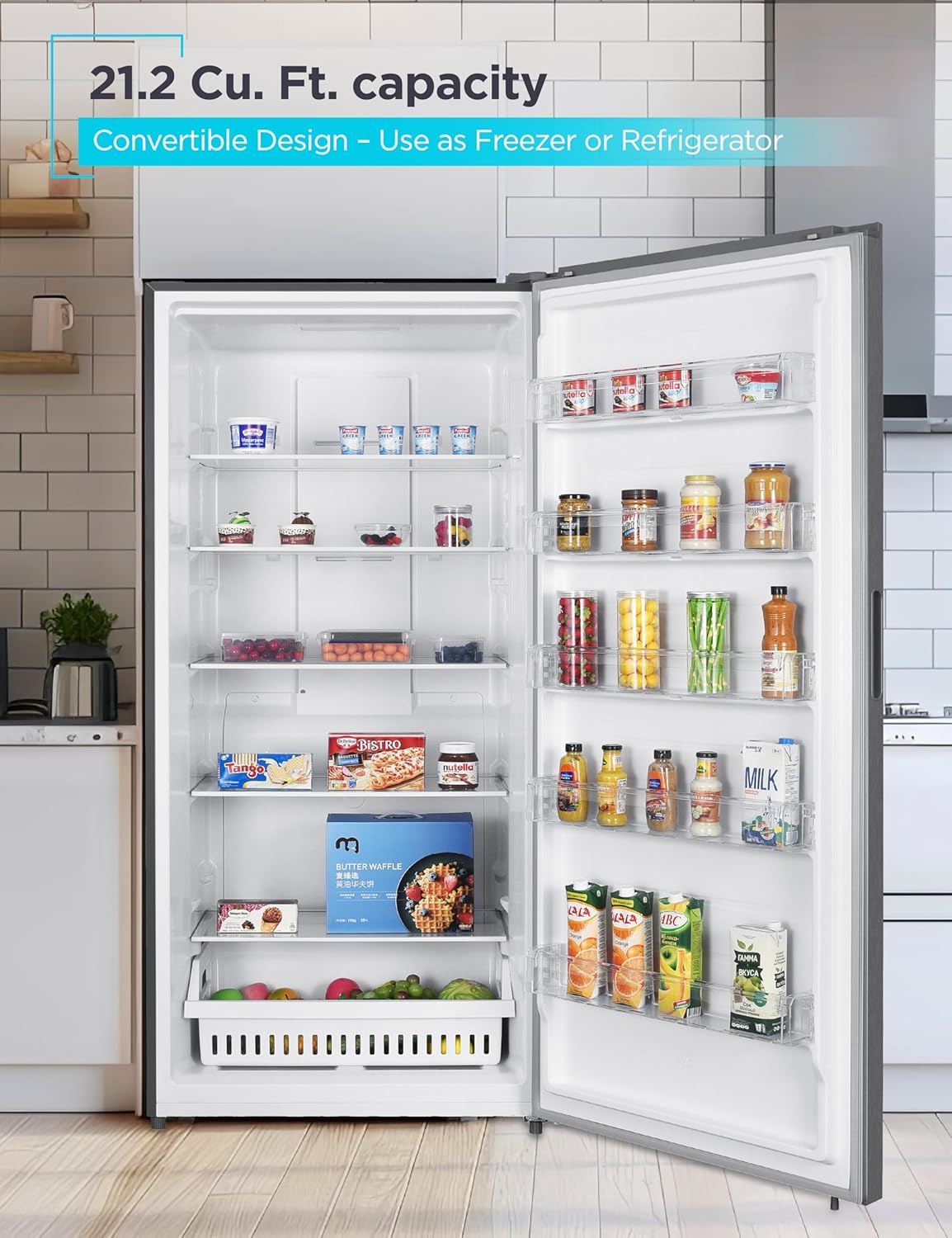
Figure 2.1: Interior view with food items. This image highlights the generous storage capacity and organization possibilities within the appliance, featuring multiple shelves and door bins.

Figure 2.2: Adjustable Glass Shelves and Plastic Storage Basket. The appliance includes four full-width adjustable glass shelves and a plastic storage basket for flexible organization of contents.

Figure 2.3: Recessed Handle and Mobility Features. This view illustrates the recessed handle for a sleek look, along with two rollers and two adjustable leveling legs for easy positioning and stability.

Figure 2.4: Electronic Control Panel. The digital display allows for easy temperature adjustments and mode selection.
3. Setup & Installation
Proper installation is crucial for the optimal performance and longevity of your appliance. Follow these guidelines carefully.
Placement:
- Place the appliance on a flat, stable surface away from direct sunlight or heat sources.
- Ensure adequate ventilation around the unit. Maintain at least 2 inches of space on the sides, 2 inches on top, and 4 inches at the back for proper airflow.
- This model is garage-ready when operating in freezer mode.

Figure 3.1: Appliance Dimensions. The overall dimensions are 33.1" (W) x 29.5" (D) x 74.6" (H). Ensure your space accommodates these measurements.
Measuring for Installation:
Before delivery, it is essential to measure your home's entry points and the designated space for the refrigerator to ensure a smooth installation process. This video provides guidance on how to measure correctly.
Video 3.1: How to Measure for Your Refrigerator. This video demonstrates how to accurately measure your kitchen space and doorways to ensure your new appliance fits properly.
For a comprehensive guide on delivery and installation, including preparing your space, refer to the following video:
Video 3.2: Refrigerator Delivery & Installation Guide. This video covers essential steps for receiving and setting up your refrigerator, from preparing the delivery path to final placement.
Door Reversal:
The appliance features a reversible door, allowing you to change the swing direction to best suit your kitchen layout. Refer to the detailed instructions in the separate door reversal kit (if applicable) or contact customer support for assistance.
4. Operating Instructions
Your BLACK+DECKER convertible appliance is designed for ease of use with its electronic control panel.
Electronic Control Panel:
The control panel is located on the front of the door and features an LED display for temperature and mode selection. Use the touch buttons to adjust settings.
Video 4.1: Dual Mode Upright Freezer Overview. This video demonstrates the electronic control panel and the dual mode functionality, allowing you to switch between freezer and refrigerator settings.
Convertible Mode Operation:
- Switching Modes: Press the "MODE" button on the control panel to toggle between "FRIDGE" and "FREEZE" settings. The LED display will indicate the current mode.
- Temperature Adjustment: Use the up/down arrows to set your desired temperature.
- Freezer Mode: Temperature range typically from 10°F to -11°F (-12°C to -24°C).
- Refrigerator Mode: Temperature range typically from 35°F to 46°F (2°C to 8°C).
- Fast Freeze Function: Activate "FAST FREEZE" for rapid cooling of newly added items. This function will automatically deactivate after a set period or when the target temperature is reached.
- Door Open Alarm: An audible alarm will sound if the door is left open for an extended period, helping to prevent temperature fluctuations and food spoilage.
Frost Free Technology:
This appliance is equipped with Frost Free technology, which automatically prevents ice buildup inside the unit. This eliminates the need for manual defrosting, ensuring consistent performance and easy maintenance.

Figure 4.1: Frost Free Interior with LED Light. The interior LED lighting provides clear visibility, complementing the frost-free design.
5. Maintenance & Care
Regular cleaning and proper care will help maintain the efficiency and appearance of your appliance.
- Cleaning: Unplug the appliance before cleaning. Use a soft cloth with a mild detergent and warm water to clean interior and exterior surfaces. Avoid abrasive cleaners or harsh chemicals.
- Power Outage: In case of a power outage, keep the appliance door closed to maintain internal temperature for as long as possible. Avoid opening the door unnecessarily.
- Moving the Appliance: When moving the appliance, ensure it is unplugged and secured. Use the built-in rollers for easier movement, and adjust the leveling legs once in the new position.
6. Troubleshooting
If you experience issues with your appliance, consult the following table for common problems and solutions. If the problem persists, contact customer support.
| Problem | Possible Cause | Solution |
|---|---|---|
| Appliance does not operate. | Not plugged in; circuit breaker tripped; temperature control set to "OFF". | Ensure plug is secure; reset circuit breaker; adjust temperature setting. |
| Temperature is not cold enough. | Door opened too frequently; large amount of warm food added; poor ventilation; door gasket not sealing properly. | Minimize door openings; allow time for new food to cool; ensure proper clearance around unit; check and clean door gasket. |
| Appliance runs too frequently. | High room temperature; door opened too often; door not closed completely. | This is normal in warmer environments; reduce door openings; ensure door is fully closed. |
| Vibrations. | Appliance not level. | Adjust leveling legs to ensure the appliance is stable. |
| Moisture on interior walls. | Door left open; humid weather; food not properly sealed. | Ensure door is closed; this is normal in humid conditions; seal food containers tightly. |
7. Specifications
| Feature | Detail |
|---|---|
| Model | BUC2120MS |
| Capacity | 21.2 Cu. Ft. |
| Dimensions (D x W x H) | 29.5"D x 33.1"W x 74.6"H |
| Weight | 176.4 Pounds |
| Color | Stainless Steel Look |
| Door Material | Stainless Steel |
| Voltage | 120 Volts |
| Number of Shelves | 4 (Glass) |
| Installation Type | Freestanding |
| Energy Rating | ENERGY STAR Qualified |
8. Warranty & Support
This BLACK+DECKER appliance comes with a 1 Year Manufacturer Warranty. For warranty claims, technical support, or service inquiries, please refer to the contact information provided in your product packaging or visit the official BLACK+DECKER appliance support website.
Please retain your proof of purchase for warranty validation.
Related documentsBUC2120MS


Ask a question about this manual
Ask about setup, troubleshooting, compatibility, parts, safety, or missing instructions. Manuals+ will review the question and use this page’s manual context to help answer it.