
1. Introduction
This manual provides detailed instructions for the installation, operation, and maintenance of your MSI MAG CoreLiquid I360 Black All-in-One (AIO) ARGB CPU Liquid Cooler. Please read this manual thoroughly before installation to ensure proper setup and optimal performance. This liquid cooler is designed to provide efficient cooling for high-performance CPUs, featuring a 360mm radiator, triple 120mm ARGB PWM fans, and broad compatibility with Intel LGA 1700/1851 and AMD AM5/AM4 sockets.

Image 1.1: Overview of the MSI MAG CoreLiquid I360 Black AIO Liquid Cooler, showcasing the pump block and the 360mm radiator with three installed ARGB fans.
2. Package Contents
Verify that all components are present in the package before proceeding with installation. If any items are missing or damaged, please contact your retailer or MSI support.
- MSI MAG CoreLiquid I360 AIO Unit (Radiator, Pump, Tubing, and Pre-installed Fans)
- Mounting Hardware for Intel Sockets (LGA 1150/1151/1155/1156/1200/1700/1851/1366/2011/2011-3/2066)
- Mounting Hardware for AMD Sockets (AM5/AM4/FM2+/FM2/FM1/AM3+/AM3/AM2+/AM2)
- Thermal Paste (pre-applied or in a tube)
- Fan and ARGB Cables
- User Manual (this document)

Image 2.1: Contents of the mounting hardware kit, including various brackets and screws for Intel and AMD platforms.
3. Setup and Installation
Before beginning, ensure your system is powered off and disconnected from the power source. Refer to your motherboard manual for specific CPU socket information.
3.1. Prepare the CPU Socket
- Identify your CPU socket type (Intel LGA or AMD AM).
- For Intel sockets, install the appropriate backplate behind the motherboard. For AMD sockets, use the existing AMD backplate.
- Attach the correct standoffs to the motherboard according to your CPU socket.

Image 3.1: Illustration of the UNI Bracket, designed for universal compatibility with both Intel and AMD CPU sockets.
3.2. Install the Radiator and Fans
The fans are pre-installed on the radiator for convenience. Choose a suitable mounting location in your PC case (top, front, or side) that supports a 360mm radiator.
- Secure the radiator to your chosen mounting location using the provided long screws. Ensure proper airflow direction (intake or exhaust) based on your case's cooling design.
- Connect the fan cables. The MAG CoreLiquid I360 features an 'EZ Connect' design for simplified fan wiring.

Image 3.2: Diagram illustrating the 'EZ Connect' feature for simplified fan cable management, showing how multiple fans connect to a single header.

Image 3.3: Example of the 360mm radiator mounted at the top of a PC case, demonstrating typical installation.
3.3. Mount the Pump Block
The pump block comes with pre-applied thermal paste. If you are reapplying thermal paste, ensure the CPU surface is clean and free of old paste.
- Carefully place the pump block onto the CPU, aligning the mounting holes with the standoffs.
- Secure the pump block with the appropriate thumb screws or nuts, tightening them in a diagonal pattern until snug. Do not overtighten.
- Connect the pump's 3-pin or 4-pin power cable to the designated CPU_FAN or AIO_PUMP header on your motherboard.
- Connect the ARGB cable from the pump block to an available 5V ARGB header on your motherboard or an ARGB controller.

Image 3.4: Close-up view of the pump block, highlighting its infinity mirror design and integrated ARGB lighting.
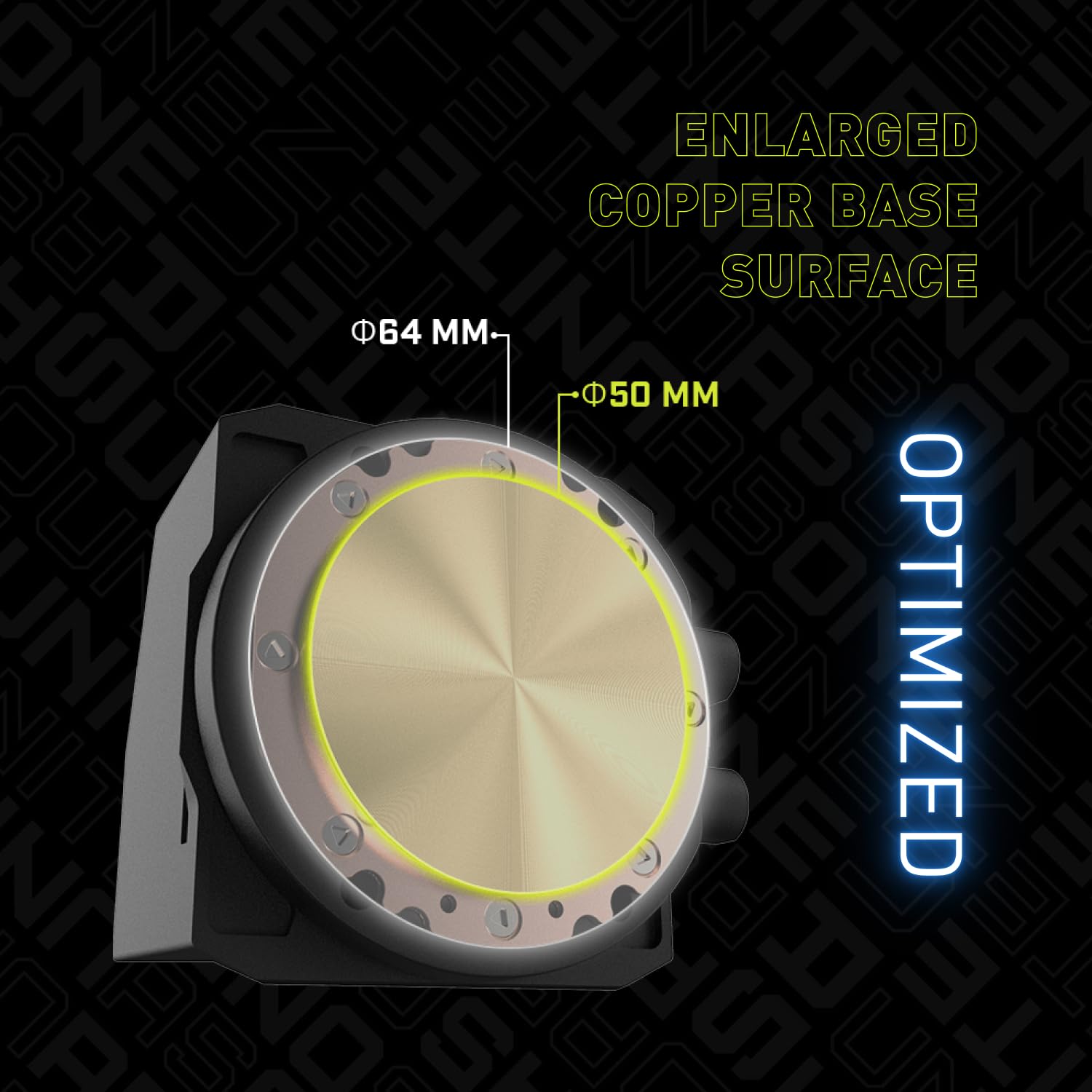
Image 3.5: Diagram showing the enlarged copper base surface of the pump block, designed for optimal heat transfer from the CPU.

Image 3.6: Internal diagram of the high-efficiency pump, illustrating its split-flow design for improved cooling performance.
4. Operating Instructions
Once installed, the MSI MAG CoreLiquid I360 operates automatically. The pump and fans will adjust their speeds based on CPU temperature, managed by your motherboard's BIOS/UEFI settings or dedicated software.
4.1. ARGB Lighting Control
The Addressable RGB (ARGB) lighting on the pump block and fans can be customized using MSI Mystic Light software or compatible motherboard RGB software. Ensure the ARGB cable is correctly connected to a 5V ARGB header.
- Download and install MSI Mystic Light from the official MSI website.
- Use the software interface to select desired lighting effects, colors, and synchronization options.
5. Maintenance
Regular maintenance ensures the longevity and optimal performance of your liquid cooler.
- Dust Cleaning: Periodically clean dust from the radiator fins and fan blades using compressed air. Ensure fans are not spinning during cleaning.
- Tubing Inspection: Inspect the tubing for any signs of kinks, leaks, or damage. The evaporation-proof tubing is designed for durability, but regular checks are recommended.
- Fan Operation: Listen for any unusual noises from the fans or pump. If abnormal sounds occur, refer to the troubleshooting section.

Image 5.1: Close-up of the liquid cooler's tubing, highlighting its reinforced mesh sheathing for evaporation resistance.
6. Troubleshooting
If you encounter issues with your MSI MAG CoreLiquid I360, refer to the following common problems and solutions.
- High CPU Temperatures:
- Ensure the pump power cable is securely connected to the motherboard and receiving power.
- Verify that the pump block is properly seated on the CPU and tightened evenly.
- Check if fans are spinning and oriented correctly for optimal airflow.
- Clean any dust buildup on the radiator fins.
- Fans Not Spinning or ARGB Not Working:
- Check all fan and ARGB cable connections to the motherboard or controller.
- Ensure the 5V ARGB header is enabled in your motherboard's BIOS/UEFI.
- Verify that MSI Mystic Light or other RGB software is installed and configured correctly.
- Unusual Noise from Pump or Fans:
- Ensure no cables are obstructing fan blades.
- Check for air bubbles in the loop (this usually resolves itself over time).
- If pump noise is excessive, ensure it is running at an appropriate speed (check BIOS/UEFI settings).
7. Specifications
Detailed technical specifications for the MSI MAG CoreLiquid I360 Black.
| Feature | Specification |
|---|---|
| Model Number | CLI360 |
| Cooling Method | Liquid (AIO) |
| Radiator Size | 360mm |
| Fan Size | 3 x 120mm ARGB PWM Fans |
| Maximum Rotational Speed | 2500 RPM |
| Noise Level | 32.8 dB |
| Power Connector Type | 4-Pin (PWM) |
| Compatible Intel Sockets | LGA 1150, 1151, 1155, 1156, 1700, 1851, 1200, 1366, 2011, 2011-3, 2066 |
| Compatible AMD Sockets | AM5, AM4, FM2+, FM2, FM1, AM3+, AM3, AM2+, AM2 |
| Product Dimensions | 18.5 x 5.7 x 8.3 inches |
| Item Weight | 5.41 pounds |
| UPC | 824142372258, 824142372241 |
8. Warranty and Support
MSI products are backed by a manufacturer's warranty. For specific warranty terms and conditions, please refer to the warranty card included with your product or visit the official MSI website. In case of technical issues or inquiries not covered in this manual, please contact MSI customer support.
- MSI Official Website: www.msi.com
- Technical Support: Refer to the support section on the MSI website for contact information and service centers.


