
XIAOMI L55MA-AIN
Xiaomi 55-inch X Series 4K LED Smart Google TV User Manual
Model: L55MA-AIN
1. Introduction
Welcome to the user manual for your new Xiaomi 55-inch X Series 4K LED Smart Google TV. This manual provides essential information for setting up, operating, and maintaining your television. Please read it thoroughly before using the product to ensure proper function and safety.
Important Safety Information
- Do not block ventilation openings. Ensure adequate space around the TV for proper airflow.
- Do not place the TV near heat sources or in direct sunlight.
- Protect the power cord from being walked on or pinched.
- Only use attachments/accessories specified by the manufacturer.
- Unplug the TV during lightning storms or when unused for long periods.
- Refer all servicing to qualified service personnel.
2. What's in the Box
Verify that all components are present in the packaging:
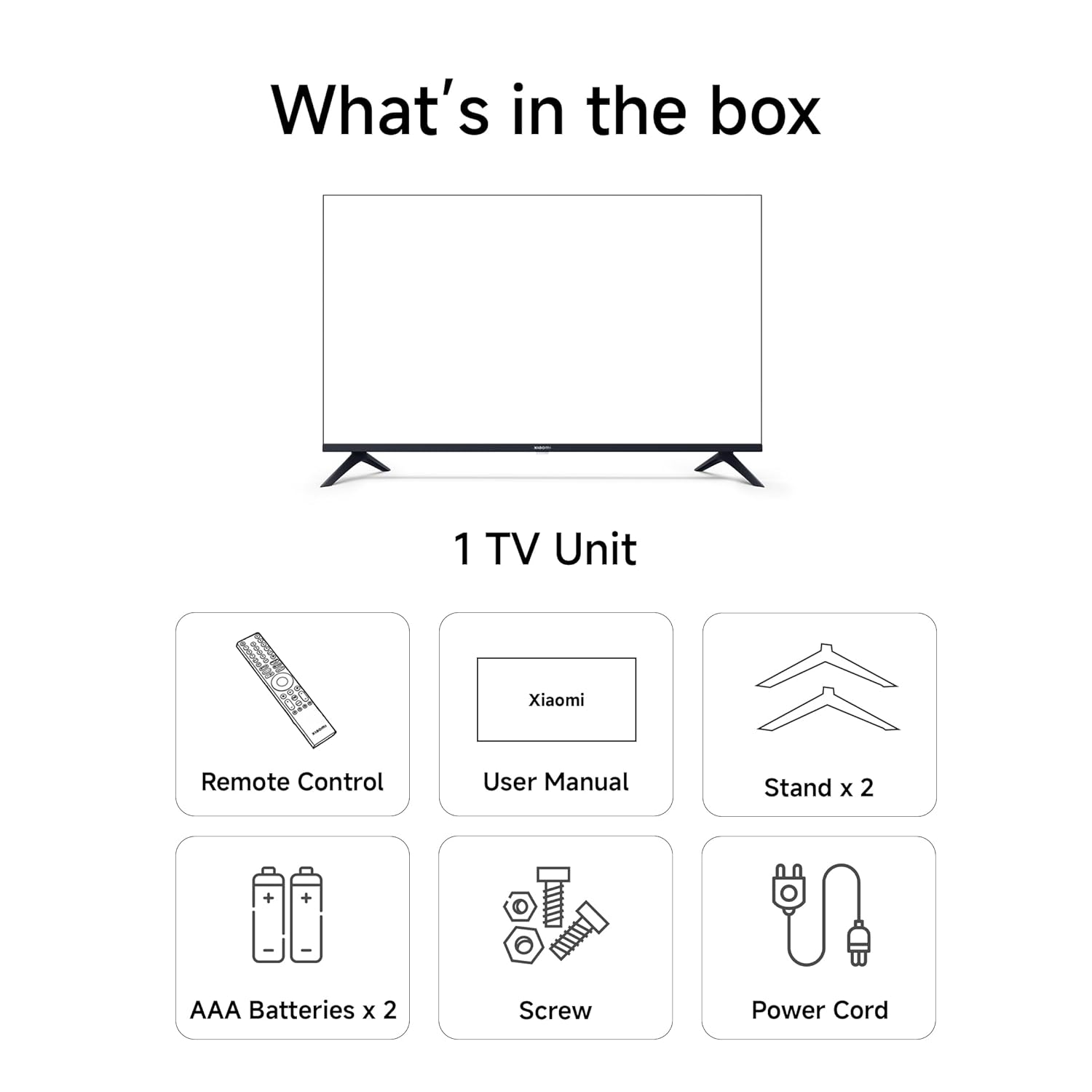
Image: Contents of the Xiaomi TV box, showing the TV unit, remote control, user manual, two table stand bases, two AAA batteries, screws, and a power cord.
- 1 LED TV Unit
- 2 Table Stand Bases
- 1 Remote Control
- 1 AC Power Cord
- 2 AAA Batteries
- Screws for stand assembly
3. Setup
3.1 Attaching the TV Stand
If you are placing the TV on a flat surface, attach the two table stand bases to the bottom of the TV using the provided screws. Ensure the stands are securely fastened.
3.2 Wall Mounting (Optional)
For wall mounting, it is recommended to use a professional installation service to ensure safety and proper mounting. Refer to the wall mount bracket's instructions for specific details. The TV supports VESA mounting standards.
3.3 Connecting Power
Connect the AC power cord to the TV's power input and then plug the other end into a suitable electrical outlet.
3.4 Initial Power-On and First-Time Setup
- Press the power button on the remote control or TV to turn it on.
- Follow the on-screen instructions to select your language and region.
- Connect to your Wi-Fi network.
- Sign in with your Google account to access Google TV features and apps.
- Complete the guided setup for channel scanning and other preferences.
4. Connectivity
Your Xiaomi Smart Google TV offers a variety of connectivity options for seamless integration with your devices.

Image: An illustration detailing the TV's connectivity options, including three HDMI 2.1 ports, Auto Low Latency Mode (ALLM), Bluetooth 5.0, Dual-band Wi-Fi (2.4 GHz / 5 GHz), and Chromecast Built-in.
- HDMI 2.1 (x3): Connect gaming consoles, Blu-ray players, and other high-definition devices. Supports ALLM (Auto Low Latency Mode) for gaming.
- USB (x2): Connect external storage devices for media playback.
- Dual-band Wi-Fi (2.4 GHz / 5 GHz): Connect to your home network for internet access and streaming.
- Bluetooth 5.0: Connect wireless headphones, soundbars, and other Bluetooth-enabled accessories.
- Ethernet: Wired network connection for stable internet access.
- Optical: Digital audio output for connecting to external audio systems.
5. Operating Your TV
5.1 Remote Control
The sleek remote control provides intuitive access to your TV's functions.

Image: The TV's remote control, highlighting features such as Quick Mute (double tap volume down), Quick Wake (turn on TV in less than 5 seconds), and Quick Settings (long press PatchWall button).
- Quick Mute: Double-tap the volume down button to mute the audio.
- Quick Wake: The TV can power on from standby in less than 5 seconds.
- Quick Settings: Long press the PatchWall button to access the quick settings menu.
- Google Assistant: Use voice commands for content search and TV control.
5.2 Google TV Interface
Your TV runs on Google TV, offering a personalized and integrated entertainment experience.

Image: The Google TV interface displaying content recommendations and the 'Hey Google...Play Stranger Things' voice command prompt.
- Access a wide range of streaming apps like Netflix, Prime Video, YouTube, Disney+ Hotstar.
- Receive personalized content recommendations based on your viewing habits.
- Use the built-in Chromecast to cast content from your mobile devices.
- Control your TV and compatible smart home devices using Google Assistant voice commands.
5.3 PatchWall & Xiaomi TV+
Explore additional content and features through PatchWall and Xiaomi TV+.

Image: The PatchWall interface, showcasing access to over 20 OTT apps, 200+ live channels, universal search, Kids Mode, Live Sports, and smart recommendations.
- Access over 20+ OTT apps and 200+ live channels.
- Utilize Universal Search to find content across platforms.
- Enjoy features like Kids Mode and Smart Recommendations.
6. Display Features
Experience stunning visuals with advanced display technologies.

Image: A split-screen comparison demonstrating the enhanced clarity and detail of a 4K display compared to a non-4K display, featuring Dolby Vision and HDR10 logos.
- 4K Ultra HD (3840 x 2160): Delivers exceptional clarity and detail.
- Dolby Vision, HDR10, HLG: Supports multiple HDR formats for enhanced contrast and vibrant colors.
- Vivid Picture Engine 2: Proprietary technology for optimized colors, contrast, and true-to-life visuals.
- Reality Flow MEMC: Motion Estimation, Motion Compensation technology reduces blur in fast-moving scenes, providing smoother visuals.
- 1 Billion+ Colors: Wide color gamut for accurate and rich color reproduction.
7. Audio Features
Immerse yourself in rich and clear audio.

Image: A television displaying a vibrant scene with sound waves emanating, illustrating a cinematic audio experience powered by Dolby Audio, DTS-X, and DTS Virtual:X technologies.
- 30 Watts Output: Powerful stereo speakers for clear sound.
- Dolby Audio: Delivers immersive, high-quality sound.
- DTS-X & DTS Virtual:X: Provides a multi-dimensional audio experience.
8. Performance
The Xiaomi X Series TV is designed for smooth and responsive operation.

Image: A close-up of a processor chip labeled 'A55', representing the TV's top-notch performance with a powerful Quad Core Processor and Mali G52 MC1 GPU, enabling smooth multitasking and app operation with 8GB storage.
- Quad Core Processor: Ensures fast and efficient performance.
- Mali G52 MC1 GPU: Provides smooth graphics for gaming and media.
- 2GB RAM: Supports multitasking and responsive app usage.
- 8GB ROM: Internal storage for apps and system data.
9. Maintenance
Proper care will extend the life of your television.
- Cleaning the Screen: Gently wipe the screen with a soft, lint-free cloth. For stubborn marks, use a screen-specific cleaning solution applied to the cloth, not directly to the screen.
- Cleaning the Body: Use a soft, dry cloth to wipe the TV's frame and stand. Avoid abrasive cleaners.
- Ventilation: Ensure the ventilation openings are clear of dust and obstructions.
- Storage: If storing the TV for an extended period, unplug it and cover it to protect from dust.
10. Troubleshooting
Refer to this section for solutions to common issues.
| Issue | Possible Solution |
|---|---|
| No Power | Ensure the power cord is securely connected to both the TV and the electrical outlet. Check if the outlet is working by plugging in another device. |
| No Picture / Poor Picture Quality | Check all cable connections (HDMI, antenna). Ensure the correct input source is selected. Adjust picture settings (brightness, contrast, resolution). If using an external device, check its output settings. |
| No Sound / Poor Sound Quality | Check volume levels and ensure the TV is not muted. Verify audio cable connections if using external speakers. Check audio output settings on the TV and connected devices. |
| Remote Control Not Responding | Replace the AAA batteries in the remote. Ensure there are no obstructions between the remote and the TV. Re-pair the Bluetooth remote if necessary (refer to TV settings). |
| TV Performance is Slow / Lagging | Close unused applications. Clear cache for frequently used apps. Restart the TV. Consider performing a factory reset if the issue persists (note: this will erase all personal data and settings). |
| Voice Assistant Not Working | Ensure the remote control is properly paired via Bluetooth. Check your internet connection. Restart the TV. If the issue persists, check for system updates. |
11. Specifications
Detailed technical specifications for your Xiaomi Smart Google TV.
| Feature | Detail |
|---|---|
| Brand | Xiaomi |
| Model | L55MA-AIN |
| Screen Size | 55 Inches (138 cm) |
| Display Technology | LED |
| Resolution | 4K Ultra HD (3840 x 2160) |
| Refresh Rate | 60 Hz |
| Operating System | Google TV |
| RAM | 2 GB |
| Storage (ROM) | 8 GB |
| Graphics Coprocessor | Mali G52 MC1 |
| Connectivity | 3 HDMI 2.1 ports, 2 USB ports, Dual Band Wi-Fi, Bluetooth 5.0, Ethernet, Optical |
| Audio Output | 30 Watts, Dolby Audio, DTS-X, DTS Virtual:X |
| HDR Support | Dolby Vision, HDR10, HLG |
| Special Features | Vivid Picture Engine 2, Reality Flow MEMC, ALLM, Chromecast Built-in, Google Assistant |
| Viewing Angle | 178 Degrees |
| Product Dimensions (LxWxH) | 122.6 x 8.17 x 71.5 cm |
| Item Weight | 10.1 kg |
| Model Year | 2024 |
12. Warranty and Support
Your Xiaomi TV comes with comprehensive warranty and dedicated customer support.

Image: Xiaomi Care logo, indicating reliable after-sales service across 620+ cities, offering quick repairs, hassle-free experience, and reliable assistance. A helpline number 1800 103 6286 is provided, available from 9 AM to 9 PM.
- Warranty: Enjoy 2 years of comprehensive warranty. This covers the cost of parts and labor for the product on an on-site service basis. Local transportation costs are covered if required for repairs that cannot be performed at your premises.
- Warranty Claim: Brand warranty can be availed using your Amazon invoice.
- Customer Support: For any assistance, reach out to the dedicated helpline at 1800 103 6286, available from 9 AM to 9 PM.
- Online Manual: The user manual can also be accessed from the official Xiaomi brand website.
Related documentsL55MA-AIN


Ask a question about this manual
Ask about setup, troubleshooting, compatibility, parts, safety, or missing instructions. Manuals+ will review the question and use this page’s manual context to help answer it.