
Introduction
Thank you for choosing the Kavolet GPS Fishing Bait Boat. This remote-controlled bait boat is designed to enhance your fishing experience with advanced features such as GPS positioning, automatic return, and a triple bait container system. Constructed from durable ABS material, it offers reliable performance and stability on the water. This manual provides essential information for the safe and effective operation of your bait boat.
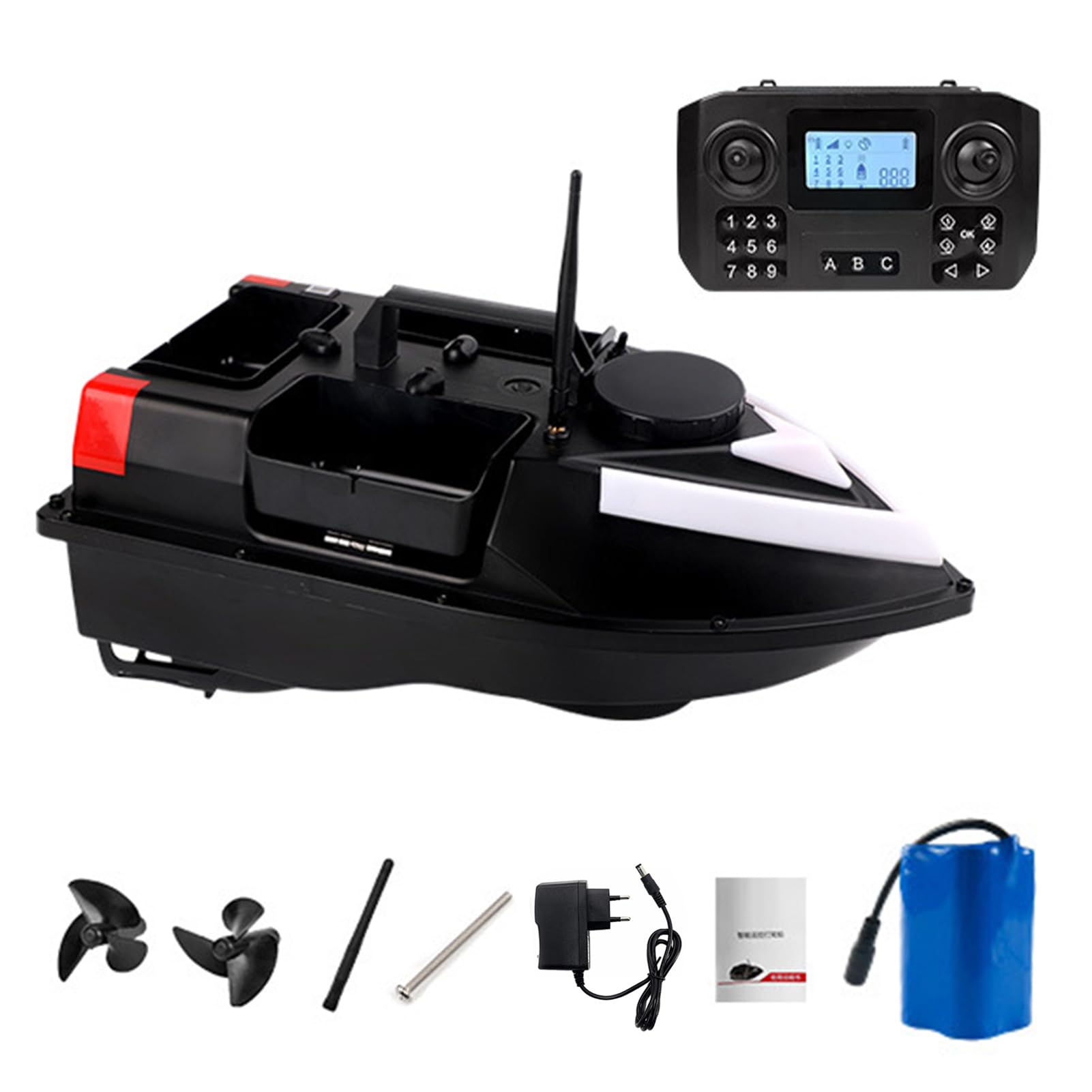
Figure 1: Kavolet GPS Fishing Bait Boat with its remote control. The boat features a sleek, black design with white and red accents, and the remote control has a digital display and multiple buttons for operation.
Key Features
- Long Endurance: Equipped with a large capacity rechargeable battery (12000mAh), ensuring low power consumption and extended operating time. Includes a low battery alarm to prompt timely retrieval.
- Triple Container Design: Features three independently controlled bait containers with a total load capacity of approximately 2 kg, allowing for precise bait placement.
- Reliable Quality: Constructed from wear-resistant and impact-resistant ABS material for durability.
- Aerodynamic Hull: A fully enclosed cabin with an aerodynamic hull design reduces water resistance and enhances stability.
- Enhanced Visibility: High-brightness front light and tail light improve visibility during night operation, aiding in navigation and precise positioning.
- GPS Functionality: Supports GPS positioning with up to 100 fixed points and an automatic return function.
- Remote Control Range: Operates effectively up to 500 meters.
Package Contents
Please check the package contents upon unboxing to ensure all items are present:
- 1 x Kavolet GPS Fishing Bait Boat
- 1 x Remote Control
- 2 x Propellers
- 1 x Antenna
- 1 x Long Screw (for antenna)
- 1 x Instruction Manual (this document)
- 1 x 12000mAh Boat Battery
- 1 x EU Plug Charger
Product Components
Bait Boat Overview

Figure 2: Side view of the Kavolet GPS Fishing Bait Boat, showing its main body, bait compartments, and rear lights. The boat is designed for stability and efficient movement on water.
Remote Control Overview
Familiarize yourself with the remote control layout and functions:
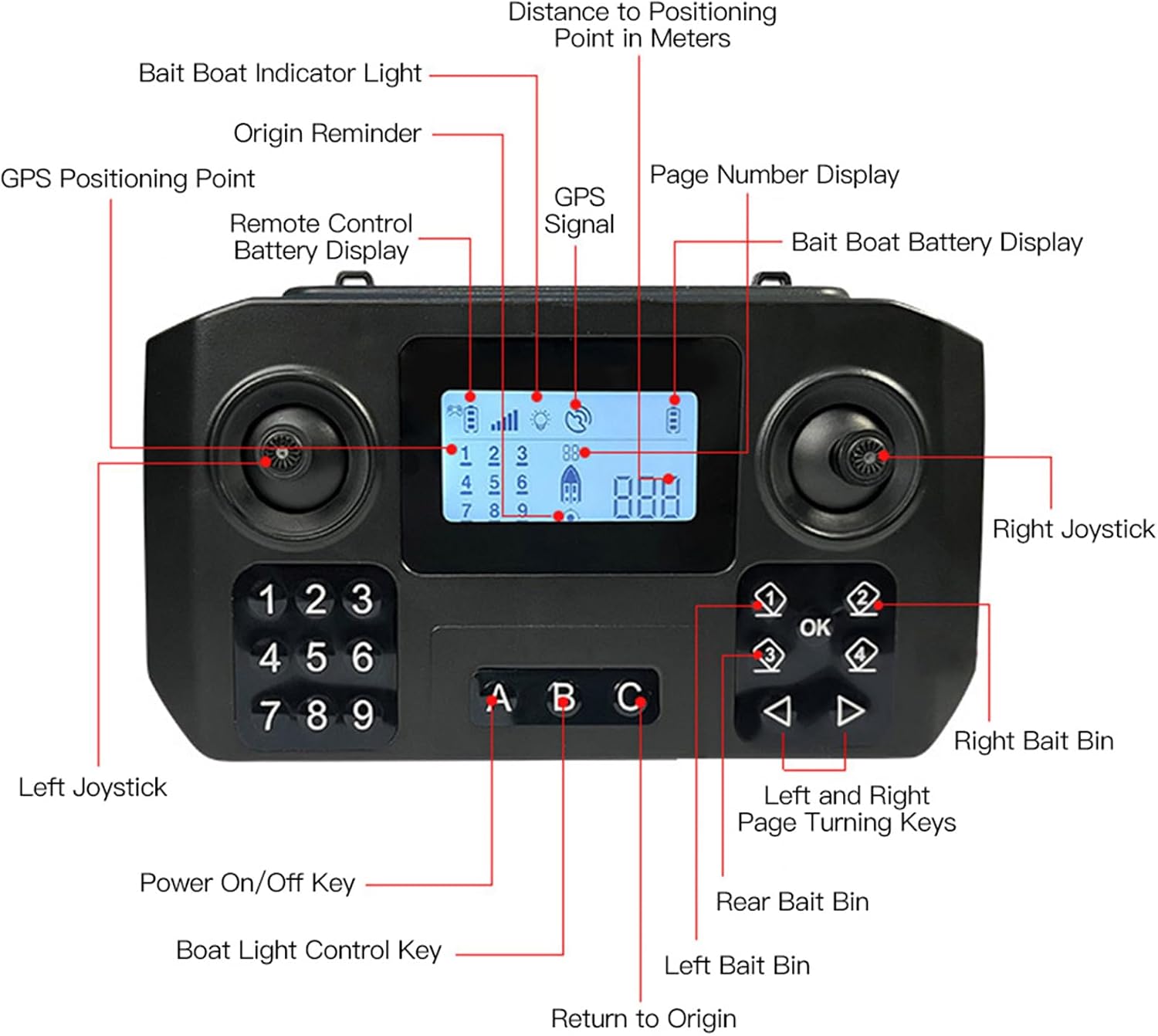
Figure 3: Detailed layout of the remote control. Key components include:
Left Joystick: Controls boat direction (forward/backward, left/right).
Right Joystick: Controls bait release for specific compartments.
Power On/Off Key: Turns the remote control power on or off.
Boat Light Control Key: Activates or deactivates the boat's lights.
Left Bait Bin Button: Releases bait from the left compartment.
Right Bait Bin Button: Releases bait from the right compartment.
Rear Bait Bin Button: Releases bait from the rear compartment.
Return to Origin Button: Initiates the automatic return function.
OK Button: Confirms selections or actions.
Left and Right Page Turning Keys: Navigates through menu options or GPS points.
Digital Display: Shows various information including GPS signal, battery levels (remote and boat), distance to positioning point, and page numbers.
GPS Positioning Point: Indicates the current GPS status.
Origin Reminder: Shows the boat's home point.
Bait Boat Indicator Light: Status indicator for the boat.
Remote Control Battery Display: Shows the remote control's battery level.
Bait Boat Battery Display: Shows the bait boat's battery level.
Setup
1. Charging the Battery
- Locate the charging port on the bait boat.
- Connect the provided EU plug charger to the boat's charging port and a power outlet.
- Allow the battery to fully charge before first use. The charging indicator on the charger will change color or turn off when charging is complete.
- The remote control also uses internal batteries. Ensure they are charged or replaced as needed.
2. Attaching the Antenna
- Carefully screw the antenna onto the designated port on the top of the bait boat.
- Ensure it is securely fastened but do not overtighten.
3. Installing Propellers (if not pre-installed)
- If the propellers are not pre-installed, carefully attach them to the motor shafts at the rear of the boat.
- Ensure they are oriented correctly for proper thrust.
Operating Instructions
1. Powering On/Off
- To Power On the Boat: Press and hold the power button on the boat until the indicator lights illuminate.
- To Power On the Remote Control: Press the Power On/Off Key on the remote control. The display will light up.
- Always power on the remote control first, then the boat. Power off the boat first, then the remote control.
2. Basic Navigation
- Use the Left Joystick to control the boat's movement: push forward for forward, pull back for reverse, and move left/right to steer.
- The boat has a remote control range of up to 500 meters. Maintain line of sight for optimal signal.

Figure 4: Demonstrates the 500m remote control range of the Kavolet bait boat. The image shows a user operating the remote control with the boat visible in the distance on a lake, highlighting the long-distance capability.
3. Bait Release
The boat features three independently controlled bait containers with a total capacity of 2 kg.
- Load your bait into the left, right, and rear compartments.
- Navigate the boat to your desired baiting location.
- Press the corresponding button on the remote control (Left Bait Bin, Right Bait Bin, or Rear Bait Bin) to release the bait from that specific compartment.

Figure 5: The Kavolet bait boat releasing bait into the water. The image illustrates the triple bait container system in action, showing bait pellets being dispensed from the side compartments into the water to attract fish.
4. GPS Functions
The boat supports advanced GPS features for precise navigation and baiting.
- Setting GPS Points: Navigate the boat to a desired location and follow the remote control's instructions to save it as a GPS positioning point. The boat can store up to 100 such points.
- Navigating to GPS Points: Select a saved GPS point using the remote control's navigation keys. The boat will automatically navigate to that location.
- Automatic Return: Press the Return to Origin Button on the remote control. The boat will automatically return to its starting point (the last recorded 'home' position). This feature is also activated automatically upon low battery.
- Constant Speed Cruise: Engage the cruise control feature (refer to remote control display for specific button/menu option) to maintain a steady speed, useful for covering larger areas or precise bait trails.

Figure 6: Visual representation of the Kavolet bait boat utilizing its GPS functionality. The image shows the boat on water with multiple red pin icons indicating saved GPS positioning points, demonstrating its ability to navigate to and store up to 100 locations.
5. Night Operation
- Use the Boat Light Control Key on the remote to activate the high-brightness front and tail lights.
- These lights improve visibility and help in recognizing the boat's direction during low-light conditions.
6. Low Battery Alarm
- The remote control display will show the bait boat's battery level.
- When the battery level is critically low, an alarm will sound, and the boat may automatically initiate the return to origin function. Retrieve the boat immediately to prevent loss.
Maintenance
1. Cleaning
- After each use, especially in saltwater, rinse the boat with fresh water to remove any debris, salt, or residue.
- Wipe the boat dry with a soft cloth.
- Ensure no water enters the electronic compartments.
2. Battery Care
- Always fully charge the boat battery before storage if it will not be used for an extended period.
- Store batteries in a cool, dry place, away from direct sunlight and extreme temperatures.
- Do not overcharge or completely drain the battery.
3. Storage
- Store the bait boat and remote control in a dry, protected environment.
- Avoid storing in areas with high humidity or extreme temperature fluctuations.
Troubleshooting
- Boat not responding to remote:
- Ensure both the boat and remote control are powered on.
- Check battery levels for both devices.
- Verify that the boat is within the 500-meter operating range.
- Check for any obstructions or signal interference.
- GPS not acquiring signal:
- Ensure the boat is in an open area with a clear view of the sky.
- Allow a few minutes for the GPS module to acquire satellites.
- Check the GPS signal indicator on the remote control display.
- Bait not releasing:
- Ensure the bait compartments are not jammed or overloaded.
- Check if the specific bait release button on the remote is functioning.
- Boat moving erratically:
- Check for debris caught in the propellers.
- Ensure propellers are securely attached and undamaged.
- Verify the remote control joysticks are functioning correctly.
Specifications
| Brand | Kavolet |
| Model Name | Kavolet GPS Fishing Bait Boat 12000mAh |
| Material | ABS |
| Max. Load Capacity | 2 kg |
| Boat Battery Capacity | 12000 mAh |
| Operating Time | 4-8 hours (depending on usage) |
| Remote Control Range | 500 meters |
| Dimensions (L x W x H) | 48.5 x 26.5 x 19 cm |
| Weight | 1729 g |
| Power Source | Battery Powered |
| Display Type | COLOR TFT |
Warranty and Support
For warranty information or technical support, please refer to the documentation provided with your purchase or contact your retailer. Keep your proof of purchase for any warranty claims.