
1. Introduction
Thank you for choosing the BLOW S18D Senior Phone. This device is designed for ease of use, featuring large buttons, a clear display, and essential functions for daily communication. Please read this manual carefully to understand how to operate your phone safely and efficiently.
2. Package Contents
Ensure all items are present in your package. If anything is missing or damaged, please contact your retailer.
- BLOW S18D Senior Phone
- Charging Dock
- Power Adapter (AC Charger)
- Battery
- User Manual

Image: BLOW S18D phone with charging dock, power adapter, and product box.
3. Phone Layout
Familiarize yourself with the key components of your BLOW S18D phone.
3.1 Front View
The front of the phone features the display screen, navigation buttons, call/end buttons, and the numeric keypad with large, easy-to-read characters.
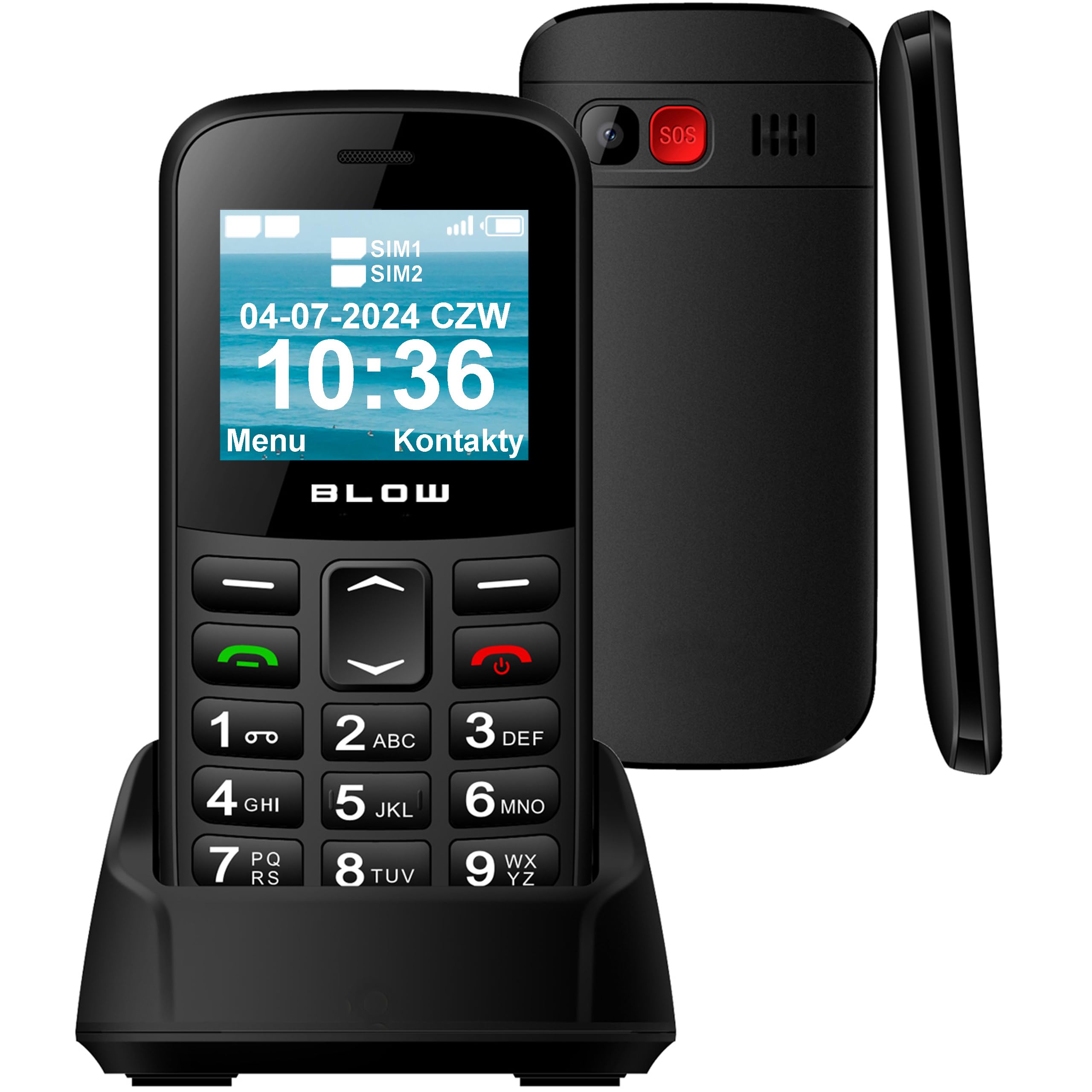
Image: Front view of the BLOW S18D senior phone in its charging dock, highlighting the large keypad and display.
3.2 Back and Side Views
The back of the phone includes the SOS emergency button, camera, and speaker. The sides may contain volume controls and the USB-C charging port.

Image: Side and back view of the BLOW S18D senior phone, illustrating its slim profile and the prominent SOS button on the rear.
4. Setup
4.1 Inserting SIM Card(s) and Battery
- Carefully remove the back cover of the phone.
- Insert your SIM card(s) into the designated slot(s). The phone supports Dual SIM.
- If using an external memory card (up to 32 GB), insert it into the microSD card slot.
- Insert the battery, ensuring the contacts align correctly.
- Replace the back cover until it clicks into place.
4.2 Charging the Phone
Before first use, fully charge the phone battery.
- Connect the power adapter to a wall outlet.
- Place the phone into the charging dock, ensuring it sits securely and the charging indicator appears on the screen. Alternatively, connect the USB-C cable directly to the phone.
- A full charge typically takes a few hours.
4.3 Powering On/Off
- To power on: Press and hold the Power/End Call button until the screen lights up.
- To power off: Press and hold the Power/End Call button, then confirm power off on the screen.
5. Operating Instructions
5.1 Making and Receiving Calls
- Making a Call: Enter the phone number using the keypad and press the Call button (green).
- Receiving a Call: When the phone rings, press the Call button (green) to answer. Press the End Call button (red) to reject or end a call.
5.2 Sending and Receiving SMS
- Navigate to the Messages menu.
- Select Write Message to compose a new SMS.
- Enter the recipient's number or select from contacts, then type your message.
- Press Send.
5.3 SOS Emergency Function
The SOS button is located on the back of the phone. It allows you to quickly contact pre-set emergency numbers in critical situations.
- Setting SOS Numbers: Go to Settings > SOS Settings to add up to 5 emergency contacts.
- Activating SOS: Press and hold the SOS button for a few seconds. The phone will automatically call the emergency contacts one by one until one answers, and send an emergency SMS.

Image: The BLOW S18D phone with its SOS button highlighted, set against a background suggesting emergency services.
5.4 FM Radio
- Access the FM Radio application from the main menu.
- Use the navigation buttons to scan for stations or manually tune.
- Headphones may be required to act as an antenna for optimal reception.
5.5 Flashlight
The phone includes a built-in flashlight for convenience.
- To turn on/off the flashlight, typically press and hold the '0' key or a dedicated side button (refer to your phone's specific key mapping).

Image: The BLOW S18D phone with its flashlight activated, shown illuminating a dark path.
5.6 Dual SIM Management
The BLOW S18D supports two SIM cards, allowing you to manage two different phone numbers simultaneously.
- You can select which SIM card to use for calls or messages from the phone's settings or directly before making a call/sending a message.
- The display will show the status of both SIM cards.

Image: The BLOW S18D phone display showing the status of two SIM cards (SIM1, SIM2) and the current date and time.
5.7 Bluetooth Connectivity
The phone supports Bluetooth for connecting to compatible devices such as headsets or car kits.
- Go to Settings > Bluetooth.
- Turn Bluetooth On and search for available devices.
- Select your desired device and pair them.
6. Maintenance
6.1 Cleaning
- Use a soft, dry cloth to clean the phone's surface and screen.
- Avoid using liquid cleaners or abrasive materials.
6.2 Battery Care
- Do not expose the battery to extreme temperatures.
- Use only the original charger provided with the phone.
- If the phone will not be used for an extended period, charge it partially and store it in a cool, dry place.
6.3 Storage
- Store the phone in a dry environment, away from direct sunlight and moisture.
- Keep out of reach of children and pets.
7. Troubleshooting
If you encounter issues with your phone, try the following solutions before seeking professional assistance.
| Problem | Possible Solution |
|---|---|
| Phone does not power on | Ensure the battery is correctly inserted and fully charged. |
| Cannot make or receive calls | Check if the SIM card is properly inserted and activated. Verify network signal strength. |
| Poor sound quality | Ensure the speaker/earpiece is not blocked. Adjust volume settings. |
| Battery drains quickly | Reduce screen brightness. Close unused applications. Limit background data usage. |
| SOS button not working | Verify that emergency contacts are correctly set in SOS settings. |
8. Specifications
Below are the technical specifications for the BLOW S18D Senior Phone:
| Feature | Detail |
|---|---|
| Brand | BLOW |
| Model Name | Blow S18D |
| Operating System | KaiOS |
| Installed RAM Size | 32 MB |
| Max Supported Flash Memory Size | 32 GB (for external memory card) |
| Screen Size | 1.77 Inches |
| Wireless Carrier | All carriers |
| Cellular Technology | 3G |
| Connectivity Technology | Bluetooth |
| Color | Black |
| Connector Type | USB Type C |
| Form Factor | Slate |
| Water Resistance Level | Not waterproof |
| Special Features | Dual SIM, Built-in Flashlight, FM Radio, SOS Button |
| Camera Description | Rear |
| Battery Power | 800 mAh |
| Display Type | LCD |
| Pixel Density | 50 PPI |
| Model Year | 2024 |
| Country of Origin | China |
9. Warranty Information
The BLOW S18D Senior Phone comes with a 2-year manufacturer's warranty. This warranty covers defects in materials and workmanship under normal use. It does not cover damage caused by misuse, accidents, unauthorized modifications, or normal wear and tear.
Please retain your proof of purchase for warranty claims. For detailed warranty terms and conditions, refer to the documentation provided with your product or contact the manufacturer directly.
10. Support
If you require further assistance or have questions not covered in this manual, please contact your retailer or the BLOW customer support. You can typically find contact information on the product packaging or the manufacturer's official website.
When contacting support, please have your product model (S18D) and purchase details ready.