
GABRYLLY GY1094B
GABRYLLY Ergonomic Office Chair GY1094B User Manual
Model: GY1094B
1. Introduction
Thank you for choosing the GABRYLLY Ergonomic Office Chair GY1094B. This manual provides essential information for the assembly, operation, maintenance, and troubleshooting of your new office chair. Please read these instructions carefully before assembly and use to ensure proper function and longevity of the product.

Image 1.1: Front and back view of the GABRYLLY Ergonomic Office Chair GY1094B.
Key Features:
- Ergonomic Lumbar Support: Double back design provides comprehensive lumbar support, conforming to the body's natural curve.
- Adjustable 3D Armrests: Features 215° rotation, allowing adjustments up, down, front, back, and inward/backward for optimal elbow and wrist support.
- Big and Tall Design: Larger dimensions and upgraded steel chair base for enhanced sturdiness, supporting up to 350 lbs. Recommended for users 5'5" - 6'3".
- 3D Adjustable Headrest: Offers three modes of adjustment for height and angle, providing up to 5.2 inches of extra height for neck relaxation.
- Lockable Tilt Backrest: Backrest can tilt and lock into three positions (90°, 110°, 120°) for various activities like working, reading, or resting.
- Supportive Cool Mesh: All-mesh design ensures excellent airflow, preventing wear and deformation, and is easy to clean.
2. Important Safety Information
Please adhere to the following safety guidelines to prevent injury and ensure the safe operation of your chair:
- Always read and follow the assembly instructions carefully.
- Do not exceed the maximum weight capacity of 350 lbs (158 kg).
- Keep the chair on stable, level surfaces to prevent tipping.
- Keep the chair away from heat sources and open flames.
- Exercise caution when adjusting the backrest and armrests to avoid pinching or injury.
- Keep children and pets away from the chair during assembly and when not in use to prevent accidents.
- Do not stand on the chair or use it as a step stool.
3. Package Contents
Before beginning assembly, please verify that all components are present and undamaged. If any parts are missing or damaged, contact GABRYLLY customer support immediately.
Typical Components Included:
- Backrest Assembly
- Seat Cushion Assembly
- Headrest
- Armrests (Left and Right)
- Gas Lift Cylinder
- Star Base
- Casters (Wheels)
- Mechanism Plate
- Hardware Kit (Screws, washers, T-handle hex wrench, spare bolts)
- Assembly Instructions Manual
4. Setup (Assembly Instructions)
Assembly typically takes approximately 25 minutes. All necessary tools and hardware are included. The hardware kit is organized with each set of bolts packaged separately and labeled for convenience.
Assembly Steps:
- Attach Casters to Base: Insert the casters into the holes at the end of each leg of the star base until they click securely into place.
- Insert Gas Lift: Place the gas lift cylinder into the center hole of the star base.
- Attach Mechanism Plate to Seat: Align the mechanism plate with the pre-drilled holes on the underside of the seat cushion. Secure it using the specified screws and the provided T-handle hex wrench. Ensure the front of the mechanism faces the front of the seat.
- Attach Armrests to Seat: Secure the left and right armrests to the sides of the seat cushion using the designated screws. Pay attention to the orientation of each armrest.
- Attach Backrest to Seat: Connect the backrest assembly to the seat assembly. Align the mounting points and secure with screws.
- Attach Headrest: Slide the headrest into its designated slot at the top of the backrest.
- Connect Seat to Gas Lift: Carefully place the assembled seat onto the gas lift cylinder, ensuring it is centered and stable.
Once assembled, test all functions and adjustments to ensure proper operation.
5. Operating Adjustments
Your GABRYLLY Ergonomic Office Chair GY1094B offers multiple adjustment options to customize your seating experience for optimal comfort and support.

Image 5.1: Detailed view of the 3D armrest adjustment options.
5.1 Seat Height Adjustment
To adjust the seat height, locate the lever on the right side beneath the seat. Pull the lever up while taking your weight off the seat to raise it. To lower the seat, pull the lever up while remaining seated. Release the lever to lock the height.
5.2 Backrest Tilt and Lock
The backrest can be tilted and locked into three positions: 90° (upright for work), 110° (relaxed for reading), and 120° (reclined for rest). Use the lever on the left side beneath the seat to adjust the tilt. Pull the lever out to allow the backrest to recline, and push it in to lock the backrest at your desired angle.

Image 5.2: Illustration of the 90°, 110°, and 120° tilt positions.
5.3 3D Armrest Adjustment
The armrests offer multi-directional adjustments:
- Height Adjustment: Press the button on the side of the armrest and move the armrest up or down. Release the button to lock it at the desired height (up to 4.3 inches of travel).
- Front & Back Adjustment: Slide the armrest pad forward or backward (up to 2.8 inches of travel).
- Rotation (In & Out): Rotate the armrest pad inward or outward up to 215° (180° + 35°).
5.4 3D Headrest Adjustment
The headrest can be adjusted in three ways to provide optimal neck support:
- Height Adjustment: Slide the headrest up or down (up to 2.3 inches of travel).
- Rotation: Tilt the headrest forward or backward (up to 45°).
- Bracket Adjustment: Adjust the angle of the headrest bracket for deeper or shallower support.

Image 5.3: Illustration of the 3D headrest adjustment options.
5.5 Lumbar Support
The chair features a double back design with adaptive waist support that automatically conforms to your back for continuous ergonomic lumbar support.

Image 5.4: Ergonomic double backrest design providing balanced support.
6. Maintenance
Regular maintenance will help prolong the life and appearance of your GABRYLLY office chair.
6.1 Cleaning
- Mesh Fabric: The high-quality double-layer mesh is designed for easy cleaning. Wipe clean with a damp cloth and mild soap. Avoid harsh chemicals or abrasive cleaners, as these can damage the mesh.
- Plastic and Metal Parts: Wipe with a soft, damp cloth.
- General Cleaning: Regularly vacuum the mesh to remove dust and debris.

Image 6.1: The supportive cool mesh design promotes airflow and is easy to maintain.
6.2 Inspection
- Periodically check all screws and bolts to ensure they are tight. Retighten if necessary.
- Inspect casters for any accumulated hair or debris that might hinder smooth movement. Clean as needed.
- Ensure the gas lift operates smoothly and maintains height.
7. Troubleshooting
If you encounter any issues with your GABRYLLY office chair, refer to the following common problems and solutions:
7.1 Chair Does Not Adjust Height
- Check Gas Lift Lever: Ensure the lever is fully engaged or disengaged as required for adjustment.
- Inspect Gas Lift: If the gas lift consistently fails to hold height, it may need replacement. Contact customer support.
7.2 Chair Squeaks or Wobbles
- Tighten Screws: Most squeaks and wobbles are caused by loose hardware. Carefully re-tighten all assembly screws.
- Lubrication: A small amount of silicone spray lubricant can be applied to moving parts if squeaking persists, avoiding contact with mesh.
7.3 Casters Do Not Roll Smoothly
- Clean Casters: Remove any hair, dust, or debris wrapped around the caster wheels.
- Surface Compatibility: Ensure the casters are suitable for your flooring type (e.g., hard floor casters for hard floors, carpet casters for carpets).

Image 7.1: Quiet chair wheels designed for smooth gliding on wood, carpet, and tile.
7.4 Armrests Rotate Too Easily
- The 3D armrests are designed for a wide range of motion. If the rotation feels too loose, ensure all armrest mounting screws are securely tightened.
For issues not covered here, please contact GABRYLLY customer support.
8. Specifications

Image 8.1: Detailed dimensions of the GABRYLLY Ergonomic Office Chair GY1094B.
| Feature | Detail |
|---|---|
| Brand | GABRYLLY |
| Model Number | GY1094B |
| Color | Black |
| Product Dimensions (Overall) | Approx. 30.3" W x 26" D x 46.7"-50.4" H (77cm W x 66cm D x 118.6-128cm H) |
| Seat Dimensions | 20.5" W x 20.5" D x 22.8"-26.8" H (52cm W x 52cm D x 58-68cm H) |
| Maximum Weight Recommendation | 350 lbs (158 kg) |
| Recommended Height | 5'5" - 6'3" (165cm - 190cm) |
| Back Style | High Back with Double Lumbar Support |
| Arm Style | 3D Armrest with 215° Rotation |
| Headrest | 3D Adjustable Headrest |
| Tilting/Reclining | Yes, 3 lockable positions (90°, 110°, 120°) |
| Fill Material | Foam (in seat cushion) |
| Surface Recommendation | Carpet, wooden floor |
| Item Weight | 39 pounds (17.7 kg) |
| Certifications | BIFMA, SGS Class-3 Gas Rod |
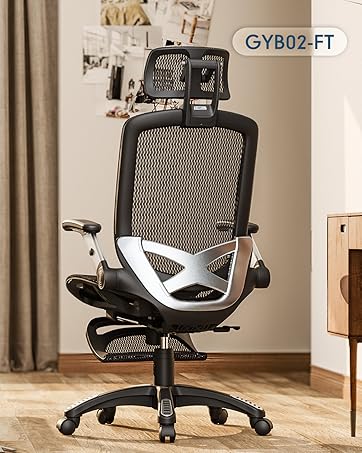
Image 8.2: The chair meets US BIFMA standards for durability and quality.

Image 8.3: SGS Class-3 gas rod for safety and durability.

Image 8.4: Heavy-duty steel chair base for stability and support up to 350 lbs.
9. Warranty and Support
9.1 Warranty Information
The GABRYLLY Ergonomic Office Chair GY1094B comes with a 2-year warranty. GABRYLLY chairs are designed and manufactured to BIFMA and SGS standards, ensuring reliability and comfort for 2 to 5 years of service life.
9.2 Customer Support
For any questions, part replacements, or support needs, please contact GABRYLLY manufacturer support. We aim to provide an effective and fast 24-hour response to assist you.
Please refer to the contact information provided on your purchase receipt or the GABRYLLY official website for the most up-to-date support channels.
Related documentsGY1094B

Ask a question about this manual
Ask about setup, troubleshooting, compatibility, parts, safety, or missing instructions. Manuals+ will review the question and use this page’s manual context to help answer it.