
Important Safety Information
Please read and understand all instructions before assembly and use. Keep this manual for future reference.
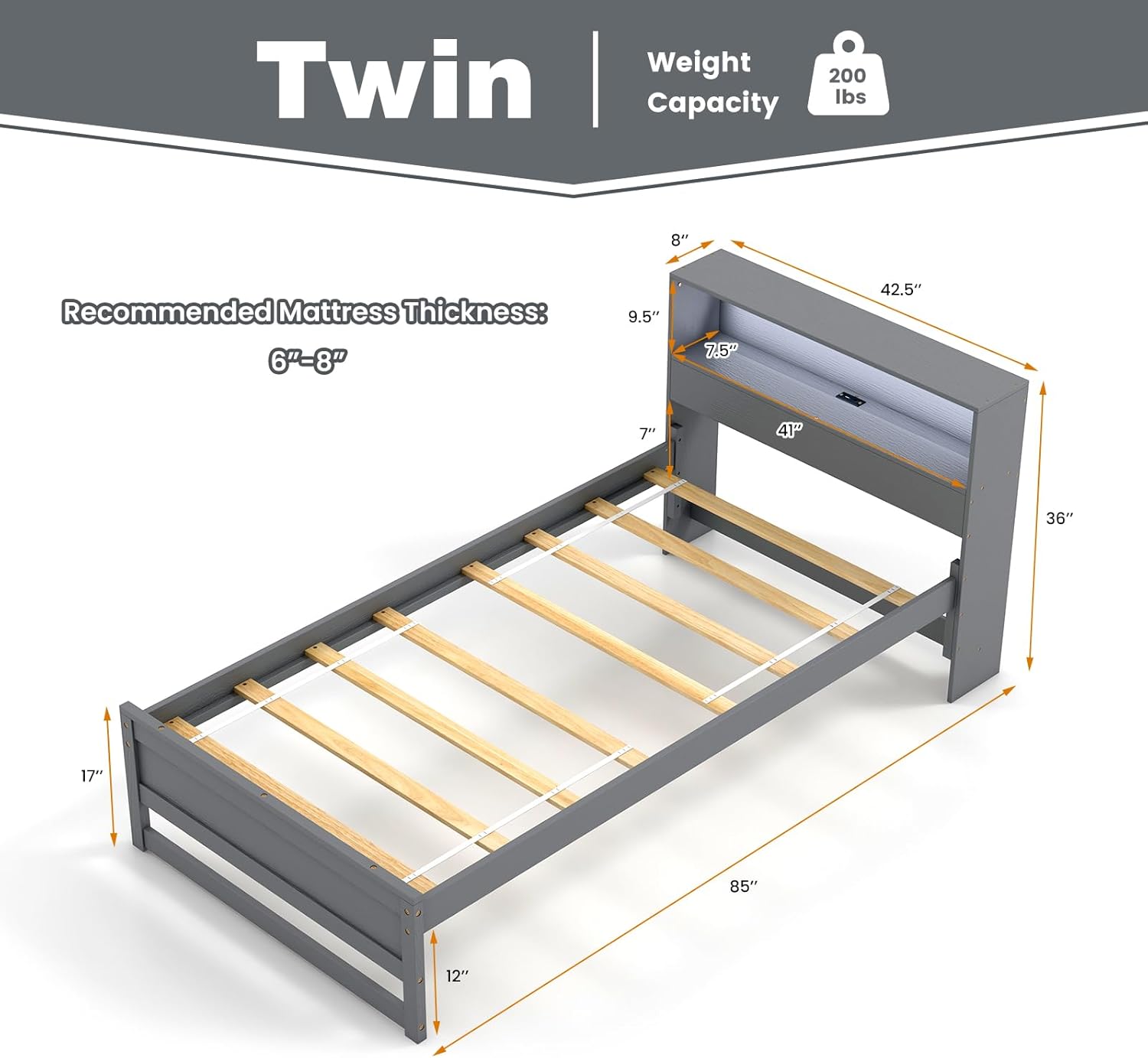
- Maximum Weight Capacity: This bed frame is designed to support a maximum weight of 200 lbs. Exceeding this limit may result in damage to the frame or personal injury.
- Recommended Mattress Thickness: For optimal support and safety, use a mattress with a thickness between 6 to 8 inches.
- Child Safety: Keep small parts and packaging materials away from children to prevent choking hazards or entrapment.
- Assembly: Always follow the assembly instructions carefully. Ensure all connections are secure before use.
Package Contents
Verify that all components are present before beginning assembly. If any parts are missing or damaged, please contact customer support.
- 1 x KOMFOTT Twin Size Wood Platform Bed Frame with Charging Station
- 1 x User Guide (this document)
- All necessary assembly hardware and tools
Specifications
| Size | Twin |
| Overall Dimensions (L x W x H) | 85" x 42.5" x 36" |
| Storage Compartment Dimensions (L x W x H) | 41" x 7.5" x 9.5" |
| Headboard Width | 8" |
| Height of Footboard | 17" |
| Height of Under-bed Space | 12" |
| Recommended Mattress Thickness | 6"-8" |
| Net Weight | 56 lbs |
| USB & Type-C Port Output | 5V/2.1A |
| Power Cord Length | 5 ft |
| Max Weight Capacity | 200 lbs |
| Material | Plywood, Pine Wood, MDF, Engineered Wood |
| Color | Grey |
| Assembly Required | Yes |
Setup and Assembly
Assembly typically requires two adults. Ensure you have ample space and all parts are accounted for before starting.
- Unpack Components: Carefully remove all parts from the packaging. Lay them out on a clean, soft surface (like a rug or blanket) to prevent scratches.
- Identify Parts: Refer to the included parts list and diagrams to identify each component.
- Assemble Headboard: Attach the side panels to the headboard storage unit. Ensure the charging station is correctly oriented and secured.
- Attach Side Rails: Connect the side rails to the assembled headboard and footboard using the provided hardware. Do not overtighten screws until all parts are aligned.
- Install Support Slats: Place the plywood slats across the side rails. Secure them according to the instructions to ensure a stable mattress foundation. The robust design eliminates the need for a box spring.
- Connect Power Cord: Plug the 5 ft power cord from the charging station into a suitable wall outlet.
- Final Tightening: Once all components are in place and aligned, securely tighten all screws and bolts.

Operating Instructions
Charging Station
The headboard features an integrated charging station for your convenience.
- USB and Type-C Ports: Located within the headboard storage compartment, these ports provide 5V/2.1A output for charging compatible devices.
- Usage: Simply plug your device's charging cable into the appropriate USB or Type-C port. Ensure the bed frame's power cord is connected to a live electrical outlet.
- Storage: The headboard compartments are ideal for keeping devices, books, and other bedtime essentials within easy reach while they charge.

LED Light
The built-in LED light provides a soft, ambient glow.
- Activation: The LED light is controlled by a side switch located on the headboard. Flip the switch to turn the light on or off.
- Ambiance: The gentle illumination is suitable for reading or creating a relaxed atmosphere in your bedroom.

Under-Bed Storage
The bed frame offers 12 inches of clearance underneath for additional storage.
- Space Utilization: This ample space can accommodate storage boxes, suitcases, or other items, helping to keep your room organized.
- Cleaning Access: The clearance also allows for easy access for vacuum cleaners or robotic sweepers, simplifying floor maintenance.

Maintenance
Proper care will extend the life and appearance of your bed frame.
- Cleaning: Wipe the wood surfaces with a clean, dry, or slightly damp cloth. Avoid harsh chemicals or abrasive cleaners that may damage the finish.
- Hardware Check: Periodically check all bolts and screws to ensure they remain tight. Retighten as necessary to maintain stability.
- Electrical Components: Ensure the power cord is not pinched or damaged. If the charging station or LED light malfunctions, discontinue use and contact customer support.
Troubleshooting
If you encounter issues, refer to the following common solutions:
- Bed Frame Squeaks:
- Check all assembly hardware and tighten any loose bolts or screws.
- Ensure slats are properly seated and not rubbing against the frame.
- Charging Station Not Working:
- Verify the bed frame's power cord is securely plugged into a functional wall outlet.
- Test the outlet with another device to confirm it has power.
- Ensure your device's charging cable is fully inserted into the USB/Type-C port.
- LED Light Not Turning On:
- Check if the bed frame's power cord is connected to a live outlet.
- Ensure the side switch for the LED light is in the 'On' position.
- Mattress Slides:
- The footboard design is intended to prevent mattress movement. Ensure the mattress is correctly positioned against the footboard.
If these steps do not resolve the issue, please contact customer support.
Warranty and Support
KOMFOTT products are manufactured with quality and care. For warranty information, product support, or to order replacement parts, please contact KOMFOTT customer service through the retailer where the product was purchased or visit the official KOMFOTT website.
Please have your model number (10880-HU-KT) and purchase date available when contacting support.