
Introduction
Thank you for purchasing the GTPLAYER L-Shaped Gaming Desk, Model DL004. This manual provides detailed instructions for assembly, operation, maintenance, and troubleshooting to ensure safe and efficient use of your new desk. Please read this manual thoroughly before assembly and retain it for future reference.
The GTPLAYER DL004 is an upgraded L-shaped gaming desk designed to offer ample space and superior storage. It features a fashionable design with a premium carbon-fiber style finish, two-tier drawers, integrated power outlets, an adjustable shelf, a small monitor stand, cable management holes, and anti-drop partition boards. This desk combines aesthetics with practical functionality, making it an ideal choice for gaming, work, study, writing, and drawing.
Safety Information
This product requires correct assembly and proper load management. Always ensure the desk is assembled according to the instructions to maintain structural integrity. When placing items on the shelves, use the provided partition boards to prevent items from falling. Do not exceed the maximum weight capacity of 80 kg for the desktop.
Keep small parts and packaging materials away from children to prevent choking hazards. Regularly check all screws and connections to ensure they remain tight and secure. Avoid placing hot items directly on the desk surface without protection.
Package Contents
Before beginning assembly, verify that all components listed below are present and undamaged. If any parts are missing or damaged, please contact customer support.
- Desktop Panels (L-shaped)
- Metal Frame Components
- 2-Tier Fabric Drawers
- Small Monitor Stand
- Integrated Power Outlet Unit
- Adjustable Shelf Boards (4 total)
- Anti-Drop Partition Boards
- Assembly Hardware (screws, bolts, etc.)
- Assembly Tools (if applicable, note: not all tools are included as per specifications)
- Japanese Instruction Manual with Video QR Code
Note: All assembly tools are not included. Please prepare necessary tools such as a screwdriver.
Setup and Assembly
Assembly is required for this product. It is recommended to have two people for assembly to ensure stability and ease of construction. Refer to the included Japanese instruction manual with a QR code for video guidance.
Assembly Steps:
- Unpack and Identify Parts: Carefully unpack all components and lay them out on a clean, soft surface to prevent scratches. Identify each part using the provided parts list in the manual.
- Assemble the Frame: Begin by assembling the main metal frame components. Secure all connections with the provided hardware, ensuring they are finger-tight initially.
- Attach Desktop Panels: Carefully place and secure the L-shaped desktop panels onto the assembled frame. Ensure proper alignment before tightening screws.
- Install Drawers: Insert the two-tier fabric drawers into their designated slots.
- Mount Monitor Stand and Power Outlet: Attach the small monitor stand and integrate the power outlet unit as shown in the manual.
- Install Shelves and Partitions: Place the adjustable shelf boards and anti-drop partition boards in their desired positions.
- Final Tightening: Once all components are in place, systematically tighten all screws and bolts using appropriate tools. Do not overtighten.
- Level the Desk: Use the adjustable feet to level the desk on uneven surfaces, ensuring stability.

Detailed dimensions of the GTPLAYER L-shaped gaming desk in centimeters.
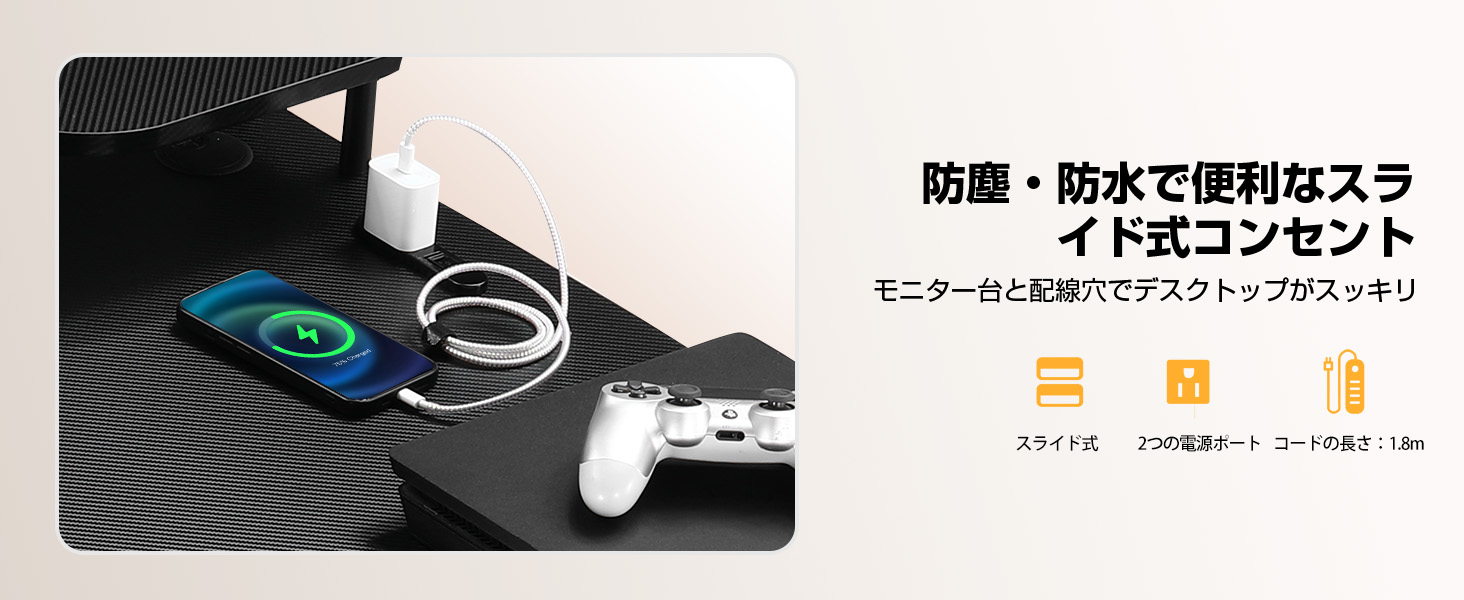
Diagram showing the dimensions and 80kg weight capacity of the L-shaped gaming desk.

Adjustable feet for leveling the desk on uneven surfaces.
Operating Instructions
Using the Desk Features:
- Desktop Surface: The carbon-fiber style desktop provides a spacious work area. Place your monitors, keyboard, mouse, and other peripherals within the 80 kg weight limit.
- Integrated Power Outlet: The desk includes a built-in power outlet with a slide cover and two power ports for convenient charging of devices like laptops, tablets, and smartphones. Ensure the power cord is properly connected to a wall outlet.
- Cable Management: Utilize the cable management holes to route and organize your cables, keeping your workspace tidy and clutter-free.
- 2-Tier Drawers: Use the two fabric drawers for storing office supplies, gaming accessories, or personal items. The design ensures ample storage space while maintaining an open feel.
- Small Monitor Stand: The dedicated small monitor stand can be used to elevate a monitor or place smaller devices like tablets or phones.
- Adjustable Shelves: The shelves provide additional storage for books, documents, or decorative items. The anti-drop partition boards help secure items and prevent them from falling.
- Monitor Arm Compatibility: The desk is designed to be compatible with monitor arms, allowing for flexible monitor placement and ergonomic setup.

Key features of the GTPLAYER L-shaped gaming desk labeled for easy identification.

Close-up view of the integrated power outlet with a protective slide cover.

Two-tier fabric drawers providing convenient storage space.

Rounded corner design for enhanced safety and reduced risk of impact.

Anti-drop partition boards designed to secure items on shelves.
Maintenance
Proper maintenance will extend the life and appearance of your GTPLAYER gaming desk.
- Cleaning: Wipe the desk surface with a soft, damp cloth. Avoid using harsh chemicals or abrasive cleaners, as they may damage the carbon-fiber style finish.
- Hardware Check: Periodically check all screws and bolts to ensure they are tight. Re-tighten if necessary to maintain stability.
- Weight Distribution: Distribute weight evenly across the desktop and shelves to prevent stress on any single point.
- Avoid Direct Heat/Moisture: Do not place hot items directly on the surface. Protect the desk from excessive moisture.
- Drawer Care: The fabric drawers can be spot cleaned with a mild detergent if needed. Ensure they are completely dry before reinserting.
Troubleshooting
If you encounter any issues with your GTPLAYER L-Shaped Gaming Desk, refer to the following common problems and solutions:
| Problem | Possible Cause | Solution |
|---|---|---|
| Desk is wobbly/unstable | Loose screws or uneven floor | Check and tighten all assembly screws. Adjust the leveling feet at the bottom of the desk legs to stabilize it on uneven surfaces. |
| Drawers do not slide smoothly | Improper installation or obstruction | Ensure drawers are inserted correctly. Check for any objects obstructing the drawer path. |
| Power outlet not working | Not plugged in or faulty connection | Verify the desk's power cord is securely plugged into a functional wall outlet. Check the connections of the integrated power outlet unit. |
| Items falling off shelves | Anti-drop partitions not installed or positioned incorrectly | Ensure the anti-drop partition boards are correctly installed and positioned to secure items. |
If the problem persists after attempting these solutions, please contact GTPLAYER customer support for further assistance.
Specifications
| Feature | Detail |
|---|---|
| Brand | GTPLAYER |
| Model Number | DL004 |
| Shape | L-shaped |
| Desk Type | Desk with shelves |
| Product Dimensions (D x W x H) | 48 x 140 x 74 cm (18.9 x 55.1 x 29.1 inches) |
| Color | Black |
| Style | Modern |
| Material | Wood with Carbon Fiber Finish, Metal Frame |
| Finish Type | Matte |
| Special Features | Integrated Power Outlet, Rounded Corner Design, Built-in Monitor Stand, Drawers, Shelves, Cable Management Holes, Anti-Drop Partitions |
| Number of Drawers | 2 (2-tier fabric drawers) |
| Product Weight | 15 kg (33 lbs) |
| Maximum Recommended Weight Capacity | 80 kg (176 lbs) |
| Assembly Required | Yes |
| Assembly Tools Included | No |
| Assembly Instructions | Manual with Video QR Code |
| Recommended Use | Gaming, Work, Study, Writing, Drawing |
| Manufacturing Origin | China (some materials from Japan) |
Warranty and Support
Your GTPLAYER L-Shaped Gaming Desk DL004 comes with a 12-month manufacturer's quality warranty from the date of purchase. This warranty covers initial defects and subsequent issues under normal use.
For warranty claims, technical support, or inquiries regarding spare parts, please contact GTPLAYER customer support directly. Spare parts are consistently stocked in warehouses in Japan (Tokyo, Osaka) to ensure prompt service.
Please note that due to the handmade nature of some components, slight variations in curves or individual differences may occur. These minor discrepancies from the stated specifications are normal and do not affect product functionality.
For customer support, please visit the official GTPLAYER store on Amazon or refer to the contact information provided in your purchase documentation.


