1. Important Safety Information
Please read all safety instructions carefully before operating the Mamibot W120-DP. Failure to follow these instructions may result in injury or damage to the device.
- Power Connection: The W120-DP requires continuous power connection during operation. Ensure a power socket is nearby.
- UPS System: The robot is equipped with an efficient UPS (Uninterruptible Power Supply) system that provides up to 30 minutes of operation during power outages to prevent falls. It is recommended to fully charge the internal battery before first use.
- Safety Rope: Always attach the provided safety rope securely to a fixed object before placing the robot on the window. This is a critical safety measure.
- Water Type: Use only clean tap water in the water tank. Purified water is not suitable and may cause the robot to report an "insufficient water" error.
- Operating Surfaces: The robot is designed for vertical and smooth surfaces such as glass, tiles, marble, and mirrors.
- Window Size and Frame: The robot will not be able to clean the entire surface if used on glass smaller than 60 x 40 cm. Ensure the window has a right-angled frame thicker than 6mm without beveled or rounded edges or silicone protecting strips. Do not use on irregular frame shapes, flat corners, or cracked frames.
- Initial Use: After receiving the machine, allow it to charge for 40 minutes before plugging it in to clean the glass.

Image: Several security precautions including safety rope, integrated UPS, adjustable suction power, and fall protection sensors.

Image: Diagram illustrating the 5-meter mountaineering quality safety rope and the UPS battery for fall prevention.
2. Product Overview
The Mamibot W120-DP is an intelligent window cleaning robot designed for efficient and safe cleaning of various smooth surfaces. It features advanced technology for optimal performance.
Key Features:
- Upgraded 4 Spray Nozzles: Equipped with a power water-spraying pump and four two-way water-spraying holes for effective cleaning.
- 60ML Water Tank: Sufficient capacity for extended cleaning sessions.
- Advanced Sensors & Edge Detection: Ensures comprehensive cleaning, even on frameless glass, by detecting edges and obstacles.
- Multiple Cleaning Paths: Offers 10 cleaning modes including Z-Type, N-Type, and Deep-Type for customized cleaning.
- Variable Frequency Suction: Increased suction power from 2800Pa to 3200Pa for strong adhesion and improved cleaning capability.
- Control Methods: Can be operated via a dedicated mobile application or the included remote control.
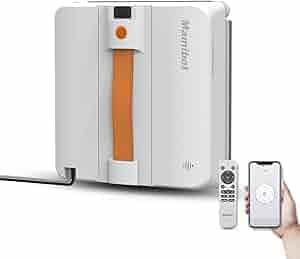
Image: The Mamibot W120-DP robot, its remote control, and a smartphone displaying the control app.

Image: The Mamibot W120-DP demonstrating its advanced dual-directional four-nozzle motorized spraying system for comprehensive cleaning.

Image: Detailed diagram showing the dimensions and various components of the Mamibot W120-DP, including water tank lid, air inlet, self-cleaning scraper, cleaning plate, and spray nozzles.
3. Setup
Follow these steps for the initial setup of your Mamibot W120-DP:
- Charge the Robot: Ensure the W120-DP is fully charged before its first use. This charges the internal UPS battery.
- Attach Cleaning Cloth: Securely place the microfiber cleaning cloth onto the cleaning plate of the robot.
- Fill Water Tank: Open the water tank lid and fill the 60ML tank with clean tap water. Do not use purified water or detergents.
- Fasten Safety Rope: Attach the safety rope tightly to a sturdy, fixed object. This is crucial for preventing falls.
- Connect Power: Plug the W120-DP into a power outlet. Wait for the voice broadcast to finish before proceeding.

Image: Visual guide for Step 1 (charging, attaching cloth, filling water, securing rope) and Step 2 (plugging in and waiting for voice broadcast).
4. Operating Instructions
Operating your Mamibot W120-DP is simple and can be done via the app or remote control.
- Turn On: Hold and press the switch button on the W120-DP for about 3 seconds to turn it on.
- Place on Surface: Place the W120-DP vertically on the window or desired smooth surface and hold it firmly until the suction activates.
- Select Cleaning Mode: Use the mobile app or remote control to select one of the 10 available cleaning modes based on your needs.
Cleaning Modes:
- Z-Type: Cleans in a Z-shaped pattern.
- N-Type: Cleans in an N-shaped pattern.
- Deep-Type: A more thorough cleaning pattern.
- Spot Cleaning Mode: For targeted cleaning of specific areas.
- Cleaning Left/Right Area in N-Type: Specific modes for cleaning sections of the window.
Note: For extremely dirty glass, multiple passes and frequent rag changes may be necessary. Ensure the edge of the W120-DP is 8cm or more away from window frames or corners before cleaning.

Image: Visual guide for Step 3 (placing vertically) and Step 4 (turning on and securing to glass).

Image: Illustration of the robot's intelligent path planning, showing Z-Type, N-Type, and N+Z-Type cleaning patterns.

Image: Depiction of Z-Type, N-Type, and Deep-Type cleaning paths on a window.

Image: Illustration of Spot cleaning mode, cleaning the left area in N-Type, and cleaning the right area in N-Type.
5. Maintenance
Regular maintenance ensures the longevity and optimal performance of your Mamibot W120-DP.
- Cleaning Cloths: Regularly remove and wash the microfiber cleaning cloths. The product comes with two double-sided cloths for better water locking and cleaning.
- Nozzle Maintenance: If the nozzles do not spray water due to accumulated dust or impurities, gently poke them with a needle to clear the blockage.
- Device Cleaning: Wipe down the robot's exterior with a soft, dry cloth after each use.

Image: An internal view of the Mamibot W120-DP highlighting the four water spray nozzles and the 60ml water tank.
6. Troubleshooting
Here are solutions to common issues you might encounter:
- Issue: W120-DP keeps alerting “insufficient water” even when the tank is full.
Solution: Please confirm if you added purified water. Purified water is not applicable for the cleaner; please replace it with clean tap water. - Issue: W120-DP cannot be turned on when holding and pressing the switch.
Solution:- The W120-DP needs to be plugged into a power source all the time during operation.
- We strongly recommend that you fully charge the machine when you use it for the first time. This charges the battery in the UPS inside the machine to prevent it from falling off if the power is cut off.
- Issue: Nozzle not spraying water.
Solution: It is normal for the nozzle to not spray water due to accumulated dust and impurities. You can clear it by gently poking it with a needle.
7. Specifications
| Feature | Detail |
|---|---|
| Brand | Mamibot |
| Model Name | W120-DP~WO |
| Special Feature | Anti-Fall |
| Color | Orange |
| Product Dimensions | 9.02"L x 9.02"W x 2.71"H |
| Included Components | Charging Adapter, Cleaning Pad |
| Filter Type | Cloth |
| Battery Life | 400 Hours |
| Cleaning Path Width | 9.02 Inches |
| Voltage | 24 Volts |
| Capacity (Water Tank) | 60 Milliliters |
| Power Source | Corded Electric |
| Batteries Included | Yes (1 Lithium Ion battery required, included) |
| Control Method | App, Remote |
| Compatible Devices | Smartphones |
| Item Weight | 3.2 pounds |
| Manufacturer | Mamibot |
| Date First Available | August 5, 2024 |
8. Warranty and Support
For any questions, concerns, or technical support regarding your Mamibot W120-DP Window Cleaning Robot, please refer to the official Mamibot website or contact customer service directly. We are committed to providing assistance and ensuring a positive user experience.
You can also check the FAQs section on the product page or send an email to the manufacturer for support.


