
1. Product Overview
The DEWIN AT2-2200X is a general-purpose Variable Frequency Drive (VFD) designed for single-phase motor applications. This VFD operates with a single-phase 220V AC input and provides a single-phase 220V AC output, suitable for motors up to 2.2KW. It features a unique control method for high torque, precision, and a wide speed control range, ensuring stable performance even in challenging environments.
Key features include:
- High Performance: Achieves high torque, precision, and a broad speed control range.
- Robust Design: Excellent anti-tripping performance and adaptability to power interference, temperature, humidity, and dust.
- Optimized Compatibility: Utilizes PWM control technology and electromagnetic compatibility for low noise and minimal electromagnetic interference.
- User-Friendly: Quick start/stop response, high torque at low speeds, and easy wiring via screw terminals.
- Comprehensive Protection: Includes overcurrent, overvoltage, overheating, undervoltage, and short-circuit protection. Equipped with large heat sinks for efficient long-term operation.
2. Safety Precautions
Failure to follow these safety instructions may result in death, severe injury, or serious property damage.
- Always ensure the power supply is disconnected before performing any wiring or maintenance.
- Wiring must be performed by qualified electrical engineers to prevent damage to the inverter.
- Do not install the inverter in areas with flammable materials or oil, as this poses a fire hazard.
- The ground terminal of the inverter must be properly grounded.
- Avoid installing the inverter in environments with explosive gases to prevent explosion risks.
- Do not open the inverter cover while the unit is powered, as internal components may retain high voltage.
3. Setup and Installation
This section provides general guidelines for installing and connecting your DEWIN AT2 VFD. Refer to the detailed wiring diagrams in the included physical manual for specific connections.
3.1 Unpacking
Upon receiving the package, verify its contents. The package should include:
- 1 x DEWIN AT2 Variable Frequency Drive
- 1 x English User Manual (physical copy)
3.2 Mounting
Mount the VFD in a location that is clean, dry, well-ventilated, and free from excessive vibration, direct sunlight, and corrosive gases. Ensure adequate clearance around the unit for proper heat dissipation.

3.3 Wiring
Connect the power input and motor output using appropriate gauge wires and screw terminals. Ensure all connections are secure and comply with local electrical codes.
- Input Power: Connect the single-phase 220V AC 50/60Hz power supply to the designated input terminals.
- Motor Output: Connect the single-phase motor to the output terminals.
- Grounding: Ensure the VFD is properly grounded to prevent electrical hazards.
4. Operating Instructions
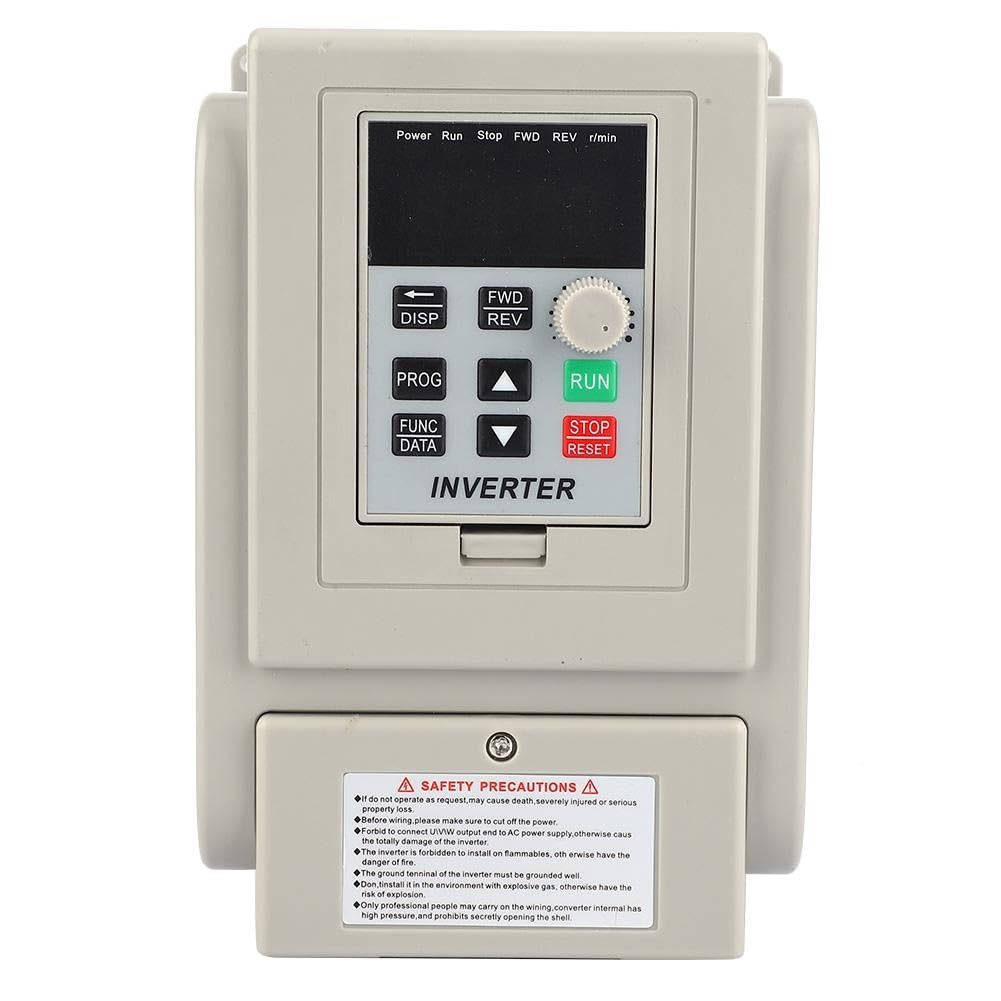
The DEWIN AT2 VFD features an intuitive control panel for easy operation. The main functions are controlled via buttons and a rotary knob.

4.1 Control Panel Overview
- Display: Shows operational status, frequency, and parameter values.
- PROG/FUNC/DATA Buttons: Used for programming parameters and accessing data.
- RUN Button: Initiates motor operation.
- STOP/RESET Button: Stops motor operation and resets errors.
- FWD/REV Buttons: Controls forward and reverse direction.
- Rotary Knob: Adjusts output frequency/speed.
4.2 Basic Operation
- Power On: After ensuring all connections are correct and secure, apply power to the VFD. The display will illuminate.
- Set Frequency: Use the rotary knob to set the desired output frequency.
- Start Motor: Press the RUN button to start the motor.
- Change Direction: Use the FWD or REV buttons to change the motor's rotation direction.
- Stop Motor: Press the STOP/RESET button to stop the motor.
For advanced parameter settings and detailed programming instructions, please consult the comprehensive physical user manual provided with the product.
5. Maintenance
Regular maintenance ensures the longevity and optimal performance of your DEWIN AT2 VFD.
5.1 Cleaning
Periodically clean the exterior of the VFD to prevent dust accumulation, especially around the ventilation openings and cooling fins. Use a soft, dry cloth. Do not use liquid cleaners or solvents.

5.2 Inspection
- Check for any loose connections or damaged wiring.
- Ensure the cooling fans (if present) are operating correctly and are not obstructed.
- Monitor the VFD for unusual noises or excessive heat during operation.
6. Troubleshooting
This section addresses common issues you might encounter with the DEWIN AT2 VFD. For more complex problems, consult a qualified technician.
6.1 Common Issues
- VFD Not Powering On: Check the input power supply and ensure all power connections are secure. Verify the circuit breaker or fuse is not tripped.
- Motor Not Running: Ensure the RUN button has been pressed. Check motor wiring and verify that the VFD is not displaying any error codes. Confirm the motor is suitable for single-phase operation.
- Motor Running Erratically: Check for stable input power. Verify motor parameters are correctly set in the VFD. Inspect motor and VFD for signs of overheating.
- Overload Protection Triggered: Reduce the motor load or check for mechanical issues with the motor or driven equipment. Ensure the motor's rated current is within the VFD's capacity.
6.2 Error Codes
The VFD display may show specific error codes in case of a fault. Refer to the physical user manual for a complete list of error codes and their corresponding troubleshooting steps.
7. Specifications
| Feature | Specification |
|---|---|
| Model | AT2-2200X |
| Applications | Single-phase motors |
| Power Phase Number | Single-phase |
| Input Method | Single-phase 220V AC |
| Output Mode | Single-phase 220V AC |
| Supply Voltage | 220V AC 50/60Hz |
| Adapted Motor Power | 2.2 kW |
| Filter | Built-in filter |
| Control Mode | V/F closed loop |
| Output Voltage Regulation | PWM control |
| Rated Current | 12 A |
| Dimensions (L x H x D) | 125 mm x 175 mm x 125 mm |
| Product Weight | 1.5 kg |
8. Warranty and Support
Information regarding product warranty and customer support is typically provided with the purchase documentation or within the physical user manual. Please refer to those resources for details on warranty coverage, technical assistance, and service options.
For further inquiries, please contact your vendor or DEWIN customer service.
