
1. Introduction
The Tek Styz PRO Adjustable Desktop Stand (Model TS-1360) is designed to provide a stable and ergonomic viewing solution for various electronic devices. Constructed from high-strength aircraft-grade steel, this stand supports devices up to 21 inches and 50 pounds, including laptops, tablets, and smartphones like the Huawei P60 Pro. Its adjustable design promotes better posture and helps prevent device overheating.
Key Features:
- Adjustable viewing angles for optimal comfort.
- Durable construction with a 50-pound weight capacity.
- Integrated rubber pads for device protection and stability.
- Portable and foldable design for easy transport.
- Enhanced heat dissipation for improved device performance and longevity.
2. Setup Instructions
Follow these steps to set up your Tek Styz PRO Adjustable Desktop Stand:
- Carefully remove the stand from its packaging.
- Unfold the stand by gently pulling the two main support arms outwards until they lock into position.
- Adjust the angle of the stand by pressing the release buttons (if applicable) or by applying gentle pressure to the hinges until the desired height and tilt are achieved. Ensure both sides are adjusted evenly for stability.
- Place the stand on a flat, stable surface.
- Verify that the rubber pads on the stand's base and device support arms are clean and free of debris to ensure maximum grip.

Figure 2.1: The stand's foldable design and dimensions (9.4 inches wide, 2.16-6.1 inches adjustable height).
3. Operating Instructions
The Tek Styz PRO stand is designed for versatile use with various devices. Follow these guidelines for optimal operation:
3.1 Placing Your Device
- Ensure the stand is fully unfolded and stable on a flat surface.
- Gently place your laptop, tablet, or smartphone onto the support arms. The device should rest securely against the rubberized hooks.
- Verify that the device's weight is evenly distributed and does not exceed the stand's 50-pound capacity.
- The stand is compatible with devices ranging from 8 to 27 inches, including laptops, tablets, and phones.
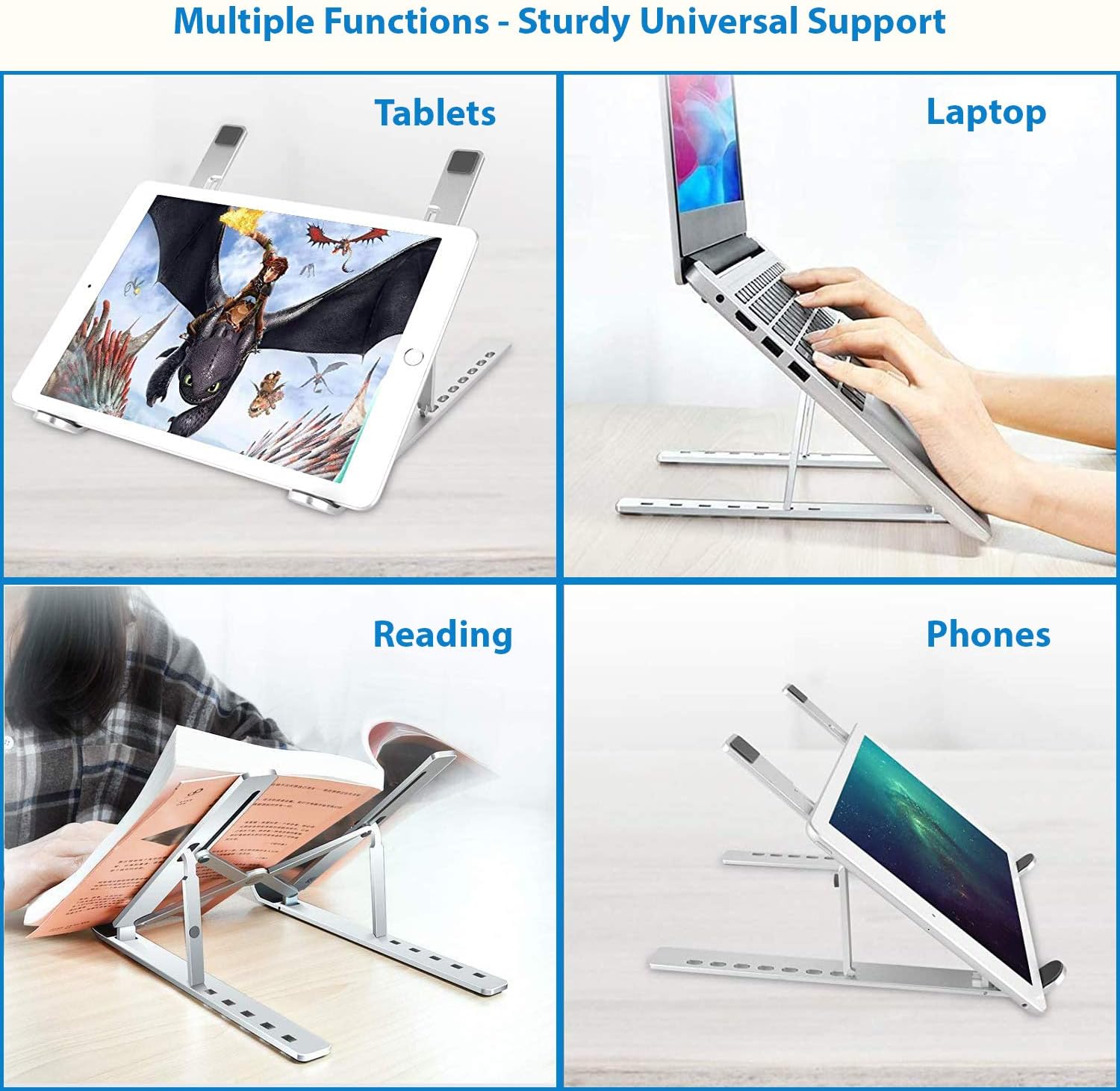
Figure 3.1: The stand's versatility in supporting various devices and for different functions.
3.2 Adjusting the Viewing Angle
- To adjust the angle, remove your device from the stand first.
- Gently push or pull the support arms to achieve the desired tilt and height. The stand offers multiple adjustable positions.
- Once adjusted, ensure the stand is locked into its new position before placing your device back on it.

Figure 3.2: An ergonomic setup with a laptop on the stand, promoting a tidy workspace.
3.3 Ergonomic Benefits and Cooling
Using the stand at an appropriate height and angle can significantly improve your posture, reducing strain on your neck and back. The open design of the stand also facilitates airflow around your device, aiding in heat dissipation and potentially extending its lifespan.

Figure 3.3: Comparison of ergonomic postures, illustrating how the stand improves viewing height.

Figure 3.4: The stand's design promotes airflow, contributing to a cooling effect for your device.
4. Maintenance
To ensure the longevity and optimal performance of your Tek Styz PRO stand, follow these maintenance guidelines:
- Cleaning: Wipe the stand with a soft, damp cloth. Avoid abrasive cleaners or solvents that could damage the finish or rubber components.
- Rubber Pads: Periodically check the rubber pads on the support arms and base for wear or damage. Ensure they are clean to maintain maximum grip and prevent scratching your device or desk surface.
- Storage: When not in use, fold the stand to its compact form and store it in a dry, clean place to protect it from dust and potential damage.
5. Troubleshooting
If you encounter any issues with your Tek Styz PRO stand, consider the following:
- Instability: Ensure the stand is fully unfolded and placed on a flat, level surface. Verify that your device's weight does not exceed 50 pounds and is centered on the stand.
- Device Slipping: Check that the rubber pads on the support arms are clean and intact. Dust or debris can reduce grip. Ensure your device is properly seated within the hooks.
- Difficulty Adjusting: Remove your device before attempting to adjust the stand's angle. Apply firm but gentle pressure to the hinges. If resistance is excessive, ensure no foreign objects are obstructing the mechanism.
For further assistance, please contact Tek Styz customer support.
6. Specifications
| Feature | Detail |
|---|---|
| Model Number | TS-1360 |
| Product Dimensions | 9.75 x 1 x 2.4 inches (folded) |
| Item Weight | 6 ounces |
| Material | Aircraft Grade Stainless Steel |
| Color | Gray |
| Maximum Weight Capacity | 50 pounds |
| Compatible Device Sizes | 8-27 inches |
| Compatible Devices | Laptops, Tablets, Smartphones (e.g., Huawei P60 Pro, iPads, Macbooks, Chromebooks) |
| Hook Width | 9.4 inches (24mm) and 6.1 inches (15.5cm) widest |
7. Warranty and Support
For warranty information or technical support regarding your Tek Styz PRO Adjustable Desktop Stand, please refer to the product packaging or contact Tek Styz customer service directly through their official website or the retailer where the product was purchased.