
Introduction
This manual provides essential instructions for the safe and efficient use of your Milwaukee M18FB8 8amp Forge Battery. Please read this manual thoroughly before operating the battery and retain it for future reference. Proper understanding and adherence to these instructions will ensure optimal performance and extend the lifespan of your battery.
Important Safety Information
Always follow basic safety precautions when using battery packs to reduce the risk of fire, electric shock, and personal injury. Failure to follow these warnings may result in serious injury or property damage.
- Do not disassemble, open, or shred battery pack.
- Do not short-circuit a battery pack.
- Do not expose battery pack to heat or fire. Avoid storage in direct sunlight.
- Do not subject battery pack to mechanical shock.
- In case of battery leakage, do not allow the liquid to come into contact with the skin or eyes. If contact has been made, wash the affected area with copious amounts of water and seek medical advice.
- Keep battery packs clean and dry.
- Do not use any charger other than that specifically provided for use with the equipment.
- Do not use any battery pack which is not designed for use with the equipment.
- Keep battery packs out of the reach of children.
- Seek medical advice immediately if a battery pack has been swallowed.
- Always charge battery packs fully before first use.
- Observe the plus (+) and minus (-) marks on the battery and equipment and ensure correct use.
- Do not use a battery pack that is damaged or modified. Damaged or modified batteries may exhibit unpredictable behavior resulting in fire, explosion or risk of injury.
Setup and Initial Charging
Before first use, ensure your Milwaukee M18FB8 8amp Forge Battery is fully charged. Use only Milwaukee M18™ compatible chargers.
- Inspect the Battery: Visually inspect the battery for any signs of damage, cracks, or leaks. Do not use a damaged battery.
- Insert into Charger: Slide the M18FB8 battery pack into a compatible Milwaukee M18™ charger. Ensure it clicks securely into place.
- Monitor Charging: The charger's indicator lights will show the charging status. Allow the battery to charge until the indicator shows a full charge. Charging time may vary based on the charger model and battery's initial charge level.
- Remove from Charger: Once fully charged, remove the battery from the charger.
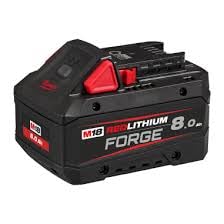
Image: The Milwaukee M18FB8 8amp Forge Battery. This image shows the battery pack, which is designed to be inserted into compatible Milwaukee M18™ tools and chargers.
Operating Instructions
The M18FB8 Forge Battery is designed for use with Milwaukee M18™ cordless power tools. Always ensure the battery is fully charged before beginning work for optimal performance.
- Insert into Tool: Align the battery pack with the battery port on your Milwaukee M18™ tool. Slide the battery into the tool until it locks securely into place. A click sound indicates proper installation.
- Check Battery Level: Most M18™ tools and the battery itself feature a fuel gauge. Press the fuel gauge button on the battery to check the remaining charge.
- Tool Operation: Operate your power tool according to its specific instruction manual. The M18FB8 provides consistent power output for demanding applications.
- Remove from Tool: To remove the battery, press the release button(s) on the battery pack or tool, and slide the battery out.
Battery Fuel Gauge
The M18FB8 battery features an on-board fuel gauge to display the remaining charge. Press the button on the battery to activate the LED indicators. The number of illuminated LEDs indicates the charge level:
- 4 Green LEDs: 75-100% charge
- 3 Green LEDs: 50-75% charge
- 2 Green LEDs: 25-50% charge
- 1 Green LED: 0-25% charge (recharge soon)
- 1 Flashing Green LED: Battery is very low or needs cooling/warming before charging.
Maintenance and Storage
Proper maintenance and storage are crucial for maximizing the lifespan and performance of your M18FB8 battery.
- Cleaning: Keep the battery terminals clean and free of debris. Use a clean, dry cloth to wipe down the battery. Do not use solvents or harsh chemicals.
- Storage: Store the battery in a cool, dry place, away from direct sunlight, moisture, and extreme temperatures. The ideal storage temperature is between 0°C and 50°C (32°F and 122°F).
- Long-Term Storage: For long-term storage (over 30 days), store the battery with approximately a 50% charge. Fully discharging or fully charging for extended periods can reduce battery life. Recharge every 6 months if stored for prolonged periods.
- Avoid Freezing: Do not store batteries in freezing temperatures.
- Disposal: Dispose of batteries responsibly according to local regulations. Do not dispose of batteries in household waste or by incineration. Many retailers and recycling centers offer battery recycling programs.
Troubleshooting
If you encounter issues with your M18FB8 battery, refer to the following common problems and solutions:
| Problem | Possible Cause | Solution |
|---|---|---|
| Battery not charging |
|
|
| Tool not operating |
|
|
| Reduced run time |
|
|
If problems persist, contact Milwaukee customer support or an authorized service center.
Specifications
| Feature | Detail |
|---|---|
| Model Number | M18FB8 |
| Battery Type | Lithium-Ion |
| Voltage | 18 Volts (Nominal) |
| Amperage | 8 Amps |
| Capacity | 8.0 Ah (Amp-hours) |
| Weight | Approximately 1 kg (2.2 lbs) |
| Compatibility | All Milwaukee M18™ Cordless Tools and Chargers |
| Recommended Operating Temperature | -18°C to 50°C (0°F to 125°F) |
| Recommended Charging Temperature | 0°C to 40°C (32°F to 104°F) |
Warranty Information
Milwaukee Tool provides a limited warranty for its battery packs. For specific warranty terms, conditions, and registration details, please refer to the official Milwaukee Tool website or the warranty card included with your purchase. Typically, this warranty covers defects in material and workmanship.
Please note: The warranty may be voided if the battery is misused, abused, modified, or repaired by unauthorized personnel.
Customer Support
For technical assistance, service, or to locate an authorized service center, please contact Milwaukee Tool customer support:
- Website: www.milwaukeetool.com
- Phone: Refer to the "Contact Us" section on the official website for regional phone numbers.
- Service Centers: Use the "Service & Repair" locator on the Milwaukee Tool website to find a service center near you.
When contacting support, please have your battery model number (M18FB8) and purchase date available.


