
1. Important Safety Information
Read all instructions before using this appliance to reduce the risk of burns, electrocution, fire, or injury to persons.
- Always wear safety glasses when using the nail drill to protect against flying debris and dust.
- Never touch the rotating bit or motor with bare hands to prevent burns.
- Always hold and operate the drill with a firm grip and keep fingers away from the rotating bit.
- Do not use this device near water or in wet environments.
- Keep out of reach of children.
2. Product Overview
The Hoxida Electric Nail Drill is a cordless, rechargeable device designed for comprehensive hand and foot care. It features adjustable speeds, forward and reverse rotation, and an integrated 360° LED light for enhanced visibility during use.
Package Contents:
- 1 x Hoxida Electric Nail Drill
- 10 x Interchangeable Drill Bits
- 100 x Sanding Bands
- 1 x Dust Shield
- 1 x Type-C Charging Cable

Image: The Hoxida Electric Nail Drill with its various components, including the main unit, multiple drill bits, sanding bands, and charging cable.
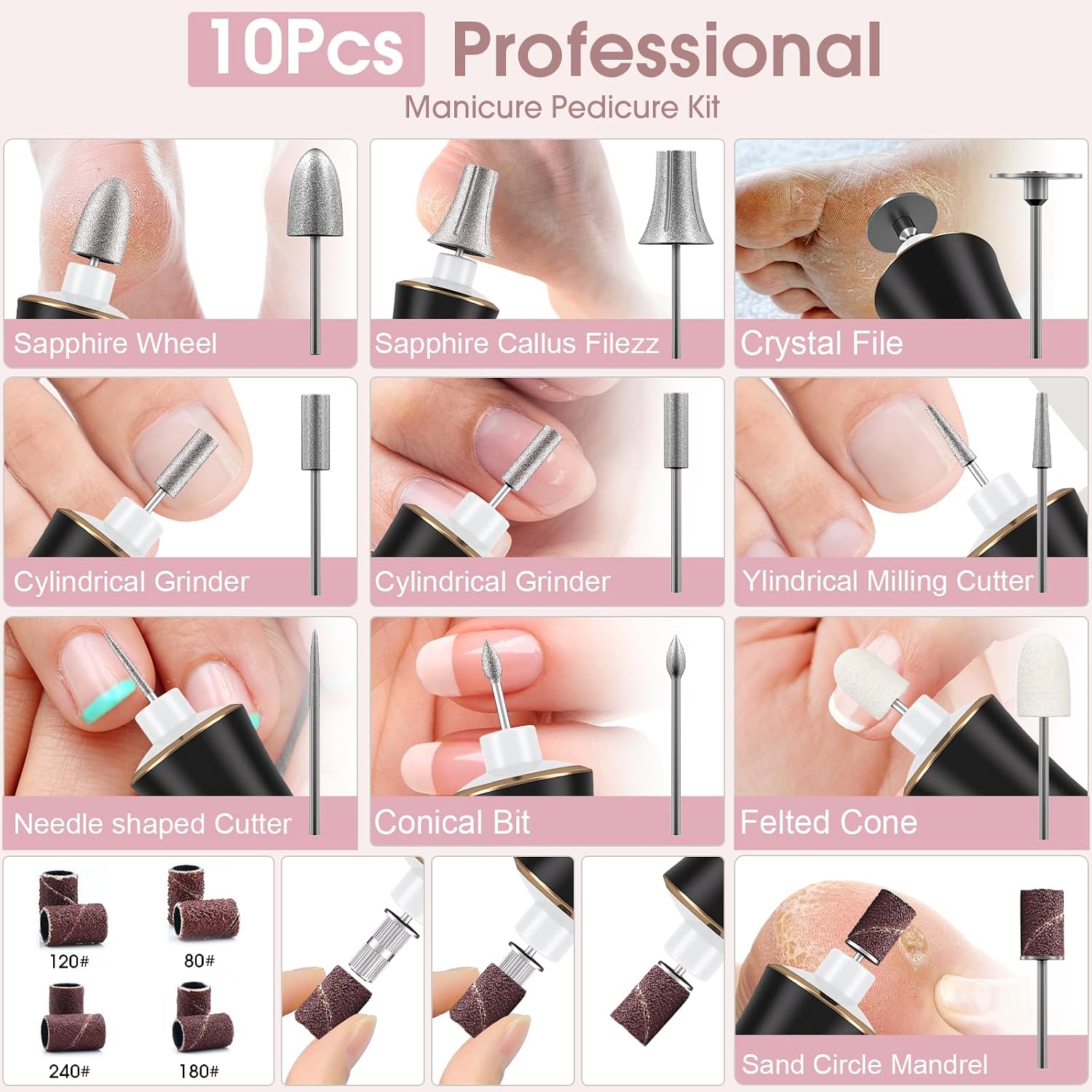
Image: A detailed view of the 10 professional drill bits and various grit sanding bands included with the kit, designed for different nail care tasks.
3. Setup
3.1 Charging the Device
Before first use, fully charge the nail drill. Connect the Type-C charging cable to the device and a suitable USB power adapter (not included). The battery indicator on the device will show charging status. A full charge typically takes approximately 3-4 hours and provides up to 3 hours of operation.

Image: The electric nail drill connected to a Type-C USB cable for charging, illustrating its cordless and rechargeable design.
3.2 Attaching Drill Bits
- Ensure the device is turned off before changing bits.
- Gently insert the desired drill bit into the opening at the tip of the device until it is securely seated.
- To remove, pull the bit straight out.
4. Operating Instructions
4.1 Power On/Off
Press and hold the power button (usually marked with a power symbol) to turn the device on or off.
4.2 Adjusting Speed
The device offers 10 adjustable speed settings, ranging from 11,000 RPM to 20,000 RPM. Use the '+' and '-' buttons to increase or decrease the rotational speed. The current speed level will be displayed on the device's screen.

Image: The device's display showing the 10 adjustable speed levels and the memory function, which recalls the last used speed.
4.3 Forward/Reverse Rotation
Press the 'L/R' button to switch between forward (clockwise) and reverse (anti-clockwise) rotation. This feature allows for comfortable use with both left and right hands and for different nail shaping techniques.

Image: A visual representation of the forward (clockwise) and reverse (anti-clockwise) rotation capabilities of the drill bit.
4.4 Using the LED Light
Press the light bulb button to activate the 360° LED ring light. This provides illumination around the drill bit, offering a clearer view of the grinding area and improving precision.

Image: The 360° LED ring light illuminated, providing bright, shadow-free lighting around the drill bit for precise work.
4.5 General Usage Tips
- Start with a low speed and gradually increase as needed.
- Apply light pressure; excessive force is not required and can cause damage.
- Move the drill bit continuously over the nail surface to avoid heat buildup.
- Refer to the included drill bit guide for specific uses of each bit (e.g., shaping, buffing, cuticle removal, callus removal).
5. Maintenance
5.1 Cleaning the Device
After each use, turn off and unplug the device. Use a soft, dry cloth to wipe down the body of the nail drill. Remove any dust or debris from the drill bit insertion area. Do not immerse the device in water or use harsh chemicals for cleaning.
5.2 Cleaning Drill Bits
Clean drill bits with a small brush to remove nail dust. For thorough cleaning, bits can be disinfected with an appropriate solution as per standard nail hygiene practices.
5.3 Storage
Store the nail drill and its accessories in a cool, dry place, away from direct sunlight and moisture. Keep all components organized to prevent loss or damage.
6. Troubleshooting
- Device not turning on: Ensure the device is fully charged. If the battery is low, connect it to the charger.
- Drill bit not rotating: Check if the bit is properly inserted. Ensure the device is powered on and not in standby mode.
- Excessive vibration or noise: Ensure the drill bit is correctly and securely inserted. A loose bit can cause vibration.
- Device overheating: If the device feels excessively hot, turn it off and allow it to cool down before resuming use. Avoid continuous operation for extended periods without breaks.
If you encounter issues not listed here or if troubleshooting steps do not resolve the problem, please contact customer support.
7. Specifications
| Model Number: | NailDrills-004 |
| Brand: | Hoxida |
| Battery Capacity: | 2000mAh |
| Battery Life: | Up to 3 hours |
| Charging Time: | Approx. 3-4 hours |
| Maximum Rotational Speed: | 20,000 RPM |
| Adjustable Speeds: | 10 levels (11,000 - 20,000 RPM) |
| Weight: | 0.31 Kilograms |
| Power Source: | Battery Powered |
8. Warranty and Support
For warranty information or technical support, please refer to the product packaging or contact Hoxida customer service directly. Keep your purchase receipt for warranty claims.
Contact information can typically be found on the manufacturer's official website or through your retailer.