
Introduction
Thank you for choosing the Edillas Kids Digital Watch Model 869LB. This watch is designed for children and teenagers, featuring a durable construction, 50M water resistance, 7-color LED backlight, stopwatch, and alarm functions. This manual provides detailed instructions for setting up and operating your watch to ensure optimal performance and enjoyment.

Image: Front view of the Edillas Kids Digital Watch Model 869LB, showcasing its digital display and green accents.
Product Features
- Digital Time Display (Hour, Minute, Second)
- Date Display (Month, Day, Week)
- 7-Color LED Backlight
- 50M Water Resistance
- Stopwatch Function (1/100 second accuracy)
- Daily Alarm
- 12/24 Hour Format Selection

Image: Visual representation of the watch's key features: 7-color light, waterproof capability, stopwatch, alarm, and 12/24 hour display, with children enjoying water activities in the background.
Button Functions
The watch features four primary buttons:
- LIGHT Button (Top Left): Activates the LED backlight. Press and hold to cycle through 7 backlight colors.
- MODE Button (Bottom Left): Cycles through different modes: Time Display → Stopwatch → Alarm Setting.
- START Button (Top Right): Used to start/stop the stopwatch, adjust values during setting, or view the date.
- RESET Button (Bottom Right): Used to reset the stopwatch, confirm settings, or switch between 12/24 hour format.

Image: Diagram illustrating the location and labels of the Light, Mode, Start, and Reset buttons on the watch, along with their primary functions.
Setup and Operation
1. Setting Time and Date
- From the normal time display, press the MODE button three times to enter time setting mode. The seconds will flash.
- Press the RESET button to cycle through the setting items: Seconds → Hour → Minute → Month → Day → Week.
- While an item is flashing, press the START button to adjust the value.
- Press the MODE button once to exit setting mode and return to the normal time display.
- To switch between 12-hour and 24-hour format, press the RESET button while the hour is flashing during time setting.
2. Using the Stopwatch
- From the normal time display, press the MODE button once to enter stopwatch mode. The display will show "00:00:00".
- Press the START button to begin timing.
- Press the START button again to pause timing.
- Press the RESET button to reset the stopwatch to "00:00:00" while it is paused.
- Press the MODE button to exit stopwatch mode.
3. Setting the Alarm
- From the normal time display, press the MODE button twice to enter alarm setting mode. The hour will flash.
- Press the START button to adjust the alarm hour.
- Press the RESET button to switch to minute setting. The minutes will flash.
- Press the START button to adjust the alarm minute.
- Press the MODE button to exit alarm setting mode.
- To turn the alarm ON/OFF, press and hold the START button and then press the RESET button simultaneously in normal time display. An alarm icon will appear/disappear.
4. Using the LED Backlight
- Press the LIGHT button (top left) to illuminate the display. The light will stay on for a few seconds.
- To change the backlight color, press and hold the LIGHT button. The color will cycle through the 7 available options. Release the button when your desired color is displayed.

Image: The watch display shown with seven different backlight colors, demonstrating the customizable LED feature.
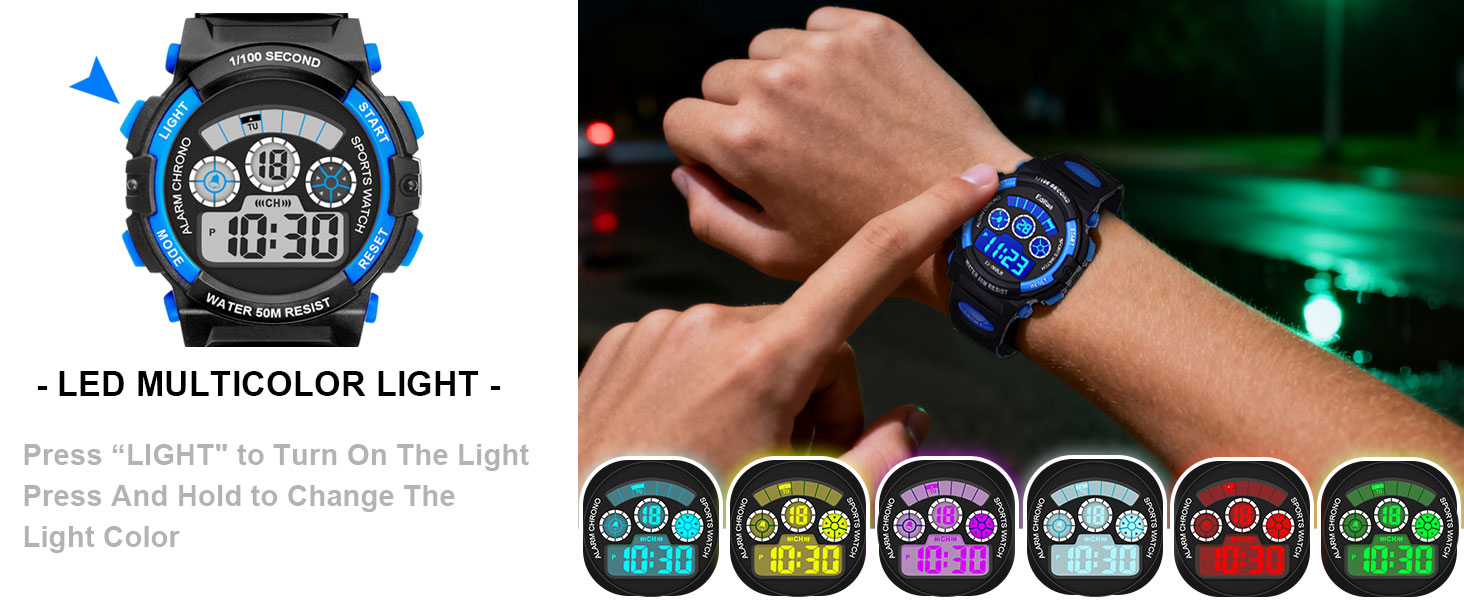
Image: A visual guide explaining how to activate and change the 7-color LED backlight by pressing and holding the LIGHT button.
Maintenance
Water Resistance
This watch is rated for 50M (5 ATM) water resistance. This means it is suitable for hand washing, rain, splashing, cold baths, and swimming. It is not suitable for diving, snorkeling, or hot water activities (e.g., hot showers, saunas) as steam can penetrate the seals.
- Do not press any buttons while the watch is submerged in water.
- Avoid exposing the watch to extreme temperatures or sudden temperature changes.
- After exposure to saltwater, rinse the watch with fresh water and dry it thoroughly.

Image: A child wearing the Edillas digital watch while swimming, illustrating its 50M water resistance feature.
Cleaning
Wipe the watch clean with a soft, dry cloth. For stubborn dirt, a slightly damp cloth can be used, followed by immediate drying. Avoid using chemical cleaners or abrasive materials.
Battery Replacement
When the display becomes dim or the backlight stops working, the battery may need replacement. Battery replacement should ideally be performed by a qualified watch technician to ensure proper sealing and maintain water resistance. Opening the watch yourself may void the warranty and compromise its water resistance.
Troubleshooting
| Problem | Possible Cause / Solution |
|---|---|
| Watch display is blank or dim. | Battery may be low or depleted. Replace the battery. |
| Buttons are unresponsive. | Ensure the watch is not in a locked mode (if applicable, though this model does not specify one). Try resetting the watch by removing and reinserting the battery (professional service recommended). |
| Time is incorrect. | Re-set the time and date following the instructions in the "Setting Time and Date" section. |
| Water inside the watch. | Water resistance may have been compromised (e.g., buttons pressed underwater, exposure to hot water). Seek professional repair immediately to prevent further damage. |
Specifications
| Feature | Detail |
|---|---|
| Model Number | 869LB |
| Brand | Edillas |
| Water Resistance | 50M (5 ATM) |
| Display Type | Digital |
| Backlight | 7-Color LED |
| Functions | Time, Date, Day, Alarm, Stopwatch, LED Light |
| Case Diameter | 44.5mm / 1.75 inches |
| Case Thickness | 17mm / 0.67 inches |
| Band Width | 16mm / 0.63 inches |
| Band Length | 24mm / 9.44 inches |
| Max Fit Wrist | 22cm / 8.66 inches |
| Min Fit Wrist | 15cm / 5.9 inches |
| Product Weight | 43g / 1.5 oz |
| Clasp Type | Tang Buckle |

Image: Technical drawing illustrating the various dimensions of the watch, including case diameter, thickness, band width, and wrist fit range.
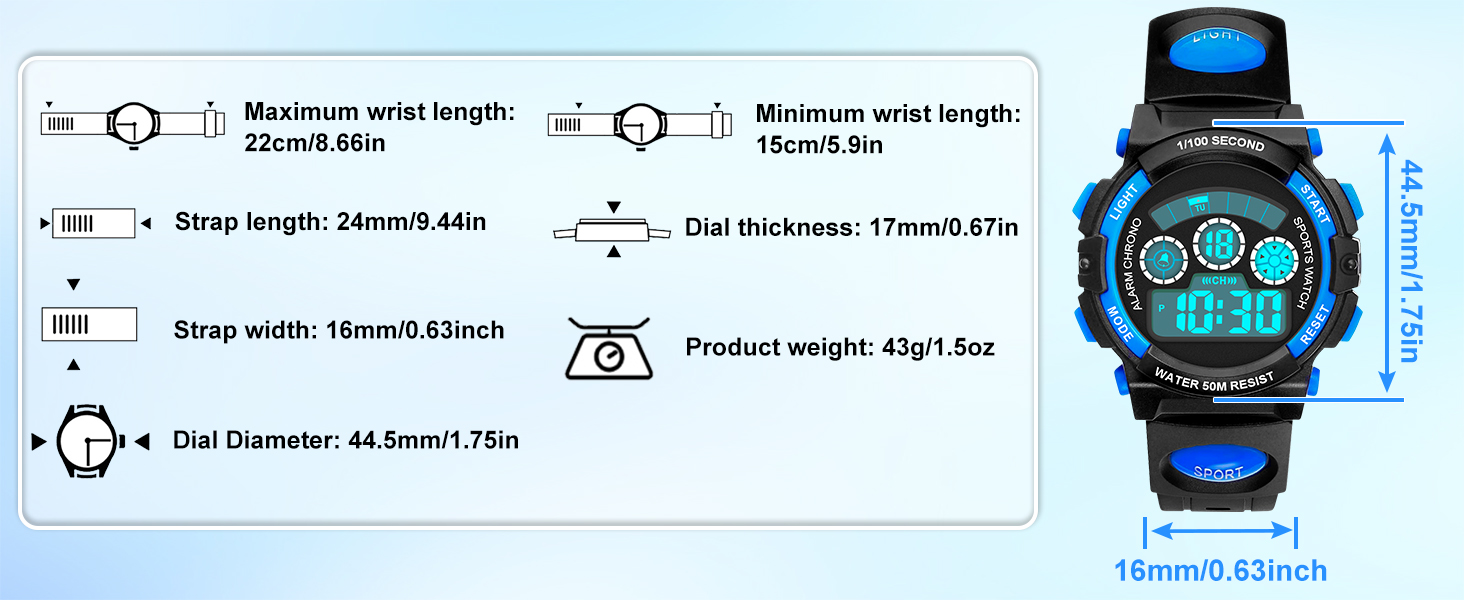
Image: A comprehensive diagram detailing the maximum and minimum wrist fit, band length, band width, case diameter, case thickness, and product weight of the watch.
Warranty and Support
Edillas provides the following support for your product:
- 30-Day Refund: If you are not satisfied with your purchase, you may be eligible for a full refund within 30 days.
- 90-Day Free Replacement: In case of manufacturing defects or issues, a free replacement service is available for 90 days from the date of purchase.
- Lifetime Technical Support: Edillas offers lifetime technical support for this product. For assistance, please contact yadelaiaftersale@163.com.
Please retain your proof of purchase for warranty claims.


