
YOJOCK KH105
YOJOCK KH105 3-in-1 Carbon Monoxide Detector Instruction Manual
Model: KH105
1. Introduction
Thank you for choosing the YOJOCK KH105 3-in-1 Carbon Monoxide Detector. This device is designed to provide essential safety monitoring by detecting carbon monoxide (CO) levels, temperature, and humidity in your environment. Its compact, plug-in design makes it suitable for various locations including homes, hotels, RVs, and during travel. Please read this manual thoroughly before use to ensure proper installation, operation, and maintenance.
2. Product Features
- 3-in-1 Detection: Monitors Carbon Monoxide (CO), ambient temperature, and humidity.
- High-Accuracy Electrochemical Sensor: Provides fast and reliable CO detection (0–1000 PPM) with a response time of 5 seconds.
- Audible and Visual Alarm: Features a loud 85dB alarm and flashing red light when CO levels reach 150 PPM.
- Portable Plug-in Design: Compact (2.9 × 3.1 × 2 inches, 0.19 lb) and energy-efficient (≤2W), ideal for travel and various indoor settings.
- Clear Digital Display: Shows real-time CO concentration, temperature, and humidity readings.

Figure 1: The YOJOCK KH105 detector showing its 3-in-1 monitoring capabilities for CO, temperature, and humidity.

Figure 2: Illustration of the high-precision electrochemical sensor, highlighting its fast response time and reliability.
3. Setup
- Unpacking: Carefully remove the detector from its packaging. Inspect for any damage.
- Power Connection: The YOJOCK KH105 is a plug-in device. Insert the detector directly into a standard electrical outlet. Ensure it is securely plugged in.
- Initial Warm-up: Upon plugging in, the device will initiate a warm-up sequence for approximately 30 seconds. During this time, the display may cycle through various indicators and the alarm may briefly sound as part of a self-test. A voice prompt will announce "Welcome to use voice carbon monoxide detector."
- Placement: For optimal performance, place the detector in an area where CO is likely to be present, such as near fuel-burning appliances, but not directly above them. Avoid placing it in direct sunlight, near vents, or in areas with high humidity or extreme temperatures.
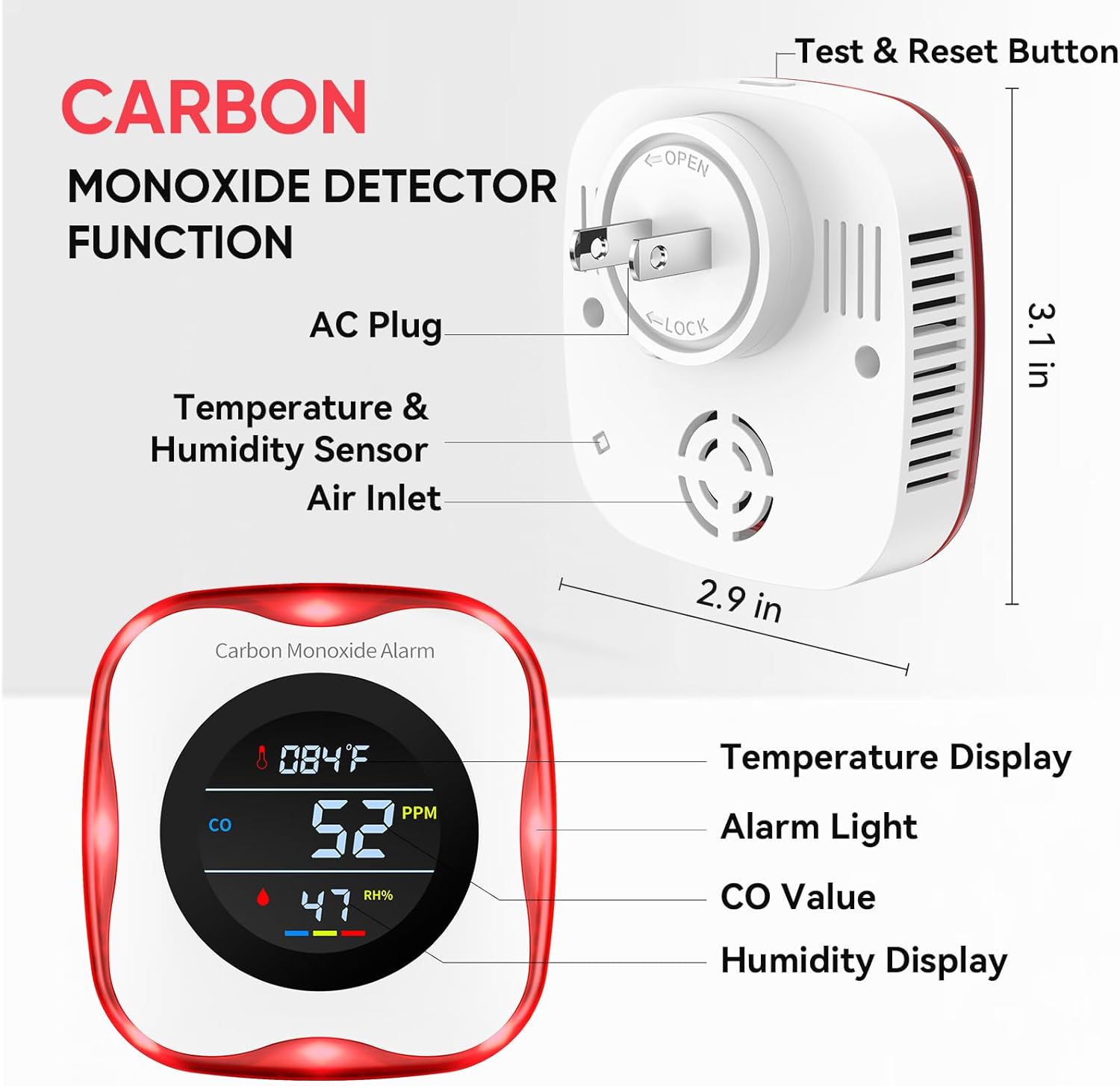
Figure 3: Key components and dimensions of the detector, illustrating the AC plug for easy setup.
4. Operating Instructions
4.1 Normal Operation
Once plugged in and warmed up, the detector will continuously monitor CO levels, temperature, and humidity. The digital display will show real-time readings:
- CO Value (PPM): Indicates the concentration of carbon monoxide in parts per million.
- Temperature: Displays the ambient temperature in Fahrenheit.
- Humidity: Shows the relative humidity percentage.
4.2 Alarm Conditions
The detector is designed to alert you to dangerous CO levels:
- When CO levels reach 150 PPM, the device will activate an 85dB audible alarm and a flashing red light.
- A voice prompt will announce: "Attention please! Carbon monoxide gas leaking! Please open the window and the door."
- In case of an alarm, immediately move to fresh air, call emergency services, and do not re-enter the premises until it has been deemed safe by professionals.
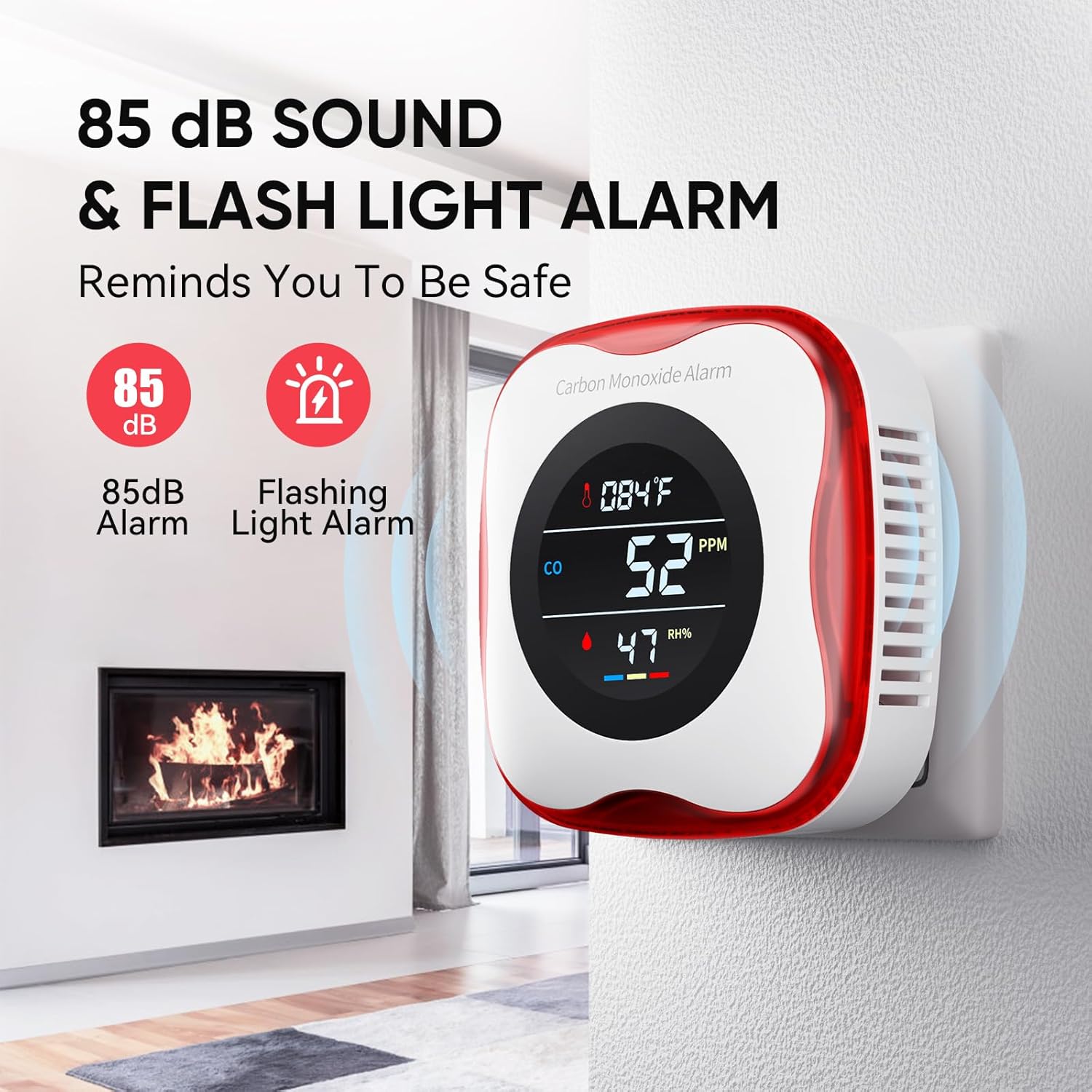
Figure 4: The detector in alarm mode, showing the visual and audible warnings.
4.3 Testing the Alarm
It is recommended to test the alarm regularly to ensure it is functioning correctly.
- Press the "Test & Reset" button located on the top of the device.
- The alarm should sound, and the red light should flash, indicating proper operation.
- To test the CO detection, you can expose the sensor to a small amount of smoke (e.g., from a lit cigarette held briefly near the air inlet). The CO PPM reading should increase, and if it reaches the alarm threshold, the alarm will activate.

Figure 5: Visual guide for testing the detector's alarm function.
4.4 Video Demonstration
Video 1: An introduction to the YOJOCK Carbon Monoxide Detector, demonstrating its features and basic operation, including plugging it in and testing the alarm with smoke.
5. Maintenance
- Regular Cleaning: Gently wipe the exterior of the detector with a soft, damp cloth. Do not use harsh chemicals or abrasive cleaners. Ensure the air inlets are free from dust and debris.
- Monthly Testing: Press the "Test & Reset" button monthly to confirm the alarm is functioning.
- Avoid Obstructions: Ensure nothing blocks the air inlets or the alarm speaker.
- No User-Serviceable Parts: Do not attempt to open or repair the detector. Refer to the warranty information for service.
6. Troubleshooting
| Problem | Possible Cause | Solution |
|---|---|---|
| No display/No power | Not properly plugged in; Power outage. | Ensure the detector is securely plugged into a working outlet. Check household circuit breakers. |
| Alarm sounds without visible CO source | Actual CO presence; Sensor malfunction; Interference. | Treat all alarms as real. Evacuate immediately. If false alarm suspected, ventilate area and test again. If problem persists, contact customer service. |
| Inaccurate temperature/humidity readings | Improper placement; Sensor obstruction. | Relocate the detector away from direct heat/cold sources or high humidity areas. Ensure air inlets are clear. |
| Test button does not trigger alarm | Device malfunction. | If the test button fails to activate the alarm, the unit may be faulty. Replace the detector immediately. |
7. Specifications
- Model: KH105
- Power Source: Plug-In (AC)
- Sensor Type: Electrochemical
- CO Detection Range: 0-1000 PPM
- CO Response Time: 5 seconds
- Alarm Loudness: 85dB
- Temperature Range: 1-176°F (±4°F)
- Humidity Range: 0-99% (±5%)
- Product Dimensions: 2.9"D x 3.1"W x 2"H
- Item Weight: 0.19 lbs
- Material: ABS
- Color: White
8. Warranty and Support
The YOJOCK KH105 Carbon Monoxide Detector comes with a 3-year warranty. If you encounter any issues or require assistance, please contact YOJOCK customer service. Our team is available to provide support and assistance within 24 hours to ensure your satisfaction.
For customer service inquiries, please refer to the contact information provided with your purchase or visit the official YOJOCK website.
Ask a question about this manual
Ask about setup, troubleshooting, compatibility, parts, safety, or missing instructions. Manuals+ will review the question and use this page’s manual context to help answer it.