1. Introduction
Thank you for purchasing the Sangean WR-301 50th Anniversary FM Radio and Bluetooth Speaker. This compact device combines classic aesthetics with modern functionality, offering FM radio, Bluetooth connectivity, and an AUX-IN port. Please read this manual carefully to ensure proper use and to maximize your listening experience.
Safety Information
- Do not expose the unit to rain or moisture to prevent fire or electric shock.
- Avoid placing the unit near heat sources such as radiators, heat registers, stoves, or other apparatus that produce heat.
- Use only attachments/accessories specified by the manufacturer.
- Refer all servicing to qualified service personnel.
2. Package Contents
Please check that all items listed below are included in your package:
- Sangean WR-301 Main Unit
- External Antenna Cable
- TYPE-C USB Charging Cable
- Carrying Pouch
- User Manual (this document)
3. Product Overview
Familiarize yourself with the various parts and controls of your Sangean WR-301.
Front Panel
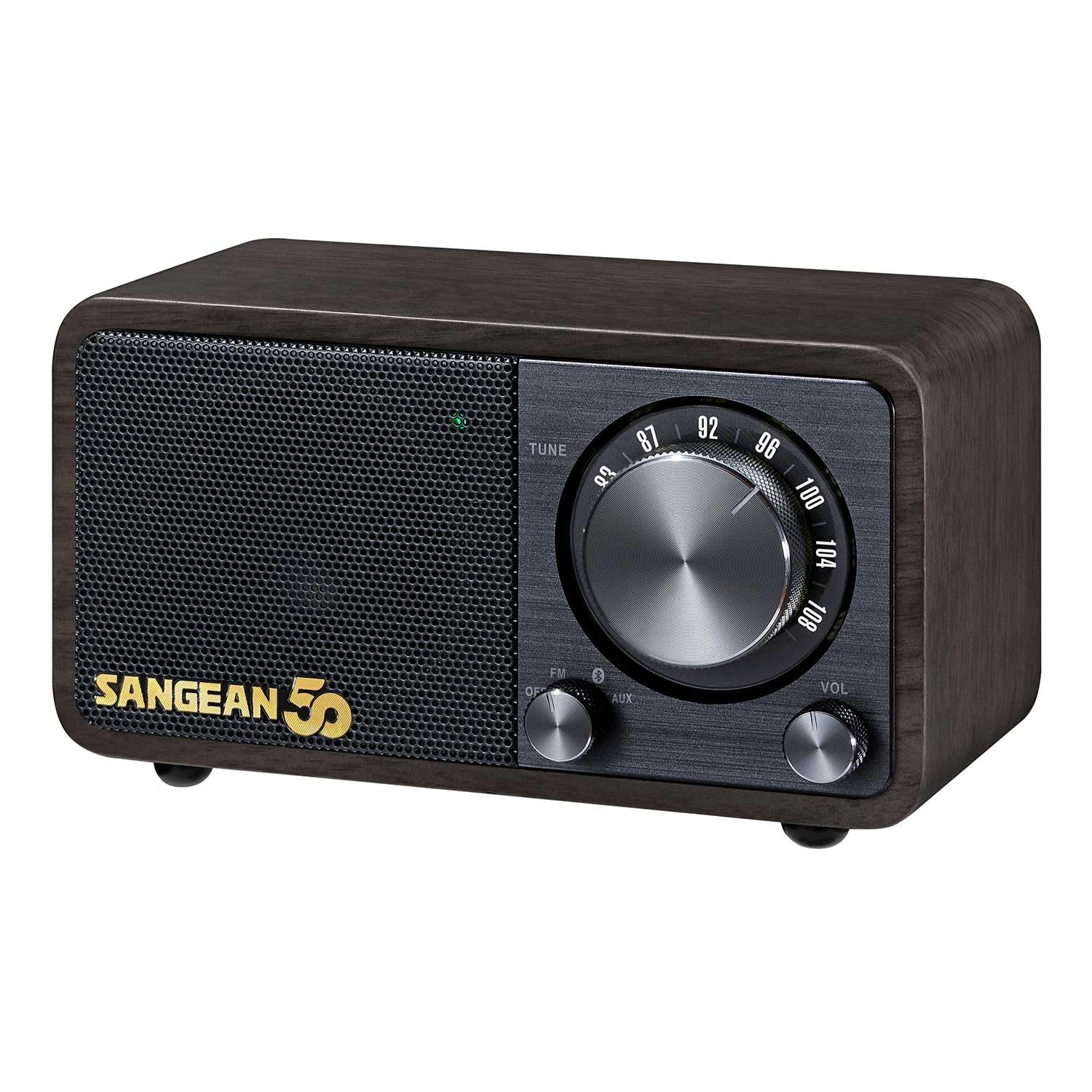
Image: Front view of the Sangean WR-301 radio, showing the speaker grille, tuning dial, volume knob, and Sangean 50th Anniversary logo.
- Speaker Grille: Audio output.
- Tuning Dial: Used to select FM radio frequencies.
- Volume Knob: Adjusts the audio output level.
- Function Selector: Switches between FM, Bluetooth, and AUX-IN modes.
- Power Button: Turns the unit on/off.
Rear Panel
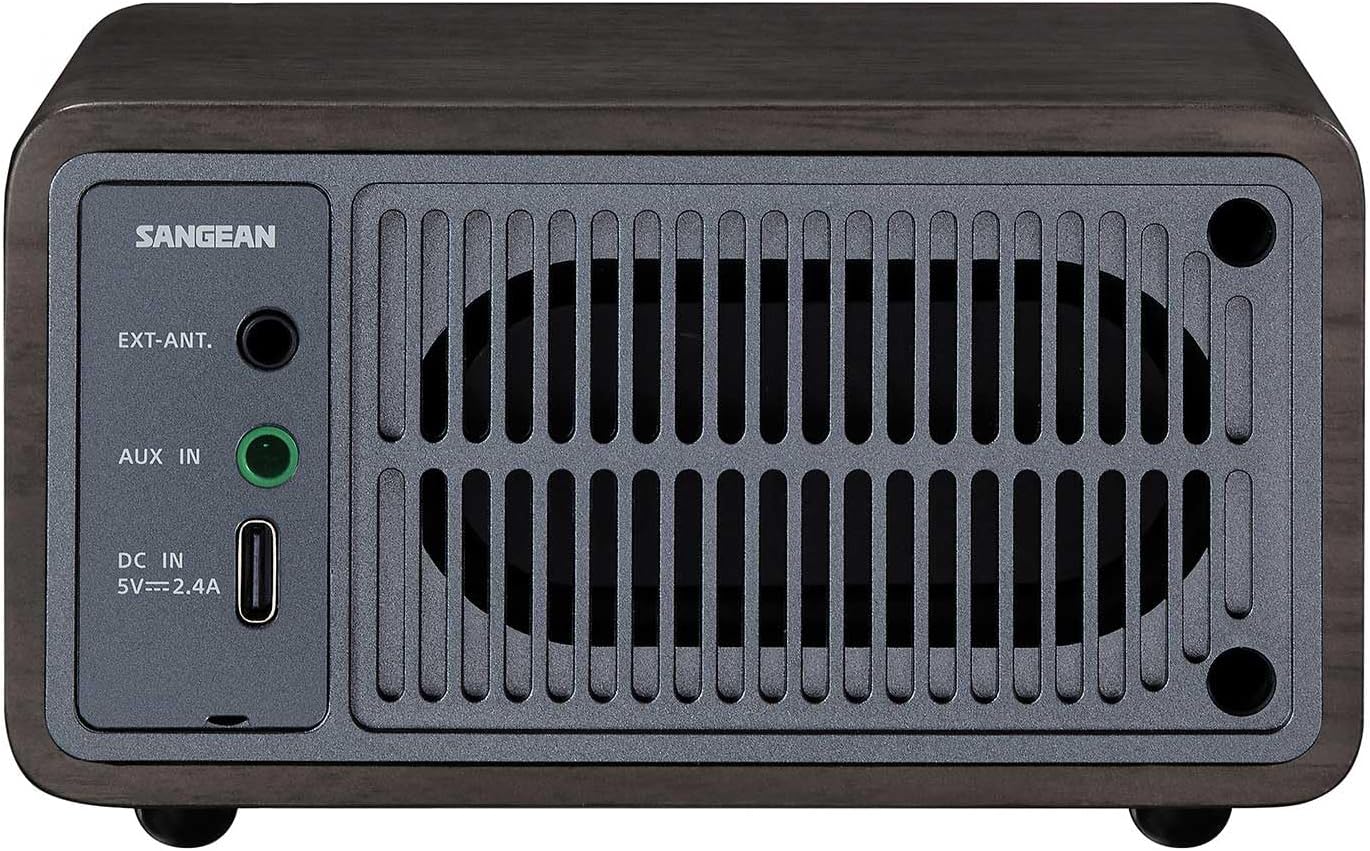
Image: Rear view of the Sangean WR-301 radio, highlighting the external antenna port, AUX IN port, and USB Type-C charging port.
- EXT. ANT. (External Antenna) Jack: Connect the included external antenna for improved FM reception.
- AUX IN Jack: Connect external audio devices using a 3.5mm audio cable.
- DC IN (USB Type-C) Port: Connect the USB Type-C charging cable for power and charging.
4. Setup
Powering On and Charging
The Sangean WR-301 is powered by a built-in rechargeable Lithium-Ion battery. It can also operate while connected to a power source.
- Connect the supplied USB Type-C charging cable to the DC IN port on the rear of the unit.
- Connect the other end of the USB cable to a compatible USB power adapter (not included) or a powered USB port.
- The charging indicator will illuminate during charging and turn off when fully charged.
- To power on the unit, press and hold the Power button on the front panel.
A full charge provides up to 36 hours of playback, depending on usage and volume level.
5. Operating Instructions
FM Radio Operation
- Ensure the unit is powered on.
- Set the Function Selector to 'FM'.
- Extend the external antenna for optimal reception.
- Rotate the Tuning Dial to select your desired FM station. The frequency will be displayed on the screen.
- Adjust the Volume Knob to your preferred listening level.
Bluetooth Pairing
- Ensure the unit is powered on.
- Set the Function Selector to 'Bluetooth'. The unit will enter pairing mode, indicated by a flashing Bluetooth icon on the display.
- On your mobile device (smartphone, tablet, etc.), enable Bluetooth and search for available devices.
- Select 'Sangean WR-301' from the list of devices.
- Once paired, the Bluetooth icon on the unit's display will stop flashing and remain solid. You can now play audio from your device through the speaker.
AUX-IN Mode
- Ensure the unit is powered on.
- Set the Function Selector to 'AUX'.
- Connect your external audio device (e.g., MP3 player, CD player) to the AUX IN jack on the rear of the unit using a 3.5mm audio cable (not included).
- Play audio from your external device.
- Adjust the volume using the Volume Knob on the WR-301 and/or your external device.
6. Maintenance
- Clean the unit with a soft, dry cloth. Do not use abrasive cleaners or solvents.
- Keep the unit away from dust, dirt, and moisture.
- If the unit will not be used for an extended period, fully charge the battery and store it in a cool, dry place.
7. Troubleshooting
| Problem | Possible Cause | Solution |
|---|---|---|
| No power | Battery is depleted or unit is not charged. | Connect the USB Type-C charging cable and charge the unit. |
| No sound from FM radio | Poor reception or incorrect mode. | Extend the external antenna fully. Try adjusting the unit's position. Ensure Function Selector is set to 'FM'. |
| Cannot pair Bluetooth device | Unit not in pairing mode or device too far. | Ensure Function Selector is set to 'Bluetooth' and the Bluetooth icon is flashing. Move your device closer to the WR-301. |
| No sound in AUX-IN mode | Cable not connected properly or volume too low. | Check the 3.5mm audio cable connections. Increase volume on both the WR-301 and the external device. |
8. Specifications
| Feature | Detail |
|---|---|
| Model | WR-301 |
| Brand | Sangean |
| Power Source | Battery Powered (1 Lithium Ion battery included) |
| Interfaces | USB (Type-C for charging), Bluetooth, AUX-IN |
| Speaker Type | Active |
| Tuner Technology | FM (Wide FM compatible) |
| Dimensions (L x W x H) | 11.6 cm x 7.4 cm x 6.5 cm |
| Color | Dark Walnut |
| Special Feature | Rechargeable, up to 36 hours playback |
9. Warranty and Support
For warranty information and customer support, please refer to the documentation provided with your purchase or visit the official Sangean website. Keep your proof of purchase for any warranty claims.
For further assistance, you may contact Sangean customer service through their official channels. Please have your model number (WR-301) and purchase date ready.


