
Tribit BTS61
Tribit Soundbar Speaker S1 with Wired Subwoofer User Manual
Model: BTS61
Introduction
This manual provides detailed instructions for the setup, operation, and maintenance of your Tribit Soundbar Speaker S1 with a wired subwoofer. Please read this manual thoroughly before using the product to ensure proper functionality and to maximize your audio experience. Keep this manual for future reference.
Safety Information
- Power Source: Use only the provided power adapter. Ensure the voltage matches your local power supply.
- Placement: Place the soundbar and subwoofer on a stable, flat surface. Avoid placing near heat sources, direct sunlight, or in humid environments. Ensure adequate ventilation.
- Water Exposure: Do not expose the unit to water or moisture. If liquid enters the unit, disconnect power immediately and contact customer support.
- Cleaning: Clean the unit with a soft, dry cloth. Do not use liquid cleaners or aerosols.
- Servicing: Do not attempt to repair the unit yourself. Refer all servicing to qualified personnel.
- Children: Keep out of reach of children. Small parts may pose a choking hazard.
Package Contents
Verify that all items listed below are included in your package:
- Tribit Soundbar Speaker S1
- Wired Subwoofer
- Remote Control (with 2 AAA batteries included)
- AC Power Cord (for Soundbar)
- AUX Cable
- Mounting Kit (x2)
- User Manual
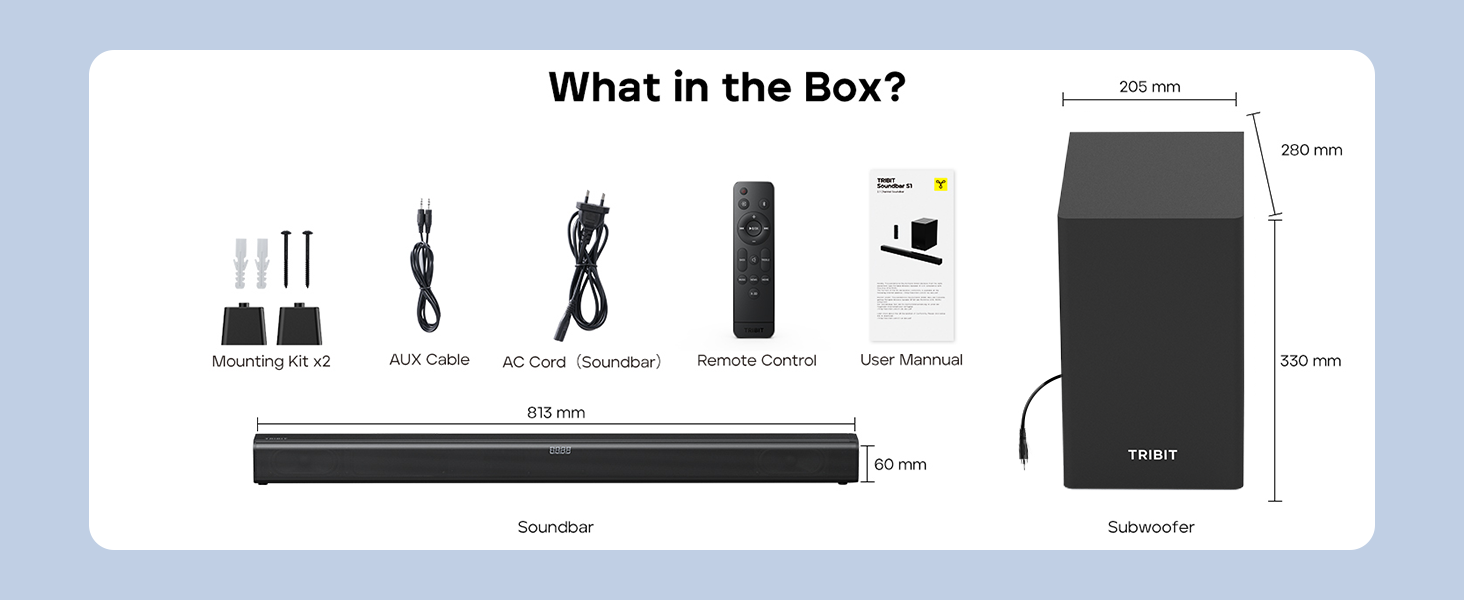
Image: Contents of the Tribit Soundbar S1 package, including the soundbar, subwoofer, remote control, power cord, AUX cable, mounting kit, and user manual. Dimensions for the soundbar and subwoofer are also shown.
Product Overview
Soundbar and Subwoofer Components

Image: The Tribit Soundbar S1, its accompanying wired subwoofer, and the remote control, displayed together.

Image: An exploded view diagram illustrating the 100W soundbar and 100W subwoofer with its bass reflex port, highlighting the 200W peak power output.
Soundbar Controls

Image: A detailed view of the soundbar's top-mounted controls, including the On/Off button, Source button, Volume + button, and Volume - button. The remote control receiver is also indicated.
- Power Button: Press to turn the soundbar On or Off.
- Source Button: Press to cycle through input modes (Bluetooth, AUX, HDMI, USB).
- Volume + Button: Increase volume.
- Volume - Button: Decrease volume.
- LED Display: Shows current status, volume level, and EQ mode.
Rear Panel Connections

Image: A diagram illustrating the rear connection panel of the soundbar, featuring ports for HDMI (ARC), USB Disk Input, AUX Input, SUB Output (for the wired subwoofer), and AC Input. Bluetooth 5.3 connectivity is also noted.
- HDMI (ARC): Connect to your TV's HDMI ARC port for audio output.
- AUX IN: Connect external audio devices via a 3.5mm AUX cable.
- USB: For playing audio files from a USB drive.
- SUB OUT: Connects to the wired subwoofer.
- AC IN: Connect the power cord.
Remote Control

Image: A detailed view of the remote control for the Tribit Soundbar S1, showing buttons for Power On/Off, Source Switching, Bluetooth Mode, Volume +/-, Previous/Next Song, Play/Pause, Mute, Bass/Treble +/- adjustments, and dedicated EQ Mode buttons (Music, News, Movie, X-3D).
The remote control allows full functionality from a distance. Ensure batteries are correctly inserted.
Setup
Placement
Position the soundbar centrally below your television. The subwoofer can be placed on the floor near the soundbar, ideally in a corner for enhanced bass response, but ensure it is not obstructed.

Image: The Tribit Soundbar S1 positioned below a television on a media console, with the wired subwoofer placed to the side, demonstrating a typical home theater setup.
Connecting the Subwoofer
Connect the wired subwoofer to the "SUB OUT" port on the rear of the soundbar using the provided cable.
Power Connection
Connect the AC power cord to the "AC IN" port on the soundbar, then plug the other end into a wall outlet.
Audio Connections
Choose one of the following methods to connect your audio source:
- HDMI (ARC): For optimal audio quality and control, connect an HDMI cable from the soundbar's HDMI (ARC) port to your TV's HDMI ARC port. Ensure your TV's HDMI ARC function is enabled in its settings.
- AUX: Connect the provided 3.5mm AUX cable from the soundbar's AUX IN port to the audio output (headphone jack or AUX out) of your device (TV, smartphone, tablet).
- USB: Insert a USB drive containing audio files into the USB port. The soundbar will automatically switch to USB mode.
- Bluetooth: For wireless connection, refer to the "Bluetooth Pairing" section under Operating Instructions.
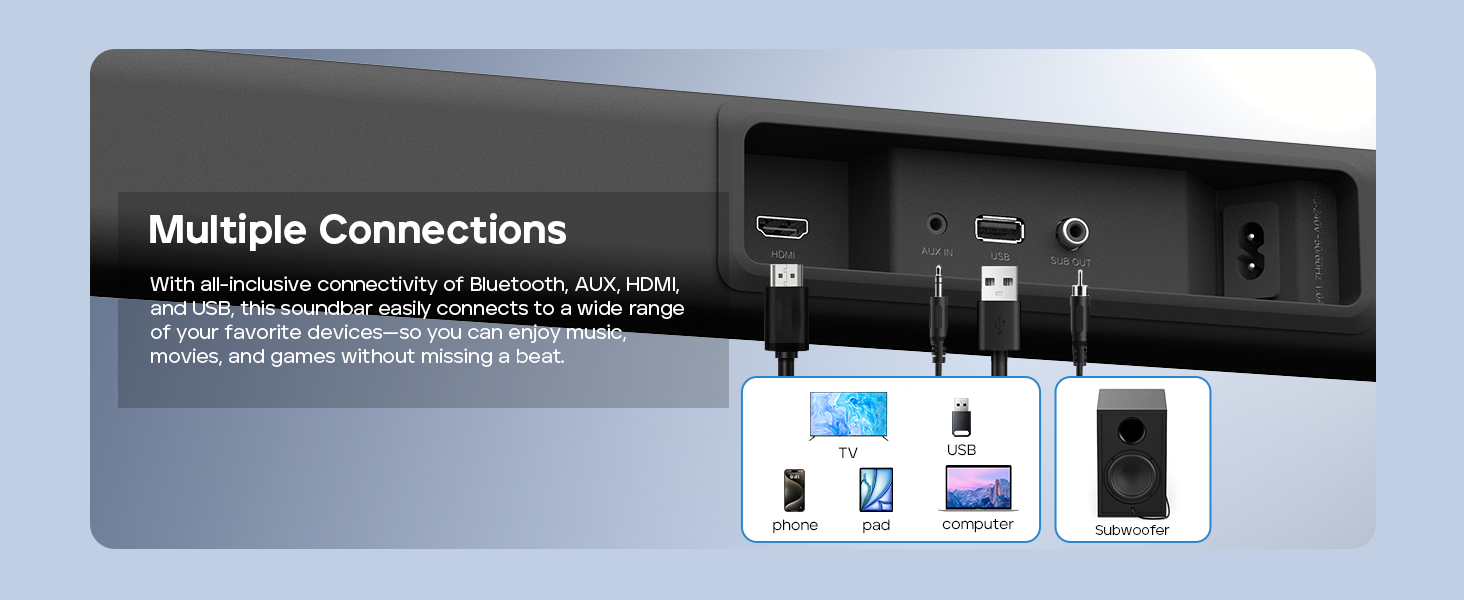
Image: A visual guide demonstrating the multiple connection options for the soundbar, including HDMI, AUX, USB, and Bluetooth, with examples of compatible devices like TVs, phones, tablets, and computers.
Wall Mounting (Optional)
If you choose to wall-mount your soundbar, follow these steps:
- Measure 668.70mm between two points on the wall and drill two parallel holes (4x45mm).
- Firmly insert a dowel into each hole. Dowels are only required for solid walls.
- Attach the soundbar to the screws on the wall. Press and slide the soundbar to secure it in the correct position.
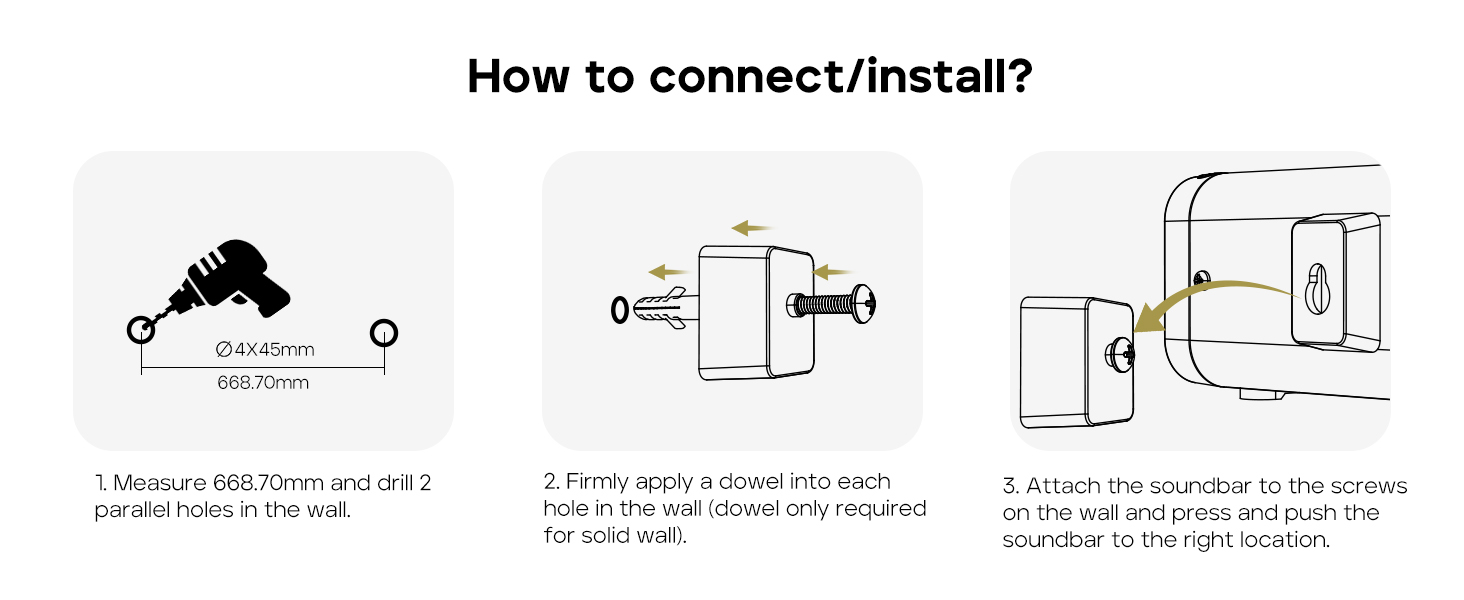
Image: A three-step instructional diagram for wall mounting the soundbar, showing measuring and drilling holes, inserting dowels, and finally attaching the soundbar to the wall.
Operating Instructions
Power On/Off
Press the Power button on the soundbar or remote control to turn the unit on or off.
Selecting Input Source
Press the Source button on the soundbar or remote control repeatedly to cycle through available input modes: Bluetooth, AUX, HDMI, USB. The LED display will indicate the current mode.
Volume Control
Use the Volume + or Volume - buttons on the soundbar or remote control to adjust the volume level.
Press the Mute button on the remote control to mute or unmute the audio.
Bluetooth Pairing
- Turn on the soundbar and select Bluetooth mode using the Source button. The LED display will show "BT" and flash, indicating it's in pairing mode.
- Enable Bluetooth on your device (smartphone, tablet, etc.) and search for "Tribit S1".
- Select "Tribit S1" from the list of available devices to connect. Once connected, the LED display will stop flashing and show "BT" steadily.
EQ Modes
The soundbar features four equalizer (EQ) modes to optimize audio for different content types. Use the dedicated buttons on the remote control to switch between modes:
- Music Mode: Provides balanced sound for general music listening.

Image: A person enjoying music with the soundbar, illustrating the Music EQ mode for balanced audio.
- Movie Mode: Enhances dialogue and sound effects for a cinematic experience.

Image: A couple watching a movie with the soundbar, illustrating the Movie EQ mode for an immersive surround-sound experience.
- News Mode: Optimizes for clear dialogue, making news broadcasts and speech easier to understand.

Image: A couple watching news with the soundbar, illustrating the News EQ mode for crystal-clear dialogue.
- X-3D Mode: Creates an expanded stereo effect for an immersive virtual surround sound experience.

Image: People watching sports with the soundbar, illustrating the X-3D mode for a dynamic, surrounding soundstage.

Image: A visual representation of the four available EQ modes (Music, Movie, News, X-3D) and their corresponding icons, indicating how to adjust them with the remote for an immersive virtual surround sound experience.
Bass and Treble Control
Use the BASS +/- and TREBLE +/- buttons on the remote control to fine-tune the low and high frequencies to your preference.
Troubleshooting
| Problem | Possible Cause | Solution |
|---|---|---|
| No power | Power cord not connected; Power outlet not active. | Ensure the power cord is securely connected to the soundbar and a working power outlet. |
| No sound | Incorrect input source selected; Volume too low; Cables not connected properly; Mute function active. | Select the correct input source. Increase volume. Check all audio cables. Deactivate mute. |
| Bluetooth pairing fails | Soundbar not in pairing mode; Device too far; Interference. | Ensure soundbar is in Bluetooth pairing mode (flashing "BT"). Move device closer. Avoid strong interference sources. Try re-pairing. |
| Remote control not working | Batteries depleted; Obstruction between remote and soundbar; Remote not pointed correctly. | Replace batteries (2 AAA). Remove any obstructions. Point the remote directly at the soundbar's receiver. |
| Poor sound quality | Incorrect EQ mode; Loose cable connection; Low-quality audio source. | Switch EQ modes to find the best setting. Check cable connections. Use a higher quality audio source if possible. |
Specifications
- Model: BTS61
- Speaker Type: Soundbar, Subwoofer
- Surround Sound Channel Configuration: 2.1
- Speaker Maximum Output Power: 200 Watts (100W Soundbar, 100W Subwoofer)
- Subwoofer Diameter: 6.5 Inches
- Connectivity Technology: Bluetooth 5.3, Auxiliary, HDMI (ARC), USB
- Audio Output Mode: Stereo, Surround
- Control Method: Remote Control, On-unit buttons
- Special Feature: LED Display, 4 EQ Modes (Music, Movie, News, X-3D), Bass & Treble Control
- Power Source: AC Powered
- Color: Black
- Item Weight: 8.76 kg (Soundbar + Subwoofer)
- Package Dimensions: 90.8 x 44.8 x 27.8 cm
- Batteries: 2 AAA batteries (for remote, included)
Maintenance
- Cleaning: Wipe the surfaces of the soundbar and subwoofer with a soft, dry, lint-free cloth. Do not use abrasive cleaners, waxes, or solvents.
- Ventilation: Ensure that the ventilation openings on the soundbar and subwoofer are not blocked.
- Storage: If storing the unit for an extended period, disconnect it from the power outlet and store it in a cool, dry place.
Warranty and Support
Tribit products are designed for reliability and performance. For warranty information and customer support, please refer to the warranty card included in your package or visit the official Tribit website.
Contact Information:
- Manufacturer: Tribit
- Online Support: Visit the Tribit Store on Amazon
Please have your model number (BTS61) and purchase details ready when contacting support.
Ask a question about this manual
Ask about setup, troubleshooting, compatibility, parts, safety, or missing instructions. Manuals+ will review the question and use this page’s manual context to help answer it.