Introduction
Thank you for choosing the Sweetcrispy Video Game Desk Chair. This manual provides essential information for the safe assembly, operation, and maintenance of your new chair. Please read these instructions carefully before use and retain them for future reference.

Image: The Sweetcrispy Video Game Desk Chair in white, showcasing its ergonomic design and footrest.
Safety Information
- Do not exceed the maximum weight capacity of 275 pounds (125 kg).
- Ensure all components are securely fastened before use. Regularly check for loose screws or parts.
- Avoid standing on the chair or using it as a step stool.
- Keep hands and fingers clear of moving parts during adjustment.
- Use the chair on a flat, stable surface to prevent tipping.
- Keep children and pets away from the chair during assembly.
Package Contents
Before assembly, please verify that all parts are present and undamaged. Refer to the diagram below for identification.

Image: A visual breakdown of all components included in the Sweetcrispy Video Game Desk Chair package.
For a detailed visual guide to accessories and installation steps, please watch the video below:
Video: "Accessories display & installation steps" - This video provides a comprehensive overview of all included parts and guides you through the initial setup process.
Assembly Instructions
Follow these steps carefully to assemble your Sweetcrispy Video Game Desk Chair. It is recommended to have a clear, spacious area for assembly.
- Assemble the Base: Attach the five legs to the central hub of the chair base using the provided screws (R)*10. Ensure they are securely tightened.
- Attach Casters and Gas Lift: Insert the five casters (K)*5 into the ends of the assembled base legs. Then, insert the gas lift cylinder (J)*1 into the central hole of the base.
- Mount the Mechanism to the Seat: Place the seat cushion (B)*1 upside down. Align the mechanism (L2)*1 with the pre-drilled holes on the underside of the seat. Secure it with screws (Q)*8. Ensure the front of the mechanism faces the front of the seat.
- Attach Armrests: Secure the armrests (E)*2 to the sides of the seat cushion using screws (S)*4.
- Connect Backrest to Seat: Align the backrest (A)*1 with the metal brackets on the seat mechanism. Secure it using screws (Q)*8.
- Attach Footrest Frame: Secure the footrest frame (M)*1 to the underside of the seat mechanism using screws (O)*6.
- Insert Footrest Cushion: Slide the footrest cushion (F)*1 into the footrest frame.
- Place Seat Assembly onto Gas Lift: Carefully place the assembled seat onto the gas lift cylinder, ensuring it is centered and stable.
- Attach Headrest and Lumbar Pillow: Attach the headrest pillow (C)*1 and lumbar support pillow (D)*1 using their adjustable straps.
For a visual guide to the assembly process, refer to the "Accessories display & installation steps" video in the Package Contents section.
Operating Instructions
Height Adjustment
To adjust the chair's height, pull the lever located on the right side of the seat upwards. While seated, lift your weight off the seat to raise the chair, or remain seated to lower it. Release the lever to lock the height in place.

Image: A close-up of the chair's height adjustment lever and its function.
Backrest Recline
The backrest can be reclined from 90° (focused position) to 135° (relaxed position). Pull the recline lever, typically found on the left side of the seat, and lean back to your desired angle. Release the lever to lock the backrest position.
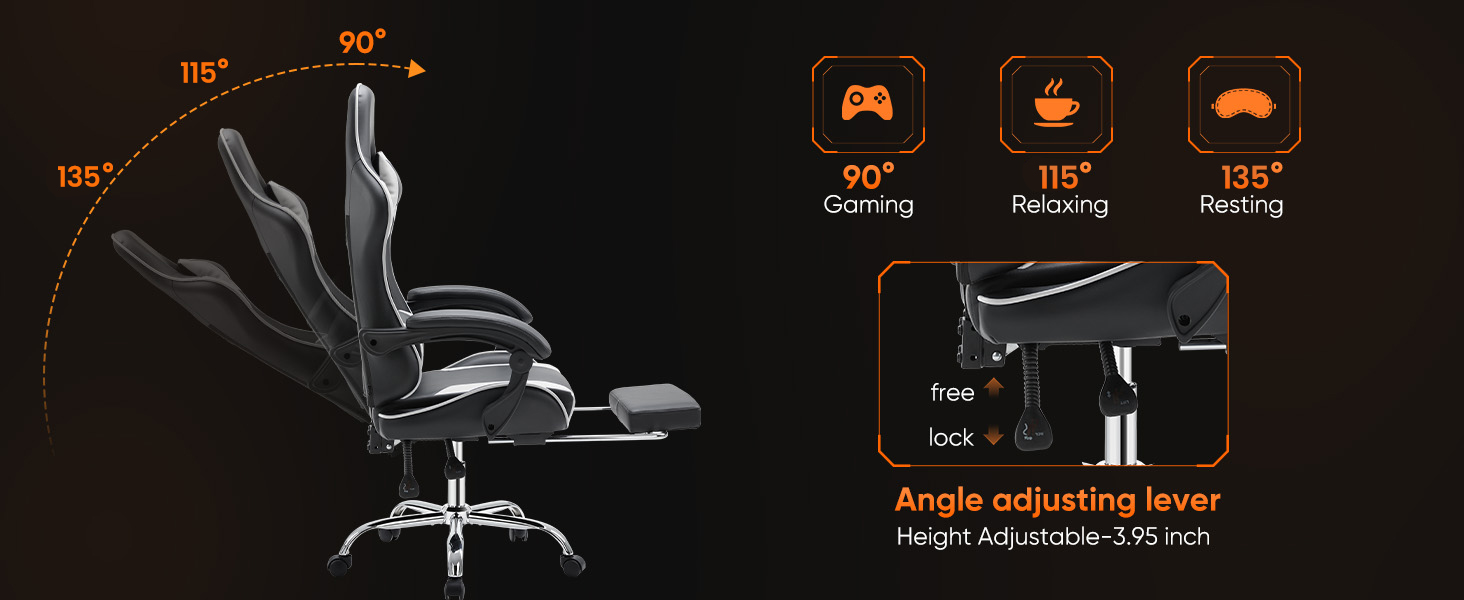
Image: Illustration showing the chair's recline capabilities, from an upright 90-degree position to a relaxed 135-degree position.
Retractable Footrest
To use the footrest, pull it out from underneath the seat. Extend it to your preferred length. To retract, push it back under the seat until it is fully stored.

Image: The chair with its retractable footrest extended, providing leg support.
Lumbar Support and Headrest Adjustment
The lumbar support and headrest pillows are detachable and adjustable. You can slide the lumbar pillow up or down along the backrest straps to find the optimal position for your lower back. The headrest pillow can also be adjusted or removed as desired.

Image: Diagram illustrating the ergonomic support points of the chair, including head, shoulder, waist, hip, and leg areas.
Video: "Sweetcrispy Video game chair with footrest" - This video demonstrates the chair's various features, including height adjustment, recline, and footrest operation.
Maintenance
- Cleaning: Wipe the PU leather with a soft, damp cloth. Avoid harsh chemicals or abrasive cleaners. For spills, blot immediately with a clean, dry cloth.
- Hardware Check: Periodically check all screws and bolts to ensure they are tight. Re-tighten if necessary to maintain stability and safety.
- Caster Care: Keep the casters free of debris (hair, dust, etc.) to ensure smooth rolling and prevent floor damage.
- Avoid Direct Sunlight: Prolonged exposure to direct sunlight can cause the PU leather to fade or crack.
Troubleshooting
- Chair Squeaks: Check all bolted connections and tighten any loose screws. Applying a small amount of lubricant to moving metal parts may also help.
- Difficulty Adjusting Height: Ensure the gas lift lever is fully engaged. If the issue persists, the gas lift cylinder may need replacement.
- Chair Feels Unstable: Verify that all legs are securely attached to the base and that the casters are properly inserted. Ensure the chair is on a level surface.
- Footrest Not Extending/Retracting Smoothly: Check for any obstructions in the footrest mechanism. Ensure the rails are clean and free of debris.
Specifications
| Brand | Sweetcrispy |
| Model Name | Sweetcrispy Video Game Desk Chair |
| Item Model Number | BKWT-DJY-H2 |
| Color | White |
| Product Dimensions | 26.8"D x 25.4"W x 52.4"H |
| Maximum Weight Recommendation | 275 Pounds (125 kg) |
| Material | Alloy Steel, Faux Leather, Foam |
| Special Features | Adjustable Height, Ergonomic, Foot Rest, Reclining, Rolling |
| Reclining Position Count | 2 (90° to 135°) |
| Assembly Required | Yes |
| UPC | 722898008677 |
Warranty & Support
For warranty information or customer support, please contact Sweetcrispy directly through their official channels. Our customer service team is available to provide effective and timely after-sales service for any issues you may encounter.
Additional protection plans may be available for purchase through your retailer.


