
1. Introduction
Thank you for purchasing the BUGANI Brief Plus Bluetooth Speaker, Model M193. This manual provides essential information for the safe and efficient operation of your speaker. Please read it thoroughly before use and retain it for future reference.
2. Safety Information
- Do not expose the speaker to extreme temperatures, direct sunlight, or open flames.
- Avoid dropping or subjecting the speaker to strong impacts.
- Keep the speaker away from water and liquids. While it features IPX5 water resistance, it is not fully waterproof and should not be submerged.
- Do not attempt to disassemble, repair, or modify the speaker yourself. Contact qualified service personnel for assistance.
- Use only the provided charging cable and a compatible power adapter.
- Clean the speaker with a soft, dry cloth. Do not use abrasive cleaners or solvents.
3. Package Contents
Verify that all items listed below are included in your package:
- BUGANI Brief Plus Speaker x 1
- USB-C Cable x 1
- 3.5mm AUX IN Cable x 1
- User Manual x 1
- Quick Start Guide x 1
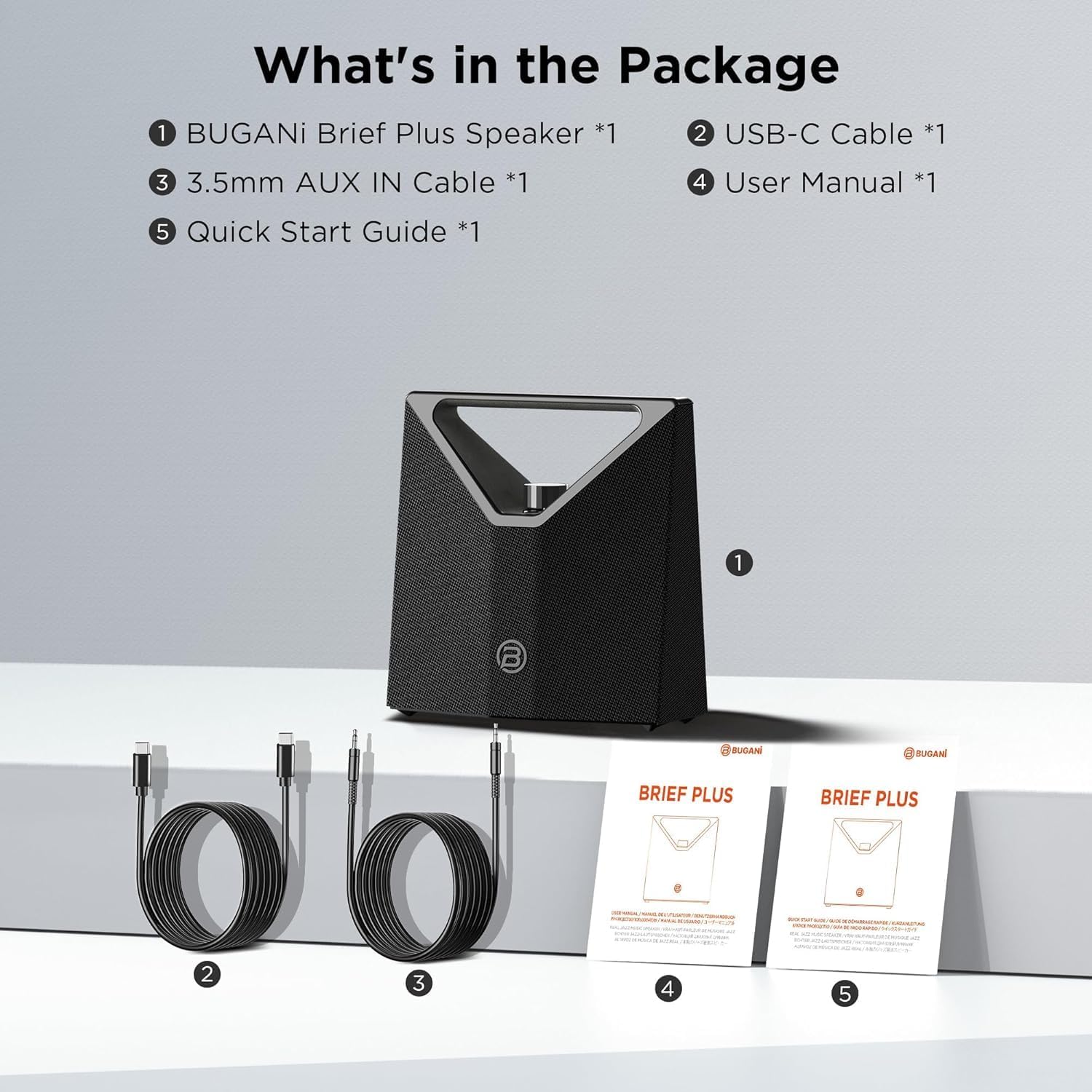
Image: The package contents for the BUGANI Brief Plus speaker, showing the speaker unit, a USB-C charging cable, a 3.5mm AUX cable, a user manual, and a quick start guide.
4. Product Overview
The BUGANI Brief Plus is a portable Bluetooth speaker designed for high-quality audio output. It features a robust design with a convenient handle and multiple connectivity options.

Image: A front view of the BUGANI Brief Plus Bluetooth Speaker, showcasing its triangular handle and mesh grille.
Key Features:
- 80W Powerful Sound: Equipped with 2x4" subwoofers and 2x51.5mm tweeters for clear audio and deep bass.
- Bluetooth 5.4: For stable and fast wireless connection.
- Bluetooth Broadcast Connection: Connects to over 100 devices simultaneously.
- IPX5 Water Resistance: Protects against splashes and light rain.
- 12-Hour Playtime: Extended battery life for continuous music.
- Multi-source Input: Supports AUX and USB connections.
- Portable Design: Integrated handle for easy transport.
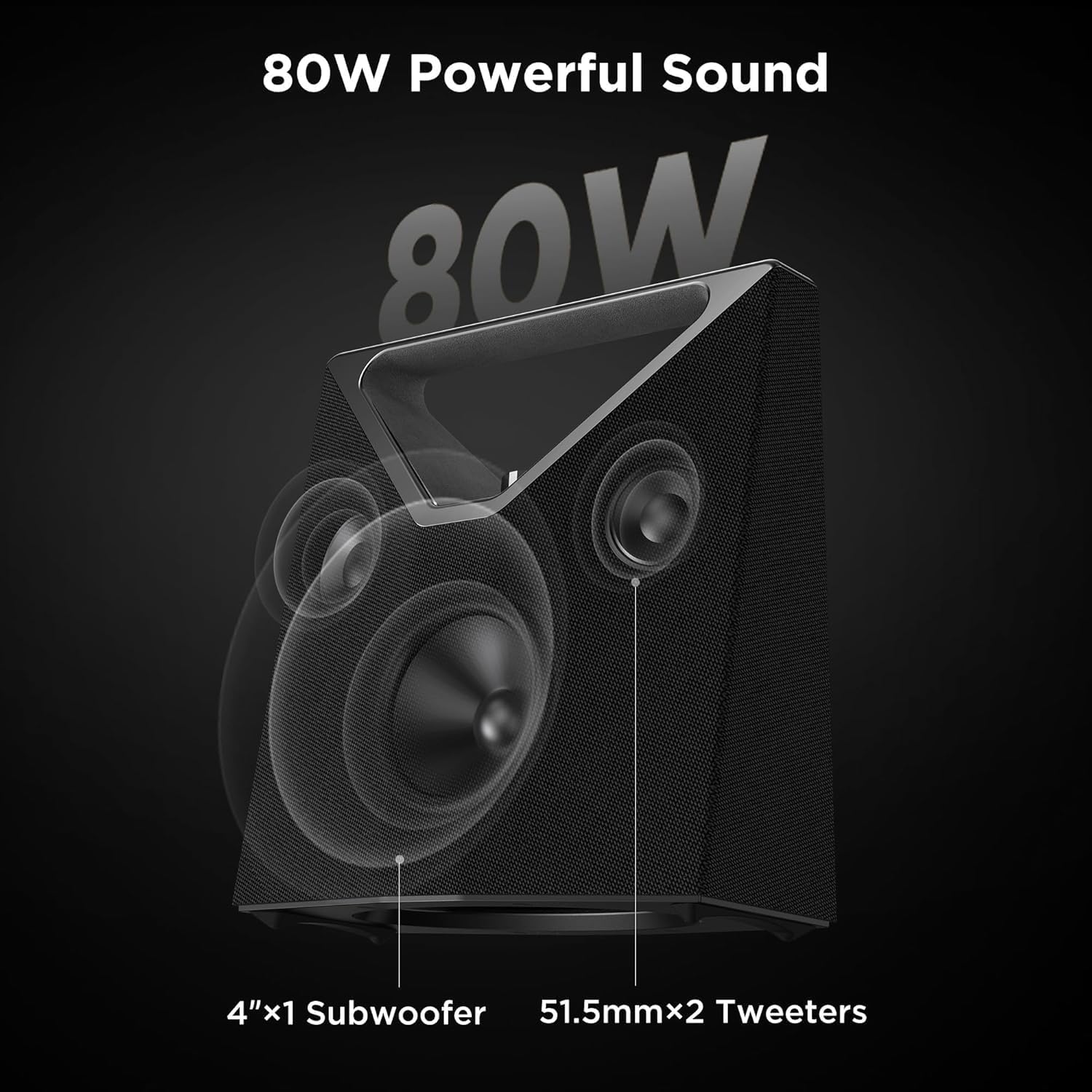
Image: An internal diagram of the speaker highlighting its 4-inch subwoofer and two 51.5mm tweeters, indicating its 80W powerful sound output.

Image: A person carrying the speaker using its portable handle, demonstrating its ease of transport.
5. Setup
5.1 Charging the Speaker
Before first use, fully charge the speaker. Connect the provided USB-C cable to the charging port on the speaker and the other end to a compatible USB power adapter (not included). The charging indicator light will show the charging status.
- Charging Time: Approximately 3-4 hours for a full charge.
- Battery Life: Up to 12 hours of playtime at moderate volume.

Image: The speaker displayed with an overlay indicating its 12-hour continuous playback capability.
5.2 Powering On/Off
- To Power On: Press and hold the Power button for 2 seconds.
- To Power Off: Press and hold the Power button for 2 seconds.
6. Operating Instructions
6.1 Bluetooth Pairing
- Ensure the speaker is powered on and in Bluetooth pairing mode (indicated by a flashing LED).
- On your device (smartphone, tablet, etc.), enable Bluetooth and search for available devices.
- Select "BUGANI Brief Plus" from the list.
- Once connected, the speaker will emit an audible confirmation, and the LED indicator will turn solid.

Image: A visual representation of the advanced Bluetooth 5.4 technology, emphasizing stable and fast audio streaming capabilities.
6.2 Bluetooth Broadcast Connection (TWS)
The BUGANI Brief Plus supports connecting to over 100 speakers simultaneously for an expansive audio experience. This feature is also known as True Wireless Stereo (TWS) for two speakers.
- Ensure all speakers are powered on and not connected to any Bluetooth device.
- On one speaker (this will be the primary speaker), press the TWS button (refer to the Quick Start Guide for button location). The speaker will enter TWS pairing mode.
- On the secondary speakers, press their respective TWS buttons. They will automatically search and connect to the primary speaker.
- Once connected, the primary speaker's LED will indicate a successful TWS connection.
- Connect your device to the primary speaker via Bluetooth as described in section 6.1.
Video: An official product video demonstrating the BUGANI Bluetooth Speaker's features, including its powerful 80W sound and multi-speaker broadcast connection capability.
6.3 AUX Input
To play audio from a device without Bluetooth, use the provided 3.5mm AUX cable.
- Connect one end of the 3.5mm AUX cable to the AUX IN port on the speaker.
- Connect the other end to the audio output jack of your device.
- The speaker will automatically switch to AUX input mode.
6.4 USB Playback
The speaker supports audio playback from a USB drive.
- Insert a USB drive containing audio files into the USB port on the speaker.
- The speaker will automatically detect the USB drive and begin playback.
6.5 Volume Control
Adjust the volume using the rotary knob on the top of the speaker or through your connected device.
7. Maintenance
7.1 Cleaning
- Wipe the speaker's exterior with a soft, dry, lint-free cloth.
- Do not use liquid cleaners, aerosols, or solvents.
7.2 Water Resistance (IPX5)
The speaker is rated IPX5 water resistant, meaning it can withstand splashes and light rain. It is not designed to be submerged in water or exposed to high-pressure water jets. Ensure the charging port cover is securely closed when near water.

Image: The speaker positioned outdoors near a pool, with water splashing onto it, illustrating its IPX5 water resistance feature.
Video: A short official product video showcasing the BUGANI Brief Plus Bluetooth Speaker's IPX5 water resistance by being splashed with water.
7.3 Storage
Store the speaker in a cool, dry place away from direct sunlight and extreme temperatures when not in use for extended periods.
8. Troubleshooting
| Problem | Possible Cause | Solution |
|---|---|---|
| Speaker does not power on. | Low battery. | Charge the speaker fully using the provided USB-C cable. |
| Cannot pair with Bluetooth device. | Speaker not in pairing mode; device Bluetooth off; too far from speaker. | Ensure speaker is in pairing mode. Turn Bluetooth on/off on your device. Move device closer to speaker. |
| No sound. | Volume too low; incorrect input mode; device not playing audio. | Increase speaker and device volume. Check if the correct input mode (Bluetooth, AUX, USB) is selected. Ensure audio is playing on your device. |
| Sound distortion. | Volume too high; low battery; interference. | Reduce volume. Charge the speaker. Move speaker away from other electronic devices. |
| Bluetooth Broadcast (TWS) not connecting. | Speakers not in TWS pairing mode; too far apart. | Ensure all speakers are disconnected from other devices and in TWS pairing mode. Place speakers closer together. |
9. Specifications
| Feature | Detail |
|---|---|
| Model Name | Brief Plus |
| Model Number | M193 |
| Speaker Type | Subwoofer |
| Speaker Maximum Output Power | 80 Watts |
| Woofer Diameter | 4 Inches |
| Tweeter Diameter | 51.5mm (x2) |
| Wireless Communication Technology | Bluetooth 5.4 |
| Connectivity Technology | Bluetooth, AUX, USB |
| Audio Output Mode | Stereo |
| Power Source | Battery Powered (1 A battery included) |
| Product Dimensions (D x W x H) | 9.9" x 5.1" x 9.9" |
| Item Weight | 6.56 pounds |
| Water Resistance | IPX5 (Splash-proof) |
| Control Method | Touch, Rotary Knob |
| Material | Metal, Plastic |
10. Warranty and Support
The BUGANI Brief Plus speaker comes with a limited warranty. Please refer to the warranty card included in your package for specific terms and conditions. For technical support, troubleshooting assistance, or warranty claims, please contact BUGANI customer service through the retailer where the product was purchased or visit the official BUGANI website.
Online Support: Visit the BUGANI Store on Amazon